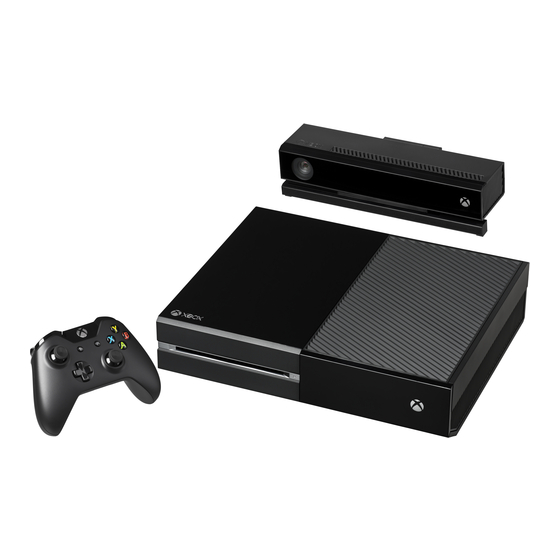
XBOX One Handbuch
Inhaltsverzeichnis
Verfügbare Sprachen
Verfügbare Sprachen
XboX one PRoDUCT GUIDe
For Xbox One console, Kinect for Xbox One sensor, and accessory product
manuals, go online to xbox.com/xboxone/support/manual.
Kinect for Xbox one sensor may be sold separately.
ImPoRTanT PRoDUCT safeTy anD WaRRanTy InfoRmaTIon
This symbol identifies safety and health
information in this product guide
Read this guide for important safety and health information for the product
that you have purchased.
WARNING: Failure to properly set up, use, and care for the
Xbox One console and Kinect for Xbox One sensor can increase the risk
of serious injury, death, property damage, or damage to the product or
related accessories. Read this product guide for important safety and
health information or go to xbox.com/xboxone/support/manual.
aGReemenT To XboX one LImITeD WaRRanTy anD sofTWaRe
LICense TeRms
You must accept the Xbox Terms of Use (including Xbox software terms and
game license terms) at xbox.com/live/termsofuse, the software license terms
at xbox.com/xboxone/slt, and the Limited Warranty at xbox.com/xboxone/
warranty to use your Xbox One console, Xbox One accessories and/or Kinect
for Xbox One sensor. By using the Xbox One console, Xbox One accessories
and/or Kinect for Xbox One sensor, you agree to be bound by these terms.
Please read them. If you do not accept them, do not set up or use your
Xbox One console, Xbox One accessories and/or Kinect for Xbox One sensor.
Return the Xbox product to Microsoft or your retailer for a refund.
InITIaL ConsoLe seTUP anD UPDaTes
You will need to be connected to the Internet for initial console setup and
updates before you can play offline. (Broadband Internet [recommended
1.5 mbps down/768 kbps up] Microsoft account and account on Xbox Live
in an Xbox One-supported Xbox Live country/region required for initial set
up and updates and for some features; ISP fees apply.) Significant online
update may be required during initial setup. For answers to questions about
console setup, troubleshooting steps, and Xbox Customer Support contact
information, visit xbox.com/support.
Use WITH InfRaReD DeVICes
The Kinect sensor may interfere with or degrade operation of infrared devices,
including remote controls and 3D glasses. If you notice interference or
reduced range, please try repositioning the Kinect sensor or infrared device.
eLeCTRICaL safeTy
WaRnInG
As with many other electrical devices, failure to take the following
precautions can result in serious injury or death from electric shock, fire, or
damage to the Xbox One console or Kinect sensor.
AC-Powered Devices
Select an appropriate power source for your Xbox One console:
• Use only the power supply unit and AC power cord that came with
your console or that you received from an authorized repair center. If
you are not sure if you have the correct power supply unit, compare
the model number on the power supply unit with the model number
specified on your console. If you need a replacement power supply
unit or AC power cord, you can find Xbox Customer Support contact
information at xbox.com/support.
• Confirm that your electrical outlet provides the type of power indicated
on the power supply unit (in terms of voltage [V] and frequency [Hz]).
If you are not sure of the type of power supplied to your home, consult
a qualified electrician.
• Do not use non-standard power sources, such as generators or
inverters, even if the voltage and frequency appear acceptable. Use
only AC power provided by a standard wall outlet.
• Do not overload your wall outlet, extension cord, power strip, or other
electrical receptacle. Confirm that they are rated to handle the total
current (in amps [A]) drawn by the Xbox One console (indicated on the
power supply unit) and any other devices that are on the same circuit.
CAUTION: Cables and Cords
• To reduce potential trip hazards or entanglement hazards, arrange any
cables and cords so that people and pets are not likely to trip over or
accidentally pull on them as they move around or walk through the
area and do not allow children to play with cables and cords.
To avoid damaging the power cords and power supply:
• Protect power cords from being walked on or crushed.
• Protect cords from being pinched or sharply bent, particularly where
they connect to the power outlet, the power supply unit, and the
console.
• Do not jerk, knot, sharply bend, or otherwise abuse power cords.
• Do not expose power cords to sources of heat.
• Keep children and pets away from power cords. Do not allow them to
bite or chew on them.
• When disconnecting power cords, pull on the plug, do not pull on the
cord.
If a power cord or power supply unit becomes damaged in any way, stop
using it immediately. Visit xbox.com/support for Xbox Customer Support
contact information.
Unplug your Xbox One console during lightning storms or when unused
for long periods.
baTTeRy PoWeReD DeVICes
WARNING: Battery Safety
The following precautions apply to all products that use disposable or
rechargeable batteries including lithium polymer. Improper battery use may
result in serious injury, death, property damage, or damage to the product
or related accessories as a result of battery fluid leakage, fire, overheating, or
explosion. Released battery fluid is corrosive and may be toxic. It can cause
skin and eye burns, and is harmful if swallowed. To reduce the risk of injury:
Keep batteries out of reach of children.
Remove the batteries if they are worn out or before storing your device
for an extended period. Always remove old, weak, or worn-out batteries
immediately and recycle or dispose of them in accordance with local and
national/regional disposal regulations.
If a battery leaks, remove all batteries by reversing the installation steps
provided for this product, being careful to keep the leaked fluid from
touching your skin or clothes. If fluid from the battery contacts skin or
clothes, flush skin with water immediately. Before inserting new batteries,
thoroughly clean the battery compartment with a dry cloth, or follow the
battery manufacturer's recommendations for cleanup.
• Do not crush, open, puncture, mutilate, heat above 35°C (95°F), apply
direct heat to, or dispose of batteries in fire.
• Do not mix new and old batteries or batteries of different types (for
example, carbon-zinc and alkaline batteries).
1
Inhaltsverzeichnis

Verwandte Anleitungen für XBOX One


Inhaltszusammenfassung für XBOX One
- Seite 36 WaRnUnG: Eine nicht ordnungsgemäße Einrichtung, Verwendung wenn Spannung und Frequenz passend erscheinen. Verwenden Sie und Pflege der Xbox One Konsole und des Kinect-Sensors für Xbox One nur Wechselstrom, der von einer normalen Netzsteckdose geliefert kann zu ernsthaften Verletzungen, Tod, Sachschäden oder Beschädigungen wird.
- Seite 37 Sonneneinstrahlung, in der Nähe einer Wärmequelle oder • Batterien dürfen nicht gestoßen oder geworfen werden. Treten Sie auf der Xbox One auf. Fassen Sie Disks immer an den Kanten an. So nicht auf Batterien, und verhindern Sie, dass diese starken physischen reinigen Sie Spiele- und sonstige Disks Kräften ausgesetzt werden.
- Seite 38 Kinder Derartige Anfälle können mit verschiedenen Symptomen einhergehen, Stellen Sie sicher, dass Kinder, die Xbox One Zubehör mit der Xbox One z. B. Schwindel, Veränderungen in der Sehleistung, Zuckungen im Konsole und dem Kinect-Sensor verwenden, auf die Sicherheit beim Spielen Auge oder Gesicht, Zuckungen oder Schüttelbewegungen der Arme...
-
Seite 39: Beschränkte Garantie
Kinder, kann dies zu schweren Verletzungen führen. Sie sollten die Xbox One Personen in Ihrer Nähe unterhalten können. gemäß dieser Anleitung aufstellen, um die Gefahr solcher Verletzungen und Schäden an der Xbox One Konsole zu verringern. Stellen Sie die Konsole auf aCHTUnG: Persönliche medizinische Geräte eine Fläche mit folgenden Eigenschaften: Funkfrequenzemissionen elektronischer Geräte können sich negativ auf... - Seite 40 L’action résultant des vices rédhibitoires doit être intentée par l’acquéreur dans un délai de deux ans à compter de la découverte (c) „Garantiefrist“ bedeutet für Xbox One ein (1) Jahr seit dem Tag, an du vice. dem Sie sie gekauft haben, und bedeutet für Zubehör 90 Tage seit dem Tag, an dem Sie es gekauft haben, vorbehaltlich Artikel 2 unten.
-
Seite 41: Regulatorische Informationen
ReGULaToRIsCHe InfoRmaTIonen (c) Nach einer Reparatur oder einem Ersatz ist Ihre Xbox One oder ihr Zubehör weiterhin für den Rest Ihrer ursprünglichen Garantiefrist • Nicht für den Einsatz in Maschinen-, Medizin- oder oder für weitere 95 Tage nach ihrer Lieferung durch Microsoft an Sie Industrieanwendungen vorgesehen. - Seite 42 © 2014 Microsoft Corporation. Alle Rechte vorbehalten. Microsoft, Windows, Radio-/TV-Techniker, um weitere Vorschläge zu erhalten. Xbox, Xbox One, Xbox 360, Xbox Live, Kinect, die Xbox Logos und das Xbox Live-Logo sind Marken der Microsoft-Firmengruppe. Dieses Produkt enthält Technologie zum Schutz des Urheberrechts, die WaRnUnG: Drahtlose Geräte an bord von flugzeugen...