Regin OPTIGO OP5U Anleitung
Inhaltsverzeichnis
Verfügbare Sprachen
Verfügbare Sprachen
INSTRUCTION
EN
OPTIGO OP5U
i
Read this instruction before installation
and wiring of the product
Consult documentation in all cases where this symbol
is used, in order to find out the nature of the potential
hazards and any actions to be taken
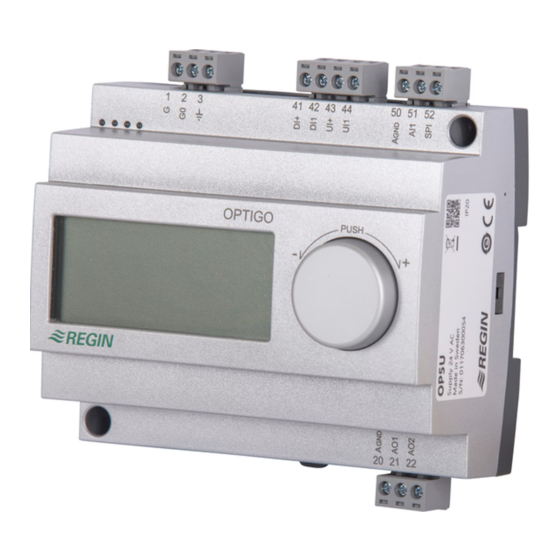
Controller with display
Optigo OP5U is a pre-programmed, configurable controller. It has 5
inputs/outputs and can be configured to control temperature, CO
humidity or pressure. All configuration and normal handling is done
using the display and the knob on the front. From revision R18, it is
possible to connect an external PT1000 setpoint device.
Technical data
Supply voltage
24 V AC ±15%, 50/60 Hz
Power consumption
3 VA
Ambient temperature
0...50°C
Ambient humidity
Max. 90% RH
Storage temperature
-20...70°C
Display
Numeric / graphic. Background
illumination.
Inputs/outputs
Refer to connection illustrations and
table below
Terminal blocks
Disconnectable, so-called lift type for
cable cross-section max 2.5 mm
Protection class
IP20
Material, casing
Polycarbonate, PC
Weight
215 g incl. terminal blocks
Dimensions
122 x 120 x 64 mm (WxHxD incl. terminals,
fixed installation)
Pollution degree
2
Temperature settings
Temperature, supply air
-20..+60, 20...100, 60...140°C
Setpoints
-18...+60, 22...100, 62...140°C
External setpoint
0...40°C
Neutral zone
0...10°C
P-band
0...99°C
I-time
0...990 s
Min. limit damper
0...99
Other settings
Setpoint values
CO
0...100% of max set value on UI1
2
General (GEN)
0...100% of max set value on UI1
Pressure (Pa)
0...100% of max set value on UI1
Scaling of UI1
0...10 V DC in
CO
10...9900 ppm
2
General
0...100%
Pressure
100 Pa...2500 kPa
Neutral zone
12.5% of max
P-band
CO
0...100% of UI1
2
General (RH)
0...100% of UI1
,
Pressure (Pa)
0...300% of UI1
2
I-time
0...990 s
Control setting 5
Outdoor compens. start
-20...+60°C
Setpoint pressure at
-20°C outdoor temp.
0 Pa...2500 kPa
OPTIGO OP5U
Installation
OP5U must be mounted in a DIN-standard casing (minimum 7
modules) or in a cabinet, either on a DIN-rail or, using the two screw-
2
pockets provided, by being screwed to any suitable flat surface in the
cabinet. The controller can also be mounted in a cabinet door or other
control panel, using a suitable front-mounting kit.
The controller must be connected to a 24 V AC safety insulating
transformer providing mains insulation.
Follow table 1 below for connection.
Table 1. I/O connection terminals. Terminals 2, 20 and 50 are internally con-
nected.
Terminal
Designation
1
G
2
G0
3
20
AGnd
21
AO1
22
AO2
41
DI+
42
DI1
43
UI+
44
UI1
50
AGnd
51
AI1
52
SPI
Digital inputs DI and UI are only intended to be used with
a potential-free contact or switch. If the Optigo OP5U and active
sensors and actuators connected to it share transformer, it is
essential that the same transformer-pole is used as reference for
all the equipment. Failure to do so will prevent the equipment from
functioning as intended and may also lead to damages.
For best protection against disturbances, a shielded twisted-pair cable
should be used for wiring the sensors. Ground the shield at one end.
The protection provided by the equipment may be impaired by im-
proper use.
Operation
Supply voltage 24 V AC
Ref. for AO1 and AO2
0...10 V DC Output
0...10 V DC Output
Reference for DI1
Digital input
Reference for UI1 digital mode
0...10 V DC or Digital input
Ref. for AI1 and UI1 analogue
PT1000 temp. sensor input
Input PT1000 setpoint device
1
Inhaltsverzeichnis

Verwandte Anleitungen für Regin OPTIGO OP5U


Inhaltszusammenfassung für Regin OPTIGO OP5U
-
Seite 11: Regler Mit Display
Regler mit Display Universal (GEN) 0...100% von UI1 Symboles utilisés pour l’affichage Druck (Pa) 0...300% von UI1 Optigo OP5U ist ein vorprogrammierter, konfigurierbarer Regler. Er ver- I-Zeit 0…990 s Compensation Change-over fügt über 5 Ein-/Ausgänge und kann so konfiguriert werden, dass er Numéro de menu... - Seite 12 Die digitalen Eingänge und UI sind nur für die Verwendung Start- mit einem potentialfreien Kontakte oder Schalter vorgesehen. signal °C Werden der Optigo OP5U und die angeschlossenen aktiven Fühler Befeuchter und Stellantriebe vom gleichen Transformator gespeist, muss als % RF Bezugsmasse immer der gleiche Transformatorpol für die gesamte...
-
Seite 13: Das Display-Menüsystem
Aufrufen des Konfigurationsmenüs. Regler bei Drücken den Drehknopfs das Basismenüdisplay anzeigen. temperatur- kompensation Für weitere Informationen über das Konfigurationsmenü im 10-Sekunden-Menü, siehe das “Optigo OP5U Handbuch”. Das Hand- buch kann unter www.regincontrols.de heruntergeladen werden. Maximale Kompensation Das Basismenü Tabelle 2 unten zeigt die Anordnung des 10-Sekunden-Menüs. Wenn Falls keine Eingaben erfolgen, wird das Basisdisplay angezeigt. -
Seite 14: Externer Sollwert
Sollwert wird durch Drehen des Knopfes im Uhrzeigersinn angezeigt. Displaysymbole Außentemperaturgeführte Regelung Konfigurationsmenü Menünummer konfiguriert Graphisches Ausgangssignal AO1 Temperaturregelung nur Regelmodus 1 Säulendiagramm Ausgangsleistung AO1 Menü mit veränderbarenWerten Säulendiagramm Ausgangsleistung AO2 Aktives 0...10V Graphisches Ausgangssignal AO2 Change-over Eingangssignal nur Regelmodus 1 OPTIGO OP5U...