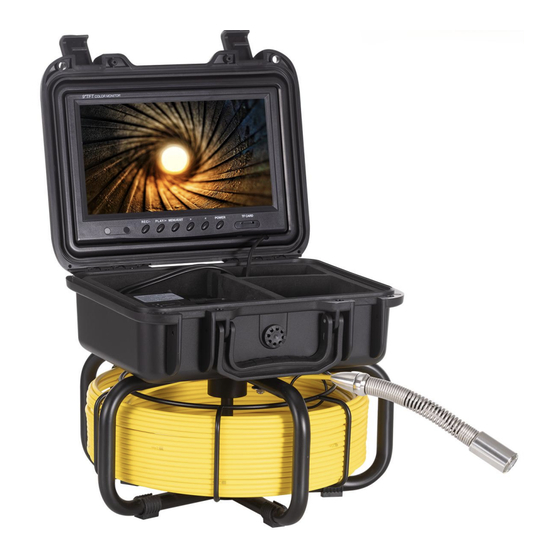
VEVOR WP9608F Bedienungsanleitung
Rohrinspektionssystem
Inhaltsverzeichnis
Quicklinks
Technical Support and E-Warranty Certificate www.vevor.com/support
Pipe Inspection System
Model:WP9608F
We continue to be committed to provide you tools with competitive price.
"Save Half", "Half Price" or any other similar expressions used by us only
represents an estimate of savings you might benefit from buying certain
tools with us compared to the major top brands and does not necessarily
mean to cover all categories of tools offered by us. You are kindly reminded
to verify carefully when you are placing an order with us if you are actually
saving half in comparison with the top major brands.
Inhaltsverzeichnis

Verwandte Anleitungen für VEVOR WP9608F


Inhaltszusammenfassung für VEVOR WP9608F
- Seite 1 Technical Support and E-Warranty Certificate www.vevor.com/support Pipe Inspection System Model:WP9608F We continue to be committed to provide you tools with competitive price. "Save Half", "Half Price" or any other similar expressions used by us only represents an estimate of savings you might benefit from buying certain tools with us compared to the major top brands and does not necessarily mean to cover all categories of tools offered by us.
- Seite 2 This is the original instruction, please read all manual instructions carefully before operating. VEVOR reserves a clear interpretation of our user manual. The appearance of the product shall be subject to the product you received. Please forgive us that we won't inform you again if there are any technology or software updates on our product.
-
Seite 3: Product Specification
Please read this manual carefully before use! Attentions 1. Please read the manual carefully before using it. 2. Handle it carefully during operation, avoid throwing down or pressing it heavily. 3. If the users disassemble or deliberately damage the machine, it will beyond the warranty. - Seite 4 Instruction for Product Camera Product Specification Item: parameter Camera diameter: 23mm With the tube diameter: >25mm 12 LED with high while Camera light source: light(adjustable) Camera working voltage: Lights working voltage: self-balancing Camera assist function: Water proof: IP68 Camera material: stainless steel Camera size: 23mm...
-
Seite 5: Systeminstallation
Coil Cell box 1. Monitor video Power of monitor 3. Adjacent coil plug 4. AV output 5. Battery indicator 6. Power input for charger 7. Light-degree adjustment for white light LED 8. Power switch 9. Power light System Installation 1. Vital: turn off the power switch, connect the video camera and the monitor, or the video camera and the monitor may be damaged. - Seite 6 2. Connect camera -coil -cell box -monitor (Pic) 3. Turn on the power switch in the power box, the indicator light on the monitor is on, the switchboard starts. 4. 4 Install the video camera with the protective cover slightly and put it into the pipe, rotate coil to proper depth.
-
Seite 7: Product Components And Accessories
Product components and accessories - 6 -... -
Seite 8: Failure Analysis
Pipe Failure Analysis 1. Ensure that each interface is properly connected during installation. 2. During the installation process, when a blue screen appears, it means that the camera, battery box and display screen are not connected successfully ① Check whether the camera is loose, and tighten the camera. ②... -
Seite 9: Equipment Cleaning
damage the camera LED. 1. Check if battery is fully charged. 2. Check if display screen is damaged. No Power 3. check the power box and screen connecting, to be sure it is right. 1. The memory card is damaged. Replace the memory Cannot format card. -
Seite 10: Fcc Information
FCC Information CAUTION: Changes or modifications not expressly approved by the party responsible for compliance could void the user's authority to operate the equipment! This device complies with Part 15 of the FCC Rules. Operation is subject to the following two conditions: 1) This product may cause harmful interference. -
Seite 11: Disposal Information
Disposal information: This product is subject to the provision of European Directive 2012/19/EU. The symbol showing a wheelie bin crossed through indicates that the product requires separate refuse collection in the European Union. This applies to the product and all accessories marked with this symbol. - Seite 12 Technical Support and E-Warranty Certificate www.vevor.com/support...
- Seite 13 Machine Translated by Google Assistance t echnique e t c ertificat d e g arantie é lectronique w ww.vevor.com/support Système d 'inspection d es t uyaux Modèle : W P9608F Nous c ontinuons à n ous e ngager à v ous f ournir d es o utils à d es p rix c ompétitifs.
- Seite 14 Vous a vez d es q uestions s ur l es p roduits ? V ous a vez b esoin d 'assistance t echnique ? N 'hésitez p as à n ous c ontacter nous: Assistance t echnique e t c ertificat d e g arantie é lectronique w ww.vevor.com/ support Il ...
-
Seite 15: Spécifications Du Produit
Machine Translated by Google Veuillez l ire a ttentivement c e m anuel a vant u tilisation ! Attention 1. V euillez l ire a ttentivement l e m anuel a vant d e l 'utiliser. 2. M anipulezle a vec p récaution p endant l e f onctionnement, é vitez d e l e j eter o u d e l e p resser f ortement. 3. ... - Seite 16 Machine Translated by Google Instructions p our l e p roduit Caméra Spécifications d u p roduit Article: paramètre Diamètre d e l a c améra : 23 m m Avec l e d iamètre d u t ube : >25 m m 12 ...
-
Seite 17: Installation Du Système
Machine Translated by Google Bobine Boîte à c ellules 1. S urveiller l a v idéo 2. P uissance d u m oniteur 3. F iche d e b obine a djacente 4 . Sortie A V 5 . I ndicateur de ... - Seite 18 Machine Translated by Google 2. C onnectez l a c améra, l a b obine, l e b oîtier d e c ellules e t l e m oniteur ( photo) 3. A llumez l 'interrupteur d 'alimentation d u b oîtier d 'alimentation, l e v oyant l umineux s ur l e m oniteur e st allumé, ...
- Seite 19 Machine Translated by Google Composants e t a ccessoires d u p roduit 6 ...
- Seite 20 Machine Translated by Google Analyse d es d éfaillances d e c analisations 1. A ssurezvous q ue c haque i nterface e st c orrectement c onnectée l ors d e l 'installation. 2. P endant l e p rocessus d 'installation, l orsqu'un é cran b leu a pparaît, c ela s ignifie q ue l e l'appareil ...
- Seite 21 Machine Translated by Google endommager l a L ED d e l a c améra. 1. V érifiez s i l a b atterie e st c omplètement c hargée. 2. V érifiez s i l ’écran d ’affichage e st e ndommagé. Pas ...
- Seite 22 Machine Translated by Google Informations d e l a F CC ATTENTION : L es c hangements o u m odifications n on e xpressément a pprouvés p ar l a p artie responsable d e l a c onformité p ourrait a nnuler l 'autorité d e l 'utilisateur à e xploiter l e équipement! Cet ...
- Seite 23 Machine Translated by Google Informations s ur l 'élimination : Ce p roduit e st s oumis a ux d ispositions d e l a d irective e uropéenne 2012/19/UE. L e s ymbole r eprésentant u ne p oubelle à r oulettes b arrée indique ...
- Seite 24 Machine Translated by Google Assistance t echnique e t c ertificat d e g arantie électronique w ww.vevor.com/support...
- Seite 25 Machine Translated by Google Technischer Support und E-Garantie-Zertifikat www.vevor.com/support Rohrinspektionssystem Modell:WP9608F Wir sind weiterhin bestrebt, Ihnen Werkzeuge zu wettbewerbsfähigen Preisen anzubieten. „Sparen Sie die Hälfte“, „Halber Preis“ oder andere ähnliche Ausdrücke, die wir verwenden, stellen nur eine Schätzung der Ersparnis dar, die Sie beim Kauf bestimmter Werkzeuge bei uns im Vergleich zu den großen Topmarken erzielen können, und decken nicht...
- Seite 26 Dies ist die Originalanleitung. Bitte lesen Sie alle Anweisungen sorgfältig durch, bevor Sie das Gerät in Betrieb nehmen. VEVOR behält sich eine klare Auslegung unserer Bedienungsanleitung vor. Das Erscheinungsbild des Produkts richtet sich nach dem Produkt, das Sie erhalten haben. Bitte verzeihen Sie uns, dass wir Sie nicht erneut informieren, wenn es Technologie- oder Software-Updates für unser Produkt gibt.
-
Seite 27: Beschreibung
Machine Translated by Google Bitte lesen Sie diese Anleitung vor der Inbetriebnahme sorgfältig durch! Aufmerksamkeiten 1. Bitte lesen Sie das Handbuch vor der Verwendung sorgfältig durch. 2. Gehen Sie während des Betriebs vorsichtig damit um und vermeiden Sie es, es herunterzuwerfen oder stark darauf zu drücken. 3. - Seite 28 Machine Translated by Google Anleitung zum Produkt Kamera Produktspezifikation Artikel: Parameter Kameradurchmesser: 23 mm Mit dem Rohrdurchmesser: >25 mm 12 LED mit hoher während Lichtquelle der Kamera: Licht (einstellbar) Betriebsspannung der Kamera: Betriebsspannung der Lichter: Kameraassistenzfunktion: selbstausgleichend IP68 Wasserdicht: Kameramaterial: Edelstahl Kameragröße: 23 mm...
-
Seite 29: Systeminstallation
Machine Translated by Google Spule Zellenbox 1. Video überwachen Leistung des Monitors 3. Nebenspulenstecker 4. AV-Ausgang 5. Batterieanzeige 6. Stromeingang für Ladegerät 7. Helligkeitseinstellung für Weißlicht-LED 8. Netzschalter 9. Betriebsanzeige Systeminstallation 1. Wichtig: Netzschalter ausschalten, Videokamera und Monitor anschließen, sonst können Videokamera und Monitor beschädigt werden. - Seite 30 Machine Translated by Google 2. Kamera-Spule-Zellenbox-Monitor verbinden (Bild) 3. Schalten Sie den Netzschalter im Netzteil ein. Die Kontrollleuchte am Monitor leuchtet an, die Telefonzentrale startet. 4. 4 Installieren Sie die Videokamera mit der Schutzhülle leicht und legen Sie sie in die Rohr, Spule auf die richtige Tiefe drehen.
-
Seite 31: Produktkomponenten Und Zubehör
Machine Translated by Google Produktkomponenten und Zubehör - 6 -... -
Seite 32: Rohrausfallanalyse
Machine Translated by Google Rohrausfallanalyse 1. Stellen Sie während der Installation sicher, dass jede Schnittstelle richtig angeschlossen ist. 2. Wenn während des Installationsvorgangs ein blauer Bildschirm erscheint, bedeutet dies, dass die Kamera, Batteriefach und Bildschirm werden nicht erfolgreich verbunden ÿ Überprüfen Sie, ob die Kamera locker sitzt, und ziehen Sie sie fest. ÿ Überprüfen Sie, ob das Videokabel der Kamera vollen Kontakt mit dem Batteriefach hat. - Seite 33 Machine Translated by Google die Kamera-LED beschädigen. 1. Prüfen Sie, ob der Akku vollständig geladen ist. 2. Überprüfen Sie, ob der Bildschirm beschädigt ist. Kein Strom 3. Überprüfen Sie die Stromversorgung und den Schirmanschluss, sicher, dass es richtig ist. 1. Die Speicherkarte ist beschädigt. Ersetzen Sie die Speicherkarte Formatieren nicht möglich Karte.
-
Seite 34: Fcc-Informationen
Machine Translated by Google FCC-Informationen ACHTUNG: Änderungen oder Modifikationen, die nicht ausdrücklich von der Partei genehmigt wurden Verantwortlichen kann die Berechtigung des Benutzers zum Betrieb des Ausrüstung! Dieses Gerät entspricht Teil 15 der FCC-Bestimmungen. Der Betrieb unterliegt den die folgenden zwei Bedingungen: 1) Dieses Produkt kann schädliche Störungen verursachen. - Seite 35 Machine Translated by Google Hinweise zur Entsorgung: Dieses Produkt unterliegt den Bestimmungen der europäischen Richtlinie 2012/19/EU. Das Symbol einer durchgestrichenen Mülltonne weist darauf hin, dass das Produkt einer getrennten Müllentsorgung im Europäische Union. Dies gilt für das Produkt und alle Zubehörteile gekennzeichnet.
- Seite 36 Machine Translated by Google Technischer Support und E-Garantie-Zertifikat www.vevor.com/support...
- Seite 37 Machine Translated by Google Supporto tecnico e certificato di garanzia elettronica www.vevor.com/support Sistema di ispezione delle tubazioni Modello:WP9608F Continuiamo a impegnarci per fornirvi strumenti a prezzi competitivi. "Risparmia la metà", "Metà prezzo" o qualsiasi altra espressione simile da noi utilizzata rappresenta solo una stima del risparmio che potresti ottenere acquistando determinati utensili con noi rispetto ai principali marchi principali e non significa necessariamente coprire tutte le categorie di utensili da noi offerti.
- Seite 38 Questa è l'istruzione originale, si prega di leggere attentamente tutte le istruzioni del manuale prima di utilizzare. VEVOR si riserva una chiara interpretazione del nostro manuale utente. L'aspetto del prodotto sarà soggetto al prodotto ricevuto. Vi preghiamo di perdonarci se non vi informeremo di nuovo se ci sono aggiornamenti tecnologici o software sul nostro prodotto.
-
Seite 39: Specifiche Del Prodotto
Machine Translated by Google Si prega di leggere attentamente questo manuale prima dell'uso! Attenzioni 1. Si prega di leggere attentamente il manuale prima di utilizzare il prodotto. 2. Maneggiarlo con cura durante il funzionamento, evitare di gettarlo a terra o di esercitare forti pressioni. 3. - Seite 40 Machine Translated by Google Istruzioni per il prodotto Telecamera Specifiche del prodotto Articolo: parametro Diametro della telecamera: 23mm Con il diametro del tubo: >25mm 12 LED con alta luminosità Sorgente luminosa della fotocamera: luce (regolabile) Tensione di funzionamento della telecamera: Tensione di funzionamento delle luci: autobilanciante Funzione di assistenza della telecamera:...
-
Seite 41: Installazione Del Sistema
Machine Translated by Google Bobina Scatola cellulare 1. Monitorare il video Potenza del monitor 3. Spina bobina adiacente 4. Uscita AV 5. Indicatore batteria 6. Ingresso alimentazione per caricabatterie 7. Regolazione grado luce per LED luce bianca 8. Interruttore di alimentazione 9. - Seite 42 Machine Translated by Google 2. Collegare la telecamera, la bobina, la scatola della cella e il monitor (foto) 3. Accendere l'interruttore di alimentazione nella scatola di alimentazione, la spia sul monitor è acceso, il centralino si avvia. 4. 4 Installare la videocamera con la copertura protettiva leggermente e inserirla nell' tubo, ruotare la bobina alla profondità...
-
Seite 43: Componenti E Accessori Del Prodotto
Machine Translated by Google Componenti e accessori del prodotto - 6 -... - Seite 44 Machine Translated by Google Analisi dei guasti delle tubazioni 1. Assicurarsi che ciascuna interfaccia sia collegata correttamente durante l'installazione. 2. Durante il processo di installazione, quando appare una schermata blu, significa che il la fotocamera, la scatola della batteria e lo schermo del display non sono collegati correttamente ÿ...
- Seite 45 Machine Translated by Google danneggiare il LED della telecamera. 1. Controllare che la batteria sia completamente carica. 2. Controllare se lo schermo del display è danneggiato. Nessun potere 3. controllare la scatola di alimentazione e la connessione dello schermo, per essere certo che è...
- Seite 46 Machine Translated by Google Informazioni FCC ATTENZIONE: Cambiamenti o modifiche non espressamente approvati dalla parte responsabile della conformità potrebbe invalidare l'autorità dell'utente di utilizzare il attrezzatura! Questo dispositivo è conforme alla Parte 15 delle Norme FCC. Il funzionamento è soggetto a seguendo due condizioni: 1) Questo prodotto può...
-
Seite 47: Informazioni Sullo Smaltimento
Machine Translated by Google Informazioni sullo smaltimento: Questo prodotto è soggetto alle disposizioni della Direttiva Europea 2012/19/UE. Il simbolo raffigurante un bidone della spazzatura barrato indica che il prodotto richiede una raccolta differenziata dei rifiuti Unione Europea. Ciò si applica al prodotto e a tutti gli accessori contrassegnati con questo simbolo. - Seite 48 Machine Translated by Google Supporto tecnico e certificato di garanzia elettronica www.vevor.com/support...
- Seite 49 Machine Translated by Google Soporte t écnico y c ertificado d e g arantía e lectrónica w ww.vevor.com/support Sistema d e i nspección d e t uberías Modelo:WP9608F Seguimos c omprometidos a b rindarle h erramientas a p recios c ompetitivos.
- Seite 50 ¿Tiene p reguntas s obre e l p roducto? ¿ Necesita a sistencia t écnica? N o d ude e n p onerse e n c ontacto c on n osotros. Soporte t écnico y c ertificado d e g arantía e lectrónica w ww.vevor.com/support a ...
-
Seite 51: Especificaciones Del Producto
Machine Translated by Google ¡Lea a tentamente e ste m anual a ntes d e u sarlo! Atenciones 1. L ea a tentamente e l m anual a ntes d e u sarlo. 2. M anipúlelo c on c uidado d urante e l f uncionamiento, e vitando t irarlo a l s uelo o p resionarlo c on f uerza. 3. ... - Seite 52 Machine Translated by Google Instrucciones p ara e l p roducto Cámara Especificaciones d el p roducto Artículo: parámetro Diámetro d e l a c ámara: 23 m m Con e l d iámetro d el t ubo: >25 m m 12 ...
-
Seite 53: Instalación D El S Istema
Machine Translated by Google Bobina Caja d e c eldas 1. M onitorizar v ídeo 2. P otencia d el m onitor 3. E nchufe d e b obina adyacente 4 . Salida A V 5 . I ndicador d e batería ... - Seite 54 Machine Translated by Google 2. C onecte l a c ámara, l a b obina, l a c aja d e c eldas y e l m onitor ( imagen) 3. E ncienda e l i nterruptor d e e ncendido e n l a c aja d e a limentación, l a l uz i ndicadora e n e l m onitor s e i luminará. encendido, ...
- Seite 55 Machine Translated by Google Componentes y a ccesorios d el p roducto 6 ...
- Seite 56 Machine Translated by Google Análisis d e f allas e n t uberías 1. A segúrese d e q ue c ada i nterfaz e sté c onectada c orrectamente d urante l a i nstalación. 2. D urante e l p roceso d e i nstalación, c uando a parece u na p antalla a zul, s ignifica q ue e l La ...
- Seite 57 Machine Translated by Google dañar e l L ED d e l a c ámara. 1. C ompruebe s i l a b atería e stá c ompletamente c argada. 2. V erifique s i l a p antalla e stá d añada. Sin ...
- Seite 58 Machine Translated by Google Información d e l a F CC PRECAUCIÓN: L os c ambios o m odificaciones n o a probados e xpresamente p or l a p arte responsable d el c umplimiento p odría a nular l a a utoridad d el u suario p ara o perar e l ¡equipo! Este ...
- Seite 59 Machine Translated by Google Información d e e liminación: Este p roducto e stá s ujeto a l as d isposiciones d e l a D irectiva E uropea 2012/19/UE. E l s ímbolo q ue m uestra u n c ontenedor d e b asura t achado indica ...
- Seite 60 Machine Translated by Google Soporte t écnico y c ertificado d e g arantía electrónica w ww.vevor.com/support...
- Seite 61 Machine Translated by Google Wsparcie techniczne i certyfikat gwarancji elektronicznej www.vevor.com/support System inspekcji rur Model: WP9608F Nadal staramy się oferować Państwu narzędzia w konkurencyjnych cenach. „Oszczędź połowę”, „Połowa ceny” lub inne podobne wyrażenia używane przez nas stanowią jedynie szacunkowe oszczędności, jakie możesz uzyskać, kupując u nas określone narzędzia w porównaniu z głównymi markami i niekoniecznie...
- Seite 62 Wsparcie techniczne i certyfikat gwarancji elektronicznej www.vevor.com/support To jest oryginalna instrukcja, przed użyciem należy uważnie przeczytać wszystkie instrukcje. VEVOR zastrzega sobie jasną interpretację naszej instrukcji obsługi. Wygląd produktu będzie zależał od produktu, który otrzymałeś. Prosimy o wybaczenie, że nie poinformujemy Cię ponownie, jeśli w naszym produkcie pojawią...
-
Seite 63: Specyfikacja Produktu
Machine Translated by Google Przed użyciem należy uważnie przeczytać instrukcję! Uprzejmości 1. Przed użyciem należy uważnie przeczytać instrukcję. 2. Podczas pracy należy obchodzić się z urządzeniem ostrożnie, unikać rzucania nim i silnego naciskania. 3. Jeżeli użytkownicy rozmontują lub celowo uszkodzą maszynę, będzie ona nieodwracalnie uszkodzona. gwarancja. - Seite 64 Machine Translated by Google Instrukcja produktu Kamera Specyfikacja produktu parametr Przedmiot: 23mm Średnica kamery: Ze średnicą rury: >25mm 12 diod LED o wysokiej jasności Źródło światła kamery: światło (regulowane) Napięcie robocze kamery: Napięcie robocze świateł: samobalansujący Funkcja wspomagania kamery: IP68 Wodoodporność: Materiał...
- Seite 65 Machine Translated by Google Cewka Skrzynka komórkowa 1. Monitoruj wideo Moc monitora 3. Wtyczka cewki sąsiadującej 4. Wyjście AV 5. Wskaźnik baterii 6. Wejście zasilania ładowarki 7. Regulacja stopnia oświetlenia dla białej diody LED 8. Wyłącznik zasilania 9. Lampka zasilania Instalacja systemu 1.
- Seite 66 Machine Translated by Google 2. Podłącz kamerę - cewkę - skrzynkę ogniw - monitor (rys.) 3. Włącz przełącznik zasilania w skrzynce zasilającej, kontrolka na monitorze jest włączona. włączona, centrala zaczyna działać. 4.4 Zainstaluj kamerę wideo z osłoną ochronną i umieść ją w rurę, obrócić...
- Seite 67 Machine Translated by Google Komponenty i akcesoria produktu - 6 -...
- Seite 68 Machine Translated by Google Analiza awarii rur 1. Upewnij się, że każdy interfejs jest prawidłowo podłączony podczas instalacji. 2. Podczas procesu instalacji, gdy pojawi się niebieski ekran, oznacza to, że kamera, pojemnik na baterie i ekran wyświetlacza nie zostały poprawnie podłączone Sprawdź, czy kamera jest luźna i dokręć...
- Seite 69 Machine Translated by Google uszkodzić diodę LED kamery. 1. Sprawdź, czy akumulator jest w pełni naładowany. 2. Sprawdź, czy ekran wyświetlacza nie jest uszkodzony. Brak zasilania 3. sprawdź, czy połączenie skrzynki zasilającej i ekranu jest prawidłowe Oczywiście, że tak. 1. Karta pamięci jest uszkodzona. Wymień kartę pamięci Nie można sformatować...
- Seite 70 Machine Translated by Google Informacje FCC UWAGA: Zmiany lub modyfikacje, na które strona nie wyraziła wyraźnej zgody odpowiedzialny za zgodność może unieważnić prawo użytkownika do korzystania z urządzenia sprzęt! To urządzenie jest zgodne z częścią 15 przepisów FCC. Eksploatacja podlega spełniając dwa warunki: 1) Produkt ten może powodować...
-
Seite 71: Informacje Dotyczące Utylizacji
Machine Translated by Google Informacje dotyczące utylizacji: Niniejszy produkt podlega postanowieniom Dyrektywy Europejskiej 2012/19/UE. Symbol przedstawiający przekreślony kosz na śmieci na kółkach oznacza, że produkt wymaga oddzielnej zbiórki odpadów w Unia Europejska. Dotyczy produktu i wszystkich akcesoriów oznaczone tym symbolem. Produktów oznaczonych tym symbolem nie wolno wyrzucać razem z normalnych odpadów domowych, ale muszą... - Seite 72 Machine Translated by Google Wsparcie techniczne i certyfikat gwarancji elektronicznej www.vevor.com/support...
- Seite 73 Machine Translated by Google Technische ondersteuning en e-garantiecertificaat www.vevor.com/support Pijpinspectiesysteem Model:WP9608F Wij streven er voortdurend naar om u gereedschappen tegen concurrerende prijzen te leveren. "Save Half", "Half Price" of andere soortgelijke uitdrukkingen die wij gebruiken, geven alleen een schatting van de besparingen die u kunt behalen door bepaalde gereedschappen bij ons te kopen in vergelijking met de grote topmerken en betekent niet noodzakelijkerwijs dat alle categorieën gereedschappen die wij aanbieden, worden gedekt.
- Seite 74 Dit is de originele instructie, lees alle handleidingen zorgvuldig door voordat u het product gebruikt. VEVOR behoudt zich een duidelijke interpretatie van onze gebruikershandleiding voor. Het uiterlijk van het product is afhankelijk van het product dat u hebt ontvangen. Vergeef ons dat we u niet opnieuw zullen informeren als er technologie- of software-updates voor ons product zijn.
-
Seite 75: Productspecificatie
Machine Translated by Google Lees deze handleiding zorgvuldig door voordat u het product gebruikt! Aandacht 1. Lees de handleiding zorgvuldig door voordat u het apparaat gebruikt. 2. Ga er voorzichtig mee om tijdens het gebruik. Gooi het apparaat niet op de grond en druk er niet hard op. 3. - Seite 76 Machine Translated by Google Instructies voor product Camera Productspecificatie Item: parameter Cameradiameter: 23mm Met de buisdiameter: >25mm 12 LED met hoge terwijl Lichtbron camera: licht(verstelbaar) Werkspanning camera: Werkspanning van de verlichting: Camera-assistentiefunctie: Zelfbalancerend IP68 Waterdicht: Cameramateriaal: roestvrij staal Cameraformaat: 23mm Materiaal van de camerabeschermhoes: kunststof-staal 29 mm* 40 mm...
- Seite 77 Machine Translated by Google Spoel Celdoos 1. Videobewaking Vermogen van de monitor 3. Aangrenzende spoelplug 4. AV-uitgang 5. Batterij-indicator 6. Stroomtoevoer voor oplader 7. Lichtsterkte-aanpassing voor witte LED 8. Aan/uit-schakelaar 9. Stroomlampje Systeeminstallatie 1. Belangrijk: schakel de stroomschakelaar uit en sluit de videocamera en de monitor aan, anders kunnen de videocamera en de monitor beschadigd raken.
- Seite 78 Machine Translated by Google 2. Sluit camera - spoel - celkast - monitor aan (Pic) 3. Zet de aan/uit-schakelaar in de voedingskast aan, het indicatielampje op de monitor brandt aan, het schakelbord start. 4.4 Installeer de videocamera met de beschermkap lichtjes en plaats deze in de buis, draai de spoel naar de juiste diepte.
- Seite 79 Machine Translated by Google Productcomponenten en accessoires - 6 -...
- Seite 80 Machine Translated by Google Analyse van pijpstoringen 1. Zorg ervoor dat elke interface correct is aangesloten tijdens de installatie. 2. Wanneer er tijdens het installatieproces een blauw scherm verschijnt, betekent dit dat de camera, batterijdoos en beeldscherm zijn niet succesvol verbonden ÿ...
- Seite 81 Machine Translated by Google de camera-LED beschadigen. 1. Controleer of de batterij volledig is opgeladen. 2. Controleer of het beeldscherm beschadigd is. Geen stroom 3. Controleer de stroomkast en de verbinding van het scherm, dat klopt zeker. 1. De geheugenkaart is beschadigd. Vervang het geheugen Kan niet formatteren kaart.
- Seite 82 Machine Translated by Google FCC-informatie LET OP: Wijzigingen of aanpassingen die niet uitdrukkelijk door de partij zijn goedgekeurd verantwoordelijk voor naleving kan de bevoegdheid van de gebruiker om de apparatuur! Dit apparaat voldoet aan Deel 15 van de FCC-regels. De werking is onderworpen aan de volgende twee voorwaarden: 1) Dit product kan schadelijke interferentie veroorzaken.
-
Seite 83: Informatie Over Verwijdering
Machine Translated by Google Informatie over verwijdering: Dit product is onderworpen aan de bepalingen van de Europese richtlijn 2012/19/EU. Het symbool met een kliko-afvalbak doorkruist geeft aan dat het product gescheiden afvalinzameling vereist in de Europese Unie. Dit geldt voor het product en alle accessoires gemarkeerd met dit symbool. - Seite 84 Machine Translated by Google Technische ondersteuning en e- garantiecertificaat www.vevor.com/support...
- Seite 85 Machine Translated by Google Teknisk support och e-garanticertifikat www.vevor.com/support Rörinspektionssystem Modell: WP9608F Vi fortsätter att vara engagerade i att ge dig verktyg till konkurrenskraftiga priser. "Spara hälften", "halva priset" eller andra liknande uttryck som används av oss representerar bara en uppskattning av besparingar du kan dra nytta av att köpa vissa verktyg hos oss jämfört med de stora toppmärkena och betyder inte...
- Seite 86 Detta är den ursprungliga instruktionen, läs alla instruktioner noggrant innan du använder den. VEVOR reserverar sig för en tydlig tolkning av vår användarmanual. Utseendet på produkten är beroende av den produkt du fått. Ursäkta oss att vi inte kommer att informera dig igen om det finns någon teknik eller mjukvaruuppdateringar på...
- Seite 87 Machine Translated by Google Läs denna bruksanvisning noggrant före användning! Uppmärksamhet 1. Läs bruksanvisningen noggrant innan du använder den. 2. Hantera den försiktigt under drift, undvik att kasta ner den eller trycka den hårt. 3. Om användarna plockar isär eller avsiktligt skadar maskinen, kommer det utöver garanti.
- Seite 88 Machine Translated by Google Instruktion för produkt Kamera Produktspecifikation Punkt: parameter Kamera diameter: 23 mm Med rördiametern: >25 mm 12 LED med hög medan Kameraljuskälla: ljus (justerbar) Kamerans arbetsspänning: Lampans arbetsspänning: självbalanserande Kamerahjälpfunktion: IP68 Vattentät: Kameramaterial: rostfritt stål Kamerastorlek: 23 mm Material för kameraskyddsdelar: plast-stål 29 mm* 40 mm...
- Seite 89 Machine Translated by Google Spole Celllåda 1. Övervaka video Ström för bildskärm 3. Intilliggande spolekontakt 4. AV-utgång 5. Batteriindikator 6. Strömingång för laddare 7. Ljusgradsjustering för vitt ljus LED 8. Strömbrytare 9. Strömlampa Systeminstallation 1. Vital: stäng av strömbrytaren, anslut videokameran och monitorn, annars kan videokameran och monitorn skadas.
- Seite 90 Machine Translated by Google 2. Anslut kamera -spole -cellbox -monitor (bild) 3. Slå på strömbrytaren i strömboxen, indikatorlampan på monitorn är på startar växeln. 4. 4 Installera videokameran med skyddskåpan något och sätt in den i rör, rotera spolen till rätt djup. 5.
- Seite 91 Machine Translated by Google Produktkomponenter och tillbehör - 6 -...
- Seite 92 Machine Translated by Google Analys av rörfel 1. Se till att varje gränssnitt är korrekt anslutet under installationen. 2. När en blå skärm visas under installationsprocessen betyder det att kamera, batterilåda och bildskärm är inte anslutna ÿ Kontrollera om kameran är lös och dra åt kameran. ÿ Kontrollera om kamerans videokabel är i full kontakt med batterilådan.
- Seite 93 Machine Translated by Google skada kamerans LED. 1. Kontrollera om batteriet är fulladdat. 2. Kontrollera om bildskärmen är skadad. Ingen kraft 3. kontrollera strömboxen och skärmanslutningen, för att vara visst är det rätt. 1. Minneskortet är skadat. Byt ut minnet Kan inte formatera kort.
- Seite 94 Machine Translated by Google FCC-information VARNING: Ändringar eller modifieringar som inte uttryckligen godkänts av parten ansvarig för efterlevnad kan ogiltigförklara användarens behörighet att använda utrustning! Denna enhet uppfyller del 15 av FCC-reglerna. Driften är föremål för följande två villkor: 1) Denna produkt kan orsaka skadliga störningar. 2) Denna produkt måste acceptera alla mottagna störningar, inklusive störningar som kan orsaka oönskad funktion.
- Seite 95 Machine Translated by Google Avfallshanteringsinformation: Denna produkt omfattas av bestämmelserna i det europeiska direktivet 2012/19/EU. Symbolen som visar en soptunna på hjul korsad indikerar att produkten kräver separat sophämtning i Europeiska unionen. Detta gäller produkten och alla tillbehör märkt med denna symbol. Produkter märkta som sådana får inte kasseras med normalt hushållsavfall, men måste lämnas till en insamlingsplats för återvinning elektriska och elektroniska apparater.
- Seite 96 Machine Translated by Google Teknisk support och e-garanticertifikat www.vevor.com/support...