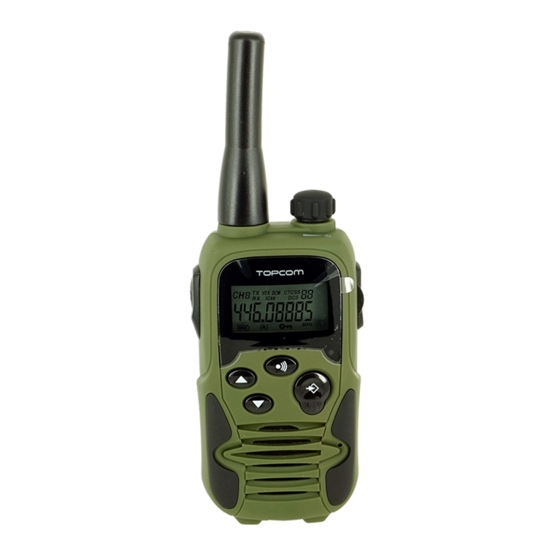
Topcom RC-6406 Bedienungsanleitung
Inhaltsverzeichnis
Verfügbare Sprachen
Verfügbare Sprachen
Quicklinks
TT 9500 Airsoft Edition.book Page 3 Monday, January 14, 2013 4:28 PM
Twintalker 9500 (RC-6406) Airsoft Edition
1
Introduction
Thank you for purchasing the Twintalker 9500 (RC-6406). It's a long
range, low powered radio communication device with a range of
maximum 10 Km. It has no running costs other than the minimal cost of
re-charging the batteries.The Twintalker operates on 8 channels.
2
Intended purpose
It can be used for recreational purposes. For example: to keep in contact
during travelling with 2 or more cars, biking, skiing. It can be used to keep
in contact with your children when they are playing outside, etc...
3
CE Mar
k
Hereby, Smartwares Europe declares that the radio equipment type
RC-6406
is
in
compliance
with
The full text of the EU declaration of conformity is available at the
follwing internet address: www.smartwares.eu/doc
4
Safety instructions
4.1
General
Please read carefully through the following information concerning safety
and proper use. Make yourself familiar with all functions of the device.
Keep this manual in a safe place for future use.
4.2
Burning injuries
•
If the cover of the antenna is damaged, do not touch because when
an antenna comes in contact with the skin, a minor burn may result
when transmitting.
•
Batteries can cause property damage such as burns if conductive
material such as jewellery, keys or beaded chains touches exposed
terminals.The material may complete an electrical circuit (short
circuit) and become quite hot. Exercise care in handling any charged
battery, particularly when placing it inside a pocket, purse or other
container with metal objects.
4.3
Injuries
•
Do not place your device in the area over an air bag or in the air bag
deployment area. Air bags inflate with great force. If a PMR is placed
in the bag deployment area and the air bag inflates, the
communicator may be propelled with great force and cause serious
injury to the occupants of the vehicle.
•
Keep the PMR at least 15 centimetres away from a pacemaker.
•
Turn your PMR OFF as soon as interference is taking place with
medical equipment.
4.4
•
Do not replace batteries in a potentially explosive atmosphere.
Contact sparking may occur while installing or removing batteries
and cause an explosion.
•
Turn your PMR off when in any area with a potentially explosive
atmosphere. Sparks in such areas could cause an explosion or fire
resulting in bodily injury or even death.
•
Never throw batteries in fire as they may explode.
Directive
2014/53/EU.
4.5
•
Keep batteries away from small children.
4.6
•
In some countries it is prohibited to use your PMR while driving a
vehicle. In this case leave the road before using the device.
•
Turn your PMR OFF when on board an aircraft when instructed to do
so. Any use of the PMR must be in accordance with airline
regulations or crew instructions.
•
Turn your PMR OFF in any facilities where posted notices instruct
you to do so. Hospitals or health care facilities may be using
equipment that is sensitive to external RF energy.
•
Replacing or modifying the antenna may affect the PMR radio
specifications and violate the CE regulations. Unauthorised
antennas could also damage the radio.
Danger of explosion
Areas with potentially explosive atmospheres are often,
but not always, clearly marked. They include fuelling
areas such as below deck on boats, fuel or chemical
transfer or storage facilities; areas where the air
contains chemicals or particles, such as grain, dust or
metal powders; and any other area where you would
normally be advised to turn off your vehicle engine.
Poisoning danger
Legal
3
Inhaltsverzeichnis

Verwandte Anleitungen für Topcom RC-6406


Inhaltszusammenfassung für Topcom RC-6406
-
Seite 30: Einleitung
Twintalker 9500 (RC-6406) Airsoft Edition Einleitung Verletzungsgefahr Herzlichen Glückwunsch zum Kauf des Twintalker 9500 (RC-6406). Es Positionieren Sie Ihr Gerät nicht in den Bereich über einem Airbag oder ist ein Sprechfunkgerät für große Entfernungen mit einer Reichweite bis im Airbagauslösebereich. Airbags blasen sich mit großer Wucht auf. Bei zu 10 km. -
Seite 31: Reinigung Und Wartung
TT 9500 Airsoft Edition.book Page 33 Monday, January 14, 2013 4:28 PM Twintalker 9500 (RC-6406) Airsoft Edition Benutzung des Geräts muss entsprechend den Bestimmungen der gebrauchten Produkten liefern Sie einen wichtigen Beitrag zum Fluglinie oder den Anweisungen der Besatzung erfolgen. -
Seite 32: Packungsinhalt
Sprechfunkgerät am besten funktioniert, wenn zwischen den Benutzern nur wenige Hindernisse vorhanden sind. Packungsinhalt • 1 x Twintalker 9500 (RC-6406) Airsoft Edition • 1 x Netzteil Entfernen Sie den Gürtelhalter (siehe Kapitel “9.1 Anbringen/ •... -
Seite 33: Beschreibung
Sprechfunkgeräte und das Ladegerät beschädigt werden. Scan-Anzeige DCM-Anzeige (Dual Channel Monitor) Beschreibung 13 Betrieb des Twintalker 9500 (RC-6406) Siehe Abbildung 1 auf der ausklappbaren Umschlagseite EIN-/AUS-/Lautstärke-Schalter Die Display-Abbildungen auf den nächsten Seiten LCD-Display zeigen nur die Symbole oder Anzeigeinformationen, die Anschluss Batterieladegerät... -
Seite 34: Batterieladezustandsanzeige / Anzeige Schwache
13.7 CTCSS (Continuous Tone Coded Squelch System) / DCS (Digital Coded Squelch) Lizenzfreien Sprechfunkgeräten, die wie der Twintalker 9500 (RC-6406) auf dem Frequenzband 446 MHz senden, stehen 8 Funkkanäle zur Verfügung. Falls in Ihrer Nachbarschaft viele Sprechfunkgeräte im... -
Seite 35: Kanalüberwachung
TT 9500 Airsoft Edition.book Page 37 Monday, January 14, 2013 4:28 PM Twintalker 9500 (RC-6406) Airsoft Edition Einsatz sind, besteht die Möglichkeit, dass einige der Benutzer 13.7.2 DCS denselben Funkkanal verwenden. • Drücken Sie die -Taste dreimal: Um zu vermeiden, dass Sie Signale von anderen Benutzern empfangen, „DCS“... -
Seite 36: Kanalsuchlauf
TT 9500 Airsoft Edition.book Page 38 Monday, January 14, 2013 4:28 PM Twintalker 9500 (RC-6406) Airsoft Edition wird. Der VOX-Betrieb ist nicht empfehlenswert, wenn Sie Ihr Funkgerät 13.10.1 Suchen nach einem aktiven Funkkanal in einer lauten oder windigen Umgebung benutzen möchten. -
Seite 37: Suchen Nach Einem Dcs-Code
TT 9500 Airsoft Edition.book Page 39 Monday, January 14, 2013 4:28 PM Twintalker 9500 (RC-6406) Airsoft Edition Sobald eine Übertragung auf dem Kanal stattfindet, wird der CTCSS- 13.11.1 Einstellen des Ruftons Code (falls verwendet) erkannt und angezeigt. Der Twintalker 9500 (RC-6406) verfügt über 15 Ruftöne. • Drücken Sie die -Taste achtmal. -
Seite 38: Tastensperre
TT 9500 Airsoft Edition.book Page 40 Monday, January 14, 2013 4:28 PM Twintalker 9500 (RC-6406) Airsoft Edition Einstellen des Quittungstons: • Drücken Sie die -Taste zwölfmal. • Drücken Sie die -Taste zehnmal. „rO“ „DCM OFF“ blinkt im Display. wird angezeigt. -
Seite 39: Display-Hintergrundbeleuchtung
TT 9500 Airsoft Edition.book Page 41 Monday, January 14, 2013 4:28 PM Twintalker 9500 (RC-6406) Airsoft Edition Begrenzte Reichweite Die Gesprächsreichweite hängt vom Gelände -Taste , die -Taste und die -Taste und Geräusche funktionieren auch bei aktivierter Tastensperre. während der Stahlkonstruktionen, Betongebäude oder die... -
Seite 40: Topcom-Garantie
17 Topcom-Garantie 17.1 Garantiezeit Topcom-Geräte haben eine 24-monatige Garantiezeit. Die Garantiezeit beginnt an dem Tag, an dem das neue Gerät erworben wurde. Die Garantie gilt nicht für normale Batterien oder wiederaufladbare Akkus (Typen AA/AAA). Verschleißteile oder Mängel, die den Wert oder die Gebrauchstauglichkeit des Geräts nur unerheblich beeinflussen, sind...