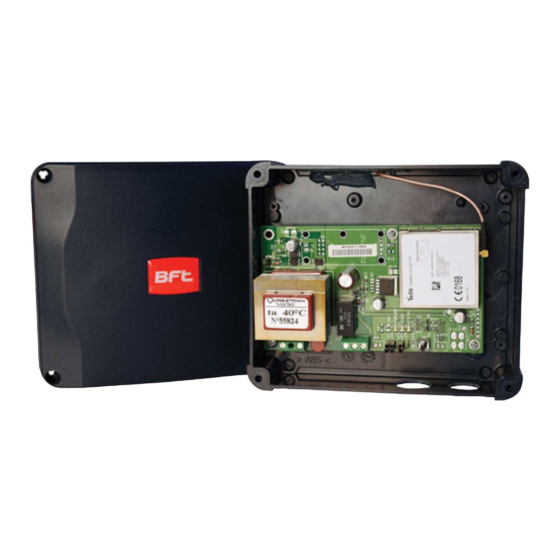
BFT GSM RECEIVER Handbuch
Quicklinks
GB
Open your gate with GSM RECEIVER
Open the gate simply by dialling the number of the SIM inside
GSM RECEIVER.
To activate phones that can open the gate, use function no. 2,
which you will nd in the "list of the main functions" table.
Installation
PRECAUTIONS FOR INSTALLATION
• Make sure that the product is intact after removing the
packaging;
• The system must be installed in compliance with current safety
standards;
• An appropriate disconnector and protection switch should be
installed upstream of the actuator;
OPERATION OF THE TERMINALS (Fig. 1)
• Before connecting the device, make sure that the rating plate
data corresponds to that of the distribution network;
A) Terminal board M1
• Disconnect the device from the mains power supply before
230V power supply
attempting to clean or service it
• Disconnect the device and do not touch it in case of failure
B) Terminal board M2
and/or malfunction;
Automation open control relay. Relay contacts:
• Do not let the device come into direct contact with water or
- NO normally open
extreme heat, moisture or heat shock: see the chapter
- NC normally closed
"installation"
- C common
• Contact the manufacturer for repairs.
C) SW1 button - Reset to factory setting
Take note that:
Turn on the module, wait for the three LEDs to light up at the
• Failure to comply with the above may compromise the safety
same time and then press the C button (SW1) within 5 seconds.
and warranty of the device;
Acceptance of the command will be con rmed by the rapid
• The manufacturer can not be held responsible for any damage
ashing of the right LED.
caused by improper, incorrect and unreasonable use.
CAUTION: This process deletes all registered telephone numbers
TECHNICAL FEATURES
and restores messages and settings to the initial values (including
• Power supply 230V - 50/60 Hz;
passwords to 0000).
• The transformer is electronically protected against overloads
and short circuits;
D) SIM Card insertion seat
• Absorbed power: 10VA;
The SIM inserted must be con gured without the PIN
• Relay: 230V maximum voltage, maximum current 1A with
number. The device will not work if a SIM con gured with the PIN
resistive load (0.4A inductive load);
request is inserted.
• Dual mode operation: pulse (default) or bistable
The connections to the control relay must be provided in function
LOCATION
of the type of apparatus that must be automated. The simplest
Install the device in an area where there is a good GSM/GPRS
approach is to identify the button/key to open the device to
signal. This area can be identi ed in the vicinity of the automation
automate and make a parallel connection. If the plant is not tted
that you want to connect, though its proximity to the gate is not
with any, refer to the manual of the plant to be automated to
an essential factor. It is advisable to perform simple eld strength
determine the correct connection with the control unit in order to
checks before installing the actuator.
automate the opening.
Once powered, GSM RECEIVER will proceed with registration on
INSTALLATION
the GSM network. Registration may last a few minutes
The device is equipped with a relay to process the open
command.
The system is ready for use after this operation.
LIST OF THE MAIN FUNCTIONS TABLE
Function
Command text via SMS
a1
Smart Start ON
password,E,SMART=ON
ex. 1234,E,SMART=ON
Smart Start OFF
password,E,SMART=OFF
a2
ex. 1234,E,SMART=OFF
Change password
oldpassword,P,newpassword
1
ex. to change the default password (0000)
Default password: 0000
with a new one (1234) type: 0000,P,1234
Enabling a new mobile phone to open a gate
password,I,phonenumber
2
ex. 1234,I,347123456789
(phone number without international country code)
Deleting a phone number enables to open a
password,D,phonenumber
3
gate
ex. 1234,D,347123456789
(phone number without international country code)
Check number
password,C,phonenumber
4
(of an enabled phone)
ex. 1234,C,347123456789
Changing the response SMS text to
password,E,T7,new text
5
command 1 "Change Password"
password,E,A1
Activating a response SMS for
6
Enabling/Deleting
a mobile phone number
password,E,A0
7
Deactivating a response SMS for
Enabling/Deleting a mobile phone number
8
Changing the response SMS text to
password,E,T5,new text
ex.: 1234,E,T5,command executed
command 2 "Enabling an opening phone
number..."
9
Changing the response SMS text to
password,E,T6,new text
command 3 "Deleting an enabled phone
ex.: 1234,E,T6,command
number..."
executed
10
Changing the response SMS text
password,E,T3,new text
to command 4 "Check Number"
ex. 1234,E,T3,number in phonebook
(for an enabled number)
11
Changing the response SMS text
password,E,T4,new text
to command 4 "Check Number"
ex. 1234,E,T4,number not in phonebook
(for an number not enabled)
12
password,E,DELETE
COMPLETELY deleting the numbers saved
in GSM RECEIVER
13
Check the status of the GSM RECEIVER
password,E,PING
device (status, firmware, antenna)
14
Pulse operating mode settings*
password,E,M,1
(factory value)
15
Bistable operating mode settings*
password,E,M,2
16
Setting pulse duration
password,E,PS,seconds
ex. 1234,E,PS,5 (5 sec pulse duration)
Setting bistable time
delay reply
password,E,DS,seconds
17
-
ex. 1234,E,DS,10 (10 sec delay)
18
Checking status in bistable mode
Call and hang up before the time-delayed
response set (default 20 sec.)
* The device can operate in two modes:
• Pulse (default) - the apparatus closes the relay for the number of seconds established (default 2 sec.). Typical applications: gates, armoured doors, etc.
• Bistable - the apparatus closes the relay until the next command. Typical applications: boilers, lights etc.
Fig. 1
D
LED
A
B
C
Note
Open to all calls
(factory default)
Open only to memorised numbers
A response SMS
"Your password has been changed" will be
sent to you as confirmation.
You will receive an SMS message reading
"phonenumber successfully inserted" as
confirmation of the process
You will receive an SMS message reading
"phonenumber successfully removed" as
confirmation of the process
You will receive a response SMS message
on the status of the phone number: "found
in phonebook" if enabled; "not found in
phonebook" if not enabled
Default SMS:
"Your password has been changed"
(max 160 characters)
This function is already factory activated
(default)
-
Default SMS:
"successfully inserted"
(max 160 characters)
Default SMS:
"successfully removed"
(max 160 characters)
Default SMS:
"found in phonebook"
(max 160 characters)
Default SMS:
"not found in phonebook"
(max 160 characters)
WARNING: this command deletes all of the
numbers saved in GSM RECEIVER
You will receive a response SMS with the
status of the GSM RECEIVER device, the
firmware version and the level of antenna
signal strength.
(ex. LT Running, firmware x.y.z, signal 20.0)
Pulse mode
Bistable mode
Factory setting:
2 seconds
Factory setting:
20 seconds
A response SMS will provide relay status
(ex. "GSM RECEIVER ON"
or "GSM RECEIVER OFF")
Apri il cancello con GSM RECEIVER
Per aprire il cancello, e ettua una telefonata al numero della SIM
inserita in GSM RECEIVER.
Per abilitare i telefoni che possono aprire il cancello, usare la
funzione n. 2 che trovate nella tabella "Lista delle funzioni
principali".
Istruzioni per l'installatore
AVVERTENZE PER L'INSTALLAZIONE
• Dopo
aver
tolto
l'imballaggio,
assicurarsi
dell'apparecchio;
• L'esecuzione dell'impianto deve essere rispondente alle norme di
sicurezza vigenti;
• È opportuno prevedere a monte dell'attuatore un appropriato
interruttore di sezionamento e protezione;
• Prima di collegare l'apparecchio, accertarsi che i dati di targa
siano rispondenti a quelli della rete di distribuzione;
• Prima di e ettuare qualunque operazione di pulizia o di
manutenzione sul dispositivo, disinserire l'apparecchio dalla rete
di alimentazione elettrica;
• In caso di guasto e/o di cattivo funzionamento dell'apparecchio,
distaccarlo dall'alimentazione e non manometterlo;
• Non far entrare il dispositivo a contatto diretto con l'acqua e non
sottoporlo a eccessivo calore, umidità o sbalzo termico: vedere
capitolo "Installazione"
• Per l'eventuale riparazione rivolgersi unicamente al costruttore.
Si avverte inoltre che:
• Il mancato rispetto di quanto sopra può compromettere la
sicurezza dell'apparecchio e la garanzia;
• Il costruttore non può essere considerato responsabile per
eventuali danni derivanti da usi impropri, erronei e irragionevoli.
CARATTERISTICHE TECNICHE
• Alimentazione 230V - 50/60 Hz;
• Il trasformatore è protetto elettronicamente contro sovraccarichi
e cortocircuiti;
• Potenza assorbita: 10VA;
• Relè: tensione massima 230V, corrente massima 1A con carico
resistivo (0,4A con carico induttivo);
• Funzionamento in doppia modalità: impulso (default) o bistabile
UBICAZIONE
Installare il dispositivo in una zona dove sia presente un buon
segnale GSM/GPRS. Questa zona può essere identi cata in
prossimità dell'automazione che si desidera collegare, ma la sua
vicinanza al cancello non è di rilevante importanza. Si consiglia
comunque di procedere con semplici veri che di campo prima di
installare l'attuatore.
INSTALLAZIONE
Il dispositivo è equipaggiato di un relè per il comando
dell'apertura.
Funzione
Smart Start ON
a1
D812967 00100_02 30-05-17
a2
Smart Start OFF
1
Modifica password
Password preimpostata: 0000
2
Abilitazione di un numero di cellulare per
l'apertura del cancello
3
Cancellazione di un numero di cellulare
abilitato all'apertura del cancello
4
Verifica numero
(di un cellulare abilitato)
5
Modifica del testo SMS di risposta al
comando 1 "Modifica Password"
6
Attivazione SMS di risposta per
Abilitazione/Cancellazione
numero cellulare
7
Disattivazione SMS di risposta per
Abilitazione/Cancellazione numero
cellulare
8
Modifica del testo SMS di risposta al
Comando 2 "Abilitazione di un numero
per apertura "
9
Modifica del testo SMS di risposta al
Comando 3 "Cancellazione di un numero
abilitato "
10
Modifica testo SMS di risposta
al comando 4 "Verifica Numero"
(per un numero abilitato)
11
Modifica testo SMS risposta
al comando 4 "Verifica Numero"
(per un numero non abilitato)
12
Cancellazione TOTALE dei numeri
memorizzati in GSM RECEIVER
13
Verifica stato del dispositivo
GSM RECEIVER
(stato, firmware, antenna)
14
Impostazione modalità di funzionamento
Impulso*
(valore di fabbrica)
15
Impostazione modalità di funzionamento
Bistabile*
16
Impostazione durata impulso
17
www.bftme.ae
Impostazione ritardo risposta Bistabi
18
Verifica stato in modalità Bistabile
* L'apparato può funzionare in due modalità:
• Impulso (default) – l'apparato chiude il relè per la quantità di secondi stabilita (default 2 sec.). Applicazioni tipo: cancello, portoni ecc.
• Bistabile – l'apparato chiude il relè no a comando successivo. Applicazioni tipo: caldaie, luci ecc.
Fig. 1
IT
D
LED
dell'integrità
A
B
C
FUNZIONE DEI MORSETTI (Fig. 1)
A) Morsettiera M1
Rete di alimentazione 230V
B) Morsettiera M2
Relè di comando dell'apertura della automazione. Contatti del
relè:
- NA normalmente aperto
- NC normalmente chiuso
- C comune
C) Pulsante SW1 - Ripristino con gurazioni di fabbrica
Accendere il modulo, attendere che i tre LED siano accesi
contemporaneamente, a questo punto premere il pulsante C
(SW1) entro 5 secondi. L'accettazione del comando verrà
confermata con il lampeggio veloce del LED di destra.
ATTENZIONE:
Questa procedura cancella tutti i numeri di telefono registrati e
ripristina i messaggi e i settaggi ai valori di iniziali (compresa
password a 0000).
D) Sede per inserimento SIM Card
La SIM inserita deve essere con gurata senza la richiesta del
PIN. Qualora venga inserita una SIM con gurata con la richiesta
del PIN, l'apparato non funzionerà.
I collegamenti al relè di comando vanno e ettuati in funzione del
tipo di apparato che si intende automatizzare. L'approccio più
semplice è identi care il pulsante/chiave di apertura del
dispositivo da automatizzare e collegarsi in parallelo. Nel caso in
cui l'impianto ne sia sprovvisto, fare riferimento al manuale
dell'impianto da automatizzare per identi care il corretto
collegamento con la centralina al ne di automatizzare l'apertura.
Una volta alimentato, GSM RECEIVER procede con la registrazione
sulla rete GSM. La fase di registrazione può durare alcuni minuti.
Dopo questa operazione il sistema è pronto all'uso.
LISTA DELLE FUNZIONI PRINCIPALI TABELLA
Testo di comando via SMS
Note
password,E,SMART=ON
Apre a tutte le chiamate
es. 1234,E,SMART=ON
(impostazione di fabbrica)
password,E,SMART=OFF
Apre solo ai numeri memorizzati
es. 1234,E,SMART=OFF
vecchiapassword,P,nuovapassword
Un SMS di risposta:
"Your password has been changed" notifica
es. per modificare la password di default (0000)
l'avvenuto cambiamento della password
con una nuova (1234) digitare: 0000,P,1234
password,I,numerotelefono
Un SMS di risposta impostato con la
formula "numerotelefono successfully
es. 1234,I,347123456789
inserted" notifica l'avvenuta abilitazione
(numero di telefono senza prefisso internazionale)
password,D,numerotelefono
Un SMS di risposta impostato con la
formula "numerotelefono successfully
es. 1234,D,347123456789
removed" notifica la cancellazione.
(numero di telefono senza prefisso internazionale)
Un SMS di risposta fornisce lo stato del
password,C,numerotelefono
numero: "found in phonebook" se abilitato;
es. 1234,C,347123456789
"not found in phonebook" se non abilitato
password,E,T7,nuovo testo
SMS preimpostato:
"Your password as been changed"
(max 160 caratteri)
password,E,A1
Questa funzione è già attivata di fabbrica
(default)
password,E,A0
-
password,E,T5,nuovotesto
SMS preimpostato:
es: 1234,E,T5,comando eseguito
"successfully inserted"
(max 160 car)
password,E,T6,nuovotesto
SMS preimpostato:
es: 1234,E,T6,comando eseguito
"successfully removed"
(max 160 caratteri)
password,E,T3,nuovo testo
SMS preimpostato:
es. 1234,E,T3,numero presente in rubrica
"found in phonebook"
(max 160 caraatteri)
password,E,T4,nuovo testo
SMS preimpostato:
es. 1234,E,T4,numero non presente in rubrica
"not found in phonebook"
(max 160 caratteri)
password,E,DELETE
ATTENZIONE: questo comando cancella
tutti i numeri memorizzati in GSM RECEIVER
password,E,PING
Un SMS di risposta fornirà lo stato del
dispositivo GSM RECEIVER, la versione del
firmware e il livello del segnale antenna
(es. LT Running, firmware x.y.z, signal 20,0)
password,E,M,1
Modalità Impulso
password,E,M,2
Modalità Bistabile
password,E,PS,secondi
Impostazione di fabbrica:
es. 1234,E,PS,5 (durata impulso 5 sec)
2 secondi
password,E,DS,secondi
Impostazione di fabbrica:
le
20 secondi
es. 1234,E,DS,10 (ritardo 10 sec)
Chiamare e riagganciare prima del ritardo
Un SMS di risposta fornirà lo stato del relé
risposta settato (default 20 sec.)
(es. "GSM RECEIVER ON"
o "GSM RECEIVER OFF")

Verwandte Anleitungen für BFT GSM RECEIVER


Inhaltszusammenfassung für BFT GSM RECEIVER
- Seite 1 It is advisable to perform simple eld strength determine the correct connection with the control unit in order to Una volta alimentato, GSM RECEIVER procede con la registrazione checks before installing the actuator. automate the opening.
- Seite 2 Fig. 1 Fig. 1 Ö nen Sie Ihr Tor mit GSM RECEIVER Um das Tor zu ö nen, rufen Sie die in GSM RECEIVER eingelegte SIM-Karte. Um die Telefone zu aktivieren, die das Tor ö nen können, Ouvrez votre portail avec GSM RECEIVER verwenden Sie die Funktion Nr.