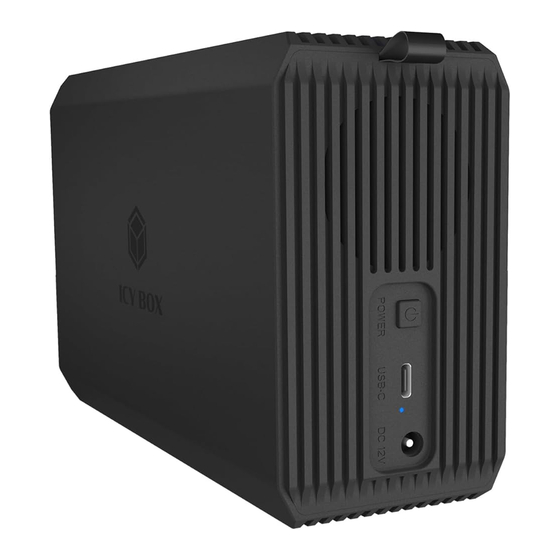
Icy Box IB-RD3720-CU3 Handbuch
Raid-system für 2.5/3.5 sata hdd/ssd

Verwandte Anleitungen für Icy Box IB-RD3720-CU3


Inhaltszusammenfassung für Icy Box IB-RD3720-CU3
- Seite 1 Manual IB-RD3720-CU3 RAID system for 2.5"/3.5" SATA HDD/SSD Handbuch IB-RD3720-CU3 RAID-System für 2.5"/3.5" SATA HDD/SSD...
- Seite 3 Safety information IB-RD3720-CU3 Please read carefully the following information to prevent injuries, damage to material and device as well as data loss: Warning levels Signal words and safety codes indicate the warning level and provide immediate information in terms of the probability of occurrence as well as the type and severity of the consequences if the measures to prevent hazards are not complied with.
- Seite 4 Safety information IB-RD3720-CU3 Potential data loss Data lost during commissioning IMPORTANT Potentially irreversible data loss • Always comply with the information in the operating instructions/quick installation guide • Exclusively use the product once the specifications have been met • Back up data prior to commissioning •...
- Seite 5 Sicherheitshinweise IB-RD3720-CU3 Zur Vermeidung körperlicher Schäden, sowie von Sach-, Geräteschäden und Datenverlust beachten Sie bitte folgende Hinweise: Warnstufen Signalwort und Sicherheitszeichen kennzeichnen die Warnstufe und geben einen sofortigen Hinweis auf Wahrscheinlich- keit, Art und Schwere der Folgen, wenn die Maßnahmen zur Vermeidung der Gefahr nicht befolgt werden.
- Seite 6 Sicherheitshinweise IB-RD3720-CU3 Gefahren durch Kleinstteile und Verpackung Erstickungsgefahr WARNUNG Lebensgefahr durch Ersticken oder Verschlucken • Kleinteile, Zubehör für Kinder unzugänglich verwahren • Plastiktüten und Verpackung für Kinder unzugänglich verwahren/entsorgen • Kleinteile und Verpackungen nicht in Kinderhände geben Möglicher Datenverlust Datenverlust bei Inbetriebnahme ACHTUNG Unwiederbringlicher Datenverlust möglich...
-
Seite 7: Package Content
Manual IB-RD3720-CU3 Package content 1x IB-RD3720-CU3 1x USB Type-C to Type-C /A cable, 100 cm ® ® 1x Screwdriver 10x Screw 1x Tool for RAID DIP switch 1x 12 V / 4 A power adapter 1x Manual View LED indicator for status... - Seite 8 Manual IB-RD3720-CU3 View HDD 2 HDD 1 RAID mode DIP switch DC power input port USB Type-C port ® On/Off button 10. LED indicator for power...
- Seite 9 Manual IB-RD3720-CU3 Product overview 2-Bay 2.5"/3.5" RAID system with features as follows Key features • Supports 2x 2.5"/3.5" HDD/SSD • Host connection USB 3.2 Gen 1 Type-C with up to 5 Gbit/s ® • RAID mode DIP switch for RAID 0/1/SINGLE/Large •...
- Seite 10 Manual IB-RD3720-CU3 RAID mode configuration Please read instructions before configuring. It is recommended that you use new hard drives of equal capacity. Ensure any important data is backed up prior to switching into a RAID mode. When switching into a RAID mode, the system will format the drive, erasing all existing data.
- Seite 11 Manual IB-RD3720-CU3 2. Plug in the power adapter and connect the USB Type-C to Type-C /A cable to ® ® the host connection of the device and the USB port of your computer. Press the "Power" button and the two LED indicators will flash for about several seconds, then light up blue.
- Seite 12 Manual IB-RD3720-CU3 Formatting and partitioning a new hard drive After configuring the RAID mode, the drives need to undergo formatting and partitioning. The specific steps may vary slightly based on the system version. Below are a few examples: For Windows ®...
- Seite 13 Manual IB-RD3720-CU3 For macOS ® Go to the "Disk Utility" app on your Mac > select "Erase", choose the "APFS" file system format in the pop-up menu, then click "Erase". If you intend to use the formatted drive on both macOS...
- Seite 14 Manual IB-RD3720-CU3 Installation Loosen the screws on the enclosure and pull out the hard disk frame. 2. Align the hard disk with the installation port to install and secure the hard disks.
- Seite 15 Manual IB-RD3720-CU3 Installation 3. Adjust the DIP switches according to user requirements, the factory default setting is JBOD(SINGLE) mode. RAID 0 RAID 1 SINGLE LARGE 4. Push the frame with the installed hard disks back into the enclosure and secure it with screws.
- Seite 16 Manual IB-RD3720-CU3 Notes 3. This product is compatible with 2.5"/3.5" mechanical hard disks and solid state disks with stan- dard SATA interface. 4. Install HDD 1 and HDD 2 disks correctly. 5. Please only use the original power adapter. Using other non-certified power adapters may damage the device or cause safety hazards.
-
Seite 17: Verpackungsinhalt
Handbuch IB-RD3720-CU3 Verpackungsinhalt 1x IB-RD3720-CU3 1x USB Type-C zu Type-C /A Kabel, 100 cm ® ® 1x Schraubendreher 10x Schraube 1x Werkzeug für RAID DIP-Schalter 1x 12 V / 4 A Netzteil 1x Handbuch Ansicht LED-Anzeige für Status Schrauböffnungen Zuglasche... - Seite 18 Handbuch IB-RD3720-CU3 Ansicht HDD 2 HDD 1 DIP-Schalter für RAID-Modus Stromanschluss USB Type-C Anschluss ® Ein/Aus-Taste 10. LED-Anzeige für Strom...
- Seite 19 Handbuch IB-RD3720-CU3 Produktübersicht 2-Bay 2.5"/3.5" RAID System mit folgenden Eigenschaften Hauptmerkmale • Unterstützt 2x 2,5"/3,5" HDD/SSD • Host-Anschluss USB 3.2 Gen 1 Type-C mit bis zu 5 Gbit/s ® • RAID-Modus DIP-Schalter für RAID 0/1/SINGLE/Large • Unterstützt SATA III, abwärtskompatibel mit SATA II •...
- Seite 20 Handbuch IB-RD3720-CU3 RAID-Modus Konfiguration Bitte lesen Sie die Anweisungen vor der Konfiguration. Es wird empfohlen, neue Festplatten mit gleicher Kapazität zu verwenden. Stellen Sie sicher, dass Sie eine Datensicherung machen, bevor Sie in einen RAID-Modus schalten. Beim Umschalten in einen RAID-Modus löscht das System das Laufwerk und löscht alle vorhandenen Daten.
- Seite 21 Handbuch IB-RD3720-CU3 2. Stecken Sie das Netzteil ein und verbinden Sie das USB Type-C zu Type-C /A Kabel mit dem ® ® Hostanschluss des Geräts und dem USB-Anschluss Ihres Computers. Drücken Sie die "Pow- er"-Taste. Die beiden LED-Anzeigen blinken für einige Sekunden und leuchten dann blau.
- Seite 22 Handbuch IB-RD3720-CU3 Formatieren und Partitionieren einer neuen Festplatte Nachdem Sie den RAID-Modus konfiguriert haben, müssen die Laufwerke formatiert und partitioniert werden. Die einzelnen Schritte können je nach Systemversion leicht variieren. Nachfolgend finden Sie einige Beispiele: Für Windows ® Klicken Sie mit der rechten Maustaste auf "Disk Management" > klicken Sie mit der rechten Maustaste auf das neu hinzugefügte Laufwerk, und wählen Sie im Popup-Menü...
- Seite 23 Handbuch IB-RD3720-CU3 Für macOS ® Rufen Sie die App "Disk Utility" auf Ihrem Mac auf > wählen Sie "Erase", wählen Sie das Dateisystem- format "APFS" im Pop-up-Menü und klicken Sie dann auf "Erase". Tipp Wenn Sie beabsichtigen, das formatierte Laufwerk sowohl unter macOS als auch unter Windows ®...
- Seite 24 Handbuch IB-RD3720-CU3 Installation Lösen Sie die Schrauben des Gehäuses und ziehen Sie den Festplattenrahmen heraus. 2. Richten Sie die Festplatte auf die Installationsschnittstelle aus, um die Festplatten zu installieren und zu sichern.
- Seite 25 Handbuch IB-RD3720-CU3 3. Stellen Sie die DIP-Schalter entsprechend den Benutzeranforderungen ein. Die Werkseinstellung ist der JBOD(SINGLE)-Modus. RAID 0 RAID 1 SINGLE LARGE 4. Schieben Sie den Rahmen mit den installierten Festplatten wieder in das Gehäuse ein und befes- tigen Sie ihn mit den Schrauben.
-
Seite 26: Warnhinweise
Handbuch IB-RD3720-CU3 Hinweise Dieses Produkt ist mit mechanischen 2,5"/3,5" HDDs und SSDs mit Standard SATA-Schnittstelle kompatibel. 2. Installieren Sie die Festplatten HDD 1 und HDD 2 richtig. 3. Bitte verwenden Sie nur das Original-Netzteil. Die Verwendung anderer, nicht zertifizierter Netzteile kann das Gerät beschädigen oder ein Sicherheitsrisiko darstellen. - Seite 28 ASTUCCIO PAP 21 PAP 22 RACCOLTA CARTA RACCOLTA CARTA © Copyright 2025 by RaidSonic Technology GmbH. All Rights Reserved. The information contained in this manual is believed to be accurate and reliable. RaidSonic Technology GmbH assumes no responsibility for any errors contained in this manual. RaidSonic Technology GmbH reser- ves the right to make changes in the specifications and/or design of the above-mentioned product without prior notice.