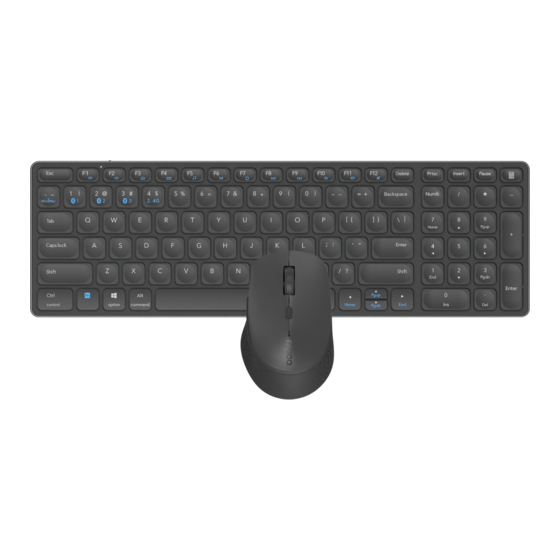
Rapoo 9700M Bedienungsanleitung
Kabellose tastatur und maus

Verwandte Anleitungen für Rapoo 9700M


Inhaltszusammenfassung für Rapoo 9700M
- Seite 1 WIRELESS KEYBOARD MOUSE 9700M Kabellose astatur und Maus On/Off Switch Type CConnector Clavier et souris sans ODOO ODOO www.rapoo-eu.com...
- Seite 2 = Mute 1. Open the Bluetooth settings on your device. 2. Select the keyboardor mousefrom the list. Instructions Mouse: RAPOO 3.0MS / RAPOO 5.0MS Getting started Keyboard: RAPOO 3.0KB / NAPOO5.0KB Keyboard: Werecommend to charge the battery fully beforefirst use.
-
Seite 3: Low Battery
Warranty conditions Fn + FIO Lautstärke Fn + Fl 1 = Lautstärke+ This deviceis coveredby a 2-yearlimited hardware warranty from the date of purchase. Formore information, please visit www.rapoo-eu.com. • (nur Windows) Fn + Fl 2 = Stumm Troubleshooting 1. Sleepmode: Whennot using the devicefor sometime it will fall into a sleep mode to save battery.Youcan pressany keyto wake it up againfor... - Seite 4 Koppeln (BT3.O Oder 8T5.O). Zwischen gekoppelten Geräten umschalten 3. Wenn Sieweitere Informationen benötigen, besuchen Sie bitte www.rapoo-eu.com. Dort finden Sieunsere Fragenund Antworten. Zudem Tastatur könnenSiedort die neuestenTreiber und Bedienungsanleitungenzu unseren Produkten herunterladen. Drücken Sie zum Umschalten zwischen den gekoppelten Geräten die Tastenkombinationen...
- Seite 5 2. Sélectionnez le clavier ou la souris dans la liste. Instruction Souris: RAPOO 3.0MS / RAPOO 5_OMS Pour commencer Clavier: RAPOO 3.0KB / RAPOO5.0KB Clavier: Nousvous recommandonsde rechargertotalement la batterie avant la premiére utilisation. 3. Cliquez sur Couplageet suiveztoutes les autres instructions qui peuvent apparaitre l'écran.
- Seite 6 Mouse: La batteria del mouse preinstallata. Rimuovere l'etichetta accanto alla batteria. 3. Sivous avez besoin de plus amples informations, veuillez visiter www.rapoo-eu.com. Vousy trouverez nos FAQs. V ous pouvez également y télécharger les derniers pilotes et manuels d'utilisation de nos produits. Modalitå 2.4 GHZ Exigences du Systéme...
- Seite 7 Bluetooth per accoppiarvi (BT3.Oo BT5.0). Commutazione tra dispositivi associati 3. Seavete bisogno di ulteriori informazioni, visitate il sito www.rapoo-eu.com.Li si troveranno le nostre FAQ. inoltre possibile scaricare i driver Tastiera piü recenti e i manuali utente peri nostri prodotti. Premere le combinazioni di tasti Fn+l, Fn*2, Fn+3, Fn+4 per commutare tra i dispositivi associati.
- Seite 8 Procedimientos iniciales Rat6n: RAPOO 3.0MS / RAPOO 5.0MS •reclado: RAPOO 3.0KB / RAPOO5.0KB Teclado: Es recomendable cargar la pila completamente antes de utilizar la unidad por primera vez. Ratön: Lapila del ratönviene preinstalada. Quite la etiqueta junto a la pila.
- Seite 9 Mouse:A bateria do mouse eståpré instalada. Removaa etiqueta ao lado da bateria. Bluetooth para emparejarse (8T3.0 0 8T5.O). 3. Si necesita més informaciön, visite www.rapoo eu.com. Alli encontrarå nuestras preguntas frecuentes. Alli también puede descargar los controladores y manuales de usuario mis recientes para nuestrosproductos.
- Seite 10 Teclado: RAPOO 3.0KB / RAPOO5.0KB usa a segunda opqäo Bluetooth alternativa para emparelhar (BT3.Oou BT5.O). 3. Cliqueem Emparelhar e siga asinstruqöes que possam ser apresentadasno ecrä. 3. Se precisarde mais informaqöes,visite www.rapoo-eu.com. Lé vocé encontrarå nossasperguntas frequentes. Vocétambém pode baixar os Alternando entre dispositivos emparelhados manuais do usuårio e 0s drivers mais recentespara nosSOS produtos 15.
- Seite 11 1.Open de Bluetooth-instellingen op uw apparaat. 2. Selecteer het toetsenbord of de muis in de lijst. Instructies Muis: RAPOO 3.0MS / RAPOO 5.0MS Aan de slag •roetsenbord: RAPOO3.0KB / RAPOO 5.0KB Toetsenbord: Wij radenu aan de batterij volledig op te ladenv6ör het eerstegebruik.
- Seite 12 Bluetooth-optie gebruikt om te koppelen (BT3.0of BT5.O). Mynua:B MVILuy nonepeAHb0iHCTanb0BaH0 6aTapeyo. 3HiMiTb spm.1K nop)N i3 6aTapeEK). 3. Ganaarwww.rapoo-eu.com als u meer informatie nodig hebt. Daarvindt u de veelgesteldevragen.U kunt hier 00k de nieuwstestuurprogram ma's en handleidingen voor onze producten downloaden.
- Seite 13 4.3aBepu_1iT noEAHaHH9 B napy Bluetooth Ha np"lcrpoi. Kony i Bawnpncrpii noEAHaH0 Bnapy,naMnoqKacrarycy BklMMKa€TbCA. npy•lcrpii p03n0BCFOAHYETbC9 06Me»ceHa rapaHTifl Ha anapaTHe3a6e3neyeHH9npMcTp010 CTPOKOM 2 pix aiA AaTMnpMA6aHH9. OTP'-1MaiTe 6 inbwe iH4)0PMagii H awvw.v.rapoo-eu.com. noEAHaHHA B napy no Bluetooth 1. BiAKpL- 1iTe Hanau_JTYBaHH Bluetooth HanpvCTP0i.
- Seite 14 KnaBnaTypa: PeK0MeHayeTcR nonHOCTbi0 3apqA1,1Tb aKKYMynRTopHY'06aTape»o nepeg nepBblM ncnonb30BaH'qeM. 2. Bb16epMTeKnaanarypy "lJu•1 MbiU.lb 1,13 c rwcxa. MbiLUb MbiUJb n ocraangercg cycTaHOBneHHOLi aKKYMy,n9TOPH0i 6aTapeei. Yaanme 3TYIKeTKy p9AOM c aKKyMy,'19TopHOL7 6aTapeei. RAPOO 3.0MS / RAPOO 5.0MS Knaauarypa: RAPOO3.0KB / RAPOO5.0KB 3. HaHML.1Te KHonKy«ConpAyeHne» cneAyLiTe "HCTpyKLV19M, KOTOPble MoryTnonaviTbcfiHa3KpaHe. 2.4 rrg 1.
- Seite 15 2. Ecw Bbl noAK.mogeHbl qepe3 Bluetooth VIy Bac B03H'•1KTW1 np06neMbl c nponycK0M 6yKB np'•l Ha60pe TeKCTa,nonnybicra, CHOBa,mcnonb3YRaribTepHaT'4BHblLiBTop0'i BapmaHT Bluetooth (BT3.0 BT5.O). 3. Ecm,l aaM HPKHa ,qon0JIHklTenbHa9 VIH(bopMaL.W19, noceTMTe cauiT www.rapoo-eu.com. TaM Bbl Haliaere Haum sacro 3aaaBaeMble Bonpocbl. TaMHe BSIMOReTe3arpY21-1Tb nocneAHne Apaigepog pyKOBOACTB nonb30gaTenq Ang Haun,1X npoayKT0g.
- Seite 16 The keyboard contains a rechargeable3.7V300mAhLithium battery. Do not open the device and do not try to retrieve or replacethe battery. In accordanceWithELJDirectivesand Regulations There is a danger of explosion when the battery is not handled properly. Shenzhen Rapoo Technology Cm, Ltd 22,Jinxiu Road East,pingshan that...