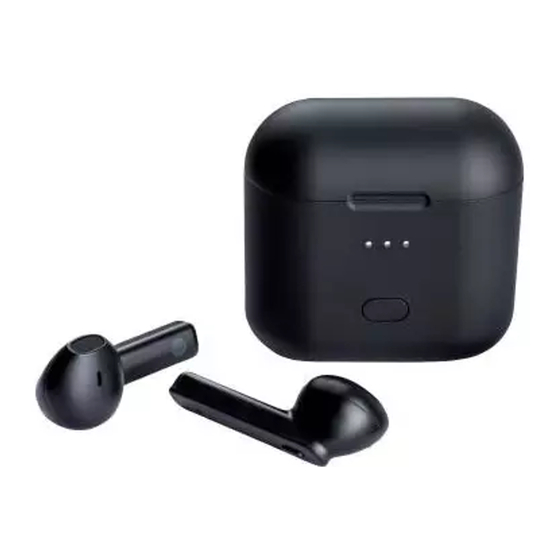
Silvercrest STSK 2 B2 Kurzanleitung
True wireless bluetooth- in-ear-kopfhörer
Vorschau anzeigen
Andere Handbücher für STSK 2 B2:
- Bedienungs- und sicherheitshinweise (140 Seiten) ,
- Bedienungs- und sicherheitshinweise (144 Seiten)
TRUE WIRELESS BLUETOOTH
IN-EAR HEADPHONES STSK 2 B2
TRUE WIRELESS
BLUETOOTH
IN-EAR HEADPHONES
Quick start guide
ÉCOUTEURS INTRA-
AURICULAIRES TRUE
WIRELESS BLUETOOTH
Guide de démarrage rapide
TRUE WIRELESS
BLUETOOTH
IN-EAR OORDOPJES
Startgids
IAN 329399_1907
®
®
®
TRUE WIRELESS
BLUETOOTH
IN-EAR-KOPFHÖRER
Kurzanleitung
®
-
®
Inhaltsverzeichnis

Verwandte Anleitungen für Silvercrest STSK 2 B2


Inhaltszusammenfassung für Silvercrest STSK 2 B2
- Seite 1 TRUE WIRELESS BLUETOOTH ® IN-EAR HEADPHONES STSK 2 B2 TRUE WIRELESS TRUE WIRELESS BLUETOOTH BLUETOOTH ® ® IN-EAR HEADPHONES IN-EAR-KOPFHÖRER Quick start guide Kurzanleitung ÉCOUTEURS INTRA- AURICULAIRES TRUE WIRELESS BLUETOOTH ® Guide de démarrage rapide TRUE WIRELESS BLUETOOTH ® IN-EAR OORDOPJES...
- Seite 2 GB/IE/NI Quick start guide Page FR/BE Guide de démarrage rapide Page NL/BE Startgids Pagina 17 DE/AT/CH Kurzanleitung Seite...
- Seite 3 This quick start guide is a fixed part of the operating instructions. Keep both this and the operating instructions in a safe place. When passing this product on to third parties, please be sure to include all documentation. Read the operating instructions before use, and pay particular attention to the safety instructions included in the operating instructions.
- Seite 4 TRUE WIRELESS BLUETOOTH ® IN-EAR HEADPHONES STSK 2 B2 TRUE WIRELESS TRUE WIRELESS BLUETOOTH ® BLUETOOTH IN-EAR ® HEADPHONES IN-EAR HEADPHONES STSK 2 B2 Operation and safety notes TRUE WIRELESS TRUE WIRELESS BLUETOOTH ® BLUETOOTH ® IN-EAR IN-EAR-KOPFHÖRER HEADPHONES Bedienungs- und...
- Seite 5 STSK 2 B2 GB/IE/NI...
- Seite 6 GB/IE/NI...
- Seite 7 After unpacking the product, check if the delivery is complete and if all parts are in good condition. B ˜ Charging Battery charge status < 30 % < 60 % < 100 % 100 % GB/IE/NI...
- Seite 8 ˜ Pairing the headphones with a Bluetooth device On your Bluetooth device, search for the device named STSK 2 B2 and pair with the device. – If your Bluetooth device prompts you to enter a password, enter 0000. GB/IE/NI...
- Seite 9 ˜ Other functions On, Off Calling functions Playback function GB/IE/NI...
- Seite 10 Ce guide rapide fait partie intégrante du mode d‘emploi. Conservez-le soigneusement avec le mode d‘emploi. Lorsque vous remettez le produit à d‘autres utilisateurs, veuillez également leur transmettre tous les documents liés à celui-ci. Lisez avant l‘utilisation le mode d‘emploi et respectez tout particulièrement les consignes de sécurité...
- Seite 11 TRUE WIRELESS BLUETOOTH ® IN-EAR HEADPHONES STSK 2 B2 TRUE WIRELESS TRUE WIRELESS BLUETOOTH ® BLUETOOTH IN-EAR ® HEADPHONES IN-EAR HEADPHONES STSK 2 B2 Operation and safety notes TRUE WIRELESS TRUE WIRELESS BLUETOOTH ® BLUETOOTH ® IN-EAR IN-EAR-KOPFHÖRER HEADPHONES Bedienungs- und...
-
Seite 12: Mise En Marche
Mise en marche Arrêt STSK 2 B2 FR/BE... - Seite 13 FR/BE...
- Seite 14 Contrôlez l'exhaustivité des pièces livrées après avoir déballé le produit et vérifiez l'état parfait de toutes les pièces. B ˜ Recharger Niveau de charge de l’accu < 30 % < 60 % < 100 % 100 % FR/BE...
- Seite 15 Désactivée éteint ˜ Couplage des écouteurs avec un appareil Bluetooth Recherchez le nom de l'appareil STSK 2 B2 sur votre appareil Bluetooth et connectez-le à celui-ci. – Si votre appareil Bluetooth demande un mot de passe : entrez 0000. FR/BE...
-
Seite 16: Fonctions D'appel
˜ Autres fonctions Allumer, éteindre Fonctions d’appel Fonction de lecture FR/BE... - Seite 17 Deze beknopte handleiding is vast bestanddeel van de gebruiksaanwijzing. Bewaar hem samen met de gebruiksaanwijzing goed. Overhandig alle documenten bij doorgifte van het product aan derden. Lees voor het gebruik de gebruiksaanwijzing en neem in het bijzonder de hierin vermelde veiligheidsvoorschriften in acht.
- Seite 18 TRUE WIRELESS BLUETOOTH ® IN-EAR HEADPHONES STSK 2 B2 TRUE WIRELESS TRUE WIRELESS BLUETOOTH ® BLUETOOTH IN-EAR ® HEADPHONES IN-EAR HEADPHONES STSK 2 B2 Operation and safety notes TRUE WIRELESS TRUE WIRELESS BLUETOOTH ® BLUETOOTH ® IN-EAR IN-EAR-KOPFHÖRER HEADPHONES Bedienungs- und...
-
Seite 19: Uitschakelen
Inschakelen Uitschakelen STSK 2 B2 NL/BE... - Seite 20 NL/BE...
- Seite 21 Controleer na uitpakken of het product volledig is en of alle onderdelen zonder gebreken zijn afgeleverd. B ˜ Opladen Acculading < 30 % < 60 % < 100 % 100 % NL/BE...
- Seite 22 Status Rood Wordt opgeladen (brandt ca. 20 s lang, Volledig opgeladen dan UIT) Wordt niet opgeladen/ uitgeschakeld ˜ Oortelefoons op een Bluetooth-apparaat aansluiten. Zoek op uw Bluetooth-apparaat naar het apparaat genaamd STSK 2 B2 en leg hiermee een verbinding. – Mocht uw Bluetooth-apparaat vragen om een wachtwoord: Voer 0000 in.
- Seite 23 ˜ Andere functies Inschakelen, uitschakelen Oproepfuncties Weergavefunctie NL/BE...
- Seite 24 Diese Kurzanleitung ist fester Bestandteil der Bedienungsanleitung. Bewahren Sie diese zusammen mit der Bedienungsanleitung gut auf. Händigen Sie alle Unterlagen bei Weitergabe des Produkts an Dritte mit aus. Lesen Sie vor der Verwendung die Bedienungsanleitung und beachten Sie insbesondere die darin enthaltenen Sicherheitshinweise.
- Seite 25 TRUE WIRELESS BLUETOOTH ® IN-EAR HEADPHONES STSK 2 B2 TRUE WIRELESS TRUE WIRELESS BLUETOOTH ® BLUETOOTH IN-EAR ® HEADPHONES IN-EAR HEADPHONES STSK 2 B2 Operation and safety notes TRUE WIRELESS TRUE WIRELESS BLUETOOTH ® BLUETOOTH ® IN-EAR IN-EAR-KOPFHÖRER HEADPHONES Bedienungs- und...
-
Seite 26: Einschalten
Einschalten Ausschalten STSK 2 B2 DE/AT/CH... - Seite 27 DE/AT/CH...
- Seite 28 Überprüfen Sie das Produkt nach dem Auspacken auf Vollständigkeit und einen einwandfreien Zustand aller Teile. B ˜ Aufladen Akkuladestand < 30 % < 60 % < 100 % 100 % DE/AT/CH...
- Seite 29 AUS) Wird nicht geladen/ Ausgeschaltet ˜ Kopfhörer mit Bluetooth-Gerät koppeln Suchen Sie auf Ihrem Bluetooth-Gerät nach dem Gerätenamen STSK 2 B2 und verbinden sich mit diesem. – Falls Ihr Bluetooth-Gerät ein Passwort anfragt: Geben Sie 0000 ein. DE/AT/CH...
- Seite 30 ˜ Andere Funktionen Einschalten, Ausschalten Anruffunktionen Wiedergabefunktion DE/AT/CH...
- Seite 31 OWIM GmbH & Co. KG Stiftsbergstraße 1 74167 Neckarsulm GERMANY Model No.: HG04281A / HG04281B Version: 01/2020 IAN 329399_1907...