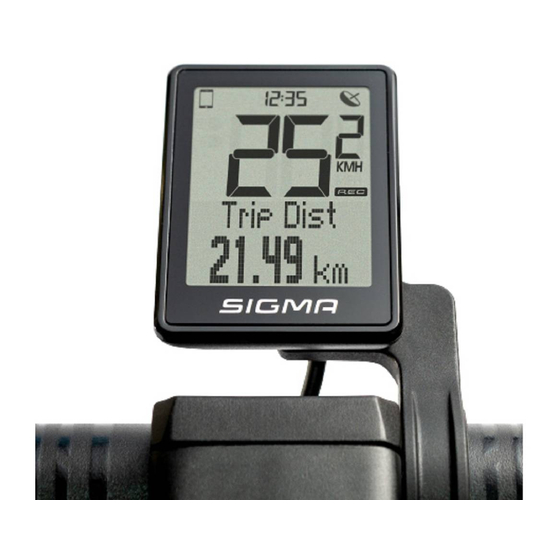
Sigma EOX REMOTE 500 Technische Dokumentation
Vorschau ausblenden
Andere Handbücher für EOX REMOTE 500:
- Bedienungs- und anbauanleitung (32 Seiten) ,
- Kurzanleitung (22 Seiten) ,
- Betriebs- und montageanleitung (82 Seiten)
Inhaltsverzeichnis
Inhaltsverzeichnis

Verwandte Anleitungen für Sigma EOX REMOTE 500


Inhaltszusammenfassung für Sigma EOX REMOTE 500
- Seite 1 TECHNICAL CUSTOMER DOCUMENTATION / TECHNISCHE KUNDENUNTERLAGE Version: TQ 1.00 (Draft)
-
Seite 2: Inhaltsverzeichnis
Table of contents / Inhaltsverzeichnis Changelog/Änderungsverfolgung ® REMOTE 500 General product information / Allgemeine Produktinformationen Dimensions / Abmessungen Cable options / Kabeloptionen Assembly / Montage Technical details / Technische Details Operation and display elements / Bedien- und Anzeigeelemente Operation and display manual / Bedien- und Anzeigeanleitung Declerations / Deklarationen VIEW 1200 ®... -
Seite 3: Eox ® Remote 500
2. EOX REMOTE 500 ® 2.1. General product information / Allgemeine Produktinformationen The EOX REMOTE 500 (R500) will be installed fixed to the Die EOX REMOTE 500 (R500) wird fest am Fahrradlenker ® ® handlebar. It is connected with the e-system by fixed wire. verbaut. -
Seite 4: Cable Options / Kabeloptionen
2.3. Cable options / Kabeloptionen 2.4. Assembly / Montage − Loosen the screw (Allen Key, 3mm) of the R500 clamp − Schraube (Innensechskant, 3mm) der R500 Schelle − Open the clamp and position the R500 at the handlebar lösen (22.2 mm) −... -
Seite 5: Operation And Display Elements / Bedien- Und Anzeigeelemente
2.6. Operation and display elements / Bedien- und Anzeigeelemente P O W E R A SSIST M O D E U P A SSIST M O D E H O CH R E M OT E C ON T R O L R E M O T E - B E D I E N U NG R E M OT E C ON T R O L R E M O T E - B E D I E N U NG... -
Seite 6: Operation And Display Manual / Bedien- Und Anzeigeanleitung
2.7. Operation and display manual Function Operation Display Comment Turn e-system on [POWER] LED animation > LEDs ON R500 turns on the e-system (if e-system is turned on by battery, R500 turns on automatically). Turn e-system off [POWER] LED animation > LEDs OFF R500 turns off the e-system (if e-system is turned on by battery, R500... -
Seite 7: Bedien- Und Anzeigeanleitung
2.7. Bedien- und Anzeigeanleitung Funktion Operation Anzeige Kommentar E-System einschalten [POWER] LED-Animation > LEDs ON Die R500 schaltet das E-System an (wenn das E-System über die Batterie angeschaltet wird, schaltet die R500 automatisch an). E-System ausschalten [POWER] LED-Animation > LEDs OFF Die R500 schaltet das E-System aus (wird das E-System über die Batterie... -
Seite 8: Declerations / Deklarationen
2.8. Declerations / Deklarationen Declaration of Conformity We, SIGMA-ELEKTRO GmbH, declare that the equipment has been tested in our facility and found compliance with the requirement limits of applicable standards, in accordance with the RED Directive 2014/53/EU and the ROHS Directive 2011/65/EU and additional according to Directive (EU) 2015/883 to ament Annex II of the above mention Directive with 4 additional substances. - Seite 9 2.8. Declerations / Deklarationen Industry Canada Statement IC number: 7580A-R500 This device complies with Innovation, Science and Economic Development Canada licence-exempt RSS standard(s). Operation is subject to the following two conditions: (1) this device may not cause interference, and (2) this device must accept any interference, including interference that may cause undesired operation of the device. CAN ICES-3(B)/NMB-3(B) Le présent appareil est conforme aux CNR Innovation, Sciences et Développement économique Canada applicables aux appareils radio exempts de licence.
-
Seite 10: Eox ® View 1200
3. EOX VIEW 1200 ® 3.1. General product information / Allgemeine Produktinformationen The EOX ® VIEW 1200 (V1200) is fixed to the handlebar using an EOX ® butler. The V1200 is connected with the e-system and the R500 by plug. Power supply is made by the e-system. -
Seite 11: Dimensions / Abmessungen
3.2. Dimensions / Abmessungen ® Out-front Butler 48.2 31.8 45.91 111.4 12.3 Reverse Butler ® 48.2 31.8 22.00 91.88... -
Seite 12: Cable Options / Kabeloptionen
3.3. Cable options / Kabeloptionen 3.4. Assembly / Montage − Loosen the screw (Allen Key, 3mm) of EOX butler − Schraube (Innensechskant, 3mm) des EOX Halters ® ® − Bend the elastic clamp around the handlebar lösen − Position V1200 in area of view −... -
Seite 13: Operation And Display Elements / Bedien- Und Anzeigeelemente
3.6. Operation and display elements / Bedien- und Anzeigeelemente CLOCK GPS (FROM SMARTPHONE) SMARTPHONE CONNECTION GPS-EMPFANG SMARTPHONE-VERBINDUNG (VOM SMARTPHONE) HIGH BEAM FERNLICHT LOW BEAM ABBLENDLICHT UNITS ( KMH / MPH ) EINHEIT ( KMH / MPH ) TRIP RECORDING TRIP-AUFZEICHNUNG MULTIFUNCTIONAL AREA MULTIFUNKTIONALER... -
Seite 14: Operation And Display Manual / Bedien- Und Anzeigeanleitung
3.7. Operation and display manual Function Operation Display Comment Speed automatic Permanently shown in segment Speed shown in kmh or mph based on area settings Light mode automatic Icon in segment area Low beam OFF, high beam OFF > light OFF Low beam ON, high beam OFF >... - Seite 15 3.7. Bedien- und Anzeigeanleitung Funktion Operation Anzeige Kommentar Geschwindigkeit automatisch Dauerhafte Anzeige Die Geschwindigkeit wird je nach im Segmentbereich Einstellung in kmh oder mph angezeigt Lichtstatus automatisch Icon im Segmentbereich Abblendlicht-Icon AUS, Fernlicht-Icon AUS > Licht AUS Abblendlicht-Icon AN, Fernlicht-Icon AUS >...
-
Seite 16: Declerations / Deklarationen
3.8. Declerations / Deklarationen Declaration of Conformity We, SIGMA-ELEKTRO GmbH, declare that the equipment has been tested in our facility and found compliance with the requirement limits of applicable standards, in accordance with the EMC Directive 2014/30/EU and the ROHS Directive 2011/65/EU and additional according to Directive (EU) 2015/883 to ament Annex II of the above mention Directive with 4 additional substances. -
Seite 17: Eox App
4.1. Installation and start of the EOX App / ® Installation und Start der EOX ® SIGMA EOX App is available in the Google Play Store and SIGMA EOX App steht im Google Play Store und Apple App ® ®... -
Seite 18: Menu "Trip Recording" / Menü „Trip Aufzeichnen
4.3. Menu “Trip recording” / Menü „Trip aufzeichnen“ Tap on to record a trip. Tippen Sie auf , um einen Trip aufzuzeichnen. The following values are shown: Folgende Werte werden angezeigt: - Location on the map - Standort auf der Karte - Distance - Distanz - Ride time... -
Seite 19: Menu "Trip" / Menü „Trip
4.5. Menu “Trip” / Menü „Trip“ Following data can be added to the trip Folgende Daten können dem Trip individually: individuell hinzugefügt werden: - Trip name - Name des Trips - Trip date and time - Datum und Uhrzeit des Trips - Sport type - Sportart - Weather and wind information... -
Seite 20: Menu "Settings" / Menü „Einstellungen
- Folgen Sie den Anweisungen in der App, um einen Herzfrequenzsensor mit der Conncections ® REMOTE 500 zu verbinden. - Recorded trips can be synchronized with the SIGMA CLOUD or shared to Allgemeine Einstellungen third party platforms as STRAVA and - Sprache und Einheitenformat definieren komoot. Benutzer - Einstellungen zum Benutzer sind möglich... - Seite 21 Notes / Notizen...
- Seite 22 Notes / Notizen...
- Seite 23 Notes / Notizen...
- Seite 24 SIGMA-ELEKTRO GmbH Dr. - Julius - Leber - Straße 15 D -67433 Neustadt /Weinstraße Tel. + 49 (0) 63 21- 9120 - 0 Fax + 49 (0) 63 21- 9120 - 34 E - Mail: info@sigmasport.com...