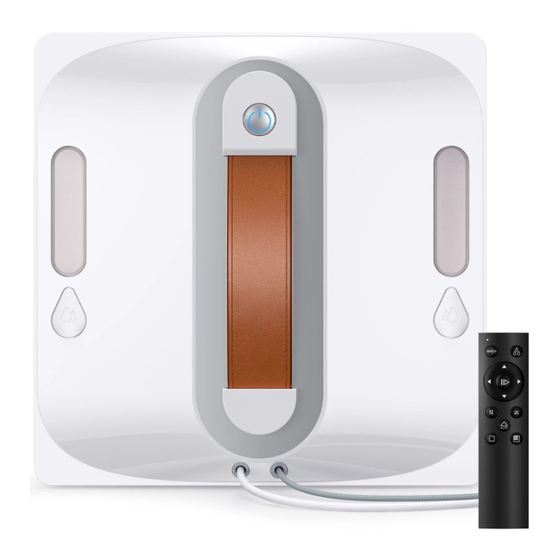
lubluelu CHYW201 Bedienungsanleitung
Inhaltsverzeichnis
Verfügbare Sprachen
Verfügbare Sprachen
Quicklinks
INSTRUCTION MANUAL
Window Cleaning Robot
Model: CHYW201
Please contact us if you need any help as following:
▪ Technical Support
▪ Package is NOT in perfect condition
▪ Parts missing
▪ Any other quality issues
service@vacsupport.com
Please keep properly and check the manual carefully
before using the machine.
Inhaltsverzeichnis
Fehlerbehebung

Verwandte Anleitungen für lubluelu CHYW201


Inhaltszusammenfassung für lubluelu CHYW201
- Seite 1 INSTRUCTION MANUAL Window Cleaning Robot Model: CHYW201 Please contact us if you need any help as following: ▪ Technical Support ▪ Package is NOT in perfect condition ▪ Parts missing ▪ Any other quality issues service@vacsupport.com Please keep properly and check the manual carefully...
-
Seite 2: Inhaltsverzeichnis
CONTENTS IMPORTANT SAFETY INSTRUCTIONS ACCESSORIES LIST PRODUCT INSTRUCTIONS INDICATOR LIGHT GUIDE REMOTE CONTROL INSTRUCTIONS ACCESSORY INSTALLATION CLEANING AND MAINTENANCE PRODUCT SPECIFICATIONS TROUBLESHOOTING GUIDE... -
Seite 3: Important Safety Instructions
IMPORTANT SAFETY INSTRUCTIONS Before using this product, please carefully read the following safety instructions and follow all standard safety precautions. • Please read the user manual thoroughly. Any operation that does not comply with the manual may result in product damage. •... - Seite 4 1. Please keep the product powered on when the product is working. The inbuilt backup battery is only suitable for using the product to maintain the adsorption state in case of a sudden power failure, and cannot be used as a normal working power supply;...
- Seite 5 Precautions Border height ≥ 5mm Please use the product on framed Please use on glass surfaces with an glass with a border height of ≥5mm. area of ≥50cm × 50cm. Ensure the product is used with If the glass surface has excessive dust, sufficient battery power.
-
Seite 6: Accessories List
ACCESSORIES LIST Main Unit Cleaning Cloth Water Inlet Power Cable Remote Control Safety Rope Assembly User Manual Water Bottle Remote Control Battery... -
Seite 7: Product Instructions
PRODUCT INSTRUCTIONS Front of the Main Unit Water Tank Start/Pause Button Water Inlet Handle Nozzle Safety Rope Power Cable Back of the Main Unit Fan Motor Anti-Drop Sensor Wheel Assembly Cleaning Cloth Programming Port Status Indicator Light... -
Seite 8: Indicator Light Guide
INDICATOR LIGHT GUIDE Blue Light Steady: Standby / In Operation / Charging Complete Blue Light Breathing (Fading In & Out): Charging Blue Light Flashing + Single Beep: Powering On Blue Light Steady + Intermittent Voice Alert: Cleaning Completed Red Light Steady: Stopped Red Light Flashing + Intermittent Voice Alert: Wheel Overload Red Light Flashing + Intermittent Voice Alert:... -
Seite 9: Accessory Installation
ACCESSORY INSTALLATION Installing the Cleaning Cloth Attach the cleaning cloth to the window cleaning board in the direction shown in the diagram below. Ensure the cloth is applied flat and does not cover the four corners of the anti-drop sensors, the wheel surface, or the inner compartment. Add clean water or specialized glass cleaner Please add clean water or glass cleaner to the water tank. -
Seite 10: Connecting The Power Cable
Connecting the Power Cable Follow the diagram to connect the power cable, ensuring all connections are secure and tightly fitted. Notice: Avoid hanging the power adapter in the air. Ensure it is placed on a stable surface to prevent damage. Insert the connected power cable into the machine's power port and tighten the fixing knob at the port. -
Seite 11: Cleaning Modes
Cleaning Modes “Z” Pattern Cleaning “N” Pattern Cleaning Function: Suitable for wide glass Function: Suitable for narrow glass surfaces, cleans in a Z-shaped route. surfaces, cleans in an N-shaped route. Operation: Press the “Z” Cleaning Operation: Press the “N” Cleaning button on the remote control. -
Seite 12: Cleaning And Maintenance
CLEANING AND MAINTENANCE Wipe the spherical sensor, fan, and two tracks on the bottom of the machine with a dry cloth to prevent suction loss and maintain sensor sensitivity for optimal cleaning performance. Remote Controls Note: Turn off the power before cleaning the cloth and bottom components. Remove the cleaning cloth and soak it in clean water for 2 minutes, then gently hand wash it. -
Seite 13: Troubleshooting Guide
TROUBLESHOOTING GUIDE Issue Possible Cause Solution Cleaning cloth is not Remove the cleaning cloth and installed correctly. reattach it properly. Machine is attached to the glass, but the blue light keeps flashing. Wipe a clean area to ensure the Glass surface is too dirty. machine attaches successfully. -
Seite 14: Wichtige Sicherheitshinweise
WICHTIGE SICHERHEITSHINWEISE Bitte lesen Sie vor der Verwendung dieses Produkts die folgenden Sicherheitshinweise sorgfältig durch und befolgen Sie alle standardmäßigen Sicherheitsvorkehrungen. • Lesen Sie das Benutzerhandbuch gründlich durch. Jeder Betrieb, der nicht mit dem Handbuch übereinstimmt, kann zu Schäden am Produkt führen. •... -
Seite 15: Batteriesicherheitswarnung Batteriewarnung Für Den Roboter
1. Halten Sie das Produkt während des Betriebs immer unter Strom. Die eingebaute Notstrombatterie dient nur zur Aufrechterhaltung der Haftung bei plötzlichem Stromausfall und ist nicht als normale Stromquelle vorgesehen. 2. Vor Wartung oder Reinigung muss der Stecker aus der Steckdose gezogen werden, um ein Ziehen am Netzkabel zu vermeiden. -
Seite 16: Vorsichtsmaßnahmen
Vorsichtsmaßnahmen Rahmenhöhe ≥ 5 mm Bitte verwenden Sie das Produkt auf Verwenden Sie das Produkt auf verglasten Flächen mit einem Rahmen Glasflächen mit einer Mindestgröße und einer Mindesthöhe von ≥ 5 mm. von ≥ 50 cm × 50 cm. Stellen Sie sicher, dass das Wenn die Glasfläche stark verstaubt ist, Produkt mit ausreichender reinigen Sie vor der Nutzung zunächst... -
Seite 17: Zubehörliste
ZUBEHÖRLISTE Haupteinheit Reinigungstuch Wassereinlass Netzkabel Fernbedienung Sicherungsseil Benutzerhandbuch Wasserflasche Batterie für die Fernbedienung... -
Seite 18: Produktanleitung
PRODUKTANLEITUNG Vorderseite der Haupteinheit Wassertank Start/Pause-Taste Wassereinlass Griff Düse Sicherungsseil Netzkabel Rückseite der Haupteinheit Lüftermotor Anti-Sturz-Sensor Radbaugruppe Reinigungstuch Programmieranschluss Statusanzeige... - Seite 19 ANZEIGELEUCHTEN-LEITFADEN Stetiges blaues Licht: Standby / In Betrieb / Laden abgeschlossen Blaues Licht pulsierend (Ein- und Ausblenden): Ladevorgang Blaues Licht blinkt + einzelner Piepton: Einschalten Stetiges blaues Licht + intermittierende Sprachansage: Reinigung abgeschlossen Stetiges rotes Licht: Gestoppt Rotes Licht blinkt + intermittierende Sprachansage: Radüberlastung Rotes Licht blinkt + intermittierende Sprachansage: Unzureichender Luftdruck...
-
Seite 20: Installation Des Zubehörs
INSTALLATION DES ZUBEHÖRS Reinigungstuch anbringen Befestigen Sie das Reinigungstuch an der Fensterreinigungsplatte in der im Diagramm unten gezeigten Richtung. Stellen Sie sicher, dass das Tuch flach aufliegt und nicht die vier Ecken der Anti-Sturz-Sensoren, die Radfläche oder das innere Fach bedeckt. Sauberes Wasser oder spezielles Glasreinigungsmittel hinzufügen Füllen Sie sauberes Wasser oder Glasreiniger in den Wassertank. -
Seite 21: Anschließen Des Netzkabels
Anschließen des Netzkabels Folgen Sie dem Diagramm, um das Netzkabel anzuschließen, und stellen Sie sicher, dass alle Verbindungen sicher und fest sitzen. Hinweis: Vermeiden Sie es, den Netzadapter in der Luft hängen zu lassen. Platzieren Sie ihn auf einer stabilen Oberfläche, um Schäden zu vermeiden. Stecken Sie das angeschlossene Netzkabel in den Stromanschluss des Geräts und ziehen Sie den Befestigungsknopf am Anschluss fest. - Seite 22 Reinigungsmodi „Z“-Muster Reinigung „N“-Muster Reinigung Funktion: Geeignet für breite Funktion: Geeignet für schmale Glasflächen, reinigt in einer Z-förmi- Glasflächen, reinigt in einer N-förmi- gen Route. gen Route. Bedienung: Drücken Sie die „Z“-Rein- Bedienung: Drücken Sie die „N“-Reini- igungstaste auf der Fernbedienung. gungstaste auf der Fernbedienung.
-
Seite 23: Reinigung Und Wartung
REINIGUNG UND WARTUNG Wischen Sie den kugelförmigen Sensor, den Lüfter und die beiden Schienen an der Unterseite des Geräts mit einem trockenen Tuch ab, um Saugkraftverluste zu vermeiden und die Sensorempfindlichkeit für eine optimale Reinigungsleistung zu erhalten. Fernbedienung Hinweis: Schalten Sie das Gerät aus, bevor Sie das Reinigungstuch und die unteren Komponenten reinigen. -
Seite 24: Fehlerbehebungshandbuch
FEHLERBEHEBUNGSHANDBUCH Problem Mögliche Ursache Lösung Das Reinigungstuch Entfernen Sie das Reinigungstuch ist nicht korrekt Das Gerät ist am und befestigen Sie es richtig. angebracht. Glas befestigt, aber das blaue Licht Wischen Sie eine saubere Fläche ab, um Die Glasoberfläche ist blinkt ständig. -
Seite 25: Instructions De Sécurité Importantes
INSTRUCTIONS DE SÉCURITÉ IMPORTANTES Avant d'utiliser ce produit, veuillez lire attentivement les instructions de sécurité suivantes et suivre toutes les précautions de sécurité standard. • Veuillez lire attentivement le manuel d'utilisation. Toute utilisation non conforme au manuel peut entraîner des dommages au produit. •... - Seite 26 1. Maintenez le produit sous tension lorsqu'il est en fonctionnement. La batterie de secours intégrée sert uniquement à maintenir l’aspiration en cas de coupure de courant et ne doit pas être utilisée comme source d’alimentation normale. 2. Avant toute opération de maintenance ou de nettoyage, débranchez impérative- ment la prise secteur pour éviter de tirer sur le câble.
- Seite 27 Précautions Hauteur du cadre ≥ 5 mm Veuillez utiliser le produit sur des Utilisez le produit sur des surfaces vitrées surfaces vitrées encadrées avec une d’une taille minimale de ≥ 50 cm × 50 cm. hauteur de cadre d’au moins ≥ 5 mm. Assurez-vous que le produit est Si la surface vitrée est excessivement utilisé...
-
Seite 28: Liste Des Accessoires
LISTE DES ACCESSOIRES Unité principale Chiffon de nettoyage Entrée d’eau Câble d’alimentation Télécommande Corde de sécurité Manuel d’utilisation Bouteille d’eau Batterie pour télécommande... - Seite 29 INSTRUCTIONS DU PRODUIT Avant de l’unité principale Réservoir d’eau Bouton Marche/Pause Entrée d’eau Poignée Buse Corde de sécurité Câble d’alimentation Arrière de l’unité principale Moteur du ventilateur Capteur anti-chute Ensemble de roues Chiffon de nettoyage Port de programmation Voyant d’état...
- Seite 30 GUIDE DES VOYANTS LUMINEUX Voyant bleu fixe : Veille / En fonctionnement / Charge terminée Voyant bleu respirant (atténuation progressive) : En charge Voyant bleu clignotant + bip unique : Mise sous tension Voyant bleu fixe + alerte vocale intermittente : Nettoyage terminé...
-
Seite 31: Installation Des Accessoires
INSTALLATION DES ACCESSOIRES Installation du chiffon de nettoyage Fixez le chiffon de nettoyage sur la plaque de nettoyage des vitres en suivant la direction indiquée sur le schéma ci-dessous. Assurez-vous que le chiffon est bien appliqué à plat et ne couvre pas les quatre coins des capteurs anti-chute, la surface des roues ou le compartiment interne. -
Seite 32: Connexion Du Câble D'alimentation
Connexion du câble d’alimentation Suivez le schéma pour connecter le câble d’alimentation et assurez-vous que toutes les connexions sont bien sécurisées et solidement fixées. Remarque : Évitez de suspendre l’adaptateur secteur dans les airs. Placez-le sur une surface stable pour éviter tout dommage. -
Seite 33: Modes De Nettoyage
Modes de nettoyage Nettoyage en motif “Z” Nettoyage en motif “N” Fonction : Convient aux grandes Fonction : Convient aux surfaces vitrées surfaces vitrées, nettoie selon un étroites, nettoie selon un trajet en trajet en forme de Z. forme de N. Utilisation : Appuyez sur le bouton de Utilisation : Appuyez sur le bouton de nettoyage “Z”... -
Seite 34: Nettoyage Et Entretien
NETTOYAGE ET ENTRETIEN Essuyez le capteur sphérique, le ventilateur et les deux rails situés sous l’appareil avec un chiffon sec afin d’éviter une perte d’aspiration et de maintenir la sensibil- ité des capteurs pour des performances de nettoyage optimales. Télécommande Remarque : Éteignez l’appareil avant de nettoyer le chiffon et les composants inférieurs. -
Seite 35: Guide De Dépannage
GUIDE DE DÉPANNAGE N° Problème Cause possible Solution Le chiffon de nettoyage Retirez le chiffon de nettoyage n'est pas installé L'appareil est fixé au et réinstallez-le correctement. correctement. verre, mais la lumière bleue clignote Essuyez une zone propre pour vous La surface du verre est constamment. - Seite 36 CUSTOMER SERVICE Please contact us if you need any help as following: ▪ Technical Support ▪ Package is NOT in perfect condition ▪ Parts missing ▪ Any other quality issues Email: service@vacsupport.com Manufacturer: Guangzhou Chuangyuan Robot Corporation Limited Address: Floor A5, Building #4, No. 282, Caixin Road, Lanhe Town, Nansha District,Guangzhou City, P.R.