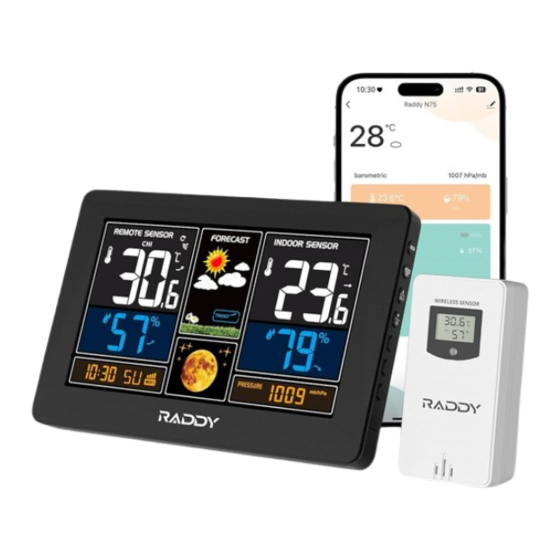
Raddy Tuya Smart N75 Bedienungsanleitung
Wifi-wetterstation
Inhaltsverzeichnis
Verfügbare Sprachen
Verfügbare Sprachen
Quicklinks
WIFI weather station of Tuya Smart
Technical Data and Features
Base station:
Perpetual Calendar Up to Year 2099
Day of week in 7 languages user selectable: English, German, Italian, French, Spanish,
Netherlands and Danish
Time in optional 12/24 hour format.
Automatic calibration of network time service
The moon phase display
Barometric pressure:
— Barometric pressure measurement ranges: 600 hPa/mb to 1100 hPa/mb
17.72 inHg to 32.50 inHg
450.1mmHg to 825.2mmHg
— Pressure alternatively in hPa/mb or inHg or mmHg
Indoor humidity measurable range: 20%RH to 95%RH
Indoor temperature:
— temperature measurement ranges:-20°C to 60°C
— Temperature alternatively in °C or °F.
Minimum/maximum display for humidity and temperature
The weather forecasting function (according to the change of air pressure)
Connects directly to wifi network, connect to Tuya Smart System
Power Supply:
Battery: 2 x LR6 AA and mains adapter: DC5V 1A
Wireless Outdoor Sensor:
— Outdoor temperature measurement ranges: -40°C (-4°F) ~ 70°C (158°F)
— Outdoor measurable range: 20%RH to 95%RH
— Data transmission frequency: 433 MHz
— Wireless range: max. 60 m (open area)
— Batteries: 2 x LR6 (UM-3), 1.5 V (size AA)
— Protection class: IPX4
-4°F to 140°F
1
Model:N75
Inhaltsverzeichnis

Verwandte Anleitungen für Raddy Tuya Smart N75


Inhaltszusammenfassung für Raddy Tuya Smart N75
- Seite 1 WIFI weather station of Tuya Smart Model:N75 Technical Data and Features Base station: Perpetual Calendar Up to Year 2099 Day of week in 7 languages user selectable: English, German, Italian, French, Spanish, Netherlands and Danish Time in optional 12/24 hour format. ...
- Seite 2 WIFI weather station of Tuya Smart Model:N75 Base station Appearance: C H 2 C H 3 Wi-Fi Part A-Positive LCD A1: Time/Calendar/Weed A2: Outdoor Humidity A3: Outdoor Temperature A4: Weather Forecasting...
- Seite 3 WIFI weather station of Tuya Smart Model:N75 A5: Indoor Temperature A6: Indoor Humidity A7: Barometric Pressure A8: Moon Phase Part B – Back button and power B1: “MEM” button B2: “MODE/SET” button B3: “▲/WIFI” button B4: “▼/CH” button B5: WIFI Indicator B6: Battery Compartment B7: Power Supply Socket B8: USB Charging Socket...
-
Seite 4: Preparation Before Use
WIFI weather station of Tuya Smart Model:N75 Preparation before use Download Tuya Smart App: According to the brand of the phone, search for tuya through the IOS APP Store or Android's Google play, Locate the APP with the icon below and download it. Initial operation: ... - Seite 5 WIFI weather station of Tuya Smart Model:N75 the AP character will flash. The WIFI indicator will flash once per second to indicate the WIFI pairing mode. After the APP download is complete, open the APP to register an account and complete the login ...
-
Seite 6: Manual Time Setting
WIFI weather station of Tuya Smart Model:N75 press and hold the “ ” button for 3 seconds to receive transmission manually. The outdoor temperature will show an animation of the RF antenna symbol, the Base Station will re receive the wireless signal of the outdoor sensor. Note: when the wireless sensor set up different channels, the base station "OUTDOOR"... -
Seite 7: Lunar Phases
WIFI weather station of Tuya Smart Model:N75 The press the “ ” or “ ” buttons to set the temperature unit in °C or °F. Press the “ ” button to confirm your setting, the barometric pressure is display either in mb/hPa to flash. -
Seite 8: Background Lighting
WIFI weather station of Tuya Smart Model:N75 current displayed values. F.Y.I.: If the temperature reading is below ranges, the LL.L will be displayed. If the temperature reading is above ranges, the HH.H will be displayed. If the battery symbol “ ”... - Seite 9 WIFI weather station of Tuya Smart Model:N75 When the power adapter of the product is disconnected, the product will switch to power by the backup battery. At this time, press any key to light up the backlight for 8 seconds F.Y.I.: If using battery power, WIFI will be automatically turned off APP interface description ...
-
Seite 10: Wifi-Wetterstation Von Tuya Smart
WIFI-Wetterstation von Tuya Smart Modell:N75 Technische Daten und Merkmale Basisstation: Ewiger Kalender bis zum Jahr 2099 Wochentag in 7 Sprachen vom Benutzer wählbar: Englisch, Deutsch, Italienisch, Französisch, Spanisch, Niederländisch und Dänisch Uhrzeit im optionalen 12/24-Stunden-Format. Automatische Kalibrierung des Netzzeitdienstes ... -
Seite 11: Basisstation Erscheinungsbild
WIFI-Wetterstation von Tuya Smart Modell:N75 Basisstation Erscheinungsbild: C H 2 C H 3 Wi-Fi Teil A-Positiv LCD A1: Zeit/Kalender/Blatt A2: Luftfeuchtigkeit im Freien A3: Außentemperatur A4: Wettervorhersage... -
Seite 12: Teil B - Zurück-Taste Und Power
WIFI-Wetterstation von Tuya Smart Modell:N75 A5: Innentemperatur A6: Luftfeuchtigkeit in Innenräumen A7: Barometrischer Druck A8: Mondphase Teil B - Zurück-Taste und Power B1: "MEM"-Taste B2: "MODE/SET"-Taste B3: Taste "▲/WIFI B4: Taste "▼/CH". B5: WIFI-Anzeige B6: Batteriefach B7: Stromversorgungsbuchse B8: USB-Ladebuchse B9: Tragrahmen B10: Hängeloch Teil C - Drahtloser Außensensor:... -
Seite 13: Vorbereitung Vor Der Verwendung
WIFI-Wetterstation von Tuya Smart Modell:N75 Vorbereitung vor der Verwendung Tuya Smart App herunterladen: Suchen Sie je nach Telefonmarke im IOS APP Store oder in Google Play für Android nach tuya, suchen Sie die APP mit dem unten stehenden Symbol und laden Sie sie herunter. Erstinbetriebnahme: ... -
Seite 14: Verbindung Von Basisstation Und App
WIFI-Wetterstation von Tuya Smart Modell:N75 Verbindung von Basisstation und APP: Wenn die Basisstation zum ersten Mal an das Netzteil angeschlossen und eingeschaltet wird, wechselt das LCD-Display in den normalen Anzeigemodus. Die Zeitleiste zeigt 01 AP- und WIFI-Symbole an, und das AP-Zeichen blinkt. Die WIFI-Anzeige blinkt einmal pro Sekunde, um den WIFI-Pairing-Modus anzuzeigen. -
Seite 15: Manuelle Zeiteinstellung
WIFI-Wetterstation von Tuya Smart Modell:N75 Die Basisstation unterstützt die Registrierung von bis zu 3 Kanälen für drahtlose Sensoren. Wenn Sie mehrere drahtlose Sensoren verwenden, stellen Sie sicher, dass jedem Sensor ein eindeutiger Kanal zugewiesen wird (Kanal 1, 2 oder 3). Vermeiden Sie es, denselben Kanal für mehr als einen Sensor gleichzeitig zu wählen. - Seite 16 WIFI-Wetterstation von Tuya Smart Modell:N75 zu blinken. Drücken Sie dann die Tasten " " oder " ", um den richtigen Monat einzustellen. Drücken Sie die Taste " ", um Ihre Einstellung zu bestätigen, die Datumsanzeige beginnt zu blinken. Drücken Sie dann die Tasten " "...
-
Seite 17: Maximale/Minimale Temperatur/Relative Luftfeuchtigkeit
WIFI-Wetterstation von Tuya Smart Modell:N75 Anzeige von Temperatur/Luftfeuchtigkeit/barometrischem Druck und Temperatur/Luftfeuchtigkeitstrend Die aktuelle Raumtemperatur/Luftfeuchtigkeit/der barometrische Druck und der Temperatur-/Luftfeuchtigkeitstrend (in Innenräumen) werden auf dem LCD-Display angezeigt. Nach erfolgreicher Verbindung mit dem Außensensor zeigt die Wetterstation die Außentemperatur/Luftfeuchtigkeit und den Temperatur-/Luftfeuchtigkeitstrend (außen) an. ... -
Seite 18: Hintergrundbeleuchtung
WIFI-Wetterstation von Tuya Smart Modell:N75 Die Wetterstation zeigt die folgenden Wettersymbolean: sonnig leicht bewölkt bewölkt regnerisch Stark regnerisch Verschneit Die Wetterstation kann den Trend des barometrischen Drucks anzeigen. Sie können die folgenden Anzeigen sehen: Der Luftdruck wird steigen. Der barometrische Druck bleibt konstant. - Seite 19 WIFI-Wetterstation von Tuya Smart Modell:N75 Schnittstelle Einstellung der Hauptschnittstelle Geschichte Schnittstelle...
- Seite 20 Estación meteorológica WIFI de Tuya Smart Modelo:N75 Datos técnicos y características Estación base: Calendario perpetuo hasta el año 2099 Día de la semana en 7 idiomas seleccionables por el usuario: inglés, alemán, italiano, francés, español, neerlandés y danés ...
- Seite 21 Estación meteorológica WIFI de Tuya Smart Modelo:N75 Estación base Apariencia: C H 2 C H 3 Wi-Fi Parte A - LCD positivo A1: Tiempo/Calendario/Weed A2: Humedad exterior A3: Temperatura exterior A4: Predicción meteorológica...
- Seite 22 Estación meteorológica WIFI de Tuya Smart Modelo:N75 A5: Temperatura interior A6: Humedad interior A7: Presión barométrica A8: Fase lunar Parte B - Botón trasero y encendido B1: Botón "MEM B2: Botón "MODE/SET B3: Botón "▲/WIFI B4: Botón "▼/CH B5: Indicador WIFI B6: Compartimento de la batería B7: Toma de alimentación B8: Toma de carga USB...
-
Seite 23: Preparación Antes Del Uso
Estación meteorológica WIFI de Tuya Smart Modelo:N75 Preparación antes del uso Descargar Tuya Smart App: Según la marca del teléfono, busca tuya a través de la APP Store de IOS o Google play de Android, Localiza la APP con el icono de abajo y descárgatela. Operación inicial: ... - Seite 24 Estación meteorológica WIFI de Tuya Smart Modelo:N75 Estación base y APP bonding: Si la estación base se enchufa al adaptador de corriente por primera vez y se enciende, la pantalla LCD cambiará al modo de visualización normal. La barra de tiempo mostrará 01 iconos AP y WIFI, y el carácter AP parpadeará.
-
Seite 25: Ajuste Manual De La Hora
Estación meteorológica WIFI de Tuya Smart Modelo:N75 La estación base admite el registro de hasta 3 canales para sensores inalámbricos. Cuando utilice varios sensores inalámbricos, asegúrese de asignar a cada sensor un canal único (canales 1, 2 o 3). Evite seleccionar el mismo canal para más de un sensor simultáneamente. ... -
Seite 26: Fases Lunares
Estación meteorológica WIFI de Tuya Smart Modelo:N75 Pulse el botón " " para confirmar la configuración, la selección de idioma para las pantallas del día de la semana empieza a parpadear. A continuación, pulse los botones " " o "... - Seite 27 Estación meteorológica WIFI de Tuya Smart Modelo:N75 Es posible que aparezcan las siguientes pantallas: La temperatura y la humedad aumentan. La temperatura/humedad se mantiene constante. La temperatura/humedad desciende. Temperatura máxima/mínima/humedad relativa Para alternar entre los datos de temperatura máxima, mínima y humedad interior/exterior, pulse el botón "MEM": Una vez para mostrar los valores máximos de temperatura y humedad.
-
Seite 28: Iluminación De Fondo
Estación meteorológica WIFI de Tuya Smart Modelo:N75 ligeramente soleado nublado lluvioso Lluvia intensa Nevado nublado La estación meteorológica puede mostrar la tendencia de la presión barométrica. Es posible que aparezcan las siguientes pantallas: La presión barométrica subirá. La presión barométrica permanecerá constante. La presión barométrica bajará. - Seite 29 Estación meteorológica WIFI de Tuya Smart Modelo:N75 Interfaz principal Interfaz de historia Interfaz de configuración...
-
Seite 30: Capteur Extérieur Sans Fil
Station météo WIFI de Tuya Smart Modèle:N75 Données techniques et caractéristiques Station de base : Calendrier perpétuel jusqu'en 2099 Jour de la semaine en 7 langues sélectionnables par l'utilisateur : anglais, allemand, italien, français, espagnol, néerlandais et danois ... - Seite 31 Station météo WIFI de Tuya Smart Modèle:N75 Station de base Apparence : C H 2 C H 3 Wi-Fi Partie A - LCD positif A1 : Heure/Calendrier/Mauvaises herbes A2 : Humidité extérieure A3 : Température extérieure A4 : Prévisions météorologiques...
- Seite 32 Station météo WIFI de Tuya Smart Modèle:N75 A5 : Température intérieure A6 : Humidité intérieure A7 : Pression barométrique A8 : Phase de la lune Partie B - Bouton arrière et alimentation B1 : Touche "MEM B2 : Touche "MODE/SET B3 : Bouton "▲/WIFI B4 : Bouton "▼/CH B5 : Indicateur WIFI...
-
Seite 33: Préparation Avant Utilisation
Station météo WIFI de Tuya Smart Modèle:N75 Préparation avant utilisation Télécharger l'application Tuya Smart : Selon la marque du téléphone, recherchez tuya dans l'APP Store d'IOS ou Google play d'Android, localisez l'APP avec l'icône ci-dessous et téléchargez-la. Opération initiale : ... - Seite 34 Station météo WIFI de Tuya Smart Modèle:N75 Station de base et liaison APP : Si la station de base est branchée sur l'adaptateur d'alimentation pour la première fois et qu'elle est mise sous tension, l'écran LCD passe en mode d'affichage normal. La barre de temps affiche les icônes 01 AP et WIFI, et le caractère AP clignote.
-
Seite 35: Réglage Manuel De L'heure
Station météo WIFI de Tuya Smart Modèle:N75 capteurs sans fil. Lorsque vous utilisez plusieurs capteurs sans fil, assurez-vous que chaque capteur se voit attribuer un canal unique (canaux 1, 2 ou 3). Évitez de sélectionner le même canal pour plus d'un capteur simultanément. ... -
Seite 36: Phases Lunaires
Station météo WIFI de Tuya Smart Modèle:N75 clignoter. Appuyez ensuite sur les touches " " ou " " pour régler le mois correct. Appuyez sur la touche " " pour confirmer votre réglage, l'affichage de la date commence à clignoter. Appuyez ensuite sur les touches " "... - Seite 37 Station météo WIFI de Tuya Smart Modèle:N75 Affichage de la température, de l'humidité, de la pression barométrique et de la tendance de la température et de l'humidité La température/humidité/pression barométrique intérieure actuelle et la tendance de la température/humidité (à l'intérieur) sont affichées sur l'écran LCD. ...
-
Seite 38: Éclairage De Fond
Station météo WIFI de Tuya Smart Modèle:N75 météorologique. En cas de divergence entre les informations fournies par votre appareil et celles du service météorologique local, c'est l'avis de ce dernier qui fait foi. La station météorologique affiche les icônesmétéorologiques suivantes : légèrement ensoleillé... - Seite 39 Station météo WIFI de Tuya Smart Modèle:N75 Interface principale Interface historique Interface de réglage...
-
Seite 40: Dati Tecnici E Caratteristiche Stazione Base
Stazione meteo WIFI di Tuya Smart Modello: N75 Dati tecnici e caratteristiche Stazione base: Calendario perpetuo fino all'anno 2099 Giorno della settimana in 7 lingue selezionabili dall'utente: Inglese, tedesco, italiano, francese, spagnolo, olandese e danese Ora in formato opzionale 12/24 ore. ... - Seite 41 Stazione meteo WIFI di Tuya Smart Modello: N75 Stazione base Aspetto: C H 2 C H 3 Wi-Fi Parte A - LCD positivo A1: Tempo/calendario/erba A2: Umidità esterna A3: Temperatura esterna A4: Previsioni meteorologiche...
- Seite 42 Stazione meteo WIFI di Tuya Smart Modello: N75 A5: Temperatura interna A6: Umidità interna A7: Pressione barometrica A8: Fase lunare Parte B - Pulsante posteriore e alimentazione B1: pulsante "MEM B2: pulsante "MODE/SET B3: pulsante "▲/WIFI". B4: pulsante "▼/CH B5: Indicatore WIFI B6: Vano batteria B7: Presa di alimentazione B8: Presa di ricarica USB...
-
Seite 43: Preparazione Prima Dell'uso
Stazione meteo WIFI di Tuya Smart Modello: N75 Preparazione prima dell'uso Scaricare l'applicazione Tuya Smart: A seconda della marca del telefono, cercare tuya nell'APP Store di IOS o in Google Play di Android, individuare l'APP con l'icona sottostante e scaricarla. Funzionamento iniziale: ... - Seite 44 Stazione meteo WIFI di Tuya Smart Modello: N75 Se la stazione base viene collegata per la prima volta all'adattatore di alimentazione e accesa, il display LCD passa alla modalità di visualizzazione normale. La barra del tempo visualizza le icone 01 AP e WIFI e il carattere AP lampeggia. L'indicatore WIFI lampeggia una volta al secondo per indicare la modalità...
-
Seite 45: Impostazione Manuale Dell'ora
Stazione meteo WIFI di Tuya Smart Modello: N75 Premendo il tasto " " è possibile commutare la visualizzazione dei diversi canali della temperatura e dell'umidità esterna; quando viene visualizzato il simbolo " ", i canali vengono commutati automaticamente ogni 5 secondi. ... -
Seite 46: Fasi Lunari
Stazione meteo WIFI di Tuya Smart Modello: N75 Language Sunday Monday Tuesday Wednesday Thursday Friday Saturday German, GE English, EN French, FR Italian, IT Spanish, SP Dutch, DU Danish, DA Premere il pulsante " " per confermare l'impostazione, la temperatura viene visualizzata in °C e lampeggia. - Seite 47 Stazione meteo WIFI di Tuya Smart Modello: N75 La temperatura/umidità è in aumento. La temperatura/umidità rimane costante. La temperatura/umidità è in calo. Temperatura massima/minima/umidità relativa Per alternare i dati di temperatura e umidità massima e minima interna/esterna, premere il pulsante "MEM": Una volta per visualizzare i valori massimi di temperatura e umidità.
-
Seite 48: Illuminazione Di Sfondo
Stazione meteo WIFI di Tuya Smart Modello: N75 leggermente solare nuvoloso piovoso Pioggia intensa Innevato nuvoloso La stazione meteorologica può visualizzare l'andamento della pressione barometrica. È possibile che vengano visualizzate le seguenti schermate: La pressione barometrica aumenterà. La pressione barometrica rimarrà costante. La pressione barometrica si abbassa. - Seite 49 Stazione meteo WIFI di Tuya Smart Modello: N75 Impostazione Interfaccia principale Interfaccia della storia dell'interfaccia...