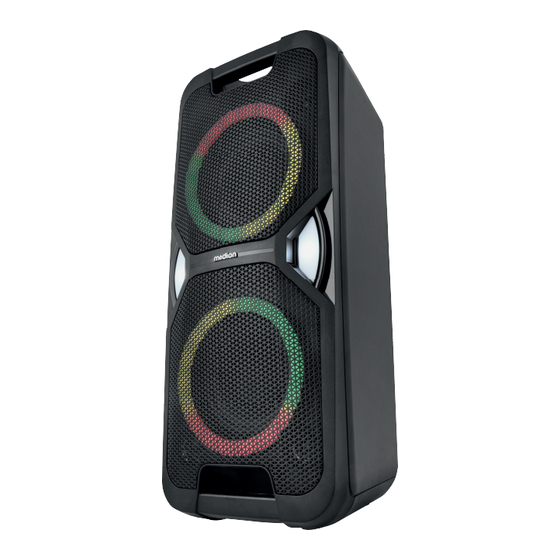
Medion LIFE PE-1 Pure Bedienungsanleitung
Inhaltsverzeichnis
Verfügbare Sprachen
Verfügbare Sprachen
Bedienungsanleitung
Manual de instrucciones
Notice d'utilisation
Istruzioni per l'uso
Gebruiksaanwijzing
User manual
Bluetooth® Party-Soundsystem
Système audio de fête Bluetooth®
Bluetooth® party-audiosysteem
Sistema de sonido Bluetooth® para fi estas
Sistema audio per feste Bluetooth®
Bluetooth® Party Sound System
MEDION LIFE PE-1 Pure
(MD 400000)
Kapitel
Inhaltsverzeichnis

Verwandte Anleitungen für Medion LIFE PE-1 Pure


Inhaltszusammenfassung für Medion LIFE PE-1 Pure
- Seite 1 Manual de instrucciones Notice d‘utilisation Istruzioni per l‘uso Gebruiksaanwijzing User manual Bluetooth® Party-Soundsystem Système audio de fête Bluetooth® Bluetooth® party-audiosysteem Sistema de sonido Bluetooth® para fi estas Sistema audio per feste Bluetooth® Bluetooth® Party Sound System MEDION LIFE PE-1 Pure (MD 400000)
-
Seite 3: Inhaltsverzeichnis
Inhaltsverzeichnis Informationen zu dieser Bedienungsanleitung ..........5 1.1. Zeichenerklärung ..................5 Bestimmungsgemäßer Gebrauch ..............5 Allgemeine Sicherheitshinweise ..............5 Lieferumfang ....................7 Geräteübersicht .....................8 Gerät aufstellen .................... 11 6.1. Allgemeines Sicherheitshinweise zur Aufstellung .........11 6.2. Netzbetrieb - Netzkabel anschließen ............12 6.3. Akkubetrieb ....................12 6.4. - Seite 4 22. Impressum ....................26...
-
Seite 5: Informationen Zu Dieser Bedienungsanleitung
Informationen zu die- Bestimmungsgemä- ser Bedienungsanlei- ßer Gebrauch Das Bluetooth® Party-Soundsystem dient tung dem Empfang und der Wiedergabe von Ra- diosendern und der Wiedergabe von Audio- material, welches via USB, Bluetooth® oder AUX IN zugespielt werden kann. Vielen Dank, dass Sie sich für unser Produkt Das Gerät kann auch als Karaokesystem oder entschieden haben. - Seite 6 Kinder jünger als 8 Jahre nende Kerzen auf bzw. in die müssen beaufsichtigt wer- Nähe der Geräte. Öffnen Sie niemals das Ge- den, um sicherzustellen, dass sie nicht mit dem Gerät häuse des Gerätes und des spielen. Netzteils und führen Sie kei- ...
-
Seite 7: Lieferumfang
Benutzen Sie das Gerät nicht Lieferumfang in explosionsgefährdeten GEFAHR! Bereichen. Hierzu zählen z. Erstickungsgefahr! B. Tankanlagen, Kraftstoff- Durch Einatmen oder Verschlucken von lagerbereiche oder Bereiche, Folien oder Kleinteilen besteht Erstickungs- in denen Lösungsmittel gefahr. Halten Sie Verpackungen von Kindern verarbeitet werden. -
Seite 8: Geräteübersicht
Geräteübersicht Abb. 1 – Oberseite... - Seite 9 1. Tablet-PC-/Smartphone-Ablage 2. AUX IN — Eingang (3,5 mm Klinkenstecker) 3. MIC 1/MIC 2 — Mikrofon-Eingang (6,3 mm Klinkenstecker) 4. ON/OFF — Gerät ein-/ausschalten 5. USB CHARGE — USB-Anschluss zum Aufladen externer Geräte /FUNC . — Betriebsmodus wählen; Gerät aus dem Standby-Modus heraus wieder einschalten —...
- Seite 10 Abb. 2 – Vorderseite Abb. 3 – Rückseite 21. Oberer Tragegriff 25. Bassreflexöffnungen 22. Party-LED-Licht 26. Standfüße 23. Unterer Tragegriff 27. AC~ — Netzanschluss (AC 100-240 ~ 50/60Hz) 24. Seitliches LED-Licht 28. Fest installierte FM-Wurfantenne...
-
Seite 11: Gerät Aufstellen
Abb. 4 – Mikrofon 29. ON/OFF — Mikrofon ein-/ausschalten 30. Anschlusskabel Gerät aufstellen 6.1. Allgemeines Sicherheitshinweise zur Aufstellung HINWEIS! Beschädigungsgefahr! Bei großen Temperatur- oder Feuchtigkeitsschwankungen kann es durch Kondensation zur Feuchtigkeitsbildung innerhalb des Gerätes kommen, die einen elektrischen Kurzschluss ver- ursachen kann. -
Seite 12: Netzbetrieb - Netzkabel Anschließen
6.2. Netzbetrieb - Netzkabel anschließen HINWEIS! Beschädigungsgefahr! Durch unsachgemäße Verwendung des Netzkabels oder Verwendung eines nicht kompatib- len Netzkabels können Geräteschäden entstehen. Schließen Sie das Gerät nur an eine ordnungsgemäß installierte, geerdete und elektrisch abgesicherte Steckdose an. Die Netzspannung muss den technischen Daten des Gerätes entsprechen ... -
Seite 13: Gerät Ein-/Ausschalten
6.4. Gerät ein-/ausschalten Kippen Sie den Ein-/Ausschalter auf die Position ON, um das Gerät einzuschalten. Das Display leuchtet auf. Kippen Sie den Ein-/Ausschalter auf die Position OFF, um das Gerät auszuschalten. Die Displayanzeige erlischt. Auch im ausgeschalteten Zustand wird der interne Akku bis zur Vollständigkeit geladen. Solange das Soundsystem mit dem Stromnetz verbunden ist, verbraucht er auch bei voll ge- ladenem Akku weiterhin eine geringe Menge Strom. -
Seite 14: Usb-Speicher Einsetzen
Schalten Sie das Soundsystem ein. Drücken Sie die Taste FUNC . einmal oder mehrfach, bis AUX im Display angezeigt wird. Das Audiosignal Ihres externen Gerätes wird jetzt wiedergegeben. Bei der kabelgebundenen Signalübertragung stehen nicht alle Bedienfunktionen über die Tasten des Soundsystems zur Verfügung. - Seite 15 Das Soundsystem versucht automatisch, sich mit dem zuletzt via Bluetooth verbundenen Au- dioausgabegerät zu verbinden. Ist dies nicht möglich, verbleibt das Gerät im Suchmodus. Schalten Sie die Bluetooth-Funktion an Ihrem Audioausgabegerät ein und aktivieren Sie dort den Suchmodus, um die beiden Geräte miteinander zu koppeln. Informationen über die Bluetooth-Funktion Ihres Audioausgabegerätes entnehmen Sie der dazugehörigen Bedienungsanleitung.
-
Seite 16: Bedienung
10. Bedienung 10.1. Lautstärke anpassen Drehen Sie den Lautstärkeregler - VOLUME + in Richtung +, um die Lautstärke zu er- höhen oder in Richtung -, um die Lautstärke zu verringern. Das Soundsystem startet nach dem Einschalten, ungeachtet der letzten Lautstärkeeinstel- lung, immer in einer voreingestellten Lautstärke. -
Seite 17: Titelauswahl, Schneller Vor-/Rücklauf
10.6. Titelauswahl, schneller Vor-/Rücklauf Drücken Sie die Taste , um zum Anfang des wiedergegebenen Titels zu springen. Drü- cken Sie die Taste zweimal kurz hintereinander, um zum vorigen Titel zu springen. Drücken Sie die , um zum nächsten Titel zu springen. ... -
Seite 18: Radiobetrieb
11. Radiobetrieb Drücken Sie die Taste FUNC . einmal oder mehrfach, um in den Radiomodus zu wech- seln. Im Display wird FM und die aktuell eingestellte Frequenz angezeigt. 11.1. Sender einstellen Drücken Sie wiederholt eine der Tasten TUN. + oder TUN. -, um manuell eine be- stimmte Frequenz einzustellen. -
Seite 19: Mikrofon Anschließen
12. Mikrofon anschließen Sie haben die Möglichkeit bis zu zwei Mikrofone zeitgleich an das Soundsystem anzuschlie- ßen. Ein Mikrofon ist bereits im Lieferumfang enthalten. Mikrofone können in jedem Betriebsmodus genutzt werden. Gehen Sie wie folgt vor, um ein Mikrofon anzuschließen: ... -
Seite 20: Reinigung
Schalten Sie das Soundsystem ein. Verbinden Sie ein externes Wiedergabegerät via Bluetooth mit dem Soundsystem, dieses wird damit zum Mastersystem. Schalten Sie nun das zweite Soundsystem ein. Aktivieren Sie am zweiten Soundsystem den Bluetooth®-Modus. Drücken und halten Sie die Taste , der Kooplungsvorgang wird nun gestartet. -
Seite 21: Technische Daten
18. Technische Daten Allgemeines Abmessungen (BxHxT): 265 mm x 605 mm x 275 mm Umgebungstemperatur (in Betrieb): +5 °C bis +35 °C bei einer relativen Luftfeuch- tigkeit (nicht kondensierend) von max. 85% Umgebungstemperatur (Lagerung): 0 °C bis +40 °C bei einer relativen Luftfeuch- tigkeit (nicht kondensierend) von max. -
Seite 22: Eu Konformitätsinformation
Impedanz: 600 Ω +/- 30 % 19. EU Konformitätsinformation Hiermit erklärt die MEDION AG, dass der Funkanlagentyp MD 400000 der Richt- linie 2014/53/EU [(RE-Richtlinie), sowie der Richtlinie 2009/125/EG (Öko-Design- Richtlinie) und der Richtlinie 2011/65/EU (RoHS-Richtlinie)] entspricht. Der voll- ständige Text der EU-Konformitätserklärung ist unter der folgenden Internetadresse verfügbar: www.medion.com/conformity. - Seite 23 GERÄT (nur für Deutschland) Alle mit dem nebenstehenden Symbol gekennzeichneten Elektro- bzw. Elektronik- geräte dürfen nicht im normalen Hausmüll entsorgt werden, sondern sind vom Endnutzer am Ende ihrer Lebenserwartung einer vom unsortierten Siedlungsabfall getrennten Erfassung zuzuführen. Die Endnutzer haben Altbatterien und Altakkumulatoren, die nicht vom Altgerät umschlossen sind, sowie Lampen, die zerstörungsfrei aus dem Altgerät entnommen werden können, vor der Abgabe an einer Erfassungsstelle vom Altgerät zerstörungs- frei zu trennen und einer separaten Sammlung zuzuführen.
-
Seite 24: Serviceinformationen
Ihre Erfahrungen austauschen und Ihr Wissen weitergeben. Sie finden unsere Service-Community unter community.medion.com. • Gerne können Sie auch unser Kontaktformular unter www.medion.com/contact nutzen. • Selbstverständlich steht Ihnen unser Serviceteam auch über unsere Hotline oder posta- lisch zur Verfügung. - Seite 25 Deutschland Österreich Öffnungszeiten Rufnummer Mo. - Fr.: 08:00 - 20:00 01 9287661 Sa.: 10:00 - 18:00 Serviceadresse MEDION Service Center Franz-Fritsch-Str. 11 4600 Wels Österreich Schweiz Öffnungszeiten Rufnummer Mo. - Fr.: 09:00 - 19:00 0848 - 33 33 32...
- Seite 26 Mo. - Fr.: 09:00 - 19:00 02 - 200 61 98 Rufnummer (Luxemburg) 34-20 808 664 Serviceadresse MEDION B.V. John F.Kennedylaan 16a 5981 XC Panningen Die Niederlande Diese und viele weitere Bedienungsanleitungen stehen Ihnen über das Serviceportal www.medionservice.com zum Download zur Verfügung.
- Seite 27 Sommaire Informations concernant la présente notice d’utilisation ........29 1.1. Explication des symboles ................. 29 Utilisation conforme ..................29 Consignes de sécurité générales ..............29 Contenu de l’emballage..................31 Vue d’ensemble de l’appareil ................. 32 Installation de l’appareil ................35 6.1. Consignes de sécurité générales pour l’installation ........35 6.2.
- Seite 28 22. Mentions légales ...................49...
-
Seite 29: Informations Concernant La Présente Notice D'utilisation
Informations concer- Utilisation conforme Le système audio de fête Bluetooth® sert à la nant la présente no- réception et à la lecture de stations radio ain- tice d’utilisation si qu’à la lecture de matériel audio qui peut être lu via USB, Bluetooth® ou AUX IN. L’appareil peut également être utilisé... - Seite 30 lés pour s’assurer qu’ils ne mentation, et n’introduisez jouent pas avec l’appareil. aucun objet à travers les Conservez l’appareil et les fentes et les ouvertures à l’intérieur de l’appareil/du accessoires dans un endroit bloc d’alimentation. hors de portée des enfants. ...
-
Seite 31: Contenu De L'emballage
explosives. Il s’agit, p. ex. Contenu de l’embal- de dépôts de carburant, de lage zones de stockage de car- DANGER ! burant ou de zones dans Risque de suffocation ! lesquelles des solvants sont Il existe un risque de suffocation en cas d’in- traités. -
Seite 32: Vue D'ensemble De L'appareil
Vue d’ensemble de l’appareil Fig. 1 – Face supérieure... - Seite 33 1. Support pour tablette PC/Smartphone 2. AUX IN — Entrée (prise jack 3,5 mm) 3. MIC 1/MIC 2 — Entrée microphone (prise jack 6,3 mm) 4. ON/OFF — Mise en marche/arrêt de l’appareil 5. USB CHARGE — Port USB pour la recharge de périphériques externes /FUNC.
- Seite 34 Fig. 2 – Face avant Fig. 3 – Face arrière 21. Poignée de transport supérieure 25. Évents bass-reflex 22. Lumière LED de fête 26. Pieds 23. Poignée de transport inférieure 27. AC~ — Raccordement au secteur (AC 100-240 ~ 50/60 Hz) 24.
-
Seite 35: Installation De L'appareil
Fig. 4 – Microphone 29. ON/OFF — Mise en marche/arrêt du microphone 30. Câble de raccordement Installation de l’appareil 6.1. Consignes de sécurité générales pour l’installation AVIS ! Risque d’endommagement ! En cas de fortes variations de température ou d’humidité, il est possible que de l’humidité par condensation se forme dans l’appareil, ce qui peut provoquer un court-circuit électrique. -
Seite 36: Fonctionnement Sur Secteur - Brancher Le Cordon D'alimentation
6.2. Fonctionnement sur secteur - brancher le cordon d’ali- mentation AVIS ! Risque d’endommagement ! Une utilisation inappropriée du cordon d’alimentation ou l’utilisation d’un cordon d’alimen- tation non compatible peut endommager l’appareil. Branchez l’appareil uniquement sur une prise de courant correctement installée, mise à la terre et protégée par un fusible. -
Seite 37: Allumer/Éteindre L'appareil
La batterie est installée de manière fixe et ne doit pas être réparée ou remplacée par l’utilisa- teur lui-même. 6.4. Allumer/éteindre l’appareil Placez l’interrupteur marche/arrêt sur la position ON pour allumer l’appareil. L’écran s’allume. Placez l’interrupteur marche/arrêt sur la position OFF pour éteindre l’appareil. L’écran s’éteint. -
Seite 38: Utiliser Une Clé Usb
Branchez l’extrémité d’un câble jack 3,5 mm (non fourni) sur le port AUX IN sur le dessus de l’appareil. Branchez l’autre extrémité du câble à votre périphérique externe. Allumez le périphérique externe. Allumez le système audio. Appuyez une ou plusieurs fois sur le bouton FUNC. jusqu’à ce que AUX s’affiche à l’écran. - Seite 39 Allumez le système audio. Appuyez une ou plusieurs fois sur le bouton FUNC. pour passer en mode Bluetooth. L’indication bt s’affiche à l’écran et l’appareil est en mode de recherche. Pendant la re- cherche, la LED Bluetooth PAIR clignote rapidement en bleu. Le système audio tente automatiquement de se connecter au dernier périphérique de sortie audio connecté...
-
Seite 40: Utilisation
10. Utilisation 10.1. Régler le volume Tournez le bouton de réglage du volume - VOLUME + vers + pour augmenter le volume sonore, ou vers - pour le réduire. Le système audio de fête démarre toujours à un volume préréglé après la mise en marche, quel que soit le dernier réglage du volume. -
Seite 41: Sélection De Titres, Avance/Retour Rapide
10.6. Sélection de titres, avance/retour rapide Appuyez sur le bouton pour revenir au début d’un titre en cours de lecture. Appuyez brièvement deux fois de suite sur le bouton pour revenir au titre précédent. Appuyez sur le bouton ... -
Seite 42: Fonctionnement De La Radio
11. Fonctionnement de la radio Appuyez une ou plusieurs fois sur le bouton FUNC. pour passer en mode radio. FM s’affiche à l’écran ainsi que la fréquence réglée actuellement. 11.1. Réglage d’une station Appuyez plusieurs fois sur l’un des boutons TUN. + ou TUN. - pour régler manuellement une certaine fréquence. -
Seite 43: Connecter Un Microphone
12. Connecter un microphone Vous avez la possibilité de connecter simultanément jusqu’à deux microphones au système audio. Un microphone est déjà inclus dans la livraison. Les microphones peuvent être utilisés dans n’importe quel mode de fonctionnement. Procédez comme suit pour connecter un microphone : ... -
Seite 44: Nettoyage
Connectez un périphérique de lecture externe via Bluetooth au système audio de fête qui devient le système principal. Allumez le deuxième système audio. Activez le mode Bluetooth® sur ce système. Maintenez le bouton enfoncé, le processus de couplage démarre. Les deux systèmes se connectent automatiquement ;... -
Seite 45: Caractéristiques Techniques
18. Caractéristiques techniques Généralités Dimensions (l x H x P) : 265 mm x 605 mm x 275 mm Température ambiante (en fonctionne- +5 °C à +35 °C pour une humidité relative de ment) : 85 % max. (sans condensation) Température ambiante (stockage) : 0 °C à +40 °C pour une humidité relative de 85 % max. (sans condensation) Poids : 6,5 kg Alimentation électrique Tension :... -
Seite 46: Information Relative À La Conformité Ue
600 Ω +/- 30 % 19. Information relative à la conformité UE L’entreprise MEDION AG déclare par la présente que le type d’équipement radio MD 400000 est conforme aux directives 2014/53/UE [(directive RE), 2009/125/CE (directive sur l’écoconception) et à la directive 2011/65/UE (directive RoHS)]. La dé- claration de conformité... -
Seite 47: Informations Relatives Au Sav
à notre service après-vente. Vous disposez des moyens suivants pour entrer en contact avec nous : • Au sein de notre Service-Community, vous pouvez discuter avec d’autres utilisateurs ainsi qu’avec nos collaborateurs pour partager vos expériences et vos connaissances. Vous pouvez accéder à notre Service-Community ici : community.medion.com. - Seite 48 France Suisse Horaires d’ouverture Hotline SAV Lun - Ven : 9h00 à 19h00 0848 - 33 33 32 Adresse du service après-vente MEDION/LENOVO Service Center Ifangstrasse 6 8952 Schlieren Suisse Belgique & Luxembourg Horaires d’ouverture Hotline SAV (Belgique) Lun - Ven : 9h00 à 19h00...
-
Seite 49: Mentions Légales
La présente notice d’utilisation est protégée par les droits d’auteur. Toute reproduction sous forme mécanique, électronique ou sous toute autre forme est inter- dite sans l’autorisation préalable écrite du fabricant. L’entreprise suivante possède les droits d’auteur : MEDION AG Am Zehnthof 77 45307 Essen Allemagne Veuillez noter que l’adresse ci-dessus n’est pas celle du service des retours. - Seite 51 Inhoudsopgave Informatie over deze gebruiksaanwijzing ............53 1.1. Betekenis van de symbolen ..............53 Beoogd gebruik .................... 53 Algemene veiligheidsvoorschriften ............... 53 Inhoud van de levering .................. 55 Overzicht van het apparaat ................56 Apparaat plaatsen ..................59 6.1. Algemene veiligheidsvoorschriften voor plaatsing ........59 6.2.
- Seite 52 22. Colofon ......................72...
-
Seite 53: Informatie Over Deze Gebruiksaanwijzing
Informatie over deze Beoogd gebruik Het Bluetooth®-party-audiosysteem dient gebruiksaanwijzing voor het ontvangen en afspelen van radio- zenders en het afspelen van audiomateriaal via USB, Bluetooth® of AUX IN. Het apparaat kan ook als karaokesysteem of Hartelijk dank dat u voor ons product hebt als voorversterker worden gebruikt. - Seite 54 dat ze niet met het apparaat adapter en steek geen voor- spelen. werpen door de sleuven en Bewaar het apparaat en de openingen in het apparaat of de netadapter. accessoires buiten het bereik Trek bij beschadiging van van kinderen. ...
-
Seite 55: Inhoud Van De Levering
werkt. Ook in omgevingen Inhoud van de leve- waar veel fijnstof voorkomt ring (bijvoorbeeld meel- of hout- GEVAAR! stof ) mag dit apparaat niet Verstikkingsgevaar! worden gebruikt. Er bestaat verstikkingsgevaar door het ina- Bouw het product zonder demen of inslikken van folie of kleine onder- delen. -
Seite 56: Overzicht Van Het Apparaat
Overzicht van het apparaat Afb. 1 – Bovenkant... - Seite 57 1. Tablet-/smartphonehouder 2. AUX IN — Ingang (jackplug 3,5 mm) 3. MIC 1/MIC 2 — Microfooningang (jackplug 6,3 mm) 4. ON/OFF — Apparaat in-/uitschakelen 5. USB CHARGE — USB-aansluiting voor het opladen van externe apparaten /FUNC. — Modus selecteren; Apparaat vanuit de stand-bymodus opnieuw inschakelen —...
- Seite 58 Afb. 2 – Voorkant Afb. 3 – Achterkant 21. Bovenste draaggreep 25. Openingen voor basreflex 22. Partyledlampje 26. Pootjes 23. Onderste draaggreep 27. AC~ — Netaansluiting (AC 100-240 ~ 50/60Hz) 24. Ledlampje aan zijkant 28. Vast geïnstalleerde FM-draadantenne...
-
Seite 59: Apparaat Plaatsen
Afb. 4 – Microfoon 29. ON/OFF — Microfoon in-/uitschakelen 30. Aansluitkabel Apparaat plaatsen 6.1. Algemene veiligheidsvoorschriften voor plaatsing LET OP! Gevaar voor beschadiging! Bij grote schommelingen in temperatuur of luchtvochtigheid kan er door condensatie vocht in het apparaat terechtkomen, waardoor er kortsluiting kan ontstaan. ... -
Seite 60: Netvoeding - Netsnoer Aansluiten
6.2. Netvoeding - netsnoer aansluiten LET OP! Gevaar voor beschadiging! Onjuist gebruik van het netsnoer of gebruik van een niet-compatibel netsnoer kan leiden tot schade aan het apparaat. Sluit het apparaat alleen aan op een volgens de voorschriften geïnstalleerd, geaard en elektrisch beveiligd stopcontact. -
Seite 61: Apparaat In-/Uitschakelen
De accu is vast ingebouwd en mag niet door de gebruiker zelf worden gerepareerd of ver- vangen. 6.4. Apparaat in-/uitschakelen Zet de aan-uitschakelaar in de stand ON om het apparaat in te schakelen. Het display gaat aan. Zet de aan-uitschakelaar in de stand OFF om het apparaat uit te schakelen. Het display gaat uit. -
Seite 62: Extern Afspeelapparaat Aansluiten
Extern afspeelapparaat aansluiten Als u verbinding met een extern apparaat maakt, moet u eerst het netsnoer van het audiosys- teem uit het stopcontact trekken. Gebruik de aansluiting AUX IN om een verbinding met een extern afspeelapparaat (bijv. een cd-speler of een mp3-speler) tot stand te brengen. ... -
Seite 63: Apparaat Verbinden Via Bluetooth
Apparaat verbinden via Bluetooth® Met bluetooth is draadloze ontvangst mogelijk van audiosignalen vanaf een extern au- dio-uitvoerapparaat met bluetoothfunctionaliteit. Houd er rekening mee dat de afstand tus- sen de beide apparaten niet groter mag zijn dan 10 meter. Er kan altijd maar één bluetoothapparaat tegelijk met het audiosysteem verbonden zijn. Om een met bluetooth compatibel audio-uitvoerapparaat aan te sluiten, gaat u als volgt te werk: ... -
Seite 64: Bediening
10. Bediening 10.1. Volume aanpassen Draai de volumeregelaar - VOLUME + in de richting + om het volume te verhogen of in de richting - om het volume te verlagen. Het audiosysteem start na het inschakelen altijd met een vooraf ingesteld volume, ongeacht welk volume het laatst was ingesteld. -
Seite 65: Afspeelopties In De Usb-Modus
10.7. Afspeelopties in de USB-modus Na het aansluiten van de USB-stick start het afspelen van de daarop aanwezige nummers au- tomatisch in numerieke volgorde. 10.7.1. Map selecteren voor mp3-bestanden Mp3-bestanden kunnen op de USB-stick in verschillende mappen zijn opgeslagen. Als u op een mp3-gegevensdrager naar een andere map wilt gaan, houdt u de toets - FOLDER of FOLDER + ingedrukt. -
Seite 66: Zenders Opslaan En Beluisteren
Houd een van de toetsen TUN. + of TUN. - ingedrukt om automatisch naar de volgende te ontvangen frequentie te zoeken. Het automatisch zoeken stopt zodra de volgende zender is gevonden. 11.2. Zenders opslaan en beluisteren 11.2.1. Zenders handmatig opslaan ... -
Seite 67: Spraakvervorming
Schakel de aan-uitschakelaar op de microfoon na het gebruik in de stand OFF om deze uit te schakelen. 12.2. Spraakvervorming De spraakvervorming kan alleen worden ingeschakeld als er een microfoon is aangesloten; de bijbehorende functie wordt dan automatisch geactiveerd. U kunt uit vier verschillende spraakvervormingen kiezen en op die manier grappige effecten bereiken. -
Seite 68: Reiniging
15. Reiniging Voordat u het apparaat reinigt, moet u het absoluut eerst van het elektriciteitsnet loskop- pelen door de stekker uit het stopcontact te trekken. LET OP! Gevaar voor beschadiging! Het apparaat kan door onjuist gebruik beschadigd raken. Gebruik voor het reinigen alleen een droge, zachte doek. Gebruik geen chemische oplos- en reinigingsmiddelen, omdat deze het oppervlak en/of de opschriften van het apparaat kunnen beschadigen. - Seite 69 Elektriciteitsverbruik in uitstand < 0,5 W Elektriciteitsverbruik in standby-stand < 0,5 W (bij opgeladen accu) Tijd waarna de apparatuur overschakelt ≤ 20 min op de toepasselijke spaarstand Uitgangsvermogen: 2 x 25 W RMS Beschermingsklasse: Veiligheidsklasse II Geïntegreerde accu Lithiumaccu: 11,1 V, 5000 mAh. 55,5 Wh Laadtijd: ca.
-
Seite 70: Eu-Conformiteitsinformatie
Impedantie: 600 Ω +/- 30 % 19. EU-conformiteitsinformatie Hiermee verklaart MEDION AG dat het type radiografische apparatuur MD 400000 voldoet aan richtlijn 2014/53/EU [(RE-richtlijn) evenals richtlijn 2009/125/ EG (ecodesignrichtlijn) en richtlijn 2011/65/EU (RoHS-richtlijn)]. Ga voor de volledi- ge tekst van de EU-conformiteitsverklaring naar: www.medion.com/conformity. -
Seite 71: Service-Informatie
U vindt onze Service-Community onder community.medion.com. • U kunt natuurlijk ook ons contactformulier gebruiken onder www.medion.com/contact. • En bovendien staat ons serviceteam ook via de klantenservice of per post ter beschikking. - Seite 72 Serviceadres MEDION B.V. John F.Kennedylaan 16a 5981 XC Panningen Nederland Deze en vele andere gebruiksaanwijzingen staan ter beschikking om te downloaden via het serviceportaal www.medionservice.com. Om redenen van duurzaamheid hebben wij geen gedrukte garantie- voorwaarden. U vindt onze garantievoorwaarden ook in ons servicepor- taal.
- Seite 73 Índice Información acerca de este manual de instrucciones ........75 1.1. Explicación de los símbolos ..............75 Uso conforme a lo previsto ................75 Indicaciones generales de seguridad ............. 75 Volumen de suministro .................. 77 Vista general del aparato ................78 Colocación del aparato ..................81 6.1.
- Seite 74 22. Aviso legal ....................94...
-
Seite 75: Información Acerca De Este Manual De Instrucciones
Información acerca Uso conforme a lo de este manual de previsto El sistema de sonido Bluetooth® para fiestas instrucciones sirve para recibir y reproducir emisoras de radio y para reproducir archivos de audio a través de USB, Bluetooth® o AUX IN. El aparato también se puede utilizar como Muchas gracias por haber elegido nuestro equipo de karaoke o como megáfono. - Seite 76 Guarde el aparato y los acce- interior del aparato o de la sorios fuera del alcance de fuente de alimentación por los niños. sus ranuras y aberturas. La limpieza y el manteni- En caso de daños en el adap- miento del aparato por tador de alimentación, en parte del usuario no deben...
-
Seite 77: Volumen De Suministro
combustibles o zonas en las Volumen de suminis- que se procesan disolventes. El aparato tampoco se debe ¡PELIGRO! utilizar en entornos con aire ¡Peligro de asfixia! contaminado de partículas Peligro de asfixia por inhalación o ingestión (p. ej., polvo de harina o de de láminas de plástico o piezas pequeñas. -
Seite 78: Vista General Del Aparato
Vista general del aparato Fig. 1 – Parte superior... - Seite 79 1. Bandeja para tablet/smartphone 2. AUX IN: entrada (conector jack de 3,5 mm) 3. MIC 1/MIC 2: entrada de micrófono (conector jack de 6,3 mm) 4. ON/OFF: encender/apagar el aparato 5. USB CHARGE: conexión USB para cargar dispositivos externos /FUNC. : seleccionar el modo de funcionamiento; volver a encender el aparato desde el modo Standby : pulsación: interrumpir la conexión Bluetooth®;...
- Seite 80 Fig. 2 – Parte delantera Fig. 3 – Parte trasera 21. Asa de transporte superior 25. Orificios del recinto acústico reflector de bajos 22. Luz led festiva 26. Patas 23. Asa de transporte inferior 27. AC~: conexión de red eléctrica 24.
-
Seite 81: Colocación Del Aparato
Fig. 4 – Micrófono 29. ON/OFF: encender/apagar el micrófono 30. Cable de conexión Colocación del aparato 6.1. Indicaciones generales de seguridad para la instalación ¡AVISO! ¡Peligro de daños! En caso de grandes variaciones de temperatura o humedad, puede formarse humedad den- tro del aparato por condensación y esta puede provocar un cortocircuito eléctrico. -
Seite 82: Funcionamiento Por Cable: Conexión Del Cable De Alimentación
6.2. Funcionamiento por cable: conexión del cable de alimen- tación ¡AVISO! ¡Peligro de daños! El uso incorrecto del cable de alimentación o el uso de un cable de alimentación incompati- ble pueden dañar el aparato. Conecte el aparato solamente a una toma de corriente debidamente instalada, conectada a tierra y protegida eléctricamente. -
Seite 83: Encendido/Apagado Del Aparato
La batería está montada de forma fija y no puede repararla ni sustituirla el propio usuario. 6.4. Encendido/apagado del aparato Coloque el interruptor de encendido/apagado en la posición ON para encender el apa- rato. La pantalla se enciende. Coloque el interruptor de encendido/apagado en la posición OFF para apagar el aparato. La pantalla se apaga. -
Seite 84: Utilización De Una Memoria Usb
Apague el sistema de sonido. Apague su dispositivo externo. Inserte uno de los extremos de un cable de clavija jack de 3,5 mm (no incluido en el volu- men de suministro) en la conexión AUX IN de la parte superior del aparato. ... - Seite 85 No es posible conectar simultáneamente varios dispositivos Bluetooth al sistema de sonido. Para conectar un aparato reproductor de audio compatible con Bluetooth, proceda de la si- guiente manera: Encienda el sistema de sonido. Pulse la tecla FUNC. una o varias veces para cambiar al modo Bluetooth. ...
-
Seite 86: Manejo
10. Manejo 10.1. Regulación del volumen Gire el regulador de volumen - VOLUME + en la dirección + para subir el volumen, o en la dirección - para bajar el volumen. Al encenderse, el sistema de sonido siempre comienza con un volumen preestablecido, inde- pendientemente del último ajuste de volumen. -
Seite 87: Opciones De Reproducción En El Modo Usb
10.7. Opciones de reproducción en el modo USB Tras insertar la memoria USB, se inicia automáticamente la reproducción de las pistas que contiene en orden numérico. 10.7.1. Selección de carpetas con archivos MP3 Es posible que los archivos MP3 estén guardados en la memoria USB dentro de diferentes carpetas. -
Seite 88: Guardar Y Abrir Emisoras
Mantenga pulsada la tecla TUN. + o la tecla TUN. - para buscar automáticamente la si- guiente frecuencia disponible. La búsqueda automática se detiene cuando se encuentra la emisora siguiente. 11.2. Guardar y abrir emisoras 11.2.1. Guardado manual de emisoras ... -
Seite 89: Efectos De Sonido Eco
12.1. Efectos de sonido eco Pulse y mantenga pulsada la tecla ECHO para activar el efecto de sonido eco en los mi- crófonos conectados. Pulse y mantenga pulsada de nuevo la tecla ECHO para desactivar el efecto de sonido eco en los micrófonos conectados. -
Seite 90: Limpieza
Las funciones de volumen, iluminación y reproducción (reproducción, pausa, pista siguiente y anterior) y los ajustes de sonido (ecualizador y amplificador de bajos) pueden ajustarse a través de ambos sistemas. 15. Limpieza Antes de limpiar el aparato es imprescindible desconectarlo primero de la red eléctrica desenchufando la clavija. - Seite 91 Temperatura ambiente (almacenamien- De 0 °C a +40 °C con una humedad relativa to): del aire (sin condensación) de máx. 85 % Peso: 6,5 kg Alimentación de tensión Tensión: 100-240 V CA ~ 50/60 Hz Consumo de potencia: 40 W Assorbimento di energía en modo desac- < 0,5 W tivado Assorbimento di energía en modo prepa- <...
-
Seite 92: Información De Conformidad Ue
Impedancia: 600 Ω +/- 30 % 19. Información de conformidad UE Por la presente, MEDION AG declara que el tipo de equipo inalámbrico MD 400000 cumple la directiva 2014/53/UE (Directiva sobre la comercialización de equipos radioeléctricos), así como la directiva 2009/125/CE (Directiva sobre dise- ño ecológico) y la directiva 2011/65/UE (Directiva sobre restricciones de sustancias... -
Seite 93: Informaciones De Asistencia Técnica
• Si lo desea, también puede utilizar nuestro formulario de contacto que encontrará en www.medion.com/contact. • Por supuesto, nuestro equipo de asistencia técnica también está a su disposición a través de nuestra línea directa o por correo postal. - Seite 94 Horario Hotline de posventa Lu-Vi: 08:30-17:30 (+34) 91 904 28 00 Dirección de asistencia técnica MEDION Service Center ENAME, S.A Parque Industrial de Coimbrões, LOTE 4 E 5 São João de Lourosa 3500-618 VISEU Portugal Puede descargarse tanto este como muchos otros manuales de instruc- ciones a través del portal de servicio www.medionservice.com.
- Seite 95 Indice Informazioni relative alle presenti istruzioni per l’uso ........97 1.1. Spiegazione dei simboli ................97 Utilizzo conforme ..................97 Indicazioni generali di sicurezza ..............97 Contenuto della confezione................99 Panoramica del dispositivo ................. 100 Posizionamento del dispositivo ..............103 6.1. Indicazioni generali di sicurezza per l’installazione........103 6.2.
- Seite 96 21. Informazioni relative al servizio di assistenza ..........115 22. Note legali ....................117...
-
Seite 97: Informazioni Relative Alle Presenti Istruzioni Per L'uso
Informazioni relative Utilizzo conforme Il sistema audio per feste Bluetooth® è de- alle presenti istruzioni stinato alla ricezione e alla riproduzione di per l’uso stazioni radio nonché alla riproduzione di materiale audio trasmesso tramite USB, Blue- tooth® o AUX IN. Il dispositivo può... - Seite 98 Tenere il dispositivo e gli spositivo/dell’alimentatore accessori fuori dalla portata attraverso le sue fessure e dei bambini. aperture. La pulizia e la manutenzione In caso di danni all’alimen- del dispositivo non devono tatore, al cavo di alimen- essere eseguite da bambi- tazione o al dispositivo, ni, a meno che questi non...
-
Seite 99: Contenuto Della Confezione
di solventi. Il dispositivo non Contenuto della con- deve inoltre essere utilizzato fezione in ambienti con alte concen- PERICOLO! trazioni di polveri fini nell’a- Pericolo di soffocamento! ria (ad es. polvere di farina o Pericolo di soffocamento in seguito all’inge- legno). -
Seite 100: Panoramica Del Dispositivo
Panoramica del dispositivo Fig. 1 – Lato superiore... - Seite 101 1. Base di appoggio per tablet PC/smartphone 2. AUX IN — ingresso (connettore jack da 3,5 mm) 3. MIC 1/MIC 2 — ingresso microfono (connettore jack da 6,3 mm) 4. ON/OFF — accensione/spegnimento del dispositivo 5. USB CHARGE — porta USB per la ricarica di dispositivi esterni /FUNC.
- Seite 102 Fig. 2 – Lato anteriore Fig. 3 – Lato posteriore 21. Maniglia superiore 25. Aperture bass reflex 22. Luce a LED per feste 26. Piedini d’appoggio 23. Maniglia inferiore 27. AC~ — presa di alimentazione (AC 100-240 ~ 50/60Hz) 24. Luce a LED laterale 28.
-
Seite 103: Posizionamento Del Dispositivo
Fig. 4 – Microfono 29. ON/OFF — accensione/spegnimento del microfono 30. Cavo di alimentazione Posizionamento del dispositivo 6.1. Indicazioni generali di sicurezza per l’installazione AVVISO! Pericolo di danni! In caso di forte escursione termica o di notevoli variazioni dell’umidità dell’aria, la formazione di condensa all’interno del dispositivo può... -
Seite 104: Utilizzo Con Alimentazione Elett Rica - Collegamento Del Cavo Di Alimentazione
6.2. Utilizzo con alimentazione elett rica – Collegamento del cavo di alimentazione AVVISO! Pericolo di danni! L’uso improprio del cavo di alimentazione o l’uso di un cavo di alimentazione incompatibile possono causare danni al dispositivo. Collegare il dispositivo esclusivamente a una presa installata, messa a terra e protetta a regola d’arte. -
Seite 105: Accensione/Spegnimento Del Dispositivo
La batteria ricaricabile è integrata in modo fisso e non può essere riparata o sostituita autono- mamente dall’utilizzatore. 6.4. Accensione/spegnimento del dispositivo Portare l’interruttore On/Off in posizione ON per accendere il dispositivo. Il display si accende. Portare l’interruttore On/Off in posizione OFF per spegnere il dispositivo. Il display si spegne. -
Seite 106: Collegamento Di Un Dispositivo Di Riproduzione Esterno
Collegamento di un dispositivo di riproduzione esterno Prima di collegare un dispositivo esterno, staccare il cavo di alimentazione del sistema audio. Utilizzare la presa AUX IN per collegare un dispositivo di riproduzione esterno (per es. lettore CD o lettore MP3). ... -
Seite 107: Collegamento Di Dispositivi Tramite Bluetooth
Collegamento di dispositivi tramite Bluetooth® La modalità Bluetooth consente di ricevere senza fili i segnali audio emessi da un dispositivo di riproduzione audio esterno dotato di tecnologia Bluetooth. Assicurarsi di non superare la distanza massima di 10 metri tra i due dispositivi. Il sistema audio può... -
Seite 108: Funzionamento
10. Funzionamento 10.1. Regolazione del volume Ruotare la manopola di regolazione del volume - VOLUME + in direzione + per alzare il volume o in direzione - per abbassarlo. L’altoparlante per feste si accende sempre con un volume preimpostato, indipendentemente dall’ultima impostazione eseguita. -
Seite 109: Opzioni Di Riproduzione In Modalità Usb
10.7. Opzioni di riproduzione in modalità USB Dopo aver inserito il supporto di memoria USB nell’apposita presa, la riproduzione dei brani memorizzati viene avviata automaticamente in ordine numerico. 10.7.1. Selezione di una cartella di fi le MP3 I file MP3 possono essere memorizzati sul supporto di memoria USB all’interno di diverse cartelle. -
Seite 110: Memorizzazione E Richiamo Di Una Stazione Radio
Tenere premuto uno dei tasti TUN. + oppure TUN. - per cercare automaticamente la fre- quenza ricevibile successiva. La ricerca automatica si ferma automaticamente non appena viene trovata la stazione radio successiva. 11.2. Memorizzazione e richiamo di una stazione radio 11.2.1. -
Seite 111: Effetto Sonoro Eco
12.1. Eff ett o sonoro eco Tenere premuto il tasto ECHO per attivare l’effetto sonoro eco per i microfoni collegati. Premere e tenere nuovamente premuto il tasto ECHO per disattivare l’effetto sonoro eco per i microfoni collegati. Al termine dell’utilizzo, portare l’interruttore On/Off del microfono in posizione OFF per spegnerlo. -
Seite 112: Pulizia
Il volume, l’illuminazione, le funzioni di riproduzione (riproduzione, pausa, traccia successiva e precedente) e le impostazioni audio (equalizzatore e super bass) possono essere regolati da entrambi i sistemi. 15. Pulizia Prima di pulire il dispositivo, scollegarlo assolutamente dalla rete elettrica staccando la spina dalla presa elettrica. - Seite 113 Temperatura ambiente (conservazione): da 0 °C a +40 °C con un’umidità relativa massima (senza formazione di condensa) dell’85% Peso: 6,5 kg Alimentazione elettrica Tensione: AC 100-240 V ~ 50/60Hz Potenza assorbita: 40 W Potenza assorbita in modo spento < 0,5 W Potenza assorbita in modo stand-by <...
-
Seite 114: Informazioni Sulla Conformità Ue
600 Ω +/- 30% 19. Informazioni sulla conformità UE Con la presente MEDION AG dichiara che il tipo di apparecchiatura radio MD 400000 è conforme alla direttiva 2014/53/UE [(Direttiva RED), alla direttiva 2009/125/CE (Direttiva sulla progettazione ecocompatibile) e alla direttiva 2011/65/UE (Direttiva RoHS)]. -
Seite 115: Informazioni Relative Al Servizio Di Assistenza
Nel caso in cui il dispositivo non funzioni come desiderato o come previsto, per prima cosa contattare il nostro servizio clienti. Esistono diversi modi per mettersi in contatto con noi. • In alternativa è possibile compilare il modulo di contatto disponibile alla pagina www.medion.com/contact. • Il nostro team di assistenza è raggiungibile anche via telefonicamente. - Seite 116 Orari di apertura Assistenza Post-Vendita Lun.-ven.: 9.00-19.00 0848 - 33 33 32 Indirizzo del servizio di assistenza MEDION/LENOVO Service Center Ifangstrasse 6 8952 Schlieren Svizzera Queste e altre istruzioni per l’uso possono essere scaricate dal portale dell’assistenza www.medionservice.com. Per ragioni di sostenibilità abbiamo deciso di non stampare le condizio- ni di garanzia: le nostre condizioni di garanzia sono reperibili sul nostro portale dell’assistenza.
- Seite 117 Le presenti istruzioni per l’uso sono protette da copyright. È vietata la riproduzione in forma meccanica, elettronica e in qualsiasi altra forma senza l’au- torizzazione scritta da parte del produttore. Il copyright appartiene all’azienda: MEDION AG Am Zehnthof 77 45307 Essen Germania L’indirizzo riportato sopra non è...
- Seite 119 Contents Information about this user manual ............. 121 1.1. Explanation of symbols ................121 Proper use ....................121 General safety instructions ................121 Package contents ..................123 Device overview ..................124 Setting up the device ...................127 6.1. General safety instructions for installation ..........127 6.2.
- Seite 120 22. Legal Notice ....................139...
-
Seite 121: Information About This User Manual
Information about Proper use The Bluetooth® party sound system is used this user manual to receive and play back radio stations and audio material that can be played via USB, Bluetooth® or AUX IN. The device can also be used as a karaoke sys- Thank you for choosing our product. - Seite 122 Keep the device and its ac- If the mains adapter, con- cessories out of the reach of nection cable or device is children. damaged, immediately un- Cleaning and user mainte- plug the mains adapter from the socket. This also applies nance on the device must if liquids or foreign objects not be carried out by chil-...
-
Seite 123: Package Contents
not use any auxiliary equip- Package contents ment that we have not ap- DANGER! proved or supplied. Risk of choking and suffocation! Only use replacement parts There is a risk of choking and suffocation if or accessories that we have plastic film or small parts are inhaled or swal- lowed. -
Seite 124: Device Overview
Device overview Fig. 1 – Top... - Seite 125 1. Tablet PC/smartphone storage 2. AUX IN – Input (3.5 mm jack plug) 3. MIC 1/MIC 2 – Microphone input (6.3 mm jack plug) 4. ON/OFF – Switch device on/off 5. USB CHARGE – USB port for charging external devices /FUNC.
- Seite 126 Fig. 2 – Front Fig. 3 – Back 21. Upper carry handle 25. Bass reflex ports 22. Party LED light 26. Feet 23. Lower carry handle 27. AC~ – Power supply (AC 100–240 ~ 50/60Hz) 24. Side LED light 28. Permanently installed FM wire aerial...
-
Seite 127: Setting Up The Device
Fig. 4 – Microphone 29. ON/OFF – Switch microphone on/off 30. Connection cable Sett ing up the device 6.1. General safety instructions for installation NOTICE! Risk of damage! Major changes in temperature or fluctuations in humidity can cause moisture to build up within the device due to condensation –... -
Seite 128: Mains Operation - Connecting The Mains Cable
6.2. Mains operation – connecting the mains cable NOTICE! Risk of damage! Improper use of the mains cable or use of a non-compatible mains cable can result in dam- age to the device. Only connect the device to a properly installed, earthed and fused socket. The mains voltage must match the technical specifications for the device. -
Seite 129: Switch The Device On/Off
6.4. Switch the device on/off Shift the On/Off switch to the ON position to switch on the device. The display lights up. Shift the On/Off switch to the OFF position to switch off the device. The display turns off. Even when switched off, the internal battery is charged until it is fully charged. -
Seite 130: Inserting Usb Memory Devices
When signals are being transmitted via a cable, it is not possible to control all operating func- tions using the buttons on the sound system. In this case, you have to rely on the controls on your external device. Inserting USB memory devices ... -
Seite 131: Operation
You will find more information about the Bluetooth function of your audio output device in its user manual. The device name of the sound system “MD 400000” will be displayed in the device list on your audio output device as soon as the signal is found. ... -
Seite 132: Party Light Effect
10.4. Party light eff ect The lighting effects can only be controlled if no microphone is connected. Press the LIGHT button once or several times to activate preset party light effect L-1 to L-5. Press the LIGHT button several times until LOFF is shown on the display to deactivate all party light effects. -
Seite 133: Random Playback
In case of USB memory devices where the files are stored in several folders, you also have the option to continuously repeat all tracks in the currently selected folder. To do so, press the P-MODE button several times until FOLDER is shown on the display. -
Seite 134: Selecting Stations
Press the TUN. + or TUN. - button to stop the automatic storage. 11.2.3. Selecting stations Press one of the - MEM. or MEM. + buttons once or several times to select the desired programme position and play the station stored under it. ... -
Seite 135: Tws Mode
14. TWS mode The TWS (True Wireless Stereo) function allows you to pair two speakers. By purchasing a second speaker of the same type, it is possible to pair both speakers and use them as a stereo speaker system. Switch on the sound system. ... -
Seite 136: Technical Specifications
18. Technical specifi cations General information Dimensions (WxHxD): 265 mm x 605 mm x 275 mm Ambient temperature (during operation): +5°C to +35°C at a relative air humidity of max. 85% (non-condensing) Ambient temperature (storage): 0°C to +40°C at a relative air humidity of max. 85% (non-condensing) Weight: 6.5 kg... -
Seite 137: Eu Declaration Of Conformity
600 Ω +/- 30% 19. EU Declaration of Conformity MEDION AG hereby declares that the radio equipment type MD 400000 complies with the Directive 2014/53/EU [(RE Directive), as well as the Directive 2009/125/EC (ecodesign Directive) and the Directive 2011/65/EU (RoHS Directive)]. The com- plete EU declaration of conformity is available at: www.medion.com/conformity. -
Seite 138: Service Information
• In our Service-Community, you can meet other users, as well as our staff, and you can ex- change your experiences and pass on your knowledge there. You will find our Service-Community at community.medion.com. • Alternatively, use our contact form at www.medion.com/contact. • You can also contact our Service team via our hotline or by post. -
Seite 139: Legal Notice
Mon – Fri: 08.00 – 20.00 0333 3213106 Sat – Sun: 10.00 – 16.00 Service address MEDION Electronics Ltd. 120 Faraday Park, Faraday Road, Dorcan Swindon SN3 5JF, Wiltshire United Kingdom You can download this and many other sets of operating instructions from our service portal at www.medionservice.com. -
Seite 140: Prodott O In Cina
Prodott o in Cina...