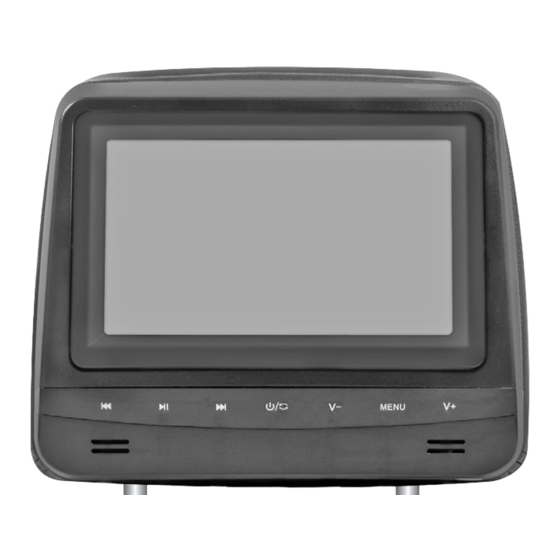
Phonocar VM151 Montageanleitungen

Verwandte Anleitungen für Phonocar VM151


Inhaltszusammenfassung für Phonocar VM151
- Seite 1 POGGIATESTA CON MONITOR 7” HEADREST WITH MONITOR 7” LED DIGITAL PANEL HIGH DEFINITION ISTRUZIONI DI MONTAGGIO MOUNTING INSTRUCTIONS INSTRUCTIONS DE MONTAGE MONTAGE-ANLEITUNGEN INSTRUCCIONES PARA EL MONTAJE VM 151...
- Seite 2 Precauzioni • Warnings • Précautions • Vorsicht • Precauciones • Per l’installazione rivolgersi al personale tecnico qualificato. • Usare solo con impianto elettrico a 12V DC con negativo a massa. • Scollegare il terminale negativo della batteria del veicolo quando si effettuano le connessioni dell’apparecchio. •...
- Seite 3 Installazione • Installation • Instalación • Inserire l’apposito adattatore nel sedile. • Introduce the suitable adapter into the seat. • Insérer l’adaptateur adéquat dans le siège. • Den passenden Adapter in den Sitz eingeben. • Introducir el adaptador más idóneo en el asiento.
- Seite 4 Collegamenti e Funzioni • Connections and Functions Branchements et Fonctions • Verbindungen und Funktionen Conexiones y Funciones 11 12 13 14 NERO-BLACK-NOIR-SCHWARZ-NEGRO NON ABILITATO / NOT AVAILABLE ROSSO-RED-ROUGE-ROT-ROJO +12 V Alimentazione / Power FUSE NERO-BLACK-NOIR-SCHWARZ-NEGRO GND Massa / Groud ROSSO-RED-ROUGE-ROT-ROJO Audio R OUT Uscita / Output BIANCO-WHITE-BLANCHE-WEISS-BLANCO Audio L OUT Uscita / Output...
- Seite 5 Traccia precedente Previous track Avvia/Ferma riproduzione/Espulsione disco Play/Pause/Disk-ejection Traccia successiva Next tracks ON-OFF/Source Accensione spegnimento/Cambia sorgente Volume - Adjust volume Impostazioni schermo MENU Screen-Setting MENU Volume + Adjust volume Non abilitato Power input 12 V Uscita cuffie jack 3,5 Headphones output jack 3,5 Ingresso audio/video jack 3,5 AV IN Audio/Video input...
- Seite 6 Funzioni telecomando • Remote-control functions • Fonctions télécommande Fernbedienungs-Tasten • Funciones mando a distancia Power: Accensione / Spegnimento PBC: Menu / Titoli / Torna all’inizio Mute: Volume azzerato Program: Programmazione riproduzione Tasti direzionali Enter: Conferma USB/SD: Riproduzione da USB o SD Vol + / Vol - : Volume Tastiera numerica 10 Zoom...
- Seite 7 Funzioni telecomando • Remote-control functions • Fonctions télécommande Fernbedienungs-Tasten • Funciones mando a distancia Power: Allumage/Extinction Power: Einschalten / Ausschalten PBC/Menu / Titre / Retourne au début PBC/Menu / Title / Zurück zum Menü Mute: Volume mis à zéro Mute: Stumm-Schaltung Program: Programmation reproduction Program: Wiedergabe-Programmierung Touches directionnelles...
-
Seite 8: System Setup
Impostazioni di sistema SYSTEM SETUP SYSTEM SETUP TV System NTSC Premere il tasto SETUP sul telecomando. Power resume Muovere la barra bianca nella posizione con i tasti direzionali Screen save r Auto TV Type per selezionare la voce da modificare. Premere ENTER Password per mostrare il relativo sottomenu. -
Seite 9: Riproduzione Dvd
Riproduzione RIPRODUZIONE MP3/WMA/JPEG/AVI Dopo aver inserito un supporto DISCO, SD CARD o USB, il lettore visualizzerà le cartelle automaticamente e inizierà la riproduzione. In presenza di file AUDIO/VIDEO l’unità riprodurrà sempre i file musicali. RIPRODUZIONE IMMAGINI JPEG L’unità visualizza la prima immagine della prima cartella. Usare il tasto sul telecomando per selezionare il file da riprodurre. - Seite 10 System setup SYSTEM SETUP SYSTEM SETUP TV System NTSC Press SETUP-key on the remote-control. Power resume To modify requested Function, move the white bar, by means of Screen save r Auto TV Type the direction-keys . Press ENTER, to show related sub- Password menu.
- Seite 11 Playback PLAYBACK OF MP3/WMA/JPEG/AVI After having introduced a DISC, SD-CARD or USB-key, the Player will automatically visualize the Folders and start reproduction. In the presence of AUDIO/VIDEO-files, the Player will always reproduce the musical Audio-files. PICTURES-PLAYBACK JPEG The unit will visualize the first Picture of the first Folder. Use key the remote-control to select the File to be reproduced.
- Seite 12 Réglages de système SYSTEM SETUP SYSTEM SETUP TV System NTSC Appuyer la touche SETUP sur la télécommande. Power resume Déplacer la barre blanche avec les touches directionnelles Screen save r Auto TV Type .pour sélectionner la voie à modifier. Appuyer ENTER Password pour montrer le sous-menu correspondent.
- Seite 13 Reproduction REPRODUCTION MP3/WMA/JPEG/AVI Après avoir inséré un support DISQUE, CARTE SD ou USB, le lecteur visualisera automatiquement les dossiers et commencera la reproduction. En présence de fichier AUDIO/VIDEO l’appareil reproduira toujours les fichiers musicaux. REPRODUCTION IMAGES JPEG L’appareil visualisera la première image du premier dossier. Utiliser la touche sur la télécommande pour sélectionner le fichier à...
- Seite 14 System-Einstellungen SYSTEM SETUP SYSTEM SETUP TV System NTSC Auf der Fernbedienung, SETUP-Taste drücken. Power resume Mittels Pfeiltasten, den weißen Balken in die gewünschte Screen save r Auto TV Type Position setzen, um die gewünschte Funktion zu ändern. Password ENTER drücken, um das betreffende Unter-Menü auszuweisen. Rating Default TV SYSTEM...
- Seite 15 Wiedergabe WIEDERGABE MP3/WMA/JPEG/AVI Nach Eingabe von CD, SD, oder USB, weist das Gerät automatisch die Ordner aus und beginnt mit der Wiedergabe. Wenn AUDIO/VIDEO-Files vorliegen, dann spielt das Gerät immer erst die Musik-Dateien ab. BILD-WIEDERGABE JPEG Das Gerät zeigt das erste Bild des ersten Ordners. Auf der Fernbedienung, Taste drücken, um die gewünschte Datei zu starten.
- Seite 16 Ajustes del sistema SYSTEM SETUP SYSTEM SETUP TV System NTSC Presionar la tecla SETUP en el mando a distancia. Power resume Desplazar la barra blanca en la posición con las teclas Screen save r Auto TV Type direccionales para seleccionar la voz que se desea modificar. Password Presionar ENTER para mostrar el relativo submenú.
-
Seite 17: Reproducción Dvd
Reproducción REPRODUCCIÓN MP3/WMA/JPEG/AVI Después de haber introducido un soporte, DISCO, SD CARD o USB, el lector visualizará las carpetas automáticamente e iniciará la reproducción. En presencia de archivos AUDIO/VIDEO la unidad reproducirá los archivos musicales. REPRODUCCIÓN IMAGENES JPEG La unidad visualiza la primera imagen de la carpeta. Usar la tecla en el mando a distancia para seleccionar el archivo correcto. - Seite 18 Caratteristiche tecniche • Technical specifications Caracteristiques techniques • Technische daten • Caracteristicas tecnicas Formato / Aspect ratio 16:9-4:3 • Sistema / System PAL/NTSC ✓ Risoluzione orizzontale-verticale / Resolution horizontal-vertical 800 x 480 Regolazioni immagini / Images regulations ✓ Trasmettitore IR per cuffie / Infrared transmitter for headphones DUAL 1 Porta / Port USB •...
- Seite 20 DECLARATION OF CONFORMITY to the directives 1999/5/EC R&TTE IT Phonocar dichiara che il VM159 è conforme ai requisiti essenziali e a tutte le altre disposizioni pertinenti stabilite dalla direttiva 1999/5/CE. GB Phonocar declares that this unit VM159 is in compliance with the essential requirements and other revelant provisions of Directive 1999/5/EC.