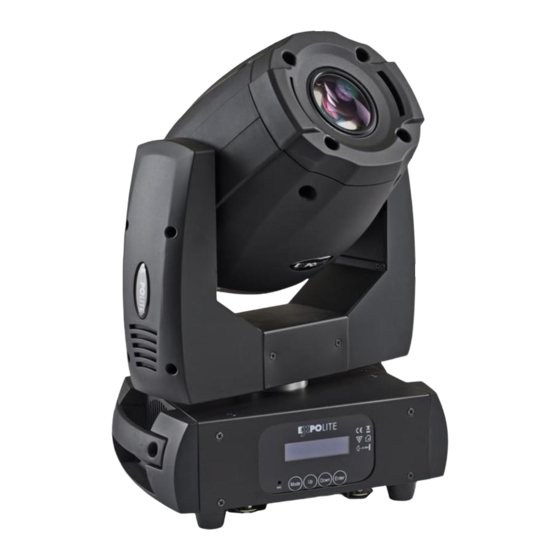
Expolite TourSpot Mini 150 Bedienungsanleitung
Inhaltsverzeichnis
TourSpot Mini 150
Bedienungsanleitung
Eigenschaften
Bedienelemente
Steuerung
Bedienungsanleitung bitte aufbewahren
Keep this Manual for later queries
User Manual
Art.Nr.: led21310
Specifications
Änderungen sind ohne Ankündigung möglich.
Changes are possible without prior notice.
Rev. 2019-11-11
Menu
Control
Inhaltsverzeichnis

Verwandte Anleitungen für Expolite TourSpot Mini 150


Inhaltszusammenfassung für Expolite TourSpot Mini 150
- Seite 1 TourSpot Mini 150 Bedienungsanleitung User Manual Art.Nr.: led21310 Specifications Eigenschaften Menu Bedienelemente Control Steuerung Bedienungsanleitung bitte aufbewahren Änderungen sind ohne Ankündigung möglich. Changes are possible without prior notice. Keep this Manual for later queries Rev. 2019-11-11...
- Seite 2 Die beiliegenden Bedienhinweise für Expolite Geräte sind Bestandteil dieser Bedienungs- anleitung. Lesen Sie diese sorgfältig, bevor Sie das Gerät in Betrieb nehmen. The enclosed General Information for Expolite Units are part of these user manual. Read them carefully before operating the device. FOCON SHOWTECHNIC...
-
Seite 3: Inhaltsverzeichnis
Inhalt - Content Inhalt - Content Seite / Page Lieferumfang D-04 Technische Daten D-04 Abmessungen D-05 Installation D-06 Bedienung D-07 Steuerung mit DMX512 D-14 Delivery E-22 Product Information E-22 Dimensions E-23 Installation E-24 Operation E-25 Using DMX512 Controller E-32... -
Seite 4: Lieferumfang
- Expolite TourSpot Mini 150 - Quicklock Montagebügel - Anschlusskabel für Spannungsversorgung - Bedienhinweise für Expolite Geräte - Bedienungsanleitung Expolite Geräte werden vor dem Versand sorgfältig geprüft. Sollte der Lieferumfang dennoch nicht vollständig sein, wenden Sie sich bitte umgehend an Ihren Vertriebspartner. D-04... -
Seite 5: Technische Daten D
Technische Daten Spannungsversorgung 100V - 240V AC 50/60Hz Maximale Leistungsaufnahme 175W Abmessungen 183 x 298 x 410mm Gewicht 9,5kg Anschlüsse Power In/Out | DMX In/Out Betriebstemperatur -10°C - 45°C Luftfeuchtigkeit < 98% Schutzklasse IP 20 Gehäuse Kunststoff LEDs 1x 150W 7500K* Abstrahlwinkel 13,2°... -
Seite 6: Abmessungen
Abmessungen D-06... - Seite 7 Installation Montage Hängend Das Gerät kann an den mitgelieferten Quicklock Montagebügeln hängend montiert werden. Geräte müssen entsprechend der jeweils gültigen Vorschriften sicher montiert und mit einer zweiten Sicherung gegen herabfallen versehen werden. Hierzu ist am Gerät eine Öse für Safeties angebracht.
-
Seite 8: Bedienung
Bedienung Bedienelemente am Gerät LCD DISPLAY MODE - Taste: Eine Menüebene aufwärts Mode Down In gewähltes Menü springen; Eingabe bestätigen ENTER-Taste: UP-Taste: Aufwärts blättern; Wert erhöhen Enter DOWN-Taste: Abwärts blättern; Wert verringern MIC: Eingebautes Mikrofon Menüstruktur MENU Dmx Address PERSON A001-A512 HSIC Auto Play... - Seite 9 MENU Edit Program STEP(01-48) Auto Program1 STEP(01-48) 0-255 Program2 PAN Fine 0-255 TILT 0-255 0-255 TILT Fine P/T Speed Program8 0-255 0-255 Color Wheel Gobo Wheel 1 0-255 0-255 Gobo Rot. Gobo Wheel 2 0-255 Strobe 0-255 0-255 Dimmer Focus 0-255 0-255 Prism...
- Seite 10 DMX-Adresse einstellen MENU Dmx Address PERSON A001-A512 HSIC Im Menü Dmx Address wird die DMX-Startadresse des Gerätes eingestellt. Diese bleibt auch bei dem Wechsel der Personality erhalten. DMX-Kanalbelegung einstellen MENU Mode of channel 12Ch 14Ch 16Ch Im Menü PERSON wird die Belegung der DMX-Kanäle des Gerätes festgelegt. Es stehen die Modi 12Ch (12 Kanäle), 14Ch (14 Kanäle) und 16Ch (16 Kanäle) zur Verfügung.
- Seite 11 Reset-Menü MENU PERSON Reset ALL Reset HSIC Off Scan Reset Off Color Reset HSIC Off GOBO Reset Off Dimmer Reset Off Other Reset Off Im Menü RESET können verschiedene Bereiche des Gerätes manuell einem Reset unterzogen werden: ALL Reset: führt einen Reset des gesamten Gerätes inklusive aller Kanäle durch. Scan Reset: führt einen Reset der PAN-/TILT- Kanäle durch.
- Seite 12 Verschiedene Einstellungen MENU Special PERSON Reset Default Off Calibration DMX ERROR 0-255 **** TILT 0-255 DMX ERROR Color Wheel 0-255 DMX ERROR Gobo Wheel 1 0-255 DMX ERROR Gobo Wheel 2 0-255 DMX ERROR Focus 0-255 DMX ERROR Prism 0-255 DMX ERROR Temperature XXX°C...
- Seite 13 Editieren benutzerdefinierter Programme MENU Edit Program STEP(01-48) Auto 0-255 PAN Fine 0-255 TILT 0-255 TILT Fine 0-255 P/T Speed 0-255 Color Wheel 0-255 0-255 Gobo Wheel 1 Gobo Rot. 0-255 Gobo Wheel 2 0-255 Strobe 0-255 Dimmer 0-255 0-255 Focus Prism 0-255 xx.xS...
- Seite 14 Einstellen des Pan- und Tilt-Bereiches MENU PAN Degree Select Degree 630° DMX ERROR DMX ERROR 540° 360° DMX ERROR TILT Degree 270° DMX ERROR 180° 90° DMX ERROR Im Menü Select Degree können die maximalen Bereiche für die Pan- und die Tilt-Bewegung eingestellt werden.
-
Seite 15: Steuerung Mit Dmx512 D
Steuerung mit DMX512 DMX-Kanalbelegung Dieses Gerät verfügt über verschiedene DMX-Personalities. Bei diesen werden unterschiedlich viele DMX-Kanäle belegt und die Reaktion des Gerätes unterscheidet sich entsprechend. Es sind 3 DMX- Personalities (12, 14 und 16 Kanäle) wählbar Durch Änderungen in der Gerätesoftware kann es zu weiteren oder geänderten Funktionen kommen. Auf der Website steht das aktuellste Dokument „DMX-Channels“... - Seite 16 Static Gobo Open/White 10-19 Gobo 1 20-29 Gobo 2 30-39 Gobo 3 40-49 Gobo 4 50-59 Gobo 5 60-69 Gobo 6 70-79 Gobo 7 80-89 Gobo 8 90-99 Gobo 9 100-109 Gobo 10 110-119 Gobo 11 120-129 Gobo Shake Gobo 1 (Slow to fast) 130-139 Gobo Shake Gobo 2 (Slow to fast) 140-149...
- Seite 17 Pan-/Tilt-Speed 0-225 Fast to slow Blackout When Moving 226-235 236-245 Blackout when Wheel changes 246-255 No Function Special Function 0-19 No Function 20-29 No Function 30-39 No Function 40-79 No Function 80-84 All Motor Reset 85-87 Scan Motor Reset 88-90 Colour Motor Reset 91-93 Gobo Motors Reset...
- Seite 18 14Ch 0-255 0-255 Pan Fine 0-255 Tilt 0-255 Tilt Fine Color Wheel 0-15 Open/White 16-31 32-47 Cyan 48-63 Green 64-79 Yellow 80-95 Magenta 96-111 Blue 112-127 Orange 128-189 Rainbow Effect (Fast to slow) 190-193 Stop 194-255 Rainbow Effect (Slow to fast) Rotating Gobo Open/White 10-19...
- Seite 19 70-79 Gobo 7 80-89 Gobo 8 90-99 Gobo 9 100-109 Gobo 10 110-119 Gobo 11 120-129 Gobo Shake Gobo 1 (Slow to fast) 130-139 Gobo Shake Gobo 2 (Slow to fast) 140-149 Gobo Shake Gobo 3 (Slow to fast) 150-159 Gobo Shake Gobo 4 (Slow to fast) 160-169 Gobo Shake Gobo 5 (Slow to fast)
- Seite 20 16Ch 0-255 0-255 Pan Fine 0-255 Tilt 0-255 Tilt Fine Color Wheel 0-15 Open/White 16-31 32-47 Cyan 48-63 Green 64-79 Yellow 80-95 Magenta 96-111 Blue 112-127 Orange 128-189 Rainbow Effect (Fast to slow) 190-193 Stop 194-255 Rainbow Effect (Slow to fast) Rotating Gobo Open/White 10-19...
- Seite 21 88-90 Colour Motor Reset 91-93 Gobo Motors Reset 94-96 Shutter&Dimmer Motor Reset 97-99 Other Motors Reset 100-119 Internal Program 1 120-139 Internal Program 2 140-159 Internal Program 3 160-179 Internal Program 4 180-199 Internal Program 5 200-219 Internal Program 6 220-239 Internal Program 7 240-255...
- Seite 22 70-79 Gobo 7 80-89 Gobo 8 90-99 Gobo 9 100-109 Gobo 10 110-119 Gobo 11 120-129 Gobo Shake Gobo 1 (Slow to fast) 130-139 Gobo Shake Gobo 2 (Slow to fast) 140-149 Gobo Shake Gobo 3 (Slow to fast) 150-159 Gobo Shake Gobo 4 (Slow to fast) 160-169 Gobo Shake Gobo 5 (Slow to fast)
-
Seite 23: Statische Gobos
88-90 Colour Motor Reset 91-93 Gobo Motors Reset 94-96 Shutter&Dimmer Motor Reset 97-99 Other Motors Reset 100-119 Internal Program 1 120-139 Internal Program 2 140-159 Internal Program 3 160-179 Internal Program 4 180-199 Internal Program 5 200-219 Internal Program 6 220-239 Internal Program 7 240-255... -
Seite 24: Delivery E
- Expolite TourSpot Mini 150 - Accessory quicklock assembly frame - Power connection cable - General Information for Expolite Units - User Manual Expolite devices are carefully checked before shipment. If the delivery is not complete, please contact your distributor immediately. E-24... -
Seite 25: Product Information E
Product Information Voltage 100V - 240V AC 50/60Hz Power Consumption 175W Dimensions 183 x 298 x 410mm Weight 9,5kg Connectors Power In/Out | DMX In/Out Ambient Temperature -10°C - 45°C Humidity < 98% Protection IP 20 Housing Flame-retardend Plastic LEDs 1x 150W 7500K* Optics 13,2°... - Seite 26 Dimensions E-26...
-
Seite 27: Installation E
Installation Mounting Hanging The fixture can be mounted in a hanging position using the quicklock brackets. Fixture must be safe mounted in accordance with the relevant regulations and provided with a safetycord to prevent falling. For this purpose, an eyelet for safeties is attached to the device. -
Seite 28: Operation E
Operation Display Operation MODE: Return to previous menu ENTER: Enter currently selected menu LCD DISPLAY Scroll up, Increase value Mode Down Scroll down, Decrease value DOWN: MIC: Inbuilt microphone Enter Menu Map MENU Dmx Address PERSON A001-A512 HSIC Auto Play Auto Program PERSON HSIC... - Seite 29 MENU Edit Program STEP(01-48) Auto Program1 STEP(01-48) 0-255 Program2 PAN Fine 0-255 TILT 0-255 0-255 TILT Fine P/T Speed Program8 0-255 0-255 Color Wheel Gobo Wheel 1 0-255 0-255 Gobo Rot. Gobo Wheel 2 0-255 Strobe 0-255 0-255 Dimmer Focus 0-255 0-255 Prism...
- Seite 30 Setting DMX-Address MENU Dmx Address PERSON A001-A512 HSIC The DMX start address of the fixture is set in the menu Dmx Address. This is retained even when changing the personality. Setting DMX-Personality MENU Mode of channel 12Ch 14Ch 16Ch The personality is set in the menu Mode of channel. There are three different modes which can be chosen: 12Ch (12 channels), 14Ch (14 channels) and 16Ch (16 channels).
- Seite 31 Reset-Menü MENU PERSON Reset ALL Reset HSIC Off Scan Reset Off Color Reset HSIC Off GOBO Reset Off Dimmer Reset Off Other Reset Off In RESET different parts of the fixture can be reset by the user individually: ALL Reset: runs a reset of the whole fixture including all channels. Scan Reset: runs a reset of the Pan-/Tilt-channels.
-
Seite 32: Miscellaneous Settings
Miscellaneous Settings MENU Special PERSON Reset Default Off Calibration DMX ERROR 0-255 **** TILT 0-255 DMX ERROR Color Wheel 0-255 DMX ERROR Gobo Wheel 1 0-255 DMX ERROR Gobo Wheel 2 0-255 DMX ERROR Focus 0-255 DMX ERROR Prism 0-255 DMX ERROR Temperature XXX°C... - Seite 33 Editieren benutzerdefinierter Programme MENU Edit Program STEP(01-48) Auto 0-255 PAN Fine 0-255 TILT 0-255 TILT Fine 0-255 P/T Speed 0-255 Color Wheel 0-255 0-255 Gobo Wheel 1 Gobo Rot. 0-255 Gobo Wheel 2 0-255 Strobe 0-255 Dimmer 0-255 0-255 Focus Prism 0-255 xx.xS...
- Seite 34 Setting of Pan-/Tilt-Movement Range MENU Select Degree PAN Degree 630° DMX ERROR DMX ERROR 540° 360° DMX ERROR TILT Degree 270° DMX ERROR 180° 90° DMX ERROR In the menu Select Degree the maximum Range of the Pan- and Tilt-movement can be set. The maximum Pan-range is set in the submenu PAN Degree.
-
Seite 35: Using Dmx512 Controller E
Using DMX512 Control DMX-Channel assignment This device has several DMX personalities. In each personality a different number of DMX channels is used and the reaction of the device differs accordingly. There are three DMX personalities with 12, 14 and 16 channels selectable. Because of changes in the firmware of the fixture, functions can be added or changed. - Seite 36 Static Gobo Open/White 10-19 Gobo 1 20-29 Gobo 2 30-39 Gobo 3 40-49 Gobo 4 50-59 Gobo 5 60-69 Gobo 6 70-79 Gobo 7 80-89 Gobo 8 90-99 Gobo 9 100-109 Gobo 10 110-119 Gobo 11 120-129 Gobo Shake Gobo 1 (Slow to fast) 130-139 Gobo Shake Gobo 2 (Slow to fast) 140-149...
- Seite 37 Pan-/Tilt-Speed 0-225 Fast to slow Blackout When Moving 226-235 236-245 Blackout when Wheel changes 246-255 No Function Special Function 0-19 No Function 20-29 No Function 30-39 No Function 40-79 No Function 80-84 All Motor Reset 85-87 Scan Motor Reset 88-90 Colour Motor Reset 91-93 Gobo Motors Reset...
- Seite 38 14Ch 0-255 0-255 Pan Fine 0-255 Tilt 0-255 Tilt Fine Color Wheel 0-15 Open/White 16-31 32-47 Cyan 48-63 Green 64-79 Yellow 80-95 Magenta 96-111 Blue 112-127 Orange 128-189 Rainbow Effect (Fast to slow) 190-193 Stop 194-255 Rainbow Effect (Slow to fast) Rotating Gobo Open/White 10-19...
- Seite 39 70-79 Gobo 7 80-89 Gobo 8 90-99 Gobo 9 100-109 Gobo 10 110-119 Gobo 11 120-129 Gobo Shake Gobo 1 (Slow to fast) 130-139 Gobo Shake Gobo 2 (Slow to fast) 140-149 Gobo Shake Gobo 3 (Slow to fast) 150-159 Gobo Shake Gobo 4 (Slow to fast) 160-169 Gobo Shake Gobo 5 (Slow to fast)
- Seite 40 88-90 Colour Motor Reset 91-93 Gobo Motors Reset 94-96 Shutter&Dimmer Motor Reset 97-99 Other Motors Reset 100-119 Internal Program 1 120-139 Internal Program 2 140-159 Internal Program 3 160-179 Internal Program 4 180-199 Internal Program 5 200-219 Internal Program 6 220-239 Internal Program 7 240-255...
- Seite 41 16Ch 0-255 0-255 Pan Fine 0-255 Tilt 0-255 Tilt Fine Color Wheel 0-15 Open/White 16-31 32-47 Cyan 48-63 Green 64-79 Yellow 80-95 Magenta 96-111 Blue 112-127 Orange 128-189 Rainbow Effect (Fast to slow) 190-193 Stop 194-255 Rainbow Effect (Slow to fast) Rotating Gobo Open/White 10-19...
- Seite 42 70-79 Gobo 7 80-89 Gobo 8 90-99 Gobo 9 100-109 Gobo 10 110-119 Gobo 11 120-129 Gobo Shake Gobo 1 (Slow to fast) 130-139 Gobo Shake Gobo 2 (Slow to fast) 140-149 Gobo Shake Gobo 3 (Slow to fast) 150-159 Gobo Shake Gobo 4 (Slow to fast) 160-169 Gobo Shake Gobo 5 (Slow to fast)
- Seite 43 88-90 Colour Motor Reset 91-93 Gobo Motors Reset 94-96 Shutter&Dimmer Motor Reset 97-99 Other Motors Reset 100-119 Internal Program 1 120-139 Internal Program 2 140-159 Internal Program 3 160-179 Internal Program 4 180-199 Internal Program 5 200-219 Internal Program 6 220-239 Internal Program 7 240-255...
- Seite 44 © 2019 by Focon Showtechnic Vertriebsgesellschaft mbH...