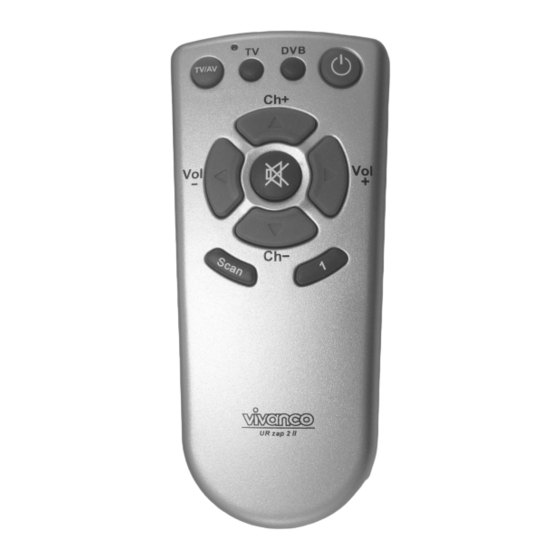
Vivanco UR zap2 II Bedienungsanleitung
Verfügbare Sprachen
Verfügbare Sprachen
Quicklinks
UR zap2 II
(GB) Instructions
(D) Bedienungsanleitung
(F) Notice d'emploi
(E) Instrucciones para el uso
(I) Istruzioni per l'uso
(NL) Gebruiksaanwijzing
(PL) Instrukcja obsługi
(GB) Instructions
UR Zap 2 II remote control for TV
sets, DVB (SAT, CBL)ellite receivers
and cable boxes
1 Inserting the batteries
Open the battery flap on the back of the
remote control and insert 2 alkaline AA
Vivanco GmbH, D-22926 Ahrensburg, E-Mail
UNIVERSAL ZAPPER TV- DVB CONTROLLER
(P) Manual de instruções
1
(S) Bruksanvisning
3
(RUS)
4
(CZ) Návod k obsluze
6
(SLO) Navodila za uporabo
8
10
12
batteries.
Check
that
markings on the batteries and in the
battery compartment are correctly lined
up (+=+), then close the flap carefully. –
Always use undamaged, fully charged
batteries.
2 Adapting to appliances
In order to control your appliances you
must adapt or set the remote control to
them. There are two ways of doing so:
direct control code entry or code search.
2.1 Direct control code entry using
the enclosed list
Example: setting to control a Panasonic
television set:
2.1.1 Using the TV button, select to
control a television set (TV).
2.1.2 The
enclosed
example, the Panasonic Code 241.
Please make sure you have selected the
correct list for television sets (TV).
2.1.3 To prepare code entry, keep the
Mute (sound on/off) button and the PWR
(appliance
on/off)
simultaneously(!) until the lamp (LED)
lights constantly.
2.1.4 Then enter the code numbers as
follows:
2.1.4.1 1st number of code (hundreds
= Volume -): Press the VOL-
down) button- twice for 2 of 241. Press
as often as the number indicates.
(1=once, 2 = twice, etc.)
2.1.4.2 2nd number of code (tens =
Channel+): Press the CH+
up) button four times for the 4 of 241.
2.1.4.3 3rd number of code (ones =
Volume+): Press the VOL+
up) button once for the 1 of 241.
2.1.4.4 Finally, press the Mute button
again briefly. The lamp (LED) goes out.
To enter a 0, do not press any button. If
incorrect entries are made the remote
control blinks for about 3 seconds.
:
hotline@vivanco.de
14
16
17
19
21
the
polarity
list
gives,
for
button
pressed
(volume
(channel
(volume
1
,

Verwandte Anleitungen für Vivanco UR zap2 II


Inhaltszusammenfassung für Vivanco UR zap2 II
-
Seite 3: Die Direkte
2.1.4 Dann geben 2.2.4 Einmal kurz EIN/AUS PWR Kodezahlen wie folgt ein: (Gerät ein/aus)Taste drücken. 2.1.4.1 Ziffer Kodes (Hunderter-Stelle = Volume-): VOL- Vivanco GmbH, Ewige Weide 15, D-22926 Ahrensburg, Tel:+49 (0)4102 231235, Fax: +49(0)4102 231444, e- Mail: hotline@vivanco.de... - Seite 4 Das zu steuerende Geräte toujours utiiser des piles bien chargées wählen Sie mittels Gerätetaste TV oder et en parfait état. DVB (SAT, CBL). Vivanco GmbH, Ewige Weide 15, D-22926 Ahrensburg, Tel:+49 (0)4102 231235, Fax: +49(0)4102 231444, e- Mail: hotline@vivanco.de...
- Seite 18 . - 1 & &$ ) - " " " 241. Mute, & 2.1.4.4 Mute, " & Zap 2 II " " & & !! & Vivanco GmbH, Ewige Weide 15, D-22926 Ahrensburg, Tel:+49 (0)4102 231235, Fax: +49(0)4102 231444, e- Mail: hotline@vivanco.de...