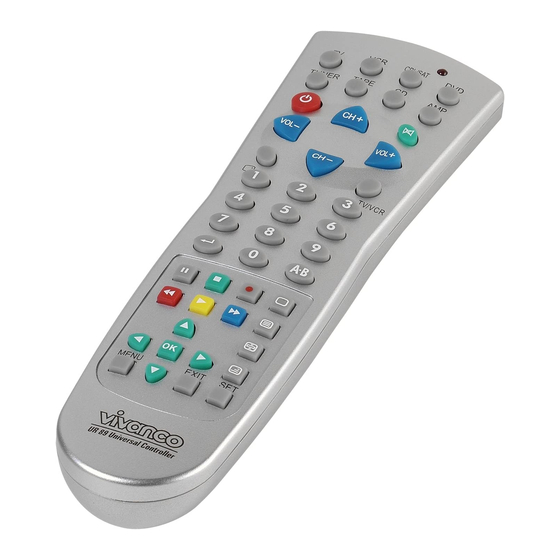
Vivanco ur 89 Bedienungsanleitung
Universal controller
Vorschau ausblenden
Andere Handbücher für ur 89:
- Bedienungsanleitung (22 Seiten) ,
- Bedienungsanleitung (19 Seiten)
Verfügbare Sprachen
Verfügbare Sprachen
Quicklinks
UR 89 Universal Controller
(GB) Instructions
Vivanco UR 89 remote control for almost all
TV, audio, video and other infrared-
controllable equipment
Inserting the batteries
Open the battery flap on the back of the remote
control, press the tongue lightly upwards, then
insert 2 alkaline AAA batteries. Check that the
polarity markings on the batteries and in the
battery compartment are correctly lined up
(+=+), then close the flap carefully. – Always
use undamaged batteries.
Adapting to appliances
In order to control your appliances you must
adapt or set the remote control to them. There
are two ways of doing so: direct control code
entry or code search.
If your UR 89 does not understand you it blinks
twice several times and you can then repeat the
entry. Each understood entry is confirmed by an
appliance button blinking once briefly.
Direct control code entry using the enclosed
list
Example: setting to control a Panasonic
television set:
1.
The enclosed list gives, for example, the
Panasonic Code 154.
Please make sure you have selected the
correct list for television sets (TV).
2.
To prepare code entry, briefly press the
SET button, bottom right, and then the required
appliance button, e.g. TV, until the lamp (LED)
lights constantly.
3.
Then press the number buttons (e.g. 1 5
4) in sequence.
4.
Once the numbers have been entered the
button lamp goes out and the remote control is
ready to control your appliance.
5.
Finally, test the control code setting by
trying to control (in this example) your television
set. If it does not work at all or not correctly try a
different code from the list or the code search
(see below).
To set the remote control for other
6.
appliances, proceed in the same way. Instead
of the TV appliance button, press another
button (e.g. VCR, CBL/SAT(DVB, DECODER),
DVD,
TUNER,
TAPE,
Vivanco GmbH, Ewige Weide 15, D-22926 Ahrensburg, e-Mail:
Code search
If the brand of your appliance is not in the list or
none of the codes given fits, we recommend a
code search.
Manual code search
1.
Switch on the appliance to be controlled.
Program is running.
2.
To prepare the code search, briefly press
the SET button, bottom right, and then
additionally the required appliance button, e.g.
TV, until the lamp (LED) lights constantly.
3.
Then point the remote control at the
appliance to be controlled.
4.
Briefly press the ON/OFF
on/off) button once. The lamp (LED) blinks. –
Except when searching for a TV code you can
also briefly press the yellow > (Play) button and
use the Play function to search. Make sure that
a tape, a DVD or a CD is inserted in the tape
deck, player or recorder.
5.
Press the ON/OFF
or Play button repeatedly, approx. every
second, until the appliance, e.g. your DVD
player, reacts. - If you notice the reaction of
your appliance too late and the next code has
already been emitted you can go back by
pressing SET and then ON/OFF or Play again.
If your appliance has switched itself off you
must switch it back on again, e.g. on the
appliance or with the original remote control, to
continue searching. - When your appliance
reacts you can also try out other buttons without
interrupting the search. If some buttons do not
work properly, simply continue searching with
ON/OFF or Play.
6.
When your appliance reacts correctly,
press the appliance button, e.g. TV, and end
the search. The lamp (LED) goes out.
- The UR 89 continues with the search at the
point where you interrupted it. When the end of
the code list is reached the search stops
automatically. The remote control blinks quickly
several times. The code last entered remains
stored. The search stops after approx. 30
seconds of inactivity.
Automatic code search *
Your remote control finds the correct settings
almost automatically in seconds:
CD,
AMP).
(appliance
(appliance on/off)
hotline@vivanco.de
1

Verwandte Anleitungen für Vivanco ur 89


Inhaltszusammenfassung für Vivanco ur 89
- Seite 3 Funktioniert es nicht oder nicht richtig, dann so die Suche. Das L mpchen (LED) geht aus. versuchen Sie bitte einen weiteren Kode aus Die UR 89 setzt die Suche dort fort, wo Sie die der Liste oder die Kodesuche, s.u.. Suche abgebrochen hatten. Wenn das Ende...
- Seite 4 Ger t steuern zu können. compartimiento de las mismas (+=+) y cierre Da die Symbole der UR 89 sich von denen Ihrer cuidadosamente el compartimiento. – Rogamos Originalfernbedienungen unterscheiden preste atención a que siempre son empleadas können, müssen Sie u.U.
- Seite 10 30,132,170,172,210,223 Elman 015,132,207,209,213 003,010,011,028,029,052,069,0 Goodmans Elsay 184,229 94,112,116,128,154,170,230 Elta Gorenje 084,115 Emerson 001,128,142 012,210,212 Engel 207,227 Graetz 050,142,143,188 Erres 016,052,170 004,007,011,020,028,032,041,0 Estel 44,052,055,065,124,128,129,13 Granada Etron 4,135,139, Eurocom 209,212 Euro-Feel Grandin 010,012,121,170,184 Vivanco GmbH, Ewige Weide 15, D-22926 Ahrensburg, e-Mail: hotline@vivanco.de...
- Seite 11 6,177,178, Interfunk 211,214 Intersound Loewe 098,099 Intervision 003,004,015,110 Loewe Opta 001,052,170,190 Irradio 010,012,052,069,170,212 Logik Iskra 183,231 Luma 020,021,052,142,170,197,198 Isukai 012,212 Lumatron 020,021,052,142,170 004,132,184,204,233 Lux May Luxor 004,020,048,078,094,102,133,1 39,142,147 012,052,069,121,212 Madison 182,212 Vivanco GmbH, Ewige Weide 15, D-22926 Ahrensburg, e-Mail: hotline@vivanco.de...
- Seite 13 Saisho 003,004,010,014,029,031,096,1 Sontec 052,161,170,196,210,220 24,183,213,215 Sony 010,011,028,030,031,077,107,1 Saito 28,131,166,203 Salora 020,048,050,094,108,109,119,1 Sound&Vision 012,015 22,129,132,133,135,139,142,19 Soundcolor 211,212,214,215 Soundmaster Sambers 015,044,073,124,181,207,209,2 Soundwave 052,170 Standard 004,010,012,022,052,166,182,1 Samsung 003,004,010,011,031,052,084,0 83,191,196 91,094,105,106,161,166,170,17 Starlight 3,199 Starline Sandra Vivanco GmbH, Ewige Weide 15, D-22926 Ahrensburg, e-Mail: hotline@vivanco.de...
- Seite 15 014,019,108 Finlux 002,003,005,026,035,045,050,0 Black Panther 61,101,115,122,144,147 Black Panther First Line 004,025,034,035,041,061,099,1 Line 03,104,106,108,120,136,138,14 Blaupunkt 026,029,030,031,032,039,071,1 7,148 15,125,126,127,128,129,130 Fisher 044,045,118,122,141,149,150 Blue Sky 099,103,104,105,106 Flint 004,103 Bondstec 019,099 Formenti-Pheonix Brandt 066,067,102,131,132,133,134 Frontech 019,114 Vivanco GmbH, Ewige Weide 15, D-22926 Ahrensburg, e-Mail: hotline@vivanco.de...
- Seite 19 High Performance 029,031,045,083,195, Emme Esse Hinari 007,008,014,206 015,039,040,078,079, Ep Sat 005,204 080,083,122,129, Hirschmann Eurocrypt 196,204 178,179,180,181,197, Eurodec 062,063 Europa 022,193 Hisawa Eurosat Hitachi 005,045,115,195,204 Eurosky 021,029,031 Houston Eurospace Humax 152,192,193,234 Eurostar 008,021,080 Vivanco GmbH, Ewige Weide 15, D-22926 Ahrensburg, e-Mail: hotline@vivanco.de...
- Seite 22 M-Electronic Wevasat 005,015 Magnum 081,089,090,091,092,093,094 Wewa 005,204 Marantz 051,052,083 Winersat Matsui 051,053,083 Wisi 005,036,038,039,040, Mcintosh 054,055 113,116,117,118, Medion 081,089,090,091,092,093,094 Memorex 006,016,025,031,034 Wittenberg Meridian Wolsey Micromaxx 081,089,090,091,092,093,094 Woorisat Micromega Xsat Microstar 081,089,090,091,092,093,094 Vivanco GmbH, Ewige Weide 15, D-22926 Ahrensburg, e-Mail: hotline@vivanco.de...
- Seite 24 001,002,031,052,074,100 Diora Brand Dual 011,025 OTHER Fischer Aiwa 028,128,129 Goldstar Akai 018,112,121 Goodmanns 014,034,077,086,1 Amstrad Goodmans Grundig 056,058 Aswo Harman Kardon Audio Comb1 Hitachi 031,082 Braun Bush 032,116 044,073,076 CD Photo Vivanco GmbH, Ewige Weide 15, D-22926 Ahrensburg, e-Mail: hotline@vivanco.de...
- Seite 25 Palladium/Okano Yamaha 030,070,076,122 042,054, Panasonic 136,138,141 Philips 043,101,140,148,1 004(LD), Others 53,154 006(LD), 043,044, 045,046 Pioneer 011,119,148 003(LD), 005(LD), 043,055 Quad Radiola 006(LD) Radiotone Radmor 140,153,154 Revox 089,120 Revox/Studer 101,153,154 Rotel 126,127 Vivanco GmbH, Ewige Weide 15, D-22926 Ahrensburg, e-Mail: hotline@vivanco.de...