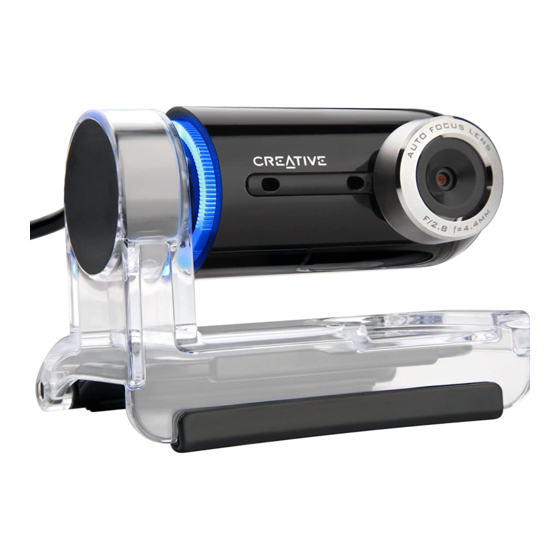
Creative Live! Cam Optia AF Bedienungsanleitung
Inhaltsverzeichnis
Verfügbare Sprachen
Verfügbare Sprachen
Quicklinks
BB2 QSB_CLE_Multi.book Page 1 Thursday, January 18, 2007 9:55 AM
Downloaded from
www.Manualslib.com
Congratulations!
®
Creative Live!
Cam Optia AF is a 24-bit, 16.7 million color digital video
camera for your computer. This USB Video Class Live! Cam does not require
drivers or additional plug-in components for basic functions, such as
capturing still images and full color videos. Not only that, it enables you to
communicate face-to-face with others on the Internet!
To get the most out of your Live! Cam, also read the comprehensive User's
Guide on your Installation CD.
Refer to the figure on the cover and match the numbers with those below to
learn more about your Live! Cam.
1. Power LED
Lights up blue when your Live!
Cam is connected to the
computer's USB port and when
performing video capture.
Turns off after five seconds
when not performing video
capture.
2. Camera head
Angle the camera head to face
the direction you want. The
camera head has a 270 degree
range and if turned backwards,
will automatically flip any
image right side up. If the
camera head is turned to face
manuals search engine
down, the video preview
displays a black screen (or a
privacy logo) and audio from
the microphones is muted.
3. Adaptive Array Microphones
Captures voices clearly during
video chats.
4. Hinged lever
Use this to mount your Live!
Cam on an LCD display panel.
5. USB cable
Connect to your computer's
USB port.
1
Inhaltsverzeichnis

Verwandte Anleitungen für Creative Live! Cam Optia AF


Inhaltszusammenfassung für Creative Live! Cam Optia AF
- Seite 13 BB2 QSB_CLE_Multi.book Page 13 Thursday, January 18, 2007 9:55 AM Herzlichen Glückwunsch! ® Bei Ihrer Creative Live! Cam Optia AF handelt es sich um eine digitale 24-Bit-Videokamera mit 16,7 Millionen Farben für den Computer. Bei dieser USB Video Class (UVC) Live! Cam werden keine Treiber oder zusätzliche steckbare Komponenten für Grundfunktionen wie die Aufnahme von...
- Seite 14 BB2 QSB_CLE_Multi.book Page 14 Thursday, January 18, 2007 9:55 AM 14 Einstieg Einstieg Schritt 1: Anschließen der Live! Cam 1 Schließen Sie das USB-Kabel der Live! Cam an einen freien USB-Anschluss ® des Computers an. Das Gerät wird von Windows automatisch erkannt.
-
Seite 15: Schritt 2: Installieren Der Gerätetreiber Und Anwendungen
5 Klicken Sie auf das Pluszeichen (+) neben dem Symbol Bildverarbeitungsgerät. Der Eintrag „Live! Cam Optia AF” wird angezeigt. 6 Klicken Sie auf das Pluszeichen (+) neben dem Symbol Audio-, Video- und Gamecontroller. Der Eintrag „Live! Cam Optia AF (Mic)” wird angezeigt. Downloaded from www.Manualslib.com... - Seite 16 1 Klicken Sie auf Start Programme oder Alle Programme Creative Creative Live! Cam Creative Live! Cam Center. 2 Klicken Sie im Fenster Creative Live! Cam Center auf die Registerkarte Videoaufnahme/Erfassung. 3 Klicken Sie auf das Feld Foto/Video, und wählen Sie die gewünschte Auflösung.
-
Seite 17: Weitere Informationen
DVD-ROM-Laufwerks und <Sprache> durch eine Sprache, in der das Benutzerhandbuch verfügbar ist) Creative Knowledge Base Mit der rund um die Uhr verfügbaren Knowledge Base von Creative lassen sich zahlreiche technische Fragen und Probleme in Selbsthilfe klären. Besuchen Sie unsere Website unter www.creative.com, wählen Sie Ihre Region und Ihr Land aus, und klicken Sie anschließend Kundendienst. - Seite 18 Müllabfuhrunternehmen oder im Laden, in dem Sie das Produkt erworben haben. Copyright © 2007, Creative Technology Ltd. Alle Rechte vorbehalten. Das Creative-Logo ist eine eingetragene Marke von Creative Technology Ltd. in den USA und/oder anderen Ländern. Microsoft, Windows und das Windows-Logo sind eingetragene Marken der Microsoft Corporation.
- Seite 112 BB2 QSB_CLE_Multi.book Page 112 Thursday, January 18, 2007 9:55 AM • Creative Product • Creative produkt • Produit Creative • Creative produkt • Prodotto Creative • Výrobek firmy Creative • Produto Creative • Creative-Produkt • Creative продукт • Producto Creative • Creative Product •...