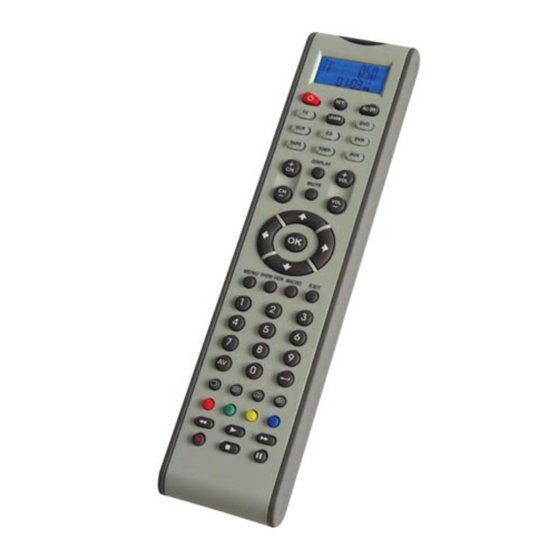
Velleman VRC801D2 Bedienungsanleitung
Inhaltsverzeichnis
Verfügbare Sprachen
Verfügbare Sprachen
Quicklinks
VRC801D2 – UNIVERSAL 8-IN-1 REMOTE CONTROL WITH LEARNING FUNCTION
1. Introduction & Features
To all residents of the European Union
Important environmental information about this product
This symbol on the device or the package indicates that disposal of the device after its lifecycle could harm the
environment.
Do not dispose of the unit (or batteries) as unsorted municipal waste; it should be taken to a specialised company for
recycling.
This device should be returned to your distributor or to a local recycling service.
Respect the local environmental rules.
If in doubt, contact your local waste disposal authorities.
Thank you for buying the VRC801D2! Please read the manual thoroughly before bringing this device into service. If the device was
damaged in transit, don't install or use it and contact your dealer.
This universal remote control replaces the remote for most brands of television sets, video recorders, DVD and CD players,
radios, satellite cable TV, audio amplifiers, and other devices.
The VRC801D2 features a quick, automatic or manual code search function. In case the code has not been found, the remote
control can learn the new code. VOLUME and DEVICE can be locked to avoid unwanted modifications.
The large blue backlit LCD shows you the actual operation status. A lo-bat icon warns you when the batteries are low.
Once set up, all data (except time) will be stored in the back-up memory to avoid data loss when changing the batteries.
2. Description (fig. 1)
Key
SET
TV VCR DVB DVD
TUNER TAPE CD
AUX
AV
MENU
CH
VOL
0 ~9
OK EXIT
PLAY
REC
STOP
PAUSE
MUTE
RED, GREEN,
YELLOW and BLUE
ALL OFF
LEARN
SHOW VIEW
MACRO
VRC801D2
Function
Set up remote control
Select the device you want to control
Turn the device ON or OFF
Works like the TV/VIDEO key on your original TV
remote control and TV/SAT key on your original
satellite remote control
Works like the MENU, OSD or MEMORY key on
your original remote control
Channel UP and DOWN
Volume UP and DOWN
The numeral keys operate in the same way as
those on your original remote control. They can also
be used to enter the device codes during setup
Keys work like the LEFT, RIGHT, UP, DOWN, OK
and EXIT keys on your original remote control.
During the setup, they will be used to select, to
confirm and to exit when programming your remote
control
Works like the ENTER key on your original remote
control
Fast rewind / fast forward
Play your CD, DVD etc.
Record
Stop
Pause
Instant sound muting
Television video
TV and text mixed
Teletext mode
Page hold
Fastext
Turn all devices on or off
Set the learning function
Scan all channels for your quick view
Carry out several functions with just one press
- 1 -
VELLEMAN
Inhaltsverzeichnis

Verwandte Anleitungen für Velleman VRC801D2


Inhaltszusammenfassung für Velleman VRC801D2
-
Seite 21: Especificaciones
Diese Fernbedienung ersetzt die Fernbedienung der meisten Fernsehgeräte, Videorecorder, DVD- und CD-Player, Radios, Satellitensysteme, Audioverstärker und anderer Geräte. Die VRC801D2 ist mit einer schnellen, einer automatischen und einer manuellen Suchfunktion für den Code ausgestattet. Sie können die Fernbedienung auch einen neuen Code lernen lassen. Die LAUTSTÄRKE und das GERÄT können gesperrt werden. - Seite 22 Konfiguration über Marke und Code • Schalten Sie das Gerät, das Sie bedienen wollen ein (z.B. Fernsehgerät) (stecken Sie eine Videokassette in den Videorecorder). • Halten Sie auf VRC801D2 die SET-Taste gedrückt und drücken Sie die Taste des entsprechenden Gerätes (hier: TV).
- Seite 23 Gerät aus, um die Funktion zu verlassen. • Drücken Sie die Taste, welche die neue Funktionen lernen soll (hier: POWER). Das LCD zeigt WAITING. • Richten Sie den IR-Sensor der VRC801D2 auf den IR- Sensor der Originalfernbedienung (max. Entfernung von 5cm).
- Seite 24 Alle gelehrte Funktionen der Fernbedienung löschen Verwenden Sie diese Funktion wenn Sie alle gelehrten Funktionen der VRC801D2 löschen wollen. • Wählen Sie das Gerät, bei dem Sie die Funktionen löschen wollen. • Wählen Sie LEARNING mit oder und drücken...
-
Seite 25: Andere Funktionen
Sie OK. • Selektieren Sie CONTRAST mit oder und drücken Sie OK. • Stellen Sie den Kontrast mit oder ein und drücken Sie OK zum Bestätigen. • Drücken Sie EXIT zum Verlassen. - 25 - VRC801D2 VELLEMAN... -
Seite 26: Technische Daten
ShowView-Funktion Die VRC801D2 ist mit einer ShowView-Funktion, die alle TV- oder Kabel-/Satellitenkanäle abtastet. • Wählen Sie ein Gerät aus. • Halten Sie SHOW VIEW gedrückt. Die Fernbedienung tastet automatisch alle Kanäle ab sobald die LED blinkt. Bemerkung:- Richten Sie die Fernbedienung während der Ausführung des Befehls auf das Gerät. - Seite 27 - 27 - VRC801D2 VELLEMAN...
- Seite 28 - 28 - VRC801D2 VELLEMAN...
- Seite 29 - 29 - VRC801D2 VELLEMAN...
- Seite 30 - 30 - VRC801D2 VELLEMAN...
- Seite 31 - 31 - VRC801D2 VELLEMAN...
- Seite 32 - 32 - VRC801D2 VELLEMAN...
- Seite 33 - 33 - VRC801D2 VELLEMAN...
- Seite 34 - 34 - VRC801D2 VELLEMAN...
- Seite 35 - 35 - VRC801D2 VELLEMAN...
- Seite 36 - 36 - VRC801D2 VELLEMAN...
- Seite 37 - 37 - VRC801D2 VELLEMAN...
- Seite 38 - 38 - VRC801D2 VELLEMAN...
- Seite 39 - 39 - VRC801D2 VELLEMAN...
- Seite 40 - 40 - VRC801D2 VELLEMAN...
- Seite 41 - 41 - VRC801D2 VELLEMAN...
- Seite 42 - 42 - VRC801D2 VELLEMAN...
- Seite 43 - 43 - VRC801D2 VELLEMAN...
- Seite 44 - 44 - VRC801D2 VELLEMAN...
- Seite 45 - 45 - VRC801D2 VELLEMAN...
- Seite 46 - 46 - VRC801D2 VELLEMAN...
- Seite 47 - 47 - VRC801D2 VELLEMAN...
- Seite 48 - 48 - VRC801D2 VELLEMAN...
- Seite 52 Modifikationen, die von einem Dritten ohne Erlaubnis von Velleman® vorgenommen werden. • Im Fall einer Reparatur, wenden Sie sich an Ihren Velleman®-Verteiler. Legen Sie das Produkt ordnungsgemäß verpackt (vorzugsweise die Originalverpackung) und mit dem Original-Kaufbeleg vor. Fügen Sie eine deutliche Fehlerumschreibung hinzu.