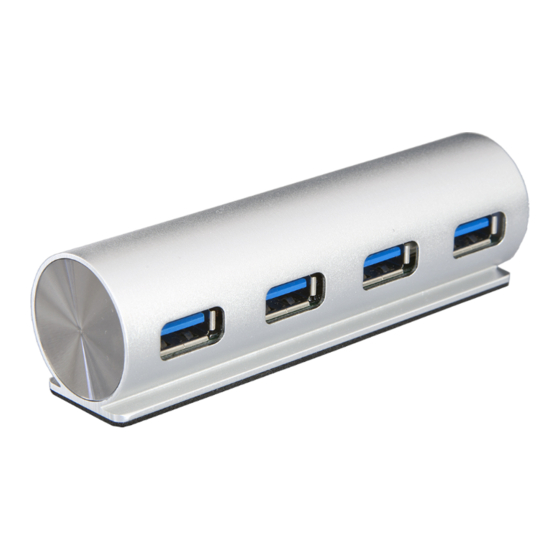
Exsys EX-1134 Anleitung
CONNECTORS
USB 3.1 (Gen1) micro B-Port:
USB 3.1 (Gen1) Pin's
Pin
1
2
3
4
USB OTG ID for identifying lines
5
6
USB 3.0 signal transmission line (−)
7
USB 3.0 signal transmission line (+)
8
9
USB 3.0 signal receiving line (−)
10
USB 3.0 signal receiving line (+)
Attention!
Never plug in with force or in wrong direction.
USB 3.1 (Gen1) C-Plug:
A12
A11
A10
A9
A8
A7
A6
A5
GND
RX2+
RX2-
VBUS
SBU1
D-
D+
CC1
GND
TX2+
TX2-
VBUS
CC2
D+
D-
SBU2
B1
B2
B3
B4
B5
B6
B7
B8
5 Volt Connector:
ATTENTION!!!
Use only with optional power supply!
HARDWARE INSTALLATION
Because there are large differences between PC's, we can give you only a general installation
guide for the EX-1134. Please refer your computer's reference manual whenever in doubt.
1.
Connect the USB cable to the USB micro B-Port at the Hub.
2.
Connect the optional power supply to the DC Connector at the Hub.
3.
Now connect the other end from the USB cable (C-Plug) to the C-Port at your PC.
5
DRIVER INSTALLATION
All Operating Systems
After the hardware installation the OS will recognize the device automatically and install the
drivers.
CHECK INSTALLED DRIVER
Signal
Open the >Device manager<. Now you should see at „USB-Controller" the following new entry's:
Power (VBUS)
USB 2.0 differential pair (D−)
USB 2.0 differential pair (D+)
GND
If you see this or a similar information the device is installed correctly.
GND
CLEANING
For cleaning please use only a dry fluff less cloth and remove the dirt with gently pressure. In
the area of the connectors please make sure that no fibres from the cloth remain in the connect-
ors. Attention! Never use a moist or wet cloth for cleaning!
A4
A3
A2
A1
VBUS
TX1-
TX1+
GND
VBUS
RX1-
RX1+
GND
B9
B10
B11
B12
AUFBAU
BESCHREIBUNG & TECHNISCHE DATEN
Die EX-1134 ist ein USB 3.1 (Gen1) HUB für bis zu 4 Endgeräte. Die EX-1134 ist mit 4 Ports für
Endgeräte und 1 Port für den Anschluss an den PC ausgestattet. Er unterstützt alle USB An-
schlüsse von 2.0 bis 3.1. Über die externe Stromversorgung per optionales Netzteil können an
jedem Port 900mA zur Verfügung gestellt werden. Der serielle USB 3.1 Bus wird optimal durch
die Leistung des schnellen Chipsatz unterstützt. Die EX-1134 gewährleistet so eine sichere
Datenübertragung und exzellente Performance von bis zu 5Gbit/s! Er unterstützt den self
powered und bus powered Modus. Es ist nicht möglich die I/O Adressen und Interrupts manuell
einzustellen, da die Einstellungen vom System (BIOS) und beim installieren des Betriebssys-
tems automatisch vorgenommen werden.
Kompatibilität:
Betriebssysteme:
Anschlüsse:
Lieferumfang:
Zertifikate:
ANSCHLÜSSE
USB 3.1 (Gen1) A-Buchse:
6
EX-1134
Anleitung
Vers. 1.0 / 22.09.16
USB 3.1 (Gen1) micro
5V DC Anschluss für
B-Buchse zum Anschluss an PC
optionales Netzteil
USB 2.0, 3.0 & 3.1
Alle Betriebssysteme
4x USB A-Buchse, 1x USB micro B-Buchse, 1x 5V Buchse
EX-1134, Anleitung, USB Kabel, USB-C auf USB-A Adapter
CE / FCC / RoHS / WEEE
DE97424562 / WHQL
1
USB 1-4:
4 x externe USB 3.1 (Gen1)
A-Buchse für Endgeräte
Achtung!
Stecker niemals
umgekehrt oder mit
Gewalt einstecken.

Verwandte Anleitungen für Exsys EX-1134


Inhaltszusammenfassung für Exsys EX-1134
- Seite 1 BESCHREIBUNG & TECHNISCHE DATEN Die EX-1134 ist ein USB 3.1 (Gen1) HUB für bis zu 4 Endgeräte. Die EX-1134 ist mit 4 Ports für Endgeräte und 1 Port für den Anschluss an den PC ausgestattet. Er unterstützt alle USB An- schlüsse von 2.0 bis 3.1.
- Seite 2 DESCRIPTION & TECHNICAL INFORMATION The EX-1134 is a plug & play high-speed USB 3.1 (Gen1) hub for 4 USB devices. The EX-1134 provides 4 ports for USB devices and 1 uplink port for PC. It uses data transfer rates up to 5Gbit/s.