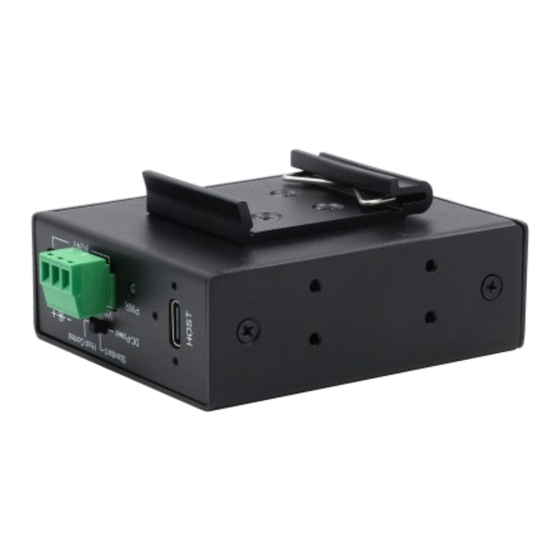
Exsys EX-12274HMS Anleitung
CONNECTORS
USB 3.2 Gen 2x1 C-Port:
+9V to +24V DC-Socket:
ATTENTION!
Only for use with optionally available power supply or
other compliant power supply!
-
+
+/-9V to +/-24V T-Block:
ATTENTION!
Please pay attention to the correct polarity!
Never connect power to GND as this will destroy your
hardware!
V+
V-
G (Ground
Never connect the power supply to the terminal block
while it is switched on!
Redundant power supply possible by simultaneous use of DC-Socket and Terminal
Block!
3-Position slide Switch:
DC-Power
Standard
Host-Control
DC-Power
USB-Bus Power
Switch Position
(external Power)
(Host PC On/Off)
YES
NO
DC-Power
NO
YES
YES
YES
Behaviour like a standard USB-Hub, Bus-powered when no DC power supply is connected, DC-powered
Standard
when it is connected (also when the PC is off)
YES
NO
Host-Control
NO
YES
YES
YES
5
HARDWARE INSTALLATION
Because there are large differences between PC's, we can give you only a general installation
guide for the EX-12274HMS. Please refer your computer's reference manual whenever in
doubt.
1.
Install the EX-12274HMS on a mounting rail by using the DIN-Rail Kit or on the wall using
the Wall Mounting Brackets.
Mounting of the DIN-Rail Kit with
four screws on the rear side
2.
Connect the USB 3.2 Gen 2x1 cable with the USB 3.2 Gen 2x1 Upstream C-Port at the EX-
12274HMS.
3.
Now connect the power connector of the optional available power supply to the DC-Socket or
to the Terminal Block of the hub and insert the power plug of the power supply into an electri-
cal outlet.
4.
Now connect the other end from the USB 3.2 Gen 2x1 cable (C-Plug) to the USB C-Port at
your PC.
DRIVER INSTALLATION
All Operating Systems
Downstream
After the hardware installation the Operating System will recognize the EX-12274HMS automati-
Data
Power
cally and install the drivers.
NO
DC ONLY
CHECK INSTALLED DRIVER
NO
NO
YES
DC ONLY
Open the >Device manager<. Now you should see at „USB-Controller" the following new entry:
NO
NO
NO
NO
YES
DC ONLY
If you see this or a similar information's the hub is installed correctly.
Germany:
EXSYS Vertriebs GmbH
Industriestrasse 8
61449 Steinbach
www.exsys.de
Mounting the Wall Mounting
Bracket with four screws on
each side
Switzerland:
Italy:
EXSYS Vertriebs GmbH
EXSYS Italia Srl
Dübendorfstrasse 17
Via Belvedere, 45/B
8602 Wangen
I-22100 Como
www.exsys.ch
www.exsys.it
6
EX-12274HMS
Anleitung
Vers. 1.0 / 18.11.25
AUFBAU
Vorderseite:
4x USB 3.2 Gen 2x1
Downstream C-Buchse
Rückseite:
1x USB 3.2 Gen 2x1
Upstream C-Buchse
Betriebs LED
9-24V T-Block für optional
erhältliches Netzteil
BESCHREIBUNG & TECHNISCHE DATEN
Der robuste und industrietaugliche EX-12274HMS ist einer unserer kleinsten USB 3.2 Gen 2x1
Metall Hubs für bis zu vier Endgeräte. Durch sein kompaktes und industrietaugliches Gehäuse,
kann er problemlos an die Wand oder auch auf einer Trag- oder Hutschiene installiert werden.
Zusätzlich ist der EX-12274HMS mit 15KV ESD Überspannungsschutz an allen Ports ausge-
stattet. Er unterstützt SuperSpeed+ USB 3.2 Gen 2x1 von bis zu 10Gbit/s. Der EX-12274HMS
ist mit einem externen Schiebeschalter ausgestattet, der es ermöglicht, die Stromversorgung
des Hubs auf einfachste Weise Ihren Bedürfnissen anzupassen. Dies ist während des Betriebs
möglich ohne, dass das Gehäuse geöffnet werden muss. Über die optional erhältliche externe
Stromversorgung per DC-Buchse oder Terminal Block, können pro USB-Port bis zu 2,4A zur
Verfügung gestellt werden. Dies ermöglicht Ihnen ein problemloses aufladen von iPhone, iPad,
Smartphone und Tablet.
Kompatibilität:
USB 1.1, 2.0 & 3.2
Betriebssysteme:
Alle Betriebssysteme
Anschlüsse:
4x USB 3.2 Gen 2x1 C-Buchse (Downstream), 1x USB 3.2 Gen 2x1
C-Buchse (Upstream), 1x DC-Buchse 9-24V, 1x Terminal Block 9-24V
Lieferumfang:
EX-12274HMS, USB 3.2 Gen 2x1 Kabel (verschraubbar) 1m,
DIN-Rail Kit, Wandmontagehalterung, Anleitung
1
3-Postion
Schiebeschalter
9-24V DC-Buchse
für optional
erhältliches Netzteil

Verwandte Anleitungen für Exsys EX-12274HMS


Inhaltszusammenfassung für Exsys EX-12274HMS
- Seite 1 EX-12274HMS. Please refer your computer’s reference manual whenever in doubt. Vers. 1.0 / 18.11.25 Install the EX-12274HMS on a mounting rail by using the DIN-Rail Kit or on the wall using the Wall Mounting Brackets. AUFBAU +9V to +24V DC-Socket:...
- Seite 2 NEIN NEIN NUR DC The robust, industrial-grade EX-12274HMS is one of our smallest USB 3.2 Gen 2x1 metal hubs, supporting up to four end devices. Thanks to its compact housing, it can easily be installed on a NEIN NEIN NEIN ÜBERPRÜFEN DES INSTALLIERTEN TREIBER...