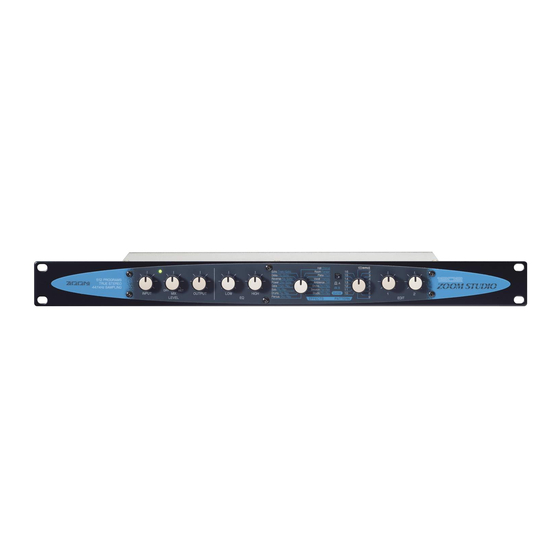
Zoom ZOOMSTUDIO 1202 Bedienungsanleitung
Quicklinks
OPERATION
MANUAL
MODE
DIEMPLOI
Thank you for selecting the ZOOM STUDIO 1202 (hereafter called "The 1202"). The 1202 is a
sophisticated effect processorwith the following features:
• A total of 512 preset effect programs (32 effects x 16 patterns) makes the unit immediately
usable for a wide variety of creative applications.
• 44.1 kHz sampling frequency assureshigh performance, ideal for processing sound sources
such as guitar,
bass, synthesizer,
• Full stereo configuration—
two channels individually is also possible.
Pleasetake the time to readthis manualcaefully, in orderto get the most out of your 1202andto ensure
optimum performance and reliability.
Wir danken Ihnen für Ihre Wahl des ZOOM STUDIO 1202 (im folgenden einfach als "1202" bezeichnet).
1202 ist ein vielseitiges Effektgerät, das die folgenden Besonderheiten bietet:
• Insgesamt512 Effektprogramme (32Effekte x 16 Arbeitsbereich) Sind bereits vorprogrammiert
und können sofort fiir eine Vielzahl von kreativen Anwendungen eingesetzt werden.
• Abtastfrequenz von 44,1 kHz sichert hohe Klangqualität, ideal für Signalquellen wie Gitarre,
Baß, Synthesizer usw.
• Volle Stereo-Konfiguration—
breitgemcherten Nachhall.Individueller Einsatz der beiden Kanäle ist ebenfallsmöglich.
Bitte lesen Sie diese Bedienungsanleimng sorgfältig durch, um sich mit den vielfältigen Funktionen des
Ga•äts vertraut zu machen. Damit stellen Sie sicher, daß Sie den 1202 (Ptimal nutzen und über viele Jahre
hinweg an diesem Gerät Freudehaben.
Nous voUs remercions d'avoir sélectionné le ZOOM STUDIO 1202 (appelé ci-apres le "1202"). Le 120
est un processeurd 'effets sophistiqué, do:é descaractéristiques suivantes :
• Un total de 512 programmes d'efTets préréglés (32 effets x 32 motifs) rend cet appareil
immédiatement utilisable pour une grande variété d' applications créatives.
• Une fréquence d'échantillonnage de 44,1 kHz assure une grande exécution, idéale pour traiter
les sources sonores telles une guitare, une basse, un synthétiseur, etc.
• Une configuration entiörement stéréophonique- la premiere dans cette catégorie - crée un son
de réverbération
riehe et naturel. L'utilisation
possible.
Pour obtenir le maximum de votre 1202 et assurer sa fiabilité et une exécution optimale, veuillez lire
attentivement ce mode d' emploi.
Gracias por seleccionar el ZOOM STUDIO 1202 (en adelante llamado "1202"). El 1202 es un sofisticado
procesador de efectos con las caracterfsticas siguientes:
• Un total de 512 programas preajustados de efeetos (32 efectos x 16 patrones) permiten usar
inmediatamente a la unidad en una amplia gama de aplicaciones creativas.
• Frecueneia de muestreo de 44,1 kHz asegura alias prestaeiones, ideal para proceSar fuentes de
sonido como guitarra, bajo, sintetizador, etc.
• Configuraciön
estéreo completa—4a primera de su clase—, crea sonido de reverberaciån rico y
natural. También esposible usar dos canales individuales.
Lea bien este manual para poder sacar eI miximo provecho de su 120 y para asegurarel funcionzniento y
fiabilidad 6ptimos.
/ BEDIENUNGSANLEITUNG
/ MANUAL
DE INSTRUCCIONES
English
etc.
a first in this class— creato rich, natural reverb sounds. Using the
Deutsch
zum ersten Mal in dieser Klasse— erzeugt natürlichen,
Frangais
individuelle
Espanol
des deux canaux est également

Verwandte Anleitungen für Zoom ZOOMSTUDIO 1202


Inhaltszusammenfassung für Zoom ZOOMSTUDIO 1202
- Seite 1 DE INSTRUCCIONES English Thank you for selecting the ZOOM STUDIO 1202 (hereafter called "The 1202"). The 1202 is a sophisticated effect processorwith the following features: • A total of 512 preset effect programs (32 effects x 16 patterns) makes the unit immediately usable for a wide variety of creative applications.
- Seite 2 1202. Verwendung cines andcren Netzstromadaptzrs kann zu Bctriebsstörungza Besdadiguag des Qhren. When using the 1202 in anareawith a lit* voltage. consult your local ZOOM disributor about acquiring a prorer AC adapter. Wenn Adapter in cinem Land rrüt •atcrschiedlicäzr Neusparmung verveadet SOIL ist ein geeigzeter SpannungswandlcrOderem andererAdapter crfordetlich.
-
Seite 3: Setup Examples
(zu erkennen durch ein / vor is selected, two types of effects can be used separately, as dem Effektnamen) gewählt wurde, können zwei Effekuypen shown in this example. separat v erwendetwerden,wiein diesemBeispielgezeigL Vaventi*er. Ven.nrz. INPt.rr OUTPUT Keyboard 00000 1202 ZOOM STUDIO 1202... - Seite 4 Cuando se selecciona un efecto combinado (indicado con I utilisés séparément, c ommeindiqué dans cet exemple. antes del nombre del efecto), pueden usarse dos tipos de efectos separados, se muestraen esteejemplo. •enil•ire DIP Ur 1 11 00000 1202 ZOOM STUDIO 1202...
- Seite 5 Diese Regler dienen zum Einstellen der Parameter des on the selected effect and the selected pattern. (Refer to the gegenwärtig gewählten Effektes. Welche Parametereingestellt supplied presetprogram list.) werden können, hängt von dem gewählLen EffekL und Einsatzmuster ab. (Siehe hierzu mitgelieferte Programmliste.) ZOOM STUDIO 1202...
- Seite 6 (consultela lista de preajustesque se suministra). (I I) Commande EDIT2(édition 2) Ces commandes servent ajuster les param&tres de l'effet actuellement sélectionné. Les paramétres å régler dépendent de lieffet sélectionné et du motif sélectionné. (Se référer liste des programmespréréglés). ZOOM STUDIO 1202...
- Seite 7 Rear Panel ZOOM STUDIO MODEL 1202 SERIAL POWER ZOOM CORPORATION MADE IN JAPAN/FABRIQUÉ AUJAPAN DC9V 200mA English Deutsch Rückseite Rear Panel (1)INPUT-Buchse (I) INPUTconnector Serves for connection of the sound source signal from an Dient zum Anschluß einer Signalquelle wie Musikinstrument, Mischpult usw.
- Seite 8 Sert raccorder I'adaptateur secteur foumi. N 'utilisez que conecta el adaptadorde CA a la toma de corriente, el 1202 se I 'adaptateur foumi. Lorsque l'adaptateur secteur est branché encenderå automåticamente. suruneprisemuralesecteur, l e 1202estautomatiquement mis sous tension. ZOOM STUDIO 1202...
- Seite 9 EFFECT PROGRAM LIST BANK EDIT EDIT Description Patterns Effects Pattern 2—16: Variations with Simulates a medium-sized Attack 1. Hall different reverb time Diffusion concert hall 1: 2.2Sec/2-16: 1.0-3.8Sec Pattern 2—16: Variations with Simulates an acoustically dead High Cut 2. Room Diffusion different reverb...
- Seite 10 EFFECT PROGRAN'I LIST BANK Effects Description Patterns EDIT EDIT Pattern 2—16: Variations with Conventional type reverb suitable High Damp 9. Percus. Diffusion different reverb time for all kinds of percussion 1: 1.8Sec/2-16: 0.6-3.4Sec Pattern 2—16: Variations with Reverb suitable for adding body Density 10.
- Seite 11 Delay FIB different modulation rate 11-370mS phase for LIR 1: 2.54Hz/2-16: 0.14-5.24Hz Pattern 2—16: Variations with Zoom noise reduction. Use EDIT different threshold. Select 21. ZNR Depth-R 1/2 to adjust the L and R depth of Depth-L pattern which yields Lhe best noise the effect.
- Seite 12 * Pitch Shift Intervals Pattern detune DRY / Input Notes EDITI WET / Shifted Notes Pattern detune Input Notes EDIT 1 WET / Shifted Notes ZOOM CORPORATION 2-10-2Miyanishicho F uchu-shi, T okyo183Japan Tel:(0423)69-7111. Fax: (0423) 69-7115. Printed in Jann 1202-5100...