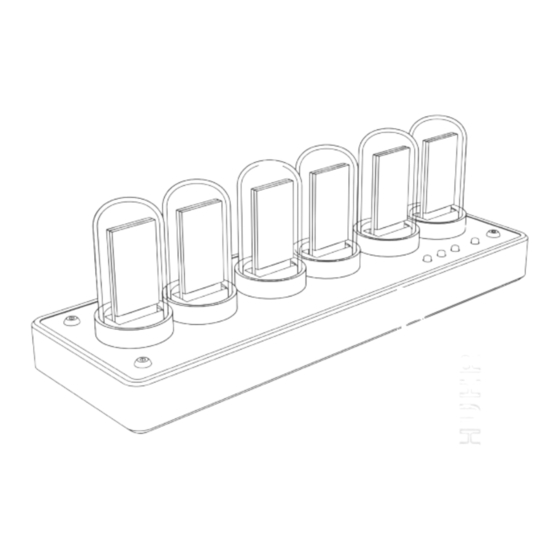
KIENZLE 14991 Bedienungsanleitung
Lcd schreibtischuhr

Verwandte Anleitungen für KIENZLE 14991


Inhaltszusammenfassung für KIENZLE 14991
- Seite 1 Bedienungsanleitung Instruction Manual Mode d‘emploi Handleiding Istruzioni per l‘uso Instrucciones de uso Art.No.: 14991...
-
Seite 2: Manual Download
DE Besuchen Sie unsere Website über den folgenden QR Code oder Weblink um weitere Informationen zu diesem Produkt oder die verfügbaren Übersetzungen dieser Anleitung zu finden. EN Visit our website via the following QR Code or web link to find further information on this product or the available translations of these instructions. -
Seite 4: Inhaltsverzeichnis
INHALTSVERZEICHNIS 1. Zu dieser Anleitung 2. Allgemeine Sicherheitshinweise 3. Lieferumfang 4. Schnellstart-Anleitung 5. Teileübersicht 6. Tasten 7. Erklärung der Modusauswahl 8. Ziffernblatt ändern 9. Alarmeinstellung 10. Zeiteinstellung 11. Einstellung des Umgebungslichts 12. Systemeinstellungen 13. Technische Daten 14. Eigenschaften 15. Netzwerk-Konfiguration 16. -
Seite 5: Lieferumfang
• Setzen Sie das Gerät keinen hohen Temperaturen aus und schützen Sie es vor Kontakt mit Wasser und hoher Luftfeuchtigkeit, um ein Auslaufen oder eine Explosion des integ- rierten Akkus zu verhindern! • Knicken, quetschen oder ziehen Sie niemals an den Netz- und Anschlusskabeln, Verlänge- rungen und Adaptern. -
Seite 6: Teileübersicht
5. TEILEÜBERSICHT Glasrohr IPS-Bildschirm Vorne Lautsprecher (Unterseite) Aluminium Gehäuse Hinten RGB LED USB Typ-C Anschluss Oben Tasten PCIe-Anschluss... -
Seite 7: Tasten
6. TASTEN Öffnet die Modusauswahl Links/Modus Ziffernblatt auswählen Einstellungsmenü Öffnet das Einstellungsmenü Rechts/STYLE Beenden 7. ERKLÄRUNG DER MODUSAUSWAHL Rufen Sie die Schnittstelle für die Modusauswahl auf, indem Sie auf die Taste Links/Modus klicken. Es gibt sechs Modi: (1) TIME 12H, Anzeigezeit HH MM SS (2) TIME 24H, Anzeige der Uhrzeit HH MM SS (3) DATE, Anzeige nur des Datums MM DD... -
Seite 8: Zeiteinstellung
10. ZEITEINSTELLUNG • Drücken Sie , um das Einstellungsmenü aufzurufen, und drücken Sie die Taste, um zu Zeiteinstellung zu navigieren. Drücken Sie , um das Zeiteinstellungsmenü aufzurufen. • Hier können Sie Jahr, Monat, Tag, Stunde, Minute und Sekunde einstellen. Drücken Sie die Taste „... -
Seite 9: Technische Daten
13. TECHNISCHE DATEN Produktname LCD Schreibtischuhr ISP Individium Bildschirmtyp 2,9 cm (1.14“) IPS Colour LCD Bildschirm Bildschirmauflösung 135x240 Pixel Stromanschluss USB Type-C Eingangsspannung DC 5V WIFI Standard 2.4 GHz, IEEE 802.11 b/g/h Produktmaterial ABS, Glasröhren Maße 204x68x70 mm Gewicht 475 g 14. -
Seite 10: Netzwerkkonfiguration Videoanleitung
NETZWERKKONFIGURATION VIDEOANLEITUNG www.bresser.de/download/14991/Network FORTGESCHRITTENE VIDEOANLEITUNGEN www.bresser.de/download/14991/Advanced... -
Seite 11: App Bedienungsanleitung Herunterladen
Reinigen Sie das Gerät nur äußerlich mit einem trockenen Tuch. Benutzen Sie keine Reini- gungsflüssigkeit, um Schäden an der Elektronik zu vermeiden. 18. EG-KONFORMITÄTSERKLÄRUNG Hiermit erklärt Bresser GmbH, dass der Funkanlagentyp mit Artikelnummer: 14991 der Richtlinie 2014/53/EU entspricht. Der vollständige Text der EG-Konformitäts- erklärung ist unter der folgenden Internetadresse verfügbar: www.bresser.de/download/14991/CE/14991_CE.pdf... -
Seite 12: About This Manual
TABLE OF CONTENTS 1. About this manual 2. General safety instructions 3. Scope of delivery 4. Quick start guide 5. Parts overview 6. Buttons 7. Explanation of mode selection 8. Changing clock face 9. Setting the alarm 10. Setting the time 11. -
Seite 13: Scope Of Delivery
• Never bend, pinch, or pull on the power and connection cables, extensions, and adapt- ers. Protect cables from sharp edges and heat. • Before use, check the device, cables, and connections for damage. Never use a dam- aged device or a device with damaged power cables. Damaged parts must be replaced immediately by an authorised service centre. -
Seite 14: Parts Overview
5. PARTS OVERVIEW Glass tube IPS screen Front Speaker (bottom) Aluminium housing Back RGB LED USB Type-C port Buttons PCIe port... -
Seite 15: Buttons
6. BUTTONS Opens mode selection Left/Mode Select clock face Settings menu Opens settings menu Right/STYLE Exit 7. EXPLANATION OF MODE SELECTION Open the mode selection interface by clicking the Left/Mode button. There are six modes: (1) TIME 12H, display time HH MM SS (2) TIME 24H, display time HH MM SS (3) DATE, display date only MM DD (4) ALBUM, display uploaded pictures... -
Seite 16: Setting The Time
10. SETTING THE TIME • Press to open the settings menu, and press the button to navigate to the time setting. Press to enter the time settings menu. • Here you can set the year, month, day, hour, minute, and second. Press the „ “... -
Seite 17: Technical Data
13. TECHNICAL DATA Product name LCD desk clock ISP Individium Screen type 2.9 cm (1.14“) IPS Colour LCD screen Screen resolution 135x240 pixels Power connection USB Type-C Input voltage DC 5V WIFI standard 2.4 GHz, IEEE 802.11 b/g/h Product material ABS, glass tubes Dimensions 204x68x70 mm... - Seite 18 NETWORK CONFIGURATION VIDEO TUTORIAL www.bresser.de/download/14991/Network ADVANCED VIDEO TUTORIALS www.bresser.de/download/14991/Advanced...
-
Seite 19: App User Manual Download
18. EC DECLARATION OF CONFORMITY Bresser GmbH hereby declares that the radio equipment type with item number: 14991 complies with Directive 2014/53/EU. The full text of the EC Declaration of Conformity is available at the following internet address: www.bresser.de/download/14991/CE/14991_CE.pdf 19. -
Seite 20: À Propos De Ce Manuel
TABLE DES MATIÈRES 1. À propos de ce manuel 2. Consignes générales de sécurité 3. Contenu de la livraison 4. Guide de démarrage rapide 5. Aperçu des pièces 6. Boutons 7. Explication de la sélection du mode 8. Changer le cadran de l'horloge 9. -
Seite 21: Contenu De La Livraison
• N'exposez pas l'appareil à des températures élevées et protégez-le du contact avec l'eau et une humidité élevée pour éviter les fuites ou l'explosion de la batterie intégrée ! • Ne pliez, ne pincez et ne tirez jamais sur les câbles d'alimentation et de connexion, les rallonges et les adaptateurs. -
Seite 22: Aperçu Des Pièces
5. APERÇU DES PIÈCES Tube de verre Écran IPS Avant Haut-parleur (en bas) Boîtier en aluminium Arrière LED RVB Port USB Type-C Haut Boutons Port PCIe... -
Seite 23: Boutons
6. BOUTONS Ouvre la sélection du mode Gauche/Mode Sélectionner le cadran de l'horloge Menu des paramètres Ouvre le menu des paramètres Droite/STYLE Sortie 7. EXPLICATION DE LA SÉLECTION DU MODE Ouvrez l'interface de sélection du mode en cliquant sur le bouton Gauche/Mode. Il existe six modes : (1) HEURE 12H, affiche l'heure HH MM SS (2) HEURE 24H, affiche l'heure HH MM SS (3) DATE, affiche uniquement la date MM JJ (4) ALBUM, affiche les images téléchargées (5) -
Seite 24: Réglage De L'heure
10. RÉGLAGE DE L'HEURE • Appuyez sur pour ouvrir le menu des paramètres, puis appuyez sur le bouton pour accéder au réglage de l'heure. Appuyez sur pour accéder au menu des paramètres de l'heure. • Ici, vous pouvez régler l'année, le mois, le jour, l'heure, les minutes et les secondes. Ap- puyez sur le bouton «... -
Seite 25: Données Techniques
13. DONNÉES TECHNIQUES Nom du produit Horloge de bureau LCD ISP Individium Type d'écran Écran LCD couleur IPS de 2,9 cm (1,14 pouce) Résolution de l'écran 135x240 pixels Connexion d'alimentation USB Type-C Tension d'entrée DC 5V Norme WIFI 2,4 GHz, IEEE 802.11 b/g/h Matériau du produit ABS, tubes en verre Dimensions... - Seite 26 DIDACTICIEL VIDÉO SUR LA CONFIGURATION DU RÉSEAU www.bresser.de/download/14991/Network DIDACTICIELS VIDÉO AVANCÉS www.bresser.de/download/14991/Advanced...
-
Seite 27: Téléchargement Du Manuel D'utilisation De L'application
18. DÉCLARATION DE CONFORMITÉ CE Bresser GmbH déclare par la présente que le type d'équipement radio portant le numéro d'article : 14991 est conforme à la directive 2014/53/UE. Le texte complet de la déclaration de conformité CE est disponible à l'adresse Internet suivante : www.bresser.de/download/14991/CE/14991_CE.pdf... -
Seite 28: Over Dit Handboek
INHOUD 1. Over dit handboek 2. Algemene veiligheidsinstructies 3. Bereik van levering 4. Snelle startgids 5. Overzicht van onderdelen 6. Knoppen 7. Uitleg van de modusselectie 8. Veranderen van wijzerplaat 9. Het alarm instellen 10. De tijd instellen 11. Instellen van de omgevingslichtinstellingen 12. -
Seite 29: Bereik Van Levering
• Demonteer het apparaat niet! Als er een defect optreedt, neem dan contact op met uw dealer. De dealer neemt contact op met het servicecentrum en kan het apparaat indien nodig voor reparatie opsturen. • Stel het apparaat niet bloot aan hoge temperaturen en bescherm het tegen contact met water en hoge luchtvochtigheid om lekkage of explosie van de ingebouwde batterij te voorkomen! •... -
Seite 30: Overzicht Van Onderdelen
5. OVERZICHT VAN ONDERDELEN Glasbuis IPS scherm Voorkant Luidspreker (onderkant) Aluminium behuizing Achterkant RGB LED USB Type-C poort Bovenkant Knoppen PCIe poort... -
Seite 31: Knoppen
6. KNOPPEN Opent de modusselectie Links/Mode Selecteer wijzerplaat Instellingenmenu Opent het instellingenmenu Rechts/STYLE Afsluiten 7. UITLEG VAN DE MODUSSELECTIE Open de modusselectie-interface door op de knop Links/Mode te klikken. Er zijn zes modi: (1) TIJD 12H, tijd weergeven HH MM SS (2) TIJD 24H, tijd weergeven HH MM SS (3) DATUM, alleen datum weergeven MM DD (4) ALBUM, geüploade foto's weergeven... -
Seite 32: De Tijd Instellen
10. DE TIJD INSTELLEN • Druk op om het instellingenmenu te openen en druk op de knop om naar de tijdin- stellingen te gaan. Druk op om het menu voor tijdinstellingen in te voeren. • Hier kunt u het jaar, de maand, de dag, het uur, de minuut en de seconde instellen. Druk op de knop „... -
Seite 33: Technische Gegevens
13. TECHNISCHE GEGEVENS Productnaam LCD bureauklok ISP Individium Schermtype 2,9 cm (1,14“) IPS kleurenscherm Schermresolutie 135x240 pixels Voedingsverbinding USB Type-C Ingangsspanning DC 5V WIFI standaard 2,4 GHz, IEEE 802.11 b/g/h Productmateriaal ABS, glasbuizen Afmetingen 204x68x70 mm Gewicht 475 g 14. KENMERKEN Aangepaste wijzerplaten (zes sets wijzerplaten, waarvan 5 aanpasbaar) Fotoalbum (twee sets van 2x6 foto’s) Nauwkeurige tijdsregistratie... - Seite 34 NETWERKCONFIGURATIE VIDEOTUTORIAL www.bresser.de/download/14991/Network GEAVANCEERDE VIDEOTUTORIALS www.bresser.de/download/14991/Advanced...
-
Seite 35: App Gebruikershandleiding Downloaden
18. EC VERKLARING VAN OVEREENSTEMMING Bresser GmbH verklaart hierbij dat het type radioapparatuur met artikelnummmer: 14991 voldoet aan Richtlijn 2014/53/EU. De volledige tekst van de EC Verklaring van Overeenstemming is beschikbaar op het volgende internetadres: www.bresser.de/download/14991/CE/14991_CE.pdf 19. -
Seite 36: Informazioni Su Questo Manuale
INDICE 1. Informazioni su questo manuale 2. Istruzioni generali di sicurezza 3. Contenuto della confezione 4. Guida rapida 5. Panoramica delle parti 6. Pulsanti 7. Spiegazione della selezione della modalità 8. Cambiare il quadrante dell'orologio 9. Impostazione della sveglia 10. Impostazione dell'ora 11. -
Seite 37: Contenuto Della Confezione
terà il centro di assistenza e potrà inviare il dispositivo in riparazione se necessario. • Non esporre il dispositivo a temperature elevate e proteggerlo dal contatto con acqua e umidità elevata per evitare perdite o esplosioni della batteria integrata! • Non piegare, schiacciare o tirare mai i cavi di alimentazione e di collegamento, le prolun- ghe e gli adattatori. -
Seite 38: Panoramica Delle Parti
5. PANORAMICA DELLE PARTI Tubo di vetro Schermo IPS Parte anteriore Altoparlante (inferiore) Alloggiamento in alluminio Retro LED RGB Porta USB Type-C Parte superiore Pulsanti Porta PCIe... -
Seite 39: Pulsanti
6. PULSANTI Apre la selezione della modalità Sinistra/Modalità Seleziona il quadrante dell'orologio Menu impostazioni Apre il menu delle impostazioni Destra/STILE Esci 7. SPIEGAZIONE DELLA SELEZIONE DELLA MODALITÀ Aprire l'interfaccia di selezione della modalità facendo clic sul pulsante Sinistra/Modalità. Ci sono sei modalità: (1) ORA 12H, visualizza l'ora HH MM SS (2) ORA 24H, visualizza l'ora HH MM SS (3) DATA, visualizza solo la data MM GG (4) ALBUM, visualizza le immagini caricate (5) ALBUM ORA,... -
Seite 40: Impostazione Dell'ora
10. IMPOSTAZIONE DELL'ORA • Premere per aprire il menu delle impostazioni e premere il pulsante per passare all'impostazione dell'ora. Premere per accedere al menu delle impostazioni dell'ora. • Qui è possibile impostare l'anno, il mese, il giorno, l'ora, i minuti e i secondi. Premere il pulsante "... -
Seite 41: Dati Tecnici
13. DATI TECNICI Nome del prodotto Orologio da scrivania LCD ISP Individium Tipo di schermo Schermo LCD IPS a colori da 2,9 cm (1,14") Risoluzione dello schermo 135x240 pixel Connessione di alimentazione USB Type-C Tensione di ingresso DC 5V Standard WIFI 2,4 GHz, IEEE 802.11 b/g/h Materiale del prodotto ABS, tubi di vetro... - Seite 42 VIDEO TUTORIAL SULLA CONFIGURAZIONE DI RETE www.bresser.de/download/14991/Network VIDEO TUTORIAL AVANZATI www.bresser.de/download/14991/Advanced...
-
Seite 43: Download Del Manuale Utente Dell'app
18. DICHIARAZIONE DI CONFORMITÀ CE Bresser GmbH dichiara che il tipo di apparecchiatura radio con numero articolo: 14991 è conforme alla Direttiva 2014/53/UE. Il testo completo della Dichiarazione di conformità CE è disponibile al seguente indirizzo Internet: www.bresser.de/download/14991/CE/14991_CE.pdf 19. -
Seite 44: Sobre Este Manual
ÍNDICE DE CONTENIDOS 1. Sobre este manual 2. Instrucciones generales de seguridad 3. Contenido del paquete 4. Guía de inicio rápido 5. Vista general de las partes 6. Botones 7. Explicación de la selección de modo 8. Cambiar la esfera del reloj 9. -
Seite 45: Contenido Del Paquete
buidor. El distribuidor se pondrá en contacto con el centro de servicio y, si es necesario, enviará el dispositivo para reparación. • ¡No exponga el dispositivo a altas temperaturas y protéjalo del contacto con el agua y la humedad alta para evitar fugas o explosiones de la batería incorporada! •... -
Seite 46: Vista General De Las Partes
5. VISTA GENERAL DE LAS PARTES Tubo de vidrio Pantalla IPS Parte frontal Altavoz (inferior) Carcasa de aluminio Parte trasera LED RGB Puerto USB Tipo-C Parte superior Botones Puerto PCIe... -
Seite 47: Botones
6. BOTONES Abre la selección de modo Izquierda/Modo Selecciona la esfera del reloj Menú de ajustes Abre el menú de ajustes Derecha/ESTILO Salir 7. EXPLICACIÓN DE LA SELECCIÓN DE MODO Abra la interfaz de selección de modo haciendo clic en el botón Izquierda/Modo. Hay seis modos: (1) HORA 12H, muestra la hora HH MM SS (2) HORA 24H, muestra la hora HH MM SS... -
Seite 48: Configurar La Hora
10. CONFIGURAR LA HORA • Presione para abrir el menú de ajustes, y presione el botón para navegar hasta la configuración de la hora. Presione para entrar en el menú de configuración de la hora. • Aquí puede configurar el año, mes, día, hora, minuto y segundo. Presione el botón „ “... -
Seite 49: Datos Técnicos
13. DATOS TÉCNICOS Nombre del producto Reloj de escritorio LCD ISP Individium Tipo de pantalla Pantalla LCD a color IPS de 2,9 cm (1,14“) Resolución de pantalla 135x240 píxeles Conexión de alimentación USB Tipo-C Voltaje de entrada DC 5V Estándar WIFI 2,4 GHz, IEEE 802.11 b/g/h Material del producto ABS, tubos de vidrio... - Seite 50 TUTORIAL EN VÍDEO DE CONFIGURACIÓN DE RED www.bresser.de/download/14991/Network TUTORIALES EN VÍDEO AVANZADOS www.bresser.de/download/14991/Advanced...
-
Seite 51: Descarga Del Manual De Usuario De La App
18. DECLARACIÓN DE CONFORMIDAD CE Bresser GmbH declara que el tipo de equipo radioeléctrico con número de artículo: 14991 cumple con la Directiva 2014/53/UE. El texto completo de la Declaración de conformidad CE está disponible en la siguiente dirección de internet: www.bresser.de/download/14991/CE/14991_CE.pdf... - Seite 52 www.kienzle1822.de Bresser GmbH Bresser UK Ltd. Gutenbergstraße 2 Eden House, 46414 Rhede · Germany Enterprise Way Edenbridge, www.bresser.de Kent TN8 6HF Great Britain @BresserEurope...