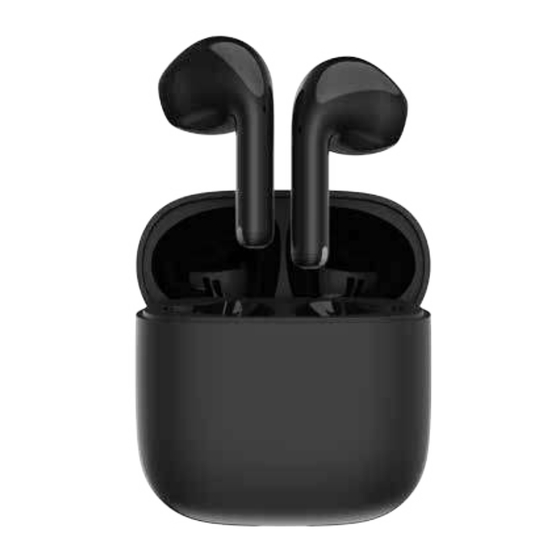
EDIFIER X2 Plus Bedienungsanleitung
Verfügbare Sprachen
Verfügbare Sprachen
EN 1. Power ON/OFF
Take out or place in both earbuds to power on/off.
2. First pairing
1. Once powered on, the earbuds will automatically enter Bluetooth
pairing mode.
2. Select "EDIFIER X2 Plus" from your device list to connect.
3. Reset/left & right connection
x5
x5
The left and right earbuds are connected by default. If the left and
right earbuds are disconnected, follow the steps below to re-pair:
1. Take out the earbuds;
2. Respectively tap the left and right earbuds 5 times in 8 seconds
to reset and enter TWS pairing, white LED will blink slowly.
3. After reset and TWS connection are successful, the earbuds will
enter Bluetooth pairing mode, white and blue LED will blink rapidly.
4. Pairing for new device
1. Once powered on, the earbuds automatically reconnect to the
last device used.
2. If the connection fails, the earbuds enter Bluetooth pairing mode
in 10 seconds.
3. If manually disconnected, the earbuds enter pairing mode
immediately.
4. Select "EDIFIER X2 Plus" from new device's list to connect.
5. Charging
Input: 5V
Note: Make sure the USB port is completely dry before charging.
6. Controls
"x2" double tap,"x3" triple tap
EN 18031-2:
Built-in microphones for hands-free smartphone calls.
X2 Plus
Model: EDF200208
True Wireless Earbuds
Bluetooth
EDIFIER X2 Plus
A
200mA(Earbuds)
Manual
Bluetooth
EDIFIER X2 Plus
5V
1A(Charging case)
x2
x2
x2
x2
x2
x2
x3
x3
Bluetooth
EDIFIER X2 Plus
B

Verwandte Anleitungen für EDIFIER X2 Plus


Inhaltszusammenfassung für EDIFIER X2 Plus
- Seite 1 1. Once powered on, the earbuds will automatically enter Bluetooth pairing mode. 2. Select "EDIFIER X2 Plus" from your device list to connect. 3. Reset/left & right connection The left and right earbuds are connected by default. If the left and right earbuds are disconnected, follow the steps below to re-pair: 1.
- Seite 2 Bluetooth dans les 10 secondes suivantes. 3. En cas de déconnexion manuelle, les écouteurs passent immédiatement en mode de connexion. 4. Sélectionnez « EDIFIER X2 Plus » dans la lis te de votre nouvel appareil pour vous connecter. 5. Charger Entrée: 5 V...
- Seite 3 2. Si la conexión falla, los auriculares accederán al modo de emparejamiento Bluetooth en 10 segundos. 3. Si se desconectan manualmente, los auriculares accederán inmediatamente al modo de emparejamiento. 4. Seleccione "EDIFIER X2 Plus" de la nueva lista de dispositivos para conectarse. 5. Carga Entrada: 5 V...
-
Seite 4: Das Erste Mal Verbinden
2. Wenn die Verbindung nicht hergestellt werden kann, wechseln die Ohrhörer nach 10 Sekunden in den Bluetooth-Kopplungsmodus. 3. Wenn die Verbindung manuell getrennt wird, wechseln die Ohrhörer sofort in den Kopplungsmodus. 4. Wählen Sie „EDIFIER X2 Plus“ aus der Liste der neu anzuschließenden Geräte. 5. Laden Eingang: 5 V 200 mA(Ohrhörer) - Seite 5 2. Se la connessione non riesce, gli auricolari entrano in modalità di associazione Bluetooth in 10 secondi. 3. Se disconnessi manualmente, gli auricolari entrano immediatamente in modalità di associazione. 4. Selezionare "EDIFIER X2 Plus" dall'elenco dei nuovi dispositivi per connettersi. 5. Carica Ingresso: 5 V...
- Seite 6 2. Se a conexão falhar, os fones de ouvido entram no modo de emparelhamento Bluetooth em 10 segundos. 3. Caso sejam desconectados manualmente, os fones de ouvido entram no modo de emparelhamento imediatamente 4. Selecione "EDIFIER X2 Plus" na lista de seu novo dispositivo para conectar 5. Carregamento Entrada: 5 V...
- Seite 7 両方のイヤホンを取り出す 、 または入れて、 製品の電源をオン/オフします 。 2. 初回のペアリング Bluetooth EDIFIER X2 Plus 1. 製品の電源をオンにすると、 イヤホンは自動的にBluetoothペアリングへ 入ります 。 2. Bluetooth機器側のデバイス一覧より 「EDIFIER X2 Plus」 を選び、 接続 します 。 3. リセッ ト/左右接続 左右のイヤホンはデフォルトで接続されています 。 左右のイヤホンが接続さ れていない場合は、 以下の手順に従っ て再度ペアリングしてください : 1. イヤホンを取り出します ; 2. 左右のイヤホンをそれぞれ8秒間に5回タップしてリセッ トし、 TWSペア...
- Seite 8 CN 1. 開/關機 耳機從充電盒取出或放入自動開機/關機。 2. 首次配對 Bluetooth EDIFIER X2 Plus 1. 首次開機自動進入藍牙配對狀態。 2. 在設備上選擇“EDIFIER X2 Plus”完成連接。 3. 重置/左右耳機配對 耳機出廠時已完成TWS配對。若左右耳配對丟失,可按此操作重新配對: 1. 從充電盒取出耳機; 2. 8秒內分別快速5擊左右耳機觸控區,白燈慢閃,進入左右耳機配對模 式並恢復出廠設置。 3. 成功後自動進入藍牙配對狀態,白蓝燈快閃。 4. 配對新設備 Bluetooth Bluetooth EDIFIER X2 Plus EDIFIER X2 Plus 1. 開機後耳機可自動回連最後一次連接過的設備。 2. 如自動回連不成功,10秒後進入藍牙配對狀態。...