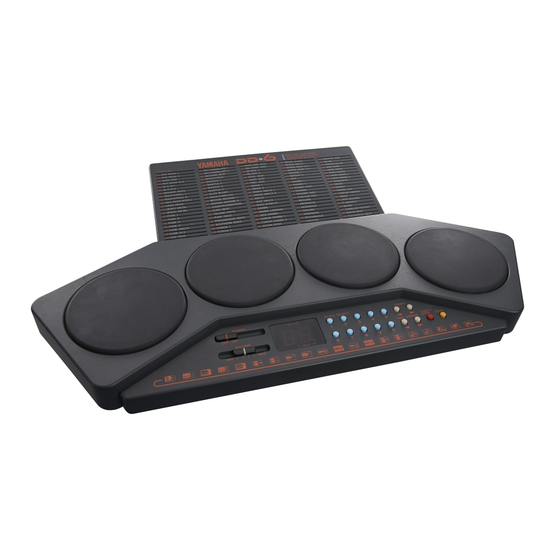
Yamaha DD-6 Bedienungsanleitung
Vorschau ausblenden
Andere Handbücher für DD-6:
- Bedienungsanleitung (19 Seiten) ,
- Bedienungsanleitung (19 Seiten)
Inhaltsverzeichnis
Quicklinks
Inhaltsverzeichnis

Verwandte Anleitungen für Yamaha DD-6


Inhaltszusammenfassung für Yamaha DD-6
- Seite 1 DIGITAL PERCU Owner's Guide Bedienungsanleitung Manuel d'instructions Manual del propietario YAMAHA...
-
Seite 2: Inhaltsverzeichnis
Contents Table matiéres Before Playing ......Avant l'exécution ....Nomenclature Nomenclature ....... Listen to the Demonstration Ecoute de la Séquence de Démonstration Enjoying Manual Percussion . Le plaisir de la Percussion Manuelle . How To Use The Auto Rhythm Section ....... 9 Utilisation de la Section de Rythmes Automatiques Percussion Ensemble... -
Seite 3: Before Playing
DD-6: changements suivants dans Ie operaci6n del DD—6: 1. Tom, Conga und anda•e I. Tom, conga and other drum-type fonctionnement de Ia boite DD—6. - Seite 4 LautsprecherproduzierteKlang vollauf entiöre satisfaction,il est possible un sonido mås saösfactorio si conecta el if you connectthe DD-6 to a bigger d'obtenirun son encore plus agréableen zufriedenstellend ist, können Sie mit DD—6a un sistema de altavoces mås speakersystem. Try usingyour home größeren Lautsprechern die Kangfülle...
-
Seite 5: Bezeichnung
Nomenclature Bezeichnung Nomenclature Nomenclatura Funktionselemente YAMAHA 016000 ö'6öA O POWERSwitch ONetzschalter O Interrupteur d'alimentation (POWER) O Interruptor dealimentaci6n O Lautstärkeregler 0 VOLUME Control OCommande de réglagedu volume (POWER) OSTYLE/ BEAT/TEMPO Display ORhythmus/ Takt/ 'Ibmpo-Anzeige 'Control del volumen(VOLUME) (VOLUME) O Rhythmuswahltasten... -
Seite 6: Listen To The Demonstration
La unidaddepercusi6n digital DD—6 La botte percussion numérique DD—6 The Yamaha DD—6Digital Percussion unit Das Digital-Sch)agzeug DD—6von Yamaha se suministra coo un par de Yamaha est fournie avec une paire de Yamaha Wird einem Paar is supplied with a pair of Percussion palillosdepercusi6n. -
Seite 7: Enjoying Manual Percussion
3. Pressthe DEMObutton O to begin sur ia touche DEMO O pour 3. Drücken Sie die DEMO-ffhste , um 3. h•esione el bot6n DEMO para demonstration playback. You can play zu starten. lancer la reproduction de la séquence de empezar Ia reproducci6n along with the demonstration by taping können hierbei... -
Seite 8: Snare Drum
2. Battre Iespads de percussionO pour 2. Presione cualquiera de los accionadores 2.Tapanyot the Percussion PadsO to 2. Schlagen Sie die einzelnen Pads de percusi6n O para escuchar obtenir des sons de percussion. um sich die zugewiesenen hear percussion sounds. de percusi6n. - Seite 9 1. Press and hold either the or > PAD I.Halten Sie je nach Position der 1.Agpuyer sur la touche PAD ASSIGN 1. Presione y mantenga presionado el O, sebn le sensdanslequelil bot6n PAD ASSIGN < 0 ASSIGN button O , dependingon the gewünschten Instrumentsstimme der Liste die PAD...
-
Seite 10: How To Use The Auto Rhythm Section
Auto Rhythm Automatik Section de Rythmes Secci6n de Ritmo Section Automatiques Automåtico This section offers you an extraordinary 1m DD-6 sind insgesamt Cette section Offre un total extraordinaire Esta secci6n le ofrece un total total of 100 different programmed rhythms, Rhythmen de 100 rythmes programmés différents,... - Seite 11 3. Seleccione un estilo rftmico 3. Sélectlonner un style de rythme 3. Rhythm us-Wahl 3. Select a Rhythm Style Use los botones numéricos para Utiliser les touches numériques pour Geben Sie die Nummer Use the number buttons to enter the introduGr el nümero del estilo rftmico introduire ie numéro du style de rythme gewünschten Rhythmus über die...
-
Seite 12: Percussion Ensemble
5.Set The Tempo 5. Tempo-Einstellung 5. Régler ie tempo del tempo Adjust the tempo as you like by using kann den TEMPO- Régler le tempo selon ses propres goüts Ajuste el tempo como quiera usando the TEMPO controls O . is for en utilisant les commandesTEMPO O Ioscontro)es TEMPO O . -
Seite 13: External Jacks
External Jacks Anschluß Prises Externes Tomas Externas externe Geräte You will find two jacks on the side of the An der Seite des Instruments befinden L'instrument est équipé de deux prises Encontrarå dos tomas en el lado sich zwei Buchsen, die zum Anschluß situées sur le cöté. -
Seite 14: Pflege Des Digital-Schlagzeugs
Taking Care Of Pfiege Entretien de la Cuidados de su Your Digital Digital- Boite å Percussion Percusi6n Digital Percussion Schlagzeugs Numérique Your Digital Percussion DD—6 Will remain Beachten Sie bitte folgende Punkte, La botte å percussion numérique DD—6 Su DD—6de percusi6n in excellent playing condition if care is damit das Digital-Schlagzeug DD—6 restera... -
Seite 15: Spécifications
Specifications Technische Daten Spécifications Especificaciones Percussion Pads Schlagflächen Pads de percussion Pulsadores de percusi6n 4 pads 4 pads 4 pads 4 pulsadores Auto Rhythm Patterns (100 styles) Automatische Rhythmen (100 Muster) Rythmes automatlques (100 styles) Patrones riånicos automåticos (100 estilos) Pop Rock 1, Pop Rock 2, Hard Pop, Pop Pop Rock 1, Pop Rock 2, Hard Pop, Pop Pop Rock 1, Pop Rock 2, Hard Pop, Pop... - Seite 16 Controls and Display Bedienelemente/ Anzeige Commandes et Affichage Controles y visualizador Power Switch, Volume Control, Style/ Netzschal ter, Lautstärkeregler, Interrupteur d'alimentation, Volume, Interruptor de alimentaci6n, control del Affichage Style/ Temps/ Tempo, Beat/ Tempo Display, Style Select Buttons, Rhythmus/ Täkt/ volumen, visualizador Rhythmus-WahItasten, Rhythmus-Liste, Touches de Sålection des Styles.
-
Seite 17: Fehlersuche
2. The POWER switm has been turned OFF and preset pad assignments are restored whenever the DD-6 is turned ON, so mis is not a malfunction. Das falseheInstrurnent ertönt, wenn Sie auf ein Pad schlagen. I. Das gewünschte Instrunpnt iBt dem Pad nicht richtig zugewiæen. -
Seite 18: Fcc Information
If mese corrective measures do not produce satisfactory results, devices. Compiiance with these requirements provides a reasonable • Diæ bezicht Bich nur aufdie von der Yamaha Eumpa GmbH vatnebenen Produkte please contact the local retaler authorizedto distribute this type of •... - Seite 19 YAMAHA YAMAHA CORPORATION P.O.Box 1. Hamznatsu. Japan 9003 VJ07600 Printed in Japan @...