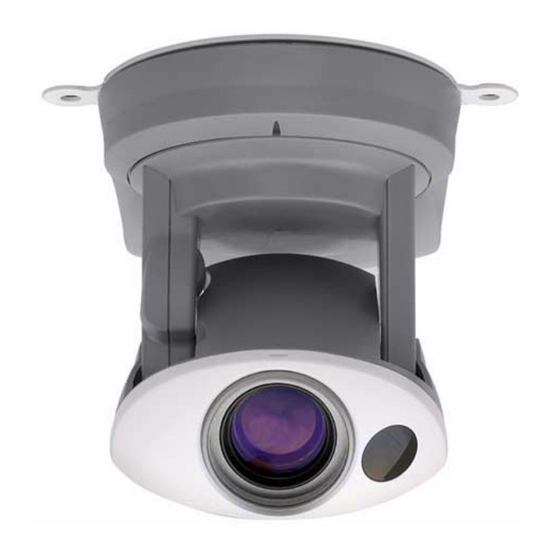
Axis 213 Anleitung
Vorschau anzeigen
Andere Handbücher für 213:
- Installationsanleitung (2 Seiten) ,
- Installationsanleitung (45 Seiten)
Inhaltsverzeichnis
Verfügbare Sprachen
Verfügbare Sprachen
Quicklinks
Installing the AXIS 213
Please observe the following before installing the AXIS 213 PTZ Network Camera.
• This product is designed for indoor use or locations where it is protected from rain and moisture. To
operate the camera in these conditions, use the outdoor housing accessories.
• Do not use strong or abrasive detergents when cleaning the casing. Use a mild detergent and wipe
gently.
• Never position the camera directly towards the sun or other bright objects. Whether the camera is in use
or not, never aim it at the sun or other extremely bright objects.
Connecting the Hardware
Before you begin
If the AXIS 213 is to be mounted in a position where it is difficult to access, it is
recommended that you set the IP address and get the camera up and running before
completing the hardware installation, i.e. skip step 1 below until the installation is
completely verified.
The AXIS 213 PTZ Network Camera is supplied with a bracket for ceiling mounting.
1. Drill two holes in the ceiling and
secure the bracket with the
appropriate screws according to
the ceiling material.
2. Connect a standard RJ-45 network
cable to your AXIS 213 and
connect it to the network.
3. Optionally, connect the Connection
Module (not supplied) to the
camera.
4. Connect the power cable.
5. The hardware installation is now
complete, proceed to Installing on
a Network, on page 2.
Note:
If the AXIS 213 is to be placed upright on a desktop, remove the four screws on the underside of the
unit to remove the bracket. Place the adhesive plastic feet by the screw holes.
AXIS 213 - Installing the AXIS 213
1
Inhaltsverzeichnis

Verwandte Anleitungen für Axis 213


Inhaltszusammenfassung für Axis 213
-
Seite 7: Axis 213 Installieren
Netzwerkeinbindung, auf Seite 8. Hinweis: Wenn AXIS 213 aufrecht auf einem Schreibtisch platziert werden soll, lösen Sie die vier Schrauben an der Unterseite des Geräts und entfernen Sie die Halterung. Setzen Sie die Haftfüße aus Kunststoff an die Schraubenlöcher ein. -
Seite 8: Netzwerkeinbindung
AXIS 213 - AXIS 213 installieren Netzwerkeinbindung AXIS 213 ist für die Einbindung in ein Ethernet-Netzwerk vorgesehen. Dazu muss die PTZ-Kamera entweder manuell oder über einen automatischen Netzwerkdienst (DHCP) eine IP-Adresse zugewiesen werden. Wählen Sie je nach Ihrem Netzwerk eines der fol- genden Verfahren aus: Franzö-... -
Seite 9: Manuelle Installation Mit Axis Ip Utility
AXIS 213 - AXIS 213 installieren Manuelle Installation mit AXIS IP Utility AXIS IP Utility ist eine Windows-Anwendung, mit der AXIS 213 über eine statische IP-Adresse in Ihrem lokalen Netzwerk installiert wird. • Laden Sie die Software AXIS IP Utility kostenlos von den Support-Seiten unter http://www.axis.com/techsup/software herunter. - Seite 10 1. Lassen Sie sich von Ihrem Netzwerkadministrator eine freie IP-Adresse für AXIS 213 zuweisen. 2. Schließen Sie ein Standard-Netzwerkkabel an AXIS 213 an, um das Gerät ins Netz einzubinden. 3. Die Seriennummer/MAC-Adresse (S/N) steht auf dem Aufkleber auf AXIS 213.
- Seite 11 1. Lassen Sie sich von Ihrem Netzwerkadministrator eine freie IP-Adresse für AXIS 213 zuweisen. 2. Schließen Sie ein Standard-Netzwerkkabel an AXIS 213 an, um das Gerät ins Netzwerk einzubinden. 3. Die Seriennummer/MAC-Adresse (S/N) steht auf dem Aufkleber auf AXIS 213.
- Seite 12 AXIS Internet Dynamic DNS Service AXIS Internet Dynamic DNS Service bietet ein denkbar einfaches Verfahren, mit dem AXIS 213 im lokalen Netzwerk sowie über das Internet verfügbar gemacht wird. Bei der Installation erhält AXIS 213 eine URL-Adresse (Webadresse), über die ein Zugriff ermöglicht wird.