Velleman MONCOLHA5PN3 Bedienungsanleitung
5.6" tft lcd-monitor (pal / ntsc)
Inhaltsverzeichnis
Verfügbare Sprachen
Verfügbare Sprachen
Quicklinks
MONCOLHA5PN3 – 5.6" TFT LCD MONITOR (PAL/NTSC)
1. Introduction & Features
Thank you for buying the MONCOLHA5PN3! Please read the manual thoroughly before bringing this device into
service. If the device was damaged in transit, don't install or use it and contact your dealer.
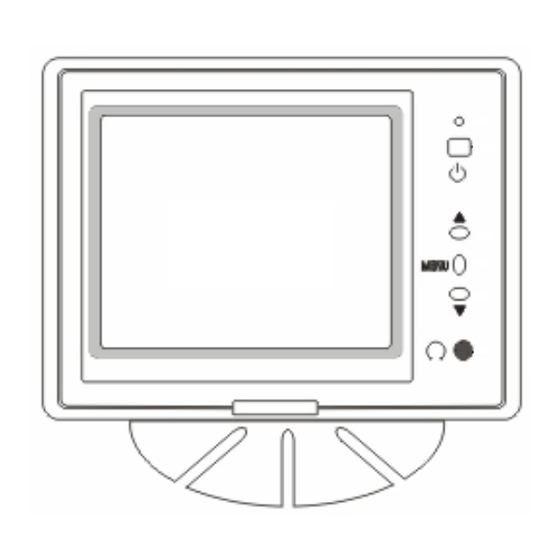
2. Front Panel
Fig. 1
3. Remote Control
Fig. 2
4. Use
• The picture reverse functions (fig.2 #6 & 8) allow you to rotate the screen 180° and view the image upside down.
This is useful for mounting the monitor upside down, for instance on the ceiling of a car.
• The MONCOLHA5PN3 has 2 channels, allowing you to connect a DVD-player or other video source on channel
Av1 as well as a rear view camera on channel Av2.
• Press the on/off button on the front panel (fig.1 #2) or the remote control (fig.2 #2) to power on the device. The
first channel (Av1) is automatically shown. Press the same button to switch between channels Av1 and Av2.
Press the power button for more than 5 seconds to switch the device off.
MONCOLHA5PN3
1. Power LED
2. Power on/off button
3. Adjustment +
4. Menu button
5. Adjustment -
6. Headphones socket
1. Mute
2. Power on/off
3. Brightness +/-
4. NTSC/PAL switch
5. Contrast +/-
6. R/L: change image horizontally (left/right)
7. Colour +/-
8. U/D: change image vertically (up/down)
9. Volume +/-
10. (no function)
11. Adjustment -
12. Menu button
13. Adjustment +
- 1 -
VELLEMAN
Inhaltsverzeichnis

Verwandte Anleitungen für Velleman MONCOLHA5PN3


Inhaltszusammenfassung für Velleman MONCOLHA5PN3
- Seite 9 Diese Funktion ist vor allem praktisch wenn Sie den Monitor umgekehrt montieren möchten (z.B. an der Decke eines Wagens). • Der MONCOLHA5PN3 hat 2 Kanäle, so können Sie einen DVD-Player oder eine andere Videoquelle auf Kanal AV1 anschließen und eine Rückfahrkamera auf Kanal AV2.
-
Seite 10: Technische Spezifikationen
• Wenn Sie das Gerät abkoppeln wollen: Schalten Sie zuerst das Gerät aus, trennen Sie zunächst die Kabel von den Videoquellen und trennen Sie schließlich erst die Kabel vom Monitor. • Benutzen Sie keine chemischen Substanzen um den MONCOLHA5PN3 zu reinigen. Reinigen Sie den Monitor mit einem feuchten Tuch.