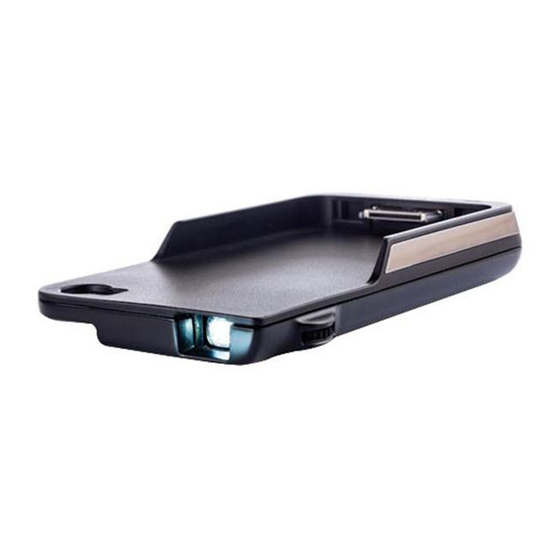
AIPTEK MobileCinema-i50S Benutzerhandbuch
Inhaltsverzeichnis
Verfügbare Sprachen
Verfügbare Sprachen
Quicklinks
User's Manual
Care and Safety Information
1. Keep the device and packaging materials out of the reach of infants and
children.
2. Avoid subjecting the power adapter and other contacts to dripping or splashing
water and dry your hands before you use it. Do not place objects filled with
liquids such as vases, etc. on or near the device.
3. Make sure that the used power outlet is always readily available and never
hidden. In case of emergency, use the power adapter to separate the device
from the power network.
4. Keep your device away from all flames such as candles and do not set them up
in the vicinity of the device.
5. Keep the unit at least 10 cm away from other objects. Make sure the ventilation
is not covered by newspapers, tablecloths, curtains, etc.
6. For your own safety, do not use the projector during thunderstorms or lightning.
7. Relative Humidity is 5~35°C, 80% (Max.), non-condensing.
8. The battery is integrated with the device. Do not dissemble and modify. The battery
should be replaced by qualified service staff only.
9. Ensure that the ambient room temperature is within -10~55°C
10. During the operation, this product may heat lightly, which is normal.
11. Wait before using if the device has been moved from a cold location into a
warm one. Any condensation that has formed may in certain circumstances
destroy the device. As soon as the device has reached room temperature it can
be used without risk.
12. Handle the product with care. Avoid contact with sharp objects. Keep device
away from metallic objects.
13. Place the projector on a flat surface. Any collision or falling to the ground is
likely to damage the product.
14. Do not drop or disassemble the product otherwise the warranty voids. Opening
or removing covers may expose you to dangerous voltage or other hazards.
Refer all servicing to qualified service personnel.
15. Use only the accessories supplied by the
manufacturer.
16. Both product and user's manual are subject to
further improvement or supplement without further
notice.
17. Avoid facing directly into the projector's lens.
I
Inhaltsverzeichnis
Fehlerbehebung

Verwandte Anleitungen für AIPTEK MobileCinema-i50S


Inhaltszusammenfassung für AIPTEK MobileCinema-i50S
-
Seite 2: Sicherheitshinweise
User’s Manual Sicherheitshinweise: 1. Das Gerät und das Verpackungsmaterial außerhalb der Reichweite von Kindern halten. 2. Das Netzteil nicht in Kontakt mit tropfendem oder fließendem Wasser kommen lassen und Hände vor der Benutzung abtrocknen. Keine mit Flüssigkeiten gefüllte Gegenstände, wie z.B. Vasen usw. auf oder in die Nähe des Gerätes stellen. - Seite 5 User’s Manual (DE) Wenn die Lebensdauer des Produkts zu Ende kommt, lassen Sie bitte möglichst alle Komponenten recyceln. Bitte recyceln Sie dieses Produkt ordnungsgemäß, wenn es nicht mehr verwendet werden kann. Es kann nicht als Haushaltsmüll behandelt werden. Es muss separat über die verfügbaren Rücknahme- und Sammelsysteme entsorgt werden.
- Seite 11 Benutzerhandbuch Produktübersicht iPhone Anschluss Fokusrad Projektor-Objektiv LED Anzeige iPhone Lademodus- Taste Mikro USB Ladeanschluss Projektionsmod us-Taste Szenemodus Schalter Kino-Modus: Farbanzeige verbessern. Web-Modus: Textanzeige verbessern. Öko-Modus: Hellgkeit für Energiesparen verringern.
-
Seite 12: Led Anzeigemodi
Benutzerhandbuch Das Produkt aufladen Schließen Sie ein Ende des beiliegenden Mikro-USB-Kabels an den USB-Anschluss des Produktes und das andere Ende an den PC/Notebook oder iPhone USB-Netzteil an. * Das Produkt kann in etwa 5 oder Stunden aufgeladen werden, wenn der Akku leer ist. Laden des iPhone 1. -
Seite 13: Den Projektor Ein/Ausschalten
Benutzerhandbuch Den Projektor ein/ausschalten Drücken Sie 3 Sekunden lang auf die Projektionsmodus-Taste, um den Projektor EIN oder AUS zu schalten. Einstellen des Fokus Stellen Sie den Fokus ein, indem Sie das Fokusrad drehen, um ein schärferes und klareres Bild zu erhalten. -
Seite 14: Technische Daten
Benutzerhandbuch Technische Daten Element Beschreibung Optische Technologie Lichtquelle RGB LED Auflösung 640 x 480 Pixel (VGA) Helligkeit Bis zu 35 Lumen Projektion Bildgröße 152 cm ~ 1524 cm (6” ~ 60” Diagonale) Interner Lautsprecher iOS4, iOS5 Projektionsquelle iPhone 4, iPhone 4S Eingangsleistung 5V / 1A Ausgangsleistung... -
Seite 15: Fehlerbehebung
Benutzerhandbuch Fehlerbehebung Symptom Prüfpunkt Der Projektor kann nicht Stellen Sie sicher, dass der Akku eingeschaltet werden. voll aufgeladen ist. Das projizierte Bild ist zu * Verwenden Sie den Projektor in dunkel. einer dunkleren Umgebung. * Verringern Sie die Größe des projizierten Bildes. - Seite 46 iPhone iPhone...
- Seite 47 iPhone USB iPhone iPhone iPhone iPhone 100% iPhone...
- Seite 51 iPhone iPhone Web (...
- Seite 52 iPhone USB iPhone iPhone iPhone 100% iPhone...
- Seite 61 iPhone iPhone Micro USB...
- Seite 62 Micro USB PC / iPhone USB iPhone 1. iPhone 2. iPhone LED 3 100% LED 2 LED 1 LED 1 iPhone...
- Seite 63 iPhone 1. iPhone “ ” iPhone...
- Seite 64 RGB LED 640 x 480 (VGA) 152 cm ~ 1524 cm (6” ~ 60” iOS4, iOS5 iPhone 4, iPhone 4S 5V / 1A 5V / 1A 1850 mAh, : 120 iPhone : 80% iPhone : 4.5W iPhone : 5W 5 °C ~ 35 °C (L x W x H) 126 x 68 x 20 mm 125 g...