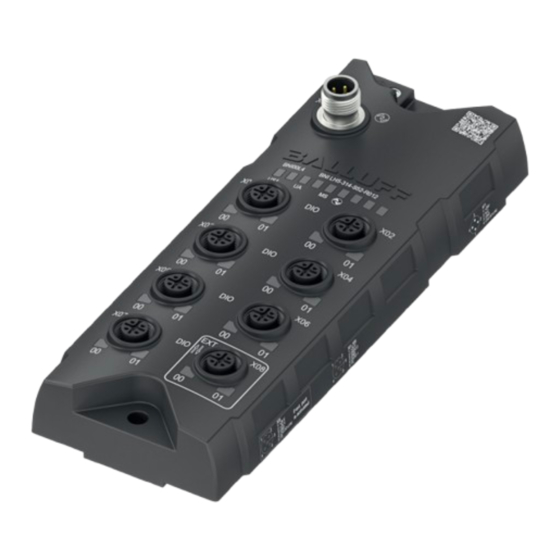
Balluff BNI LH5-314-S52-R012 Betriebsanleitung
Netzwerkschnittstelle – digitaler hub

Verwandte Anleitungen für Balluff BNI LH5-314-S52-R012


Inhaltszusammenfassung für Balluff BNI LH5-314-S52-R012
- Seite 1 BNI LH5-314-S52-R012 BNI LH5-314-S52-R071 BNI LH5-314-S52-Z012 BNI LH5-314-S52-Z071 deutsch Betriebsanleitung english User’s Guide 中文 操作手册...
- Seite 2 www.balluff.com...
- Seite 3 BNI LH5-314-S52-R012 BNI LH5-314-S52-R071 BNI LH5-314-S52-Z012 BNI LH5-314-S52-Z071 Betriebsanleitung deutsch...
- Seite 4 www.balluff.com...
-
Seite 5: Inhaltsverzeichnis
Bestimmungsgemäße Verwendung Vernünftigerweise vorhersehbare Fehlanwendung Allgemeine Sicherheitshinweise Lieferumfang, Transport und Lagerung Lieferumfang Transport Lagerbedingungen Produktbeschreibung Aufbau 4.1.1 BNI LH5-314-S52-R012 und BNI LH5-314-S52-R071 4.1.2 BNI LH5-314-S52-Z012 und BNI LH5-314-S52-Z071 Funktion Anzeigeelemente Bedruckung Einbau und Anschluss Einbau Elektrischer Anschluss 5.2.1 Spannungsversorgung 5.2.2 IO-Link-Schnittstelle (XF1/ 5.2.3 Hilfsspannungsanschluss (XD1) - Seite 6 BNI LH5-314-S52-… Netzwerkschnittstelle – digitaler Hub Reparatur, Demontage und Entsorgung Reparatur Demontage Entsorgung Technische Daten 10.1 Umgebungsbedingungen 10.2 Elektrische Merkmale 10.3 Elektrischer Anschluss 10.4 Schnittstelle 10.5 Material 10.6 Mechanische Merkmale 10.7 Zulassungen und Kennzeichnungen 10.7.1 CE 10.7.2 UL Typenschlüssel deutsch...
-
Seite 7: Gültigkeit
Das allgemeine Warnsymbol in Verbindung mit dem Signalwort GEFAHR kennzeichnet eine Gefahr, die unmit- Mitgeltende Dokumente telbar zum Tod oder zu schweren Verletzungen führt. Weitere Informationen zu diesem Produkt finden Sie unter www.balluff.com auf der Produktseite z. B. in folgenden Verwendete Fachbegriffe und Abkürzungen Dokumenten: – Datenblatt Direct Parameter Page –... -
Seite 8: Sicherheitshinweise
Sicherheitsvorschriften eingehalten werden. Einhaltung der technischen Spezifikationen und Anforde- Insbesondere muss der Betreiber Maßnahmen treffen, rungen und nur mit geeignetem Original Balluff Zubehör dass bei einem Defekt des Produkts keine Gefahren für verwendet wird. Personen und Sachen entstehen können. -
Seite 9: Lieferumfang, Transport Und Lagerung
– Erdungsband aus Edelstahl Zubehör ist nicht im Lieferumfang enthalten und deshalb getrennt zu bestellen. Empfohlenes Zubehör finden Sie unter www.balluff.com auf der Produktseite. Transport ► Produkt in Originalverpackung bis zum Verwendungs- ort transportieren. Lagerbedingungen ► Produkt in Originalverpackung lagern. -
Seite 10: Produktbeschreibung
BNI LH5-314-S52-… Netzwerkschnittstelle – digitaler Hub Produktbeschreibung Aufbau 4.1.1 BNI LH5-314-S52-R012 und BNI LH5-314-S52-R071 X01..X08 X01..X08 1: +24 V 1: +24 V 1: US+ 1: +24V if ext. port 1: +24 V 2: +24 V 1: +24 V 1: US+ 1: +24V if ext. -
Seite 11: Bni Lh5-314-S52-Z012 Und Bni Lh5-314-S52-Z071
BNIXXXX BNI-XXX-XXX-XXX-XXX-XX UA US2 MS Port 1 Port 2 Port 3 Port 4 Port 5 Port 6 Port 7 Port 8 Extension Port Befestigungsloch US2, nur bei BNI LH5-314-S52-Z071 Hilfsspannungs anschluss, nur bei BNI LH5-314-S52-Z071 Bild 4-4: Geräteübersicht www.balluff.com deutsch... -
Seite 12: Funktion
Port 6 – X06 2 A 2 A 2 A 4 A Port 7 – X07 2 A 2 A 2 A 4 A Port 8 – X08 2 A 2 A 2 A 4 A Mit thermischem Derating. Weitere Informationen siehe Kapitel 5.4 auf Seite 16 Für Einstellinformationen siehe Konfigurationsanlei- tung unter www.balluff.com auf der Produkt- seite. deutsch... -
Seite 13: Anzeigeelemente
Ports automatisch die Funktion Ausgang und die dazuge- hörige LED leuchtet entsprechend. Grün statisch Das Gerät ist bereit. Grün wech- IO-Link-Kommunikation ist aktiv. selnd mit Das Gerät ist bereit. LED aus im Verhältnis 10:1, 1 s Periode Grün statisch Keine Kommunikation. Tab. 4-1: Status-LEDs www.balluff.com deutsch... -
Seite 14: Bedruckung
BNI LH5-314-S52-… Netzwerkschnittstelle – digitaler Hub Produktbeschreibung (Fortsetzung) POWER IN Bedruckung Frontseitig BNIXXXX BNI-XXX-XXX-XXX-XXX-XX UA US2 MS QR-Code (Link zum Download-Bereich auf der Produkt-Seite) Bestellcode Bild 4-6: Bedruckung frontseitig (Beispiel) Seitlich Seriennummer Hardware-Version Software-Version Bild 4-7: Bedruckung seitlich (Beispiel) deutsch... -
Seite 15: Einbau Und Anschluss
Unfachgemäßer Aufbau, z. B. durch fehlerhaften Anschluss oder falsche Polarität der Anschlüsse, kann zu Befestigungszubehör finden Sie unter Funktionsverlust oder einer Beschädigung des Produkts www.balluff.com auf der Produktseite. führen. ► Maßnahmen treffen um einen fehlerhaften Anschluss ► Das Modul mit 2 × M6-Schrauben und dem Anzugs- oder eine Umpolung zu verhindern. -
Seite 16: Io-Link-Schnittstelle (Xf1/ )
BNI LH5-314-S52-… Netzwerkschnittstelle – digitaler Hub Einbau und Anschluss (Fortsetzung) 5.2.4 I/O-Port (X01…X08) 5.2.2 IO-Link-Schnittstelle (XF1/ Port X08 kann als Standard-I/O-Port oder als Extension-Port konfiguriert werden. Standard-I/O-Port (X01…X08) BNIXXXX Bild 5-1: Draufsicht auf M12-Stecker, A-codiert Signal BNI IOL-…-_012 BNI IOL-…-_071 Versorgungsspannung Versorgungsspannung Bild 5-3:... -
Seite 17: Erdung
Gerät aufgeteilt. Bild 5-6: Stromaufteilung bei Anschluss eines zweiten Geräts über den Extention-Port Variante BNI LH5-314-S52-Z071 Es muss keine Strombegrenzung beachtet werden, da über den Hilfsspannungsanschluss der Strom für das zweite Gerät unabhängig zur Verfügung gestellt wird. www.balluff.com deutsch... -
Seite 18: Thermisches Derating
Kabels sollte mit dem FE (Funktionserde) entweder sensor- oder modulseitig verbunden sein. Ist die Verbindung sensorseitig nicht möglich, kann das von Balluff als optionales Zubehör verfügbare Adapterkabel verwendet werden. Das Adapterkabel leitet den Schirm des Kables an Pin 5 des Ports und somit an FE. -
Seite 19: Inbetriebnahme Und Betrieb
Anlage fernhalten. ► Inbetriebnahme nur durch geschultes Fachpersonal. Für weitere Informationen siehe ECOLAB-Zertifikat ► Sicherheitshinweise des Anlagen- oder Systemher- unter www.balluff.com auf der Produktseite. stellers beachten. ► Das Produkt regelmäßig reinigen. 1. Anschlüsse auf festen Sitz und richtige Polung prüfen. -
Seite 20: Systemintegration
Das Modul muss in die Steuerung eingebunden werden. Dazu dient die entsprechende IODD-Datei. Die IODD kann kostenlos unter www.balluff.com heruntergeladen werden. Für eine detaillierte Beschreibung der Schnittstelle und über die hier zur Verfügung gestellten Daten siehe Konfigurationsanleitung unter www.balluff.com auf der Produktseite. deutsch... -
Seite 21: Io-Link-Schnittstelle
BNI LH5-314-S52-… Netzwerkschnittstelle – digitaler Hub IO-Link-Schnittstelle Das IO-Link-Gerät unterstützt die in diesem Kapitel aufge- führten Funktionen. Für weitere Informationen siehe Konfigurationsan- leitung unter www.balluff.com auf der Produkt- seite. Primäre Funktionen – Identifikation (Identification) – Geräteerkennung (Device Discovery) – Digitaler I/O-Hub (Digital I/O Hub) Sekundäre Funktionen... - Seite 22 BNI LH5-314-S52-… Netzwerkschnittstelle – digitaler Hub Reparatur, Demontage und Entsorgung Reparatur Reparaturen am Produkt dürfen nur von Balluff durchge- führt werden. Sollte das Produkt defekt sein, nehmen Sie Kontakt mit unserem Service-Center auf. Demontage ► Gerät nur in spannungsfreiem Zustand demontieren! Entsorgung ►...
-
Seite 23: Technische Daten
Datenübertragungsrate COM3 (230,4 kBit/s) Minimale Zykluszeit 2 ms Leistungsdaten für UL siehe Kapitel 10.7.2 auf Prozessdatenlänge Seite 22. Eingang 12 Byte Ausgang 2 Byte Weitere Daten finden Sie unter www.balluff.com auf der Produktseite. 10.5 Material Gehäusematerial 10.1 Umgebungsbedingungen BNI IOL-…-R… PBT, GF30 BNI IOL-…-Z… Zinkdruckguss Umgebungstemperatur −25…+60 °C... -
Seite 24: Zulassungen Und Kennzeichnungen
Anforderungen der aktuellen gekennzeichnet. EU-Richtlinie entsprechen. Kommunikation/Stromversorgung Im Kabel: 10.7.2 UL Gelistetes (CYJV/7) oder R/C (CYJV2/8) Kabel von Balluff mit A-codiertem M12-Gewindestecker mit mindestens 24 V, mindestens 2 A. R/C (AVLV2), gekennzeichnet oder UL-Anforderungen auf der UL-Style Page als geeignet für externe Zusammen- schaltung angegeben, Kabel mit mindestens 28 AWG,... - Seite 25 E/A-Ports: 8 × M12-Buchse (Innengewinde) Z012 = Zinkdruckgussgehäuse (WashDown) Busanschluss: 1 × M12-Stecker (Außengewinde) E/A-Ports: 8 × M12-Buchse (Innengewinde) Z071 = Zinkdruckgussgehäuse (WashDown) Busanschluss: 1 × M12-Stecker (Außengewinde) Hilfsspannungsanschluss: 1 × M12-Stecker (Außengewinde) E/A-Ports: 8 × M12-Buchse (Innengewinde) www.balluff.com deutsch...
- Seite 27 BNI LH5-314-S52-R012 BNI LH5-314-S52-R071 BNI LH5-314-S52-Z012 BNI LH5-314-S52-Z071 User’s guide english...
- Seite 28 www.balluff.com...
- Seite 29 General safety notes Scope of delivery, transport and storage Scope of delivery Transport Storage conditions Product description Construction 4.1.1 BNI LH5-314-S52-R012 and BNI LH5-314-S52-R071 4.1.2 BNI LH5-314-S52-Z012 and BNI LH5-314-S52-Z071 Function Display elements Labeling Installation and connection Installation Electrical connection 5.2.1 Power supply...
- Seite 30 BNI LH5-314-S52-… Network interface – Digital hub Repair, disassembly and disposal Repair Disassembly Disposal Technical data 10.1 Ambient conditions 10.2 Electrical data 10.3 Electrical connection 10.4 Interface 10.5 Materials 10.6 Mechanical features 10.7 Approvals and designations 10.7.1 CE 10.7.2 UL Type code english...
-
Seite 31: User Instructions For This Guide
DANGER identifies a hazard which, if not avoided, will certainly result in death or serious Other applicable documents injuries. Additional information about this product can be found at www.balluff.com on the product page, e.g. in the Technical terms and abbreviations used following documents: – Data sheet Direct Parameter Page –... -
Seite 32: Safety Notes
Safety notes Intended use General safety notes Activities such as installation, connection and This guide describes the Balluff network interface commissioning may only be carried out by qualified BNI LH5-314-S52-… for use as a decentralized hub personnel. module for connecting digital sensors and actuators. This... -
Seite 33: Scope Of Delivery, Transport And Storage
Stainless steel grounding strap Accessories are not included in the scope of delivery and must be ordered separately. Recommended accessories can be found at www.balluff.com on the product page. Transport ► Transport product to location of use in original packaging. -
Seite 34: Product Description
BNI LH5-314-S52-… Network interface – Digital hub Product description Construction 4.1.1 BNI LH5-314-S52-R012 and BNI LH5-314-S52-R071 X01..X08 X01..X08 1: +24 V 1: +24 V 1: US+ 1: +24V if ext. port 1: +24 V 2: +24 V 1: +24 V... -
Seite 35: Bni Lh5-314-S52-Z012 And Bni Lh5-314-S52-Z071
UA US2 MS Port 0 Port 1 Port 2 Port 3 Port 4 Port 5 Port 6 Port 7 Extension Port Befestigungsloch US2, only on BNI LH5-314-S52-Z071 Auxiliary voltage connection, only on BNI LH5-314-S52-Z071 Fig. 4-4: Device overview www.balluff.com english... -
Seite 36: Function
2 A 2 A 4 A Port 7 – X07 2 A 2 A 2 A 4 A Port 8 – X08 2 A 2 A 2 A 4 A With thermal derating. For more information see section 5.4 on page 16 For configuration information, see configuration guide at www.balluff.com on the product page. english... -
Seite 37: Display Elements
LED lights up accordingly. longer be ensured. Green, static The device is ready. Green, IO-Link communication is active. alternating The device is ready. with LED off in a ratio of 10:1, 1 s period Green, static No communication. Tab. 4-1: Status-LEDs www.balluff.com english... -
Seite 38: Labeling
BNI LH5-314-S52-… Network interface – Digital hub Product description (continued) POWER IN Labeling Front BNIXXXX BNI-XXX-XXX-XXX-XXX-XX UA US2 MS QR code (link to the download area on the product page) Order code Type Fig. 4-6: Front printing (example) Side Serial number Hardware version Software version Fig. -
Seite 39: Installation And Connection
You can find mounting accessories under of the function and property damage. www.balluff.com on the product page. ► Take measures to prevent misconnection or polarity reversal. ► Fasten the module with 2 × M6 screws and a ►... -
Seite 40: Io-Link Interface (Xf1/ )
BNI LH5-314-S52-… Network interface – Digital hub Installation and connection (continued) 5.2.4 I/O-Port (X01…X08) 5.2.2 IO-Link interface (XF1/ Port X08 can be configured as a standard I/O port or as an extension port. Standard I/O-Port (X01…X08) BNIXXXX Fig. 5-1: Top view of M12 plug, A-coded Signal BNI IOL-…-_012 BNI IOL-…-_071... -
Seite 41: Grounding
Fig. 5-6: Current split when connecting a second device via the extension port Variant BNI LH5-314-S52-Z071 There is no current limitation to consider because the current for the second device is supplied independently via the auxiliary voltage connection. www.balluff.com english... -
Seite 42: Thermal Derating
If connection is not possible on the sensor side, the adapter cable available from Balluff as an optional accessory can be used. The adapter cable routes the shielding of the cable to Pin 5 of the port and thus to FE. -
Seite 43: Startup And Operation
► Persons must keep away from the system’s hazardous zones. For further information, see ECOLAB certificate at ► Startup must be performed only by trained technical www.balluff.com on the product page. personnel. ► Observe the safety instructions of the equipment or ► Clean the product regularly. -
Seite 44: System Integration
The corresponding IODD file is used for this. The IODD can be downloaded free of charge from www.balluff.com. For a detailed description of the interface and the data provided here, see the configuration guide at www.balluff.com on the product page. english... -
Seite 45: Io-Link Interface
BNI LH5-314-S52-… Network interface – Digital hub IO-Link interface The IO-Link device supports the functions listed in this chapter. For more information, see the configuration guide at www.balluff.com on the product page. Primary functions – Identification – Device Discovery –... - Seite 46 BNI LH5-314-S52-… Network interface – Digital hub Repair, disassembly and disposal Repair Repairs to the product may only be performed by Balluff. If the product is defective, contact our Service Center. Disassembly ► Only disassemble the device when it is de-energized! Disposal ►...
-
Seite 47: Technical Data
Minimum cycle time 2 ms Performance data for UL section 10.7.2 on Process data length page 22. Input 12 Byte Output 2 Byte Further data can be found at www.balluff.com on the product page. 10.5 Materials Housing material 10.1 Ambient conditions BNI IOL-…-R… PBT, GF30 BNI IOL-…-Z…... - Seite 48 The CE Mark verifies that our products meet the requirements of the current EU Communication/Power In cord assembly: Directive. Listed (CYJV/7) or R/C (CYJV2/8) cord assembly by Balluff with threaded male A-coded M12 connector rated 24 V 10.7.2 UL minimum, 2 A minimum. R/C (AVLV2) marked or specified in UL style page as suitable for external interconnection 28 AWG minimum, 300 V minimum cord.
- Seite 49 I/O ports: 8 × M12 socket (female thread) Z071 = Zinc die cast housing Bus connection: 1 × M12 plug (male thread) Auxiliary voltage connection: 1 × M12 plug (male thread) I/O ports: 8 × M12 socket (female thread) www.balluff.com english...
- Seite 51 BNI LH5-314-S52-R012 BNI LH5-314-S52-R071 BNI LH5-314-S52-Z012 BNI LH5-314-S52-Z071 操作手册 中文...
- Seite 52 www.balluff.com...
- Seite 53 符合规定的使用 2.2 预计可能发生的错误用途 2.3 一般安全提示 供货范围、运输和存放 3.1 供货范围 3.2 运输 3.3 仓储条件 产品描述 4.1 结构 4.1.1 BNI LH5-314-S52-R012和BNI LH5-314-S52-R071 4.1.2 BNI LH5-314-S52-Z012和BNI LH5-314-S52-Z071 4.2 功能 4.3 显示元件 4.4 印刷标识 安装和连接 5.1 安装 5.2 电气连接 5.2.1 供电电压 5.2.2 IO-Link接口 (XF1/ 5.2.3 辅助电压接口 (XD1) 5.2.4 I/O端口...
- Seite 54 BNI LH5-314-S52-… 网络接口 – 数字集线器 维修、拆卸和废弃处理 9.1 维修 9.2 拆卸 9.3 废弃处理 技术数据 10.1 环境条件 10.2 电气特性 10.3 电气连接 10.4 接口 10.5 材料 10.6 机械特性 10.7 认证和标志 10.7.1 CE 10.7.2 UL 型号编码 中文...
-
Seite 55: 关于本操作手册的用户提示
- BNI LH5-314-S52-Z012 ► 防止危险的措施 订购代码:BNI00KK - BNI LH5-314-S52-Z071 下列信号词的意义: 订购代码:BNI00KL 注意 请在安装和运行本产品前完整阅读本操作手册和其他适用 标识可能导致产品损坏或毁坏的危险。 文档。 小心 原版操作手册 带“小心”信号词的一般警示符号代表可能导致轻度至 本操作手册以德语编写。其他语言版本均从本操作手册翻 中度伤害的危险。 译而来。 ©版权所有2025,Balluff GmbH 危险 所有内容均受到著作权保护。保留包括复制、出版、编辑 带提示词“危险”的一般警示符号用于标识可能直接导 和翻译在内的所有权利。 致死亡或重伤的危险。 1.2 其他适用文档 1.5 使用的专业术语及缩写 有关该产品的更多信息,请参见www.balluff.com产品页 面,例如以下文档: 直接参数页 - 数据表 电磁兼容性 - 一致性声明 - 废弃处理... -
Seite 56: 安全提示
BNI LH5-314-S52-… 网络接口 – 数字集线器 安全提示 2.1 符合规定的使用 2.3 一般安全提示 安装、连接和调试等工作只允许由经过培训的专业人员进 本手册描述了巴鲁夫网络接口BNI LH5-314-S52-…,它 行。 是一种分散式集线器模块,用于连接数字传感器和执行 器。这是一个IO-Link设备,通过IO-Link与上级IO-Link 经过培训的专业人员要能够基于其专业培训、知识、经验 主控组件通信。 以及对相关规定的认知,对他所从事的工作进行判断,识 别潜在危险并且采取恰当的安全措施。 只有当产品按照操作手册和随附的文档描述并遵守技术规 范和要求且使用合适的原装巴鲁夫附件使用时,才能保证 用户有责任遵守当地现行的安全规定。 功能按照技术数据说明正常运行。 特别是在产品出现故障的情况下,运营方必须采取必要措 施,防止出现人员伤害和财产损失。 否则视为未按规定使用。禁止不合规使用,否则将无法实 现制造商的保修和责任赔偿承诺。 不允许打开、改装或更改本产品。在产品出现损坏或不可 排除的故障情况下,必须立即停止运行,并防止擅自使 用。 2.2 预计可能发生的错误用途 BNI模块原则上具有良好的耐化学性和耐油性。在高浓度 ( 本产品不是为以下应用和区域设计的,不允许在那里使 例如由于低含水量) 的腐蚀性介质 (例如化学品、油、润滑 用: 剂和冷却剂) 中使用时,必须根据应用预先检查材料耐受 - 与安全相关的应用,在这种情况下人员安全视设备功 性。如果由于这种腐蚀性介质导致BNI模块发生故障或损... -
Seite 57: 供货范围、运输和存放
BNI LH5-314-S52-… 网络接口 – 数字集线器 供货范围、运输和存放 3.1 供货范围 - IO-Link模块 - 1个螺栓M4x6 - 不锈钢接地带 附件不包含在供货范围中,因此需另行订购。 建议的附件请参见www.balluff.com产品页面。 3.2 运输 ► 将产品装在原包装内,运输至使用地点。 3.3 仓储条件 ► 将产品装在原包装内存储。 ► 注意环境条件 (参见环境条件,第21页)。 www.balluff.com 中文... -
Seite 58: 产品描述
BNI LH5-314-S52-… 网络接口 – 数字集线器 产品描述 4.1 结构 4.1.1 BNI LH5-314-S52-R012和 BNI LH5-314-S52-R071 X01..X08 X01..X08 1: +24 V 1: +24 V 1: US+ 1: +24V if ext. port 1: +24 V 1: +24 V 1: US+ 1: +24V 2: +24 V if ext. port 2: DI/DO 2 2: UA- 2: N.C. -
Seite 59: Bni Lh5-314-S52-Z012和Bni Lh5-314-S52-Z071
M12x1 30.5 30.5 US2,仅适用于BNI LH5-314-S52-Z071 辅助电压接口,仅适用于BNI LH5-314-S52-Z071 图 4-3: 尺寸 FE接口 固定孔 POWER IN IO-Link端口 辅助电压接口 BNIXXXX BNI-XXX-XXX-XXX-XXX-XX UA US2 MS 端口1 端口2 端口3 端口4 端口5 端口6 端口7 端口8 扩展端口 固定孔 US2,仅适用于BNI LH5-314-S52-Z071 辅助电压接口,仅适用于BNI LH5-314-S52-Z071 图 4-4: 设备概览 www.balluff.com 中文... - Seite 60 各M12端口 的最大值 端口 各线脚通道上的最大输出电流 线脚4 线脚2 线脚4 线脚2 – 00 – 01 – 00 – 01 端口1 – X01 端口2 – X02 端口3 – X03 端口4 – X04 端口5 – X05 端口6 – X06 端口7 – X07 端口8 – X08 具有温度降额特性。更多信息参见章节5.4,第16页 有关设置信息,请参见www.balluff.com产品页 面上的配置说明。 中文...
-
Seite 61: 显示元件
IO-Link通信正在建立 (预操作模式)。 蓝色闪烁 可以通过系统命令激活设备识 3 Hz 别,以重新找回设备。 绿色闪烁,1 没有IO-Link通信。 红色静态 一般故障 长亮蓝色 必须进行保养。 关闭 扩展端口未激活。 黄色闪烁 设备未按照规范运行。无法保证 表 4-3: 扩展端口LED 3 Hz 测量信号是可靠的。 在扩展模式下,扩展端口的线脚2会自动获得输出端功 绿色静态 设备已就绪。 能,关联的LED也会相应亮起。 LED按照10 IO-Link通信激活。设备已就绪。 比1的比例交 替显示绿色/ 关闭,周期 为1秒 绿色静态 无通信。 表 4-1: 状态LED www.balluff.com 中文... -
Seite 62: 印刷标识
BNI LH5-314-S52-… 网络接口 – 数字集线器 产品描述 (续) POWER IN 4.4 印刷标识 正面 BNIXXXX BNI-XXX-XXX-XXX-XXX-XX UA US2 MS 二维码 (产品页面上下载区的链接) 订购代码 型号 图 4-6: 正面印刷标识 (示例) 侧面 系列号 硬件版本 软件版本 图 4-7: 侧面印刷标识 (示例) 中文... -
Seite 63: 安装和连接
BNI LH5-314-S52-… 网络接口 – 数字集线器 安装和连接 5.1 安装 注意 尺寸参见图 4-1,第8页。 功能丧失和设备损坏 安装不当 (例如由于连接错误或接口极性不正确) 可能导 致产品功能丧失或损坏。 有关固定附件,请参见 ► 采取措施,避免错误连接或混淆极性。 www.balluff.com产品页面。 ► 避免擅动接口。 ► 接口上的电压切勿超过36 V。 ► 用2个M6螺栓和3 Nm拧紧力矩通过固定孔 (参见 图 4-2,第8页) 固定模块。 尽量通过独立的电源为传感器/模块和执行器供 电,以便在停电时确保仍能独立运行。 达到防护等级的前提条件: 对于IP67,所有插头和密封帽都必须正确连接,并且必须 对 达到0.6 Nm的拧紧力矩 (请参见插头连接和密封帽的数据 于UL:遵守电缆要求和电源要求 (参见第 页)。... -
Seite 64: Io-Link接口 (Xf1/ )
BNI LH5-314-S52-… 网络接口 – 数字集线器 安装和连接 (接上页) 5.2.4 I/O端口 (X01…X08) 5.2.2 IO-Link接口 (XF1/ 端口X08可配置为标准I/O端口或扩展端口。 标准I/O端口 (X01…X08) BNIXXXX 图 5-1: M12插头俯视图,A编码 线脚 信号 BNI IOL-…-_012 BNI IOL-…-_071 图 5-3: M12插口俯视图,A编码 模块及所连接传感器的 模块供电电压 (U 供电电压 (U – 执行器供电电压 (U 线脚 信号 GND,参考电位 +24 V,传感器供电 C/Q,IO-Link数据传输电缆 数字输入端/输出端 GND,传感器供电,输入端,输出端 表 5-1: IO-Link接口线脚布置 数字输入端/输出端 5.2.3 辅助电压接口 (XD1) 功能性接地... -
Seite 65: 使用扩展端口时的电流限制
BNI LH5-314-S52-… 网络接口 – 数字集线器 安装和连接 (接上页) 5.2.5 接地 为了抵消EMC干扰,必须使用功能性接地连接。 ► 将接地接口与设备的功能性接地 (FE) 连接。 外壳和设备之间的FE连接必须必须具有低阻 抗,并尽可能短。 ► 使用随同交付的接地带。 图 5-5: 接地接口 5.3 使用扩展端口时的电流限制 型号 BNI LH5-314-S52-Z012 注意电流限制:功率在第一个和第二个设备之间按1:1分 配。 图 5-6: 通过扩展端口连接第二个设备时的电流分配 型号 BNI LH5-314-S52-Z071 无需遵守电流限制,因为第二个设备的电源是通过辅助电 压接口独立提供的。 www.balluff.com 中文... -
Seite 66: 温度降额
BNI LH5-314-S52-… 网络接口 – 数字集线器 安装和连接 (接上页) 5.4 温度降额 型号BNI LH5-314-S52-Z071的大功率输出端可使四个 端口在温度降额的情况下输出高达四安培的电流。 图 5-7: 温度降额曲线 图 5-7中的降额曲线显示了各种应用中在电阻负载情况下 5.5 屏蔽与布线 的连续运行 (> 3小时): - A = 仅激活一个输出端 (4个端口中的1个,如端口 X05.01) 屏蔽 - B = 激活两个输出端 (4个端口中的2个,如端口X05.01 和端口X07.01) 与上级IO-Link主控设备的连接以及与其他设备的连接通 - C = 激活四个输出端 (全部4个端口) 过标准传感器电缆实现。 在非连续运行时,降额的影响较小,取决于接通时间 (接 通/断开比率) (例如:接通3秒,断开1分钟)。... -
Seite 67: 调试和运行
调试 6.3 清洁 有关UL要求,请参见第10.7章 (第22页)。 危险 系统运动不受控制 只能在停机状态下对产品进行清洁。 调试过程中,如果BNI模块是控制系统的一部分而其参 该产品可使用冲洗工艺进行清洗,并可耐受食品和饮料行 数尚未设置,则可能导致系统运动不受控制。由此可能 业中基于过氧酸和胺类的多种碱性、中性和酸性清洗介质 造成人员伤害或财产损失。 (含氯或不含氯)。 ► 相关人员必须远离设备的危险区域。 ► 仅允许由接受过培训的专业人员调试设备。 详细信息请参见www.balluff.com产品页面上的 ► 请务必遵守设备或系统制造商的安全提示。 ECOLAB证书。 1. 检查接口是否牢固且电极是否正确。更换损坏的接 ► 定期清洁产品。 口。 清洁间隔取决于环境条件和使用频率。 2. 接通系统。 3. 检查可调节的参数,必要时重新配置BNI。 6.4 保养 本产品免维护。 尤其要在更换BNI或进行维修后由制造商检查数值 为了保持防护等级,根据运行条件,可能需要定期检查插 是否正确。 头和密封帽的拧紧力矩,并在必要时复紧 (参见章节5.1,... -
Seite 68: 系统集成
BNI LH5-314-S52-… 网络接口 – 数字集线器 系统集成 需要进行参数设置。详细信息请参见配置说明。 该模块必须集成到控制系统中。为此需要对应的IODD文 件。 IODD文件可以在www.balluff.com上免费下载。 有关接口及可用数据的详细说明,请参见 www.balluff.com产品页面上的配置手册。 中文... -
Seite 69: Io-Link接口
BNI LH5-314-S52-… 网络接口 – 数字集线器 IO-Link接口 IO-Link设备支持本章列出的功能。 详细信息请参见www.balluff.com产品页面上的 配置说明。 主要功能 - 识别 (Identification) - 设备识别 (Device Discovery) - 数字I/O集线器 (Digital I/O Hub) 次级功能 - 信号延迟 (Signal Delay) - 信号速度监控 (Signal Speed Monitor) - 切换计数器 (Switching Counter) - 基本统计 (Basic Statistics) - 逻辑块 (Logic Blocks) - 运行小时计数器... - Seite 70 BNI LH5-314-S52-… 网络接口 – 数字集线器 维修、拆卸和废弃处理 9.1 维修 产品的维修只允许由巴鲁夫进行。 如果产品损环,请与我们的服务中心联系。 9.2 拆卸 ► 只能在断电状态下拆卸设备! 9.3 废弃处理 ► 请遵守所在国的废弃处理规定。 更多信息请参见www.balluff.com产品页面。 中文...
- Seite 71 68 × 38.3 × 183.5 mm 电源电压U 12…30.2 V DC BNI IOL-…-Z… 68 × 31.8 × 181.5 mm 余波 (电源电压) < 1 % 重量 = 24 V时的空载电流消耗 40 mA BNI LH5-314-S52-R012 约420 g BNI LH5-314-S52-R071 约440 g 数字输入端/输出端性能 BNI IOL-…-Z… 约540 g 输入端 1型、3型 输入频率...
- Seite 72 BNI LH5-314-S52-… 网络接口 – 数字集线器 技术参数 10.7 认证和标志 电缆尺寸 电源电缆: 更多有关指令、认证和标准的信息请参见 所有型号均使用带L型编码M12螺纹插头、电压不低于 www.balluff.com产品页面。 24 V、电流不低于16 A的列名电缆或R/C (CYJV2/8) 电 缆。S、SJ、SO、ST、SV或R/C (AVLV2) 列名电缆,在 UL样式页面上标明或指定为适用于外部连接、额定电压最 10.7.1 CE 低300 V、至少14 AWG,除非按照下表标明电缆的最大负 载电流和过流保护。 通信/电缆中的供电: 我们通过CE标志证明我方产品符合最新 巴鲁夫列名 (CYJV/7) 或R/C (CYJV2/8) 电缆,带A型编码 欧盟指令的要求。 M12螺纹插头,电压最低24 V,电流最低2 A。R/C (AVLV2),在UL样式页面上标明或注明适用于外部互连, 10.7.2 UL 电缆至少28 AWG,电压最低300 V。可以单独作为附件提...
- Seite 73 总线接口:1 × M12插头 (外螺纹) 辅助电压接口:1 × M12插头 (外螺纹) 输入/输出端口:8 × M12插口 (内螺纹) Z012 = 压铸锌外壳 (冲洗) 总线接口:1 × M12插头 (外螺纹) 输入/输出端口:8 × M12插口 (内螺纹) Z071 = 压铸锌外壳 (冲洗) 总线接口:1 × M12插头 (外螺纹) 辅助电压接口:1 × M12插头 (外螺纹) 输入/输出端口:8 × M12插口 (内螺纹) www.balluff.com 中文...
- Seite 74 Technical Service Hub Technical Service Hub Region EMEA Region APAC Region Americas Balluff GmbH Balluff Automation (Shanghai) Co., Ltd. Balluff Inc. Schurwaldstrasse 9 No. 800 Chengshan Rd, 8F, Buidling A, 8125 Holton Drive 73765 Neuhausen a.d.F. Yunding International Commercial Plaza...