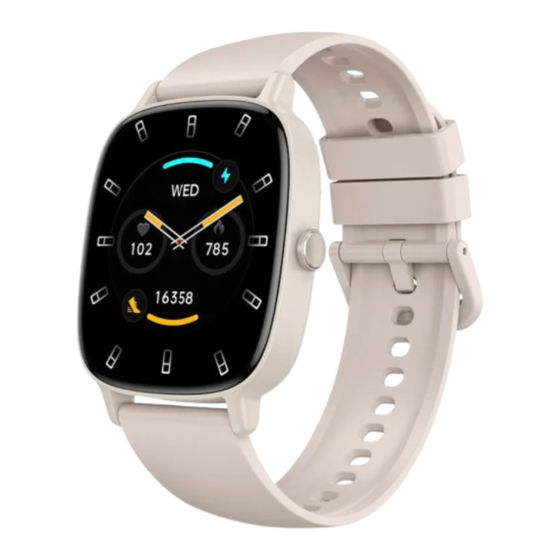
KSIX PULSE Benutzerhandbuch
Inhaltsverzeichnis
Verfügbare Sprachen
Verfügbare Sprachen
Quicklinks
ENGLISH – USER MANUAL
SMARTWATCH PULSE – BXSW31X
1. Characteristics
1.1 Technical specifications
Display: 1.83" multitouch 240 x 284 px
Battery: 300 mAh (polymer lithium)
Voltage frequency: 5 V / 1 MHz
Frequency range: 2,400-2,483.5 MHz
Maximum transmitted power in frequency ranges: 10 dB
App: KSIX Plus / Da Fit
Compatibility: iOS 9.0 + Android 9.0 and above
Housing material: ABS + PC
Display material: Glass
Strap material: Silicone
Protection rating: IP68
Watch dimensions: 46.2 x 39.5 x 10.9 mm
Strap width: 22 mm
Wrist closure diameter: 4-9 cm
Weight: 39.5 g
Battery life: Up to 7 days
Charging time: 2.5 hours
Watch languages: English, Spanish, French, Italian, German,
Portuguese, Czech, Danish
App languages: English, Chinese, Japanese, Korean,
German, French, Spanish, Arabic, Russian, Traditional
Chinese, Ukrainian, Italian, Portuguese, Dutch, Polish,
Swedish, Finnish, Danish, Norwegian, Hungarian, Czech,
Bulgarian, Romanian, Slovak, Latvian, Indonesian, Thai,
Turkish, Vietnamese, Hindi, Pashto, Lithuanian, Estonian,
Slovenian, Croatian, Greek, Filipino, Hebrew, Malay, Serbian,
Bosnian
1.2 In the box
1 x Smartwatch
1 x Magnetic cable USB-A (60 cm)
1 x Interchangeable strap (22 mm)
1 x Manual de usuario
Inhaltsverzeichnis

Verwandte Anleitungen für KSIX PULSE


Inhaltszusammenfassung für KSIX PULSE
- Seite 1 Voltage frequency: 5 V / 1 MHz Frequency range: 2,400-2,483.5 MHz Maximum transmitted power in frequency ranges: 10 dB App: KSIX Plus / Da Fit Compatibility: iOS 9.0 + Android 9.0 and above Housing material: ABS + PC Display material: Glass...
-
Seite 2: Product Parts
“System” and “Turn off”. 1.7 About IP protection rating The Pulse smartwatch has an IP68 protection rating in fresh water. Disclaimer: Although the watch has an IP68 protection rating, we do not recommend direct and prolonged contact with water, or use in saunas or steam baths. -
Seite 3: Download The App
2. Initial setup 2.1 Download the app The Pulse smartwatch-compatible apps are called KSIX Plus and Da Fit. There are two ways to download it: - Tap here to download the Da Fit or KSIX Plus app from Google Play Store. -
Seite 4: Changing The Watch Face
For the smartwatch functions to work, make sure that you enable them via the Da Fit or KSIX Plus app. 3.1 How to browse through the smartwatch The usage method of the Pulse smartwatch is very simple and intuitive: ·... -
Seite 5: Music Control
To correctly configure the voice assistants, you must have successfully synchronized smartwatch your smartphone via the Da Fit or KSIX Plus app and enabled all accesses. You can access this function from the main menu. To do so, tap on the Voice Assistant icon. 3.6 Music control The smartwatch features a music control tool. - Seite 6 After a few seconds, your blood pressure data will be displayed. It will also be displayed in the Da Fit or KSIX Plus app health section. 4.5 Blood oxygen saturation meter The Pulse smartwatch allows you to measure your blood oxygen saturation levels instantly.
- Seite 7 When you set all this info, a calendar with certain menstrual cycle data will be displayed in this app option. If you set reminders, they will show in the Pulse smartwatch. 4.8 Sedentary reminder You can set sedentary reminders in order to maintain a more active lifestyle.
-
Seite 8: Especificaciones Técnicas
For more information, contact your vendor or local waste management authorities. ESPAÑOL – MANUAL DE USUARIO RELOJ INTELIGENTE PULSE – BXSW31X 1. Características 1.1 Especificaciones técnicas Pantalla: multitáctil de 1,83 pulgadas, 240 x 284 píxeles Batería: 300 mAh (polímero de litio) -
Seite 9: Partes Del Producto
De lo contrario, el sistema de inserción podría sufrir daños irreparables. - Para quitar una correa: Sujete la correa, pulse el botón de la parte posterior del reloj que corresponde a esa correa y deslícela hacia la izquierda. -
Seite 10: Descargar La Aplicación
Las aplicaciones compatibles con el reloj inteligente Pulse se llaman KSIX Plus y Da Fit. Hay dos formas de descargarlas: - Pulse aquí para descargar la aplicación Da Fit o KSIX Plus desde Google Play o App Store. - También puede descargar la aplicación directamente escribiendo «KSIX Plus»... - Seite 11 Da Fit o KSIX Plus. 3.1 Cómo navegar por el reloj inteligente El método de uso del reloj inteligente Pulse es muy sencillo e intuitivo: · Deslizando la pantalla - Deslice hacia la izquierda para ver las funciones de actividad.
- Seite 12 · Realizar llamadas Hay tres opciones para realizar llamadas: - Llamar a un contacto: El reloj inteligente Pulse te permite llamar a los contactos almacenados en tu smartphone. Para sincronizar los contactos con el reloj inteligente, puedes hacerlo desde la aplicación,...
-
Seite 13: Otras Funciones
Da Fit o KSIX Plus y haber habilitado todos los accesos. Puedes acceder a esta función desde el menú principal. Para ello, pulsa el icono del asistente de voz. - Seite 14 El smartwatch funciona mientras duermes y proporciona estadísticas sobre la duración y la calidad de tu sueño. La información disponible en esta herramienta es más detallada en la aplicación Da Fit o KSIX Plus que en el smartwatch. 4.7 Ciclo menstrual La aplicación Da Fit o KSIX Plus te permite configurar...
- Seite 15 5. Cláusula de exención 1. Los datos de frecuencia cardíaca y presión arterial del smartwatch Pulse no deben utilizarse como base para ninguna decisión médica o diagnóstica. 2. Sólo personal médico cualificado puede diagnosticar y tratar enfermedades cardiovasculares y problemas de hipertensión.
- Seite 16 Gamme de fréquences : 2 400-2 483,5 MHz Puissance maxi émise dans les gammes de fréquences : 10 Application : KSIX Plus / Da Fit Compatibilité : iOS 9.0 + Android 9.0 et supérieur Matériau du boîtier : ABS + PC Matériau de l'écran : verre...
-
Seite 17: Pièces Du Produit
1.4 Comment fixer et retirer les sangles Les sangles du Pulse sont interchangeables. La sangle la plus courte doit être placée dans la fente supérieure de l'écran, tandis que la sangle la plus longue doit être placée dans la fente inférieure de l'écran. -
Seite 18: Mise Sous/Hors Tension
Store. Vous pouvez également télécharger l'application directement en tapant « KSIX Plus » ou « Da Fit » dans le moteur de recherche Google Play ou App Store. 2.2 Inscrivez-vous dans l'application fois l'application installée, ouvrez-la. L'écran suivant s'affiche : 2. - Seite 19 Da Fit ou KSIX Plus. 3.1 Comment naviguer dans la montre intelligent L'utilisation de la montre connectée Pulse est très simple et intuitive : · Via le balayage de l'écran - Balayez vers la gauche pour afficher les fonctionnalités d'activité.
- Seite 20 · Passer des appels Trois options s'offrent à vous pour passer des appels : - Appeler un contact : la montre connectée Pulse vous permet d'appeler les contacts enregistrés dans votre smartphone. Pour synchroniser vos contacts avec la montre connectée, vous pouvez le faire depuis l'application en...
- Seite 21 La smartwatch Pulse est compatible avec les assistants vocaux. Pour configurer correctement les assistants vocaux, vous devez avoir synchronisé la smartwatch avec votre smartphone via l'application Da Fit ou KSIX Plus et avoir activé tous les accès. Vous pouvez accéder à cette fonction depuis le menu principal.
- Seite 22 4. Santé 4.1 Sports La Pulse vous permet de suivre une grande variété de sports. Accédez au menu principal de la montre connectée et appuyez sur l'icône jaune représentant un bras. Une fois à...
- Seite 23 4.7 Cycle menstruel L'application Da Fit ou KSIX Plus vous permet de définir des rappels liés à votre cycle menstruel. Accédez à la section Appareil et appuyez sur l'option Suivi des règles. Une fois dans cette section, vous pourrez définir certaines données relatives à...
- Seite 24 il a été conçu. Si le produit est résistant aux liquides, après toute immersion ou utilisation dans des liquides, rincez le produit à l'eau douce et séchez-le. Conservez toujours le produit dans un endroit sec et à l'abri de l'humidité. Conservez toujours le produit à...
-
Seite 25: Technische Daten
Akku: 300 mAh (Polymer-Lithium) Spannungsfrequenz: 5 V / 1 MHz Frequenzbereich: 2.400–2.483,5 MHz Maximale Sendeleistung in Frequenzbereichen: 10 dB App: KSIX Plus / Da Fit Kompatibilität: iOS 9.0 + Android 9.0 und höher Gehäusematerial: ABS + PC Displaymaterial: Glas Armbandmaterial: Silikon Schutzart: IP68 Uhrmaße: 46,2 x 39,5 x 10,9 mm... - Seite 26 3. Riemenknopf 5. Grüne Sensorleuchte 1.4 Anbringen und Entfernen der Armbänder Die Armbänder des Pulse sind austauschbar. Das kürzere Armband muss in den oberen Schlitz des Displays eingesetzt werden, während das längere Armband in den unteren Schlitz des Displays eingesetzt werden muss. Andernfalls kann das Einstecksystem irreparabel beschädigt werden.
-
Seite 27: App Herunterladen
KSIX Plus und Da Fit. Es gibt zwei Möglichkeiten, sie herunterzuladen: - Tippen Sie hier, um die Da Fit- oder KSIX Plus-App aus Google Play oder dem App Store herunterzuladen. - Tippen Sie hier, um die Da Fit- oder KSIX Plus-App aus Google Play oder dem App Store herunterzuladen. - Seite 28 Einstellungen Ihres Smartphones, ob die Smartwatch richtig gekoppelt ist. Ist dies nicht der Fall, trennen Sie die Smartwatch in der Da Fit- oder KSIX Plus-App und wiederholen Sie den Kopplungsvorgang. - Wenn das Gerät nicht aufgeladen wird, kann dies an einem verschmutzten oder verrosteten Ladeanschluss liegen.
- Seite 29 · Anrufe tätigen Zum Tätigen von Anrufen stehen drei Optionen zur Verfügung: - Einen Kontakt anrufen: Mit der Pulse-Smartwatch können Sie Kontakte anrufen, die in Ihrem Smartphone gespeichert sind. Um Kontakte mit der Smartwatch zu synchronisieren, tippen Sie in der App auf „Kontakte hinzufügen”. Sie können auswählen, welche Kontakte Sie synchronisieren möchten.
- Seite 30 Videos, WhatsApp-Sprachnachrichten, WhatsApp-Videos usw. Um dies zu verhindern, rufen Sie die Einstellungen Ihres Smartphones auf und wählen Sie die Option „Pulse-Gerät“. Deaktivieren Sie die Einstellung „Medien-Audio“, damit alle Musikdateien, Videos, Sprachnachrichten und anderen Dateien, die Audio enthalten, auf dem Smartphone und nicht auf der Smartwatch abgespielt werden.
- Seite 31 Bewegungsmangel-Erinnerungen und vieles mehr. 4. Gesundheit 4.1 Sport Mit der Pulse können Sie eine Vielzahl von Sportarten überwachen. Rufen Sie das Hauptmenü der Smartwatch auf und tippen Sie auf das gelbe Symbol mit einem Arm. Dort finden Sie eine Vielzahl von Sportarten, darunter Laufen, Radfahren, Basketball, Fußball, Wandern, Freetraining und...
- Seite 32 Fit- oder KSIX Plus-App detaillierter als auf der Smartwatch. 4.7 Menstruationszyklus Mit der Da Fit- oder KSIX Plus-App können Sie Erinnerungen für Ihren Menstruationszyklus einstellen. Gehen Sie zum Abschnitt „Gerät“ und tippen Sie auf die Option „Perioden- Tracker“. Dort können Sie einige Daten zu Ihrer Menstruation eingeben, Zykluslänge,...
- Seite 33 nach jedem Eintauchen oder Gebrauch in Flüssigkeiten mit frischem Wasser ab und trocknen Sie es. Bewahren Sie das Produkt immer an einem trockenen Ort und vor Feuchtigkeit geschützt auf. Halten Sie das Produkt immer von brennbaren Materialien fern und setzen Sie es nicht Feuer, Wärmequellen oder extremen Temperaturen aus.
-
Seite 34: Caratteristiche Tecniche
ITALIANO – MANUALE D'USO OROLOGIO INTELLIGENTE PULSE – BXSW31X 1. Caratteristiche 1.1 Caratteristiche tecniche Schermo: multitouch da 1,83" 240 x 284 px Batteria: 300 mAh (polimeri di litio) Frequenza di tensione: 5 V / 1 MHz Gamma di frequenza: 2.400-2.483,5 MHz... - Seite 35 Pulsante cinturino 1.4 Come fissare e rimuovere i cinturini I cinturini del Pulse sono intercambiabili. Il cinturino più corto deve essere inserito nella fessura superiore del display, mentre quello più lungo deve essere inserito nella fessura inferiore. In caso contrario, il sistema di inserimento potrebbe subire danni irreparabili.
- Seite 36 2. Configurazione iniziale 2.1 Scarica l'app Le app compatibili con lo smartwatch Pulse si chiamano KSIX Plus e Da Fit. Ci sono due modi per scaricarle: - Tocca qui per scaricare l'app Da Fit o KSIX Plus da Google Play dall'App Store.
-
Seite 37: Modifica Del Quadrante Dell'orologio
For the smartwatch functions to work, make sure that you enable them via the Da Fit or KSIX Plus app. 3.1 Come navigare nello smartwatch L'utilizzo dello smartwatch Pulse è molto semplice e intuitivo: ·... -
Seite 38: Notifiche
Lo smartwatch Pulse è compatibile con gli assistenti vocali. Per configurare correttamente gli assistenti vocali, è necessario aver sincronizzato correttamente lo smartwatch con lo smartphone tramite l'app Da Fit o KSIX Plus e aver abilitato tutti gli accessi. È possibile accedere a questa funzione dal menu principale. - Seite 39 3.7 Controllo remoto della camera Lo smartwatch Pulse ti consente di scattare foto dal tuo smartphone in remoto. Accedi al menu principale dello smartwatch e tocca l'icona della fotocamera. Se il tuo smartphone è...
- Seite 40 Da Fit o KSIX Plus che nello smartwatch. 4.7 Ciclo mestruale L'app Da Fit o KSIX Plus ti consente di impostare promemoria relativi al tuo ciclo mestruale. Entra nella sezione Dispositivo e tocca l'opzione Monitor del ciclo.
- Seite 41 5. Clausola di esenzione 1. I dati relativi alla frequenza cardiaca e alla pressione sanguigna dello smartwatch Pulse non devono essere utilizzati come base per decisioni mediche o diagnostiche. 2. Solo personale medico qualificato può diagnosticare e trattare malattie cardiovascolari e problemi di ipertensione.
-
Seite 42: Especificações Técnicas
Per ulteriori informazioni, contattare il venditore o l'autorità locale preposta alla gestione dei rifiuti. PORTUGUÊS – MANUAL DE USO RELÓGIO INTELIGENTE PULSE – BXSW31X 1. Características 1.1 Especificações técnicas Ecrã: multitoque de 1,83” com 240 x 284 px Bateria: 300 mAh (polímero de lítio) - Seite 43 1.4 Como colocar e remover as correias 1.4 Como colocar e remover as correias As correias do Pulse são intercambiáveis. A correia mais curta deve ser colocada na ranhura superior do ecrã, enquanto a correia mais longa deve ser colocada na ranhura inferior do ecrã.
- Seite 44 2. Configuração inicial 2.1 Descarregar a aplicação As aplicações compatíveis com o smartwatch Pulse chamam-se KSIX Plus e Da Fit. Existem duas formas de as descarregar: - Toque aqui para descarregar a aplicação Da Fit ou KSIX Plus a partir do Google Play ou da App Store.
- Seite 45 Se não estiver, desemparelhe o smartwatch dentro do aplicativo Da Fit ou KSIX Plus e repita o processo de emparelhamento. - Se o dispositivo não carregar, pode ser devido a uma porta de carregamento suja ou enferrujada.
- Seite 46 As chamadas podem ser aceites pressionando o ícone verde e rejeitadas pressionando o ícone vermelho. O smartwatch Pulse possui um microfone e altifalante integrados para que possa atender chamadas sem precisar do seu smartphone. Se a chamada for aceite, pode ser encerrada pressionando o ícone vermelho.
-
Seite 47: Outras Funções
Da Fit ou KSIX Plus e ativado todos os acessos. Pode aceder a esta função a partir do menu principal. Para tal, toque no ícone Assistente de voz. 3.6 Controlo de música O smartwatch possui uma ferramenta de controlo de música. - Seite 48 Eles também serão exibidos na seção de saúde do aplicativo Da Fit ou KSIX Plus. 4.5 Medidor de saturação de oxigénio no sangue O smartwatch Pulse permite medir os níveis de saturação de oxigénio no sangue instantaneamente. Para utilizar esta ferramenta, aceda ao menu principal do smartwatch e toque no ícone azul que mostra “O2”.
- Seite 49 5. Cláusula de isenção 1. Os dados relativos ao ritmo cardíaco e à tensão arterial do smartwatch Pulse não devem ser utilizados como base para quaisquer decisões médicas ou de diagnóstico. 2. apenas pessoal médico qualificado pode diagnosticar e tratar doenças...
- Seite 50 7. Aviso legal A Atlantis Internacional, S.L, declara que este produto está em conformidade com os requisitos essenciais e quaisquer outras disposições aplicáveis ou executórias da Diretiva 2014/53/CE. As funções e características descritas neste manual baseiam- se em testes realizados pela Atlantis Internacional S.L. O utilizador é...