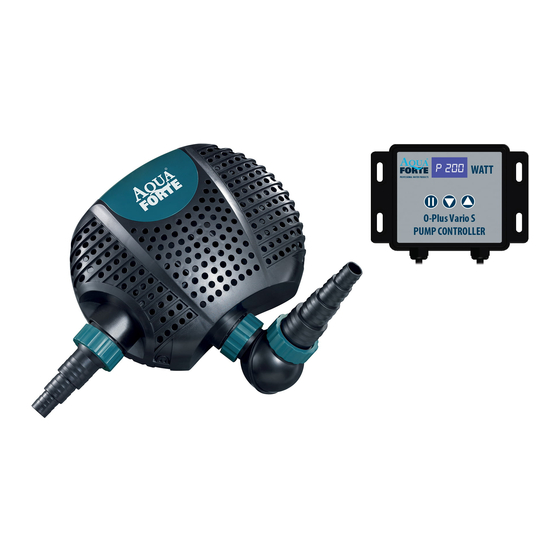
AquaForte O-Plus Vario 10000S Bedienungsanleitung
Verfügbare Sprachen
Verfügbare Sprachen
Quicklinks
Operation:
Aclogge
d
ordirtyintake screen w ill greatly reduce performance. Ifthe pumpisused onadirtysurface, raise it
slightlyto reduce theamount o f debris contacting t heintake.Ifless flow isdesired, adjust t hespeed onthe
r
controlle
to restrict t heflow.Donotletthepumprunwhennotsubmerged i nwater(orpositioned b elowwater
,
level
thismaydamage the pump. A lways submerge t he pumpfirstandthenpluginthe power c able. I nthe
beginnin
g
it probably c an'tpumpwaterbecause therecanbeairinthe pumpandthepipesystem. Donotworry
about t his,pulloutthe power c able andinsertit againafewtimes,it will worknormally.
Calcium/Limescale problems
Whe
n
youfind calcium/limescale
deposits inside the motorhouse thisimplicates t hatthepumps becomes too
warmduringuse! C alcium/lime scale expands above temperatures of 550C. Withsufficient f low,the pumpis
watercooled andcannot r each these temperatures. If,however, the head pressure i stoo big(toosmallpipe
,
system
maximum pumphead (pressure l oss) t oobig,etc)theflow will bereduced w hichcauses i nsufficient
coolin
g
andbythis,calcium deposits. Inaworstcase scenario t hecalcium/timescale layer w ill getsothickthatit
block
s
therotorandthemotorwill burnout.Youcanremove c alcium/lime s cale deposits w ithcommercial
scaling products o rcleaning vinegar.
de-
DAMAGE CAUSEDBY CALCIUM/ LIME SCALE IS NOT COVEREDBY WARRANTY!
Operatinginstructions
e operating instructions arebased onCE certification andmustbefollowed. D onotdeviate fromthese
Th
instructions
Limited warranty:
s
Thi
product i sguaranteed f or aperiod of24months fromdateof purchase for material o rmanufacturing
defect
s.
Guarante
e
consists i nguaranteed s ubstitution ofdefective parts. G uarantee isconsidered to voidincase
of imprope
r
use, o rdamages c aused byimproper h andling ornegligence o nthe partof thebuyer. A llequipment
mustbesentpostage p aid.
Disposa
l
Ifyouhave questions a bouttheoperation / safe operation, youcanalways contact y oursupplier.
D o notdispose t hisproduct a sunsorted municipal waste. C ollection o fsuch waste
separatel
y
for special treatment i snecessary. This product m ustnotbedisposed
together w ith thedomestic w aste. T hisproduct h asto bedisposed a t anauthorized
plac
e
for recycling o f electrical andelectronic a ppliances. Bycollecting andrecycling
waste
,
youhelpsave natural r esources, andmake suretheproduct i sdisposed i nan
environment
al
friendly andhealthy way.
AquaForte is a trademark of SIBOFluidra Netherlands BV,Doornhoek 3950,5465TC,Veghel(NL)
4
E-mail: info@aqua-forte.com Website:www.aqua-forte.com
AouÄ
Manual AquaForte
O-P1us Vario
I OOOOS & O-P1us Vario 220005
PROFESSIONALWATER PRODUCTS
Introduction
This information b elongs e xclusively to andisinextricably linked to the0-Plus Vario 10000S &0-Plus Vario 2 0000S
pumps. Without w rittenpermission it isnotpermitted to make anychanges tothepumportheaccompanying
documentation. The manual anddocumentation must b ekeptwiththepump. O nly people withproven expertise c an
workonthepump. The seller i snotliable for damage c aused b ytheuse and/ orapplication o fthegoods i nviolation
oftheinstructions andCE safety conditions oftheproducer and/ orsupplier. The buyer h as to befamiliar w iththese
instructions. The intellectual property o ndrawings, models, molds, shapes, theCE marking a ndeverything e lse that
relates t otheexecution o ftheassignment (remains) vested intheseller.
Control and Panel Function:
1. LED displayandcontrollerkeyinstructions
LED display i ndicates p ower, start/stop andfaultcode.
The 3touch control b uttons areused forstart/stop, slower, faster.
2. Operating instructions
Thecontrollerisnot waterproof,it mustbeinstalleddry and protectedfrom directsunlight!
Alwaysplugthe pumpcablein the controllerfirst beforeyouput the powercablein the electricalsocket!
Alwaysunplugthe powercablefrom the electricalsocket f irst beforeyou unplugthe pumpcablefrom the
controller!
After connected withpump, t hecontroller will goto thelastselected o peration, panel i sshown onLED. Touch t he
start/stop button, t hepump will stopworking, thedisplay s hows" OFF". Touch t hestart/stop buttonagain, t hepump
will resume w orking. Led shows normal d isplay"PXXX"where
change t hespeed ofthepump from30%to 100% ("F030"to " Fl00"where Fstands f orFlow). A fteronesecond t he
display g oes back tothePXXX d isplay t o show thewattage thepumpconsumes inthisselected s peed.
3. KeyLockFunction
Turn onthepower, press t hestart/stop buttonfor3seconds untiltheLED lightflashes 2 times, t hecontroller isnow
locked. Similarly, press t hestart/stop buttonforthree seconds again, t heLED indicator lightashes f ortwotimes, t he
control lerisunlocked again.
4. Screen saver mode
Turn onthepower, anddonottouch anytouchcontrol b utton formore than25seconds, theLED changes to micro
bright, t hecontroller goes inscreen s aver m ode; t hedisplay r eturns t o normal w henyoupress a nybutton.
5. Datamemoryfunction
The memory f unction ensures thatthepumpgoes back tothelastselected s peed.
6. Errorcodeand description
TheError c ode starts flashing to indicate anoperation e rror:
Erol:Abnormal Working current; Er02: Controller overheating; Er03: Pump idling;
Er04: T heimpellerstopsrunning;Er05: A bnormal Working voltage.
Version
1.01 12/2019
O-Plus Vario S
EN
LED display
FOR
'E
WATT
start/stop
slower
us Vario
S
faster
PUMP
CONTROLLER
"P"isshort f or Power, XXX stands f orthewattage. You can

Verwandte Anleitungen für AquaForte O-Plus Vario 10000S


Inhaltszusammenfassung für AquaForte O-Plus Vario 10000S
- Seite 3 DerFehlercode b linkt,umeinenFehler a nzuzeigen: Erol: abweichende B etriebsspannung; Er02:Regler W irdzuheiß;Er03:Pumpe läuftim Leerlauf; Er04:dasPumpenrad i st blockiert; E r05:abweichende V oltspannung AquaForte ist ein Handelsnahme von SIBO Fluidra Netherlands BV, Doornhoek 3950, 5465TC, Veghel (NL) E-mail: info@aqua-forte.com Website:www.aqua-forte.com Versie 1.01 12/2019...
- Seite 4 WARTUNG: Immer zuerst Stecker herausziehen! Technische Parameter: Model Spannung Verbrauch Flow Max. Fördehöhe 6- 10m3/h 1 OOOOS AC220-240V 50/60Hz 34-85 12 - 22 m3/h 22000S AC220-240V 50/60Hz 70-200 7.5 m Warnung: • Achte SiebeimStromanschluß aufdieentsprechende Spannung, welche SieaufdemPumpen-TypenschiId finden. • Di e Pump istnurfür Aquarium/Teichwasse ausgelegt, verpumpen S iedamitkeineleicht e ndflammbare Oder chemisch...