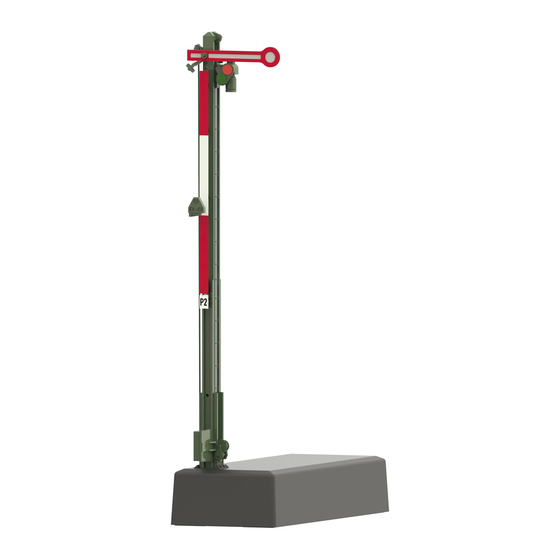
Märklin 70391 Bedienungsanleitung
Inhaltsverzeichnis
Verfügbare Sprachen
Verfügbare Sprachen
Inhaltsverzeichnis

Verwandte Anleitungen für Märklin 70391


Inhaltszusammenfassung für Märklin 70391
- Seite 1 Hauptsignal 70391/70392/70411/70412...
-
Seite 2: Inhaltsverzeichnis
Inhaltsverzeichnis Seite Page Sommaire Bestimmungsgemäße Verwendung Utilisation conforme Lieferumfang Livraison Sicherheitshinweise Consignes de sécurité Wichtige Hinweise Consignes importantes Technische Daten Caractéristiques techniques Funktionen Fonctions Signal-Einbau Montage du signal Programmierung mit CS 2 Programmation avec CS 2 Entsorgung Elimination Garantie Garantie Betriebsart und Adressen einstellen Définir le mode d’exploitation et les adresses Aufbau... -
Seite 4: Bestimmungsgemäße Verwendung
Bestimmungsgemäße Verwendung Wichtige Hinweise • Das Signal ist zum Einbau in H0 Digital-Modellbahn-Anlagen. • Die Bedienungsanleitung ist Bestandteil des Produktes und • Das Signal darf für den Analogbetrieb nur mit Stellpult 72760 muss deshalb aufbewahrt sowie bei Weitergabe des Produk- verwendet werden. tes mitgegeben werden. • Darf nur in geschlossenen Räumen verwendet werden. • Für Reparaturen wenden Sie sich bitte an Ihren Märklin- Fachhändler. Lieferumfang • Entsorgung: www.maerklin.com/en/imprint.html 1 Signal Technische Daten 1 Kabel mit Stecker 2 polig, rot und braun • Belastung ≤... -
Seite 5: Programmierung Mit Cs 2
Einstellung der Adresse und Betriebsart durch den DIP-Schalter: Die Vorgehensweise beim Programmieren mit der Control Unit • Einstellen der Betriebsart mit DIP-Schalter 10 6021 finden Sie auf www.maerklin.de -> Tools & Downloads -> Schalter 10 off = fx (MM) / mfx Technische Informationen. Schalter 10 on = DCC Die Programmierung mit anderen Geräten, entnehmen Sie bitte • fx (MM)/DCC einstellen der Adresse mit DIP-Schalter (Tabelle der Bedienungsanleitung des jeweiligen Steuergerätes. ab Seite 30) Beachten Sie: Einstellungen mit dem DIP-Schalter immer Die CV Programmierung muss am Programmiergleis erfolgen. Es spannungslos vornehmen. Das Signal erkennt erst mit dem... -
Seite 6: Entsorgung
Entsorgung CV Bedeutung Werte Langsame Bewegung 0 (0) Hinweise zum Umweltschutz: Produkte, die mit Mittelschnelle Bewegung PoM* dem durchgestrichenen Mülleimer gekennzeichnet Schnelle Bewegung sind, dürfen am Ende ihrer Lebensdauer nicht über Mittelschnelle Bewegung den normalen Haushaltsmüll entsorgt werden, mit Nachwippen sondern müssen an einem Sammelpunkt für das Schnelle Bewegung mit Recycling von elektrischen und elektronischen Nachwippen Geräten abgegeben werden. Das Symbol auf dem Mittelschnelle Bewegung nur bei 70411 / 70412 Produkt, der Bedienungsanleitung oder der Verpackung weist mit Nachwippen Flügel 1 darauf hin. Die Werkstoffe sind gemäß ihrer Kennzeichnung Mittelschnelle Bewegung... -
Seite 30: Betriebsart Und Adressen Einstellen
Betriebsart und Adressen einstellen Setting the mode of operation and addresses keyboard 10 ( 0/1 ) Définir le mode d’exploitation et les adresses fx (MM)/DCC fx (MM)/DCC Bedrijfsmodus en adres instellen fx (MM)/DCC Configuración de modo de funcionamiento y direcciones fx (MM)/DCC fx (MM)/DCC Impostate tipo di funzionamento e indirizzi fx (MM)/DCC 1 2 3 fx (MM)/DCC... - Seite 31 keyboard keyboard 10 ( 0/1 ) 10 ( 0/1 ) fx (MM)/DCC fx (MM)/DCC 3 4 5 fx (MM)/DCC fx (MM)/DCC 3 4 5 fx (MM)/DCC fx (MM)/DCC 2 3 4 5 fx (MM)/DCC 1 2 3 fx (MM)/DCC 1 2 3 4 5 fx (MM)/DCC 4 5 6 fx (MM)/DCC...
- Seite 32 keyboard keyboard 10 ( 0/1 ) 10 ( 0/1 ) fx (MM)/DCC fx (MM)/DCC 2 3 4 fx (MM)/DCC 1 2 3 fx (MM)/DCC 1 2 3 4 fx (MM)/DCC fx (MM)/DCC fx (MM)/DCC fx (MM)/DCC fx (MM)/DCC fx (MM)/DCC fx (MM)/DCC fx (MM)/DCC fx (MM)/DCC...
- Seite 33 keyboard keyboard 10 ( 0/1 ) 10 ( 0/1 ) fx (MM)/DCC fx (MM)/DCC fx (MM)/DCC fx (MM)/DCC fx (MM)/DCC 3 4 5 fx (MM)/DCC fx (MM)/DCC 3 4 5 fx (MM)/DCC fx (MM)/DCC 2 3 4 5 fx (MM)/DCC fx (MM)/DCC 1 2 3 4 5 fx (MM)/DCC...
- Seite 34 keyboard keyboard 10 ( 0/1 ) 10 ( 0/1 ) fx (MM)/DCC 2 3 4 fx (MM)/DCC fx (MM)/DCC 1 2 3 4 fx (MM)/DCC fx (MM)/DCC fx (MM)/DCC 1 2 3 fx (MM)/DCC fx (MM)/DCC 4 5 6 fx (MM)/DCC fx (MM)/DCC 4 5 6 fx (MM)/DCC...
- Seite 35 keyboard keyboard 10 ( 0/1 ) 10 ( 0/1 ) 9 fx (MM)/DCC 6 7 8 fx (MM)/DCC 9 fx (MM)/DCC 6 7 8 fx (MM)/DCC 9 fx (MM)/DCC 6 7 8 fx (MM)/DCC 9 fx (MM)/DCC 6 7 8 fx (MM)/DCC 9 fx (MM)/DCC 6 7 8...
- Seite 36 keyboard keyboard 10 ( 0/1 ) 10 ( 0/1 ) 3 4 5 9 fx (MM)/DCC 9 fx (MM)/DCC 3 4 5 9 fx (MM)/DCC 1 2 3 9 fx (MM)/DCC 2 3 4 5 9 fx (MM)/DCC 4 5 6 9 fx (MM)/DCC 1 2 3 4 5 9 fx (MM)/DCC...
- Seite 37 keyboard keyboard 10 ( 0/1 ) 10 ( 0/1 ) - - - / DCC - - - / DCC - - - / DCC - - - / DCC - - - / DCC - - - / DCC - - - / DCC - - - / DCC - - - / DCC...
- Seite 38 keyboard keyboard 10 ( 0/1 ) 10 ( 0/1 ) - - - / DCC 2 3 4 5 - - - / DCC - - - / DCC 1 2 3 4 5 - - - / DCC - - - / DCC - - - / DCC 1 2 3 - - - / DCC...
- Seite 39 keyboard keyboard 10 ( 0/1 ) 10 ( 0/1 ) 4 5 6 - - - / DCC 7 8 9 - - - / DCC 4 5 6 - - - / DCC 7 8 9 - - - / DCC 4 5 6 - - - / DCC 7 8 9...
- Seite 40 Addresses larger than 511 can only be assigned in the DCC format and must be done by programming a CV using the programming track. keyboard 10 ( 0/1 ) 6 7 8 9 - - - / DCC Les adresses supérieures à 511 peuvent uniquement être éditées 6 7 8 9 - - - / DCC dans le format DCC et doivent être exécutées avec la program- 2 3 4...
- Seite 42 E254 684 Signalabschnitt Isolieren und anschließen Oberleitung nur für Analogbetrieb Insulating the signal block and making its connections. Catenary only for analog operation Isoler la partie du signal et brancher Caténaire seulement pour exploitation analogique Stopsectie isoleren en aansluiten Bovenleiding alleen in analoogbedrijf Aislamiento y conexión del tramo de señal corriente por catenaria solo modo analógico Conexión de la vía de programación...
- Seite 44 Befestigung am K-Gleis oder anderen Gleissystemen Installation with K Track or Other Track Systems Fixation à la voie K ou à d’autres systèmes de voies Bevestiging aan K-rail of ander railsysteem Sujeción a la vía K u a otros sistemas de vías Fissaggio al binario K oppure altri sistemi di binario Fastsättning vid K-räls eller andra rälssystem Fastgørelse på...
- Seite 45 Mit beiliegender Bohrschablone markieren. Mark with the template included with the signal. Marquer avec le patron de perçage ci-joint. Met meegeleverde sjabloon markeren Marcar con la plantilla de taladros adjunta. Marcare con l’acclusa maschera di foratura. Markera med hjälp av medföljande borrschablon Markér med vedlagte boreskabelon.
- Seite 46 Steckteile entfernen Remove detail parts. Ôter les connecteurs Opsteekdelen verwijderen Desmontaje de las piezas enchufables Rimuovere gli elementi a innesto Avlägsna insticksdelar Fjern stikdele 90° Ø 1 mm Ø 1 mm Ø 1 mm Ø 1 mm Ø 16 mm...
- Seite 48 Abdeckung anbringen Steckteile nach erfolgter Unterflurmontage wieder anbringen. Install the cover. Reinstall detail parts after completing below-baseboard installation. Poser le couvercle Remonter les connecteurs après le montage souterrain. Opsteekdelen na succesvolle ondervloermontage weer aan- Afdekking aanbrengen brengen. Colocar la cubierta Colocar de nuevo las piezas enchufables una vez realizado el Applicare il coperchio montaje bajo el suelo Sätt på locket Applicare di nuovo gli elementi a innesto dopo avvenuto montag- Anbring afdækning gio sotto plancia.
- Seite 49 Anschluss Bremsmodul 72441/72442 Connections for the 72441/72442 Braking Module Branchement module de freinage 72441/72442 Aansluiten afremmodule 72441/72442 Conexión del módulo de frenado 72441/72442 Connessioni del modulo di frenatura 72441/72442 Anslutning av bromsmodul 72441/72442 Tilslutning bremsemodul 72441/72442 max 16V AC...
- Seite 52 Due to different legal requirements regarding electro-magnetic compatibility, this item may be used in the USA only after separate certification for FCC compliance and an adjustment if necessary. Use in the USA without this certification is not permitted and absolves us of any liability. If you should want such certification to be done, please contact us – also due to the additional costs incurred for this.