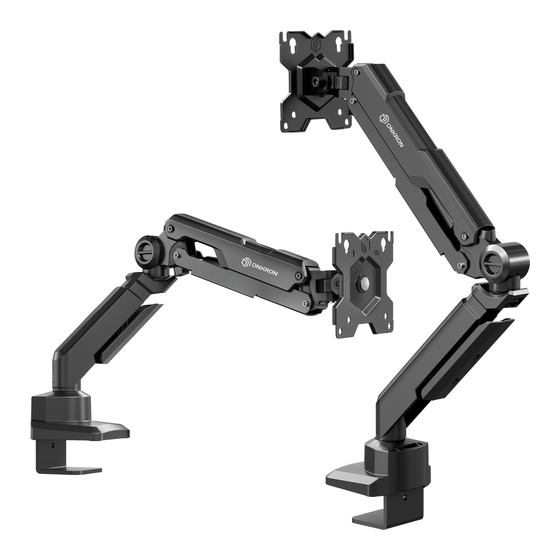
ONKRON G90 Montageanleitung
Quicklinks
ONKRON
0
G90
EN
Single monitor desk mount with gas spring
DE
Monitor-Tischhalterung
mit Gasdruckfeder
RU
HaCTOT1bHblV1 KPOHUJTeVIH
KZ
raanv•1$Txyheci
6ap 6ip MOY-WITOPFa apHaJIFaH ycren KPOHLUTeVIHi
Screen
size
Tilt
13"-34"
900—+450
Load capacity
Arm
extends
1-10 kg
0
550
mm
2.2-22
bs
0-21%
in
EN
User guide
DE
Benutzerhandbuch
PYKOBOACTBOnonb30BaTeJ19
RU
KZ
nav7nanaHYUJbl HYCKaynblFbl
OAHOro MOHYITOPaC CVICTeMOV1 ra3TIVl$T
Rotation
Swivel
360'
180'
VESA (mm)
Height
7505
adjustment
100x100
195
445
7%-171/2
mm
in

Verwandte Anleitungen für ONKRON G90


Inhaltszusammenfassung für ONKRON G90
- Seite 1 ONKRON Single monitor desk mount with gas spring Monitor-Tischhalterung mit Gasdruckfeder HaCTOT1bHblV1 KPOHUJTeVIH OAHOro MOHYITOPaC CVICTeMOV1 ra3TIVl$T raanv•1$Txyheci 6ap 6ip MOY-WITOPFa apHaJIFaH ycren KPOHLUTeVIHi Screen size Tilt Rotation Swivel 13"-34" 900—+450 360' 180' Load capacity extends VESA (mm) Height 1-10 kg...
- Seite 2 Help us to continue to deliver the best quaFty designs. Please take a moment and leave 1800 us an online review. Thank you! Sincerely, ONKRON. USA: inf0@onkron.us / +13159682278 Europe: info@onkron.de / +494029996807 -900 Russia: support@onkron.ru...
- Seite 3 Si vous avez des questions ou des difficultés, n'hésitez pas d nous contacter: Wenn Sie irgendwelche Fragen Oder Probleme haben, dann können Sie uns Etats Unis: info@onkron.us / +13159682278 jederzeit kontaktieren und wir werden hnen helfen: Europe: info@onkron.de / +494029996807 USA: inf0@onkron.us / +13159682278...
- Seite 4 •n qualsiasi momento e ti aiuteremo: Si tiene algun solicitud o neces•ta ayuda no dude on contactårnos USA: sa e@onkron.us / +13159682278 directamente y e asistimos 10 antes posible: Europa: sa e@onkron.de / +494029996807 Estados Unidos: sale@onkron.us / +13159682278 Federazione Russa: support@onkron.ru / +78007772176...
- Seite 5 TO Bbl Moxe-re 9HiMAi pvyscaT eTinreH cantvlOKTOHacaTblH KVPbIJIFblnaprv1eH n ahmanaHY, AVPbIC CB*30TbC9 C Bny060e apeM9, M Mbl BarvlnoMoxetvt: XYMSIC icTetqeyre, 6Y3blJIYfa XBHe nahnanaHyu_JblHblHxapa1SOT anyblHa Poccnx support@onkron.ru / +78007772176 aKenYl MYMKIH. 6HiMAi OCbIHYCKaYT1blKKa caV-1Kec X L,1Hay KepeK. Llypblc eMec opHaTY BHHMAHVIE na"AanaHYLIJbIHblH AeHcaynblFblHa 31,19H TT13Yl MVMKIH.
- Seite 6 Sind nicht im Bausatz enthalten VIHCTPYMeHTbl H e BKmoqeHbl B KOMnneKT Ø10 mm (3/8") A (xl) B (xl) C (xl) 3mm (xl) G 6mm (xl) H I (x4) M4x12 (x4) M4x16 (x4) M6x12 (x4) M6x16 (x4) D6 (x4) M-F (x4) ONKRON...
- Seite 7 Abdeckungen (F). four pads (F). HaKneVITe Hal<naAKV1 (F) JIL,IFIKOVI CTOPOHOVI Ha Kleben Sie die Abdeckungen (F) mit der kleb Apply pads (F)over each screw, as shown. qeTblpe HOXKVI 6a3bl KPOHl_UTeVIHa (C). rigen Seite auf die vier Beine der Halterungsbasis (C). ONKRON...
- Seite 8 Tighten the screw inside the base untill Tischplatte. Ziehen Sie die Schraube im Inneren CTOneUJHVlUY. 3aKpy-lYIBa9 B',IHTBHY'TPVI 6 a3bl, the clamp if securely fixed. Use key (H). der Basis fest, um die Sie zu sichern. Verwenden 3a$L,1KcmpyVITe ee nonoxeH1,1e. Sie den Schlüssel (H). L'1cn0J1b3yVITe Knot-I(H). ONKRON...
- Seite 9 KPOHL_UTeVIHaVI gepe3 OTBePCTVle B CTOne. key (H). 3aKperll,1Te 6a3Y c HklXHeÉ1 CTOPOHbl der Tischplatte. Befestigen Sie die Basis mit der CTOneUJHVlUbl nnaHK01.i1 (Cl). Leiste (CI) an der Unterseite der Tischplatte. 2b-4. 3a4)hKcnpyVITeKOHCTPYKUL,IO KJI}OVOM (H). 2b-4. Fixieren Konstruktion einem Schraubenschlüssel (H). ONKRON...
-
Seite 10: Verbinden Sie Das Oberteil Der Halterung (A) Mit Unterem
HE 3ATWhBAüTE DO NOT tighten adjustment screws to Ziehen Einstellschrauben NICHT bis zum Anschlag an, um das the very end, it may cause damage BHHTblAO ynopa, BO 1-436exaHL,1e Innengewinde nicht zu beschddigen. noBpexmeHL49 BHYTpeHi-qeL7 p e3b6bl. inner thread. ONKRON... - Seite 11 - reduziert Mikrovibration Monitors durch CHV1xaeT MVIKPOBV16PCIUVIV1 MOHMTOPaOT cTona den Tisch und die Kühlgerdte. VI KynepoB. protective pads (I) on the 4. Bringen Sie die elastischen Einsätze (I) an 4. YCTaHOBVITe snaCTYIHHble BCTaBKVl (I) Insta der Halterung mount. HO KPOHUJTeVIH. ONKRON...
- Seite 12 5.3. Tighten all top screws of the panel using screwdriver. Make sure screen die oberen Schlitze der VESA-PIatte passen. nay-•eJ1k1. 5.3. 3aKpYTb,1Te AO ynopa BVlHTbl securely fixed. 5.3. Ziehen oberen Schrauben einem Schraubendreher bis zum Anschlag C notvlOLUbO OTBePTKV1. fest. ONKRON...
- Seite 13 1,111M B BePHVITe BVIHTbl(M-B), (M-D) C Luau7 unteren Löchern VESA-PIatte oder spacers (M-F). Use the screwdriver. Schrauben Sie die oberen Schrauben (M-B) 60Vl (M-E), MCnOf1b3Y9 BTYJIKY (M-F), und (M-D) mit Unterlegscheibe (M-E) ein, noMOLUbiO OTBePTKV1. unter Verwendung Tül en (M-F) einem Schraubendreher. ONKRON...
-
Seite 14: Stel En Sie Den Gasdruckfeder Der Halterung Auf Das Gewicht
Monitors zu vermeiden, halten Sie die Halterung AeHh9 MOHVITOPa Bceraa Aepxme KPOHLUTeVIH B adjusting the tension of the gas spring. immer horizontal, während Sie den Arm der rOPh30HTaJ1bHOM nonoxeHL4"-1 BO apew perynh- Halterung einstellen. POBKVI nneqa KPOHLUTeüHa. ONKRON... - Seite 15 Sie die speziellen Taschen an der Anq YA06CTBaxpaHeHh9 Kill-oqeül(G), (H) and (H) at hand, on the base (C) of the mount. Basis der Halterung (C), um die Schlüssel (G), ucn0J1b3yVITe cneunaJ1bHble KaptqaLUKV1 Ha 6a3e (H) sicher aufzubewahren. KPOHLUTe"Ha (C). ONKRON...
- Seite 16 1800 1800 3600 3600 3600 3600 9. Set desirable position of the screen. 9. Stellen Position Monitors ein. 9. OTperyrwpyüTe pacnonoxeue MOHMTOPa. 9.1. Landscape mode. 9.1. Horizontale Lage. 9.1. ropV130HTaJ1bHoe pacnonoxeHme. 9.2. Portrait mode. 9.2. Hochformatige Position. 9.2. nopTpeTHoe pacnonoxeHk1e. WARNING! Keep the front arm to its highest WARNUNG: Bevor Sie den Monitor...