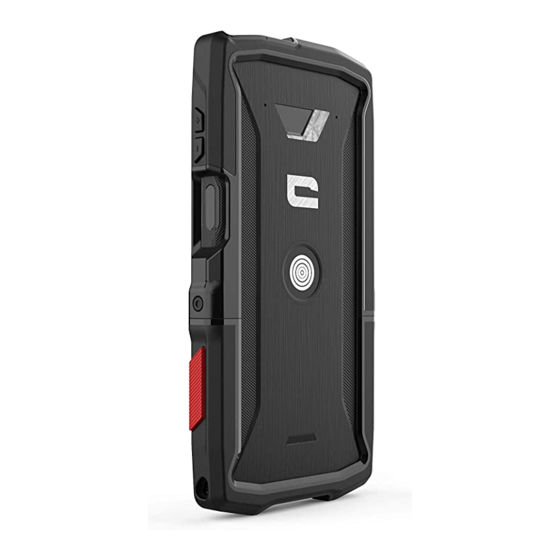
Crosscall CORE-X4 Handbücher
Anleitungen und Benutzerhandbücher für Crosscall CORE-X4. Wir haben 4 Crosscall CORE-X4 Anleitungen zum kostenlosen PDF-Download zur Verfügung: Bedienungsanleitung, Handbuch, Anleitung


Crosscall CORE-X4 Bedienungsanleitung (316 Seiten)
Inhaltsverzeichnis
-
Français
2-
Étanche4
-
X-Safe11
-
Batterie13
-
Barre D'état21
-
Widgets21
-
Téléphone21
-
Contacts22
-
Messages23
-
Galerie23
-
Calculatrice24
-
Musique24
-
Navigateur25
-
Email25
-
Annexe35
-
Garantie35
-
English
37-
Tough39
-
Waterproof39
-
Accessories40
-
X-Link Tm43
-
X-Safe44
-
Battery48
-
Phone55
-
Status Bar55
-
Widgets55
-
Contacts56
-
Camera57
-
Messages57
-
Audio58
-
Calculator58
-
Gallery58
-
Browser59
-
Email59
-
Road Safety62
-
Compliance66
-
Appendix69
-
Copyright69
-
Warranty69
-
Español
71-
Resistente73
-
Sumergible73
-
Accesorios74
-
X-Link Tm77
-
X-Safe80
-
Batería82
-
Teléfono89
-
Widgets89
-
Contactos90
-
Mensajes91
-
Calculadora92
-
Cámara92
-
Galería92
-
Audio93
-
Navegador93
-
Anexo104
-
Garantía104
-
Deutsch
106-
Wasserdicht108
-
Widerstandsfähig108
-
Zubehör109
-
Über Ihr Telefon110
-
X-Link Tm112
-
X-Safe113
-
Akku117
-
Energiesparmodus118
-
Laden des Akkus118
-
Akkusparmodus119
-
Datenübertragung124
-
Statusleiste125
-
Telefon125
-
Widgets125
-
Kontakte126
-
Galerie127
-
Kamera127
-
Mitteilungen127
-
Audio128
-
Taschenrechner128
-
Browser129
-
E-Mail129
-
System-Updates129
-
Notrufe135
-
Umweltschutz135
-
Konformität136
-
Technische Daten138
-
Anhang139
-
Urheberrecht139
-
Italiano
141-
Grande Autonomia143
-
Impermeabilità143
-
Resistenza143
-
Accessori144
-
X-Link Tm147
-
X-Safe148
-
Batteria152
-
Barra DI Stato159
-
Telefono159
-
Widget159
-
Contatti160
-
Messaggi161
-
Calcolatrice162
-
Fotocamera162
-
Galleria162
-
Audio163
-
Browser163
-
E-Mail163
-
Dati Tecnici172
-
Diritti D'autore173
-
Garanzia173
-
-
Português
175-
Hermético177
-
Resistente177
-
Acessórios178
-
Desenho Técnico179
-
X-Link Tm181
-
X-Safe184
-
Funçãotouch-Lock185
-
Bateria186
-
Barra de Estado193
-
Telefone193
-
Widgets193
-
Contactos194
-
Mensagens195
-
Câmara196
-
Galeria196
-
Browser197
-
Calculadora197
-
E-Mail197
-
Áudio197
-
Conformidade205
-
Mais Informações205
-
Anexo208
-
Garantia208
Crosscall CORE-X4 Handbuch (158 Seiten)
Inhaltsverzeichnis
-
Inhaltsverzeichnis2
-
Les Avantages du Core-M43
-
Étanche3
-
Résistant3
-
Batterie Longue Durée3
-
Certifié MIL-STD-810G3
-
Présentation du Téléphone4
-
PREMIERS PAS Installation de la Carte SIM4
-
Mise en Marche et Arrêt du Téléphone4
-
Les Atouts du Core-M45
-
X-Link Tm5
-
Touches Programmables5
-
X-Safe5
-
Conseils pour Utiliser Votre CORE-M4 Sous L'eau7
-
Fonction Touch-Lock7
-
Conseil : après une Immersion7
-
Astuces pour Utiliser au Mieux Votre CORE-M47
-
Mode Écran Partagé7
-
Configurer Plusieurs Langues8
-
Ajouter un Utilisateur8
-
État de la Batterie8
-
Charge de la Batterie8
-
Mode Économie D'énergie8
-
Mode Économiseur de Batterie8
-
Conseils et Précautions à Prendre pour Charger Votre Batterie8
-
Se Familiariser Avec le Téléphone9
-
Utilisation de L'écran Tactile9
-
Centre de Notification10
-
Verrouillage et Déverrouillage de L'écran10
-
Personnalisation de L'écran D'accueil11
-
Modification de la Date et de L'heure11
-
Gestion des Appareils et des Données11
-
UTILISATION de VOTRE TÉLÉPHONE Écran D'accueil11
-
Barre D'état11
-
Widgets11
-
ICônes D'applications11
-
Appareil Photo12
-
Informations Relatives à L'étanchéité14
-
Sécurité Routière15
-
Dispositifs Médicaux15
-
Alimentation et Charge15
-
Protection de L'environnement16
-
Nettoyage et Entretien16
-
Protection Auditive16
-
Appels D'urgence16
-
Informations Complémentaires17
-
Conditions de Garantie18
-
The Best Bits of the Core-M420
-
Waterproof20
-
Tough20
-
Long-Lasting Battery20
-
Accessories21
-
MIL-STD-810G Certified21
-
About Your Phone21
-
GETTING STARTED Installing the SIM Card22
-
Switching the Phone on and off22
-
The Strengths of the Core-M422
-
X-Link Tm22
-
X-SENSORS Application23
-
Programmable Keys23
-
X-Safe23
-
Advice for Using Your CORE-M4 under Water25
-
Advice: after Immersion25
-
Tips for Getting the most out of Your CORE-M425
-
Removing Open Apps in One Click25
-
Easily Switch between Two Apps25
-
Split-Screen Mode25
-
Configuring Multiple Languages25
-
Adding a User25
-
Battery25
-
Charging the Battery25
-
Battery Saver Mode26
-
Tips and Precautions for Charging Your Battery26
-
GETTING to GRIPS with YOUR PHONE How to Use the Touch Screen27
-
Notification Panel27
-
Locking and Unlocking the Screen28
-
Customising the Home Screen28
-
Changing the Date and Time28
-
Device and Data Management28
-
USING YOUR PHONE Home Screen28
-
Status Bar28
-
Widgets28
-
Application Icons28
-
Phone28
-
Making an International Call29
-
Contacts29
-
Messages29
-
Camera29
-
Gallery30
-
Calculator30
-
Audio30
-
Browser30
-
Email30
-
System Updates30
-
Safety Measures30
-
General Safety Information30
-
Information on Water Resistance31
-
Medical Devices32
-
Road Safety32
-
Power and Charging32
-
Protecting Your Hearing33
-
Environmental Protection33
-
Cleaning and Maintenance33
-
Emergency Calls33
-
Recommendations to Reduce the User's Exposure to Radiation33
-
FURTHER INFORMATION Compliance34
-
Frequency Bands and Power34
-
Specific Absorption Rate (SAR)35
-
Copyright35
-
Appendix35
-
Important Information35
-
Warranty35
-
Lo Mejor del Core-M437
-
Sumergible37
-
Resistente37
-
Larga Duración37
-
Accesorios38
-
Certificación MIL-STD-810G38
-
Acerca del Teléfono38
-
Primeros Pasos39
-
Los Puntos Fuertes del Core-M439
-
X-Link Tm39
-
Teclas Programables40
-
X-Safe40
-
Exención de Responsabilidad41
-
Instrucciones para Utilizar el CORE-M4 Bajo el Agua42
-
Función Touch-Lock42
-
Sugerencias para Sacar el Máximo Provecho del CORE-M442
-
Modo Pantalla Dividida42
-
Configuración de Varios Idiomas42
-
Añadir un Usuario42
-
Estado de la Batería42
-
Carga de la Batería42
-
Modo Ahorro de Energía42
-
Modo de Ahorro de Energía43
-
Modo de Ahorro de Batería43
-
Consejos y Precauciones Relativas a la Carga de la Batería43
-
FAMILIARIZARSE con el TELÉFONO Cómo Utilizar la Pantalla Táctil44
-
Panel de Notificaciones44
-
Bloqueo y Desbloqueo de la Pantalla45
-
Personalización de la Pantalla de Inicio45
-
Modificación de la Fecha y la Hora45
-
Gestión de Los Dispositivos y Los Datos45
-
USO del TELÉFONO Pantalla de Inicio45
-
Barra de Estado45
-
Widgets45
-
Iconos de Aplicaciones46
-
Teléfono46
-
Contactos46
-
Mensajes46
-
Cámara47
-
Galería47
-
Calculadora47
-
Audio47
-
Navegador47
-
Correo Electrónico48
-
Actualizaciones del Sistema48
-
Medidas de Seguridad48
-
Información Relativa a la Seguridad General48
-
Información Relativa a la Estanqueidad49
-
Dispositivos Médicos49
-
Seguridad Vial49
-
Alimentación y Carga50
-
Protección Auditiva50
-
Protección del Medio Ambiente50
-
Limpieza y Mantenimiento50
-
Llamadas de Emergencia51
-
Recomendaciones para Disminuir la Exposición del Usuario a las Radiaciones51
-
INFORMACIÓN COMPLEMENTARIA Conformidad51
-
Conformidad Normativa51
-
Bandas de Frecuencia y Potencia52
-
Información Relativa a Los Accesorios y al Software52
-
Tasa de Absorción Específica (SAR)52
-
Propiedad Intelectual53
-
Anexo53
-
Información Importante53
-
Garantía53
-
Wasserdicht55
-
X-Link Tm57
-
X-Safe57
-
Akku60
-
Statusleiste63
-
Widgets63
-
Umweltschutz68
-
Urheberrecht71
-
Anhang71
-
I Vantaggi del Core-M473
-
Impermeabilità73
-
Resistenza73
-
Grande Autonomia73
-
Accessori73
-
Certificato MIL-STD-810G73
-
Presentazione del Telefono74
-
GUIDA INTRODUTTIVA Installare la Scheda SIM74
-
Accendere E Spegnere Il Telefono74
-
I Punti DI Forza del Core-M475
-
X-Link Tm75
-
Applicazione X-SENSORS75
-
Pulsanti Programmabili75
-
X-Safe75
-
Esclusioni DI Responsabilità77
-
Consigli Per Utilizzare Il CORE-M4 Sott'acqua77
-
Funzione Touch-Lock77
-
Consiglio Post-Immersione77
-
Suggerimenti Per Utilizzare al Meglio Il CORE-M477
-
Configurare Più Lingue77
-
Aggiungere un Utente78
-
Batteria78
-
Caricare la Batteria78
-
Modalità Risparmio Energetico78
-
Modalità Risparmio Batteria78
-
Suggerimenti E Precauzioni Per Caricare la Batteria78
-
FAMILIARIZZARE con IL TELEFONO Come Utilizzare Il Touch Screen79
-
Pannello Notifiche80
-
Bloccare E Sbloccare lo Schermo80
-
Personalizzare la Schermata Iniziale80
-
Modificare la Data E L'ora80
-
Gestione Dispositivi E Dati81
-
Utilizzare Il Telefono81
-
Schermata Iniziale81
-
Barra DI Stato81
-
Widget81
-
Icone DI Applicazioni81
-
Misure DI Sicurezza83
-
Informazioni Sull'impermeabilità84
-
Dispositivi Medici85
-
Alimentazione E Ricarica85
-
Sicurezza Stradale85
-
Pulizia E Manutenzione86
-
Ulteriori Informazioni87
-
Diritti D'autore88
-
O Melhor Do Core-M490
-
Hermético90
-
Resistente90
-
Bateria de Longa Duração90
-
Acessórios91
-
Sobre O Seu Telefone91
-
INTRODUÇÃO Instalar O Cartão SIM92
-
Ligar E Desligar O Telefone92
-
Pontos Fortes Do Core-M492
-
X-Link Tm92
-
Aplicação X-SENSORS93
-
Teclas Programáveis93
-
X-Safe93
-
Isenção de Responsabilidade94
-
Recomendação para Usar O Seu CORE-M4 Debaixo de Água95
-
Recomendação: Após Imersão95
-
Dicas para Aproveitar O Seu CORE-M4 Ao Máximo95
-
Modo Split-Screen95
-
Configurar Múltiplos Idiomas95
-
Adicionar um Utilizador95
-
Bateria95
-
Carregar a Bateria95
-
Modo de Poupança de Energia95
-
Modo de Poupança da Bateria96
-
Dicas E Precauções para Carregar a Sua Bateria96
-
COMPREENDER O SEU TELEFONE como Utilizar O Ecrã Tátil97
-
Painel de Notificações97
-
Bloquear E Desbloquear O Ecrã98
-
Personalizar O Ecrã Inicial98
-
Alterar a Data E Hora98
-
Dispositivo E Gestão de Dados98
-
USAR O SEU TELEFONE Ecrã Inicial98
-
Barra de Estado98
-
Widgets98
-
Ícones de Aplicações98
-
Telefone98
-
Contactos99
-
Mensagens99
-
Câmara100
-
Galeria100
-
Calculadora100
-
Áudio100
-
Browser100
-
E-Mail100
-
Atualizações Do Sistema101
-
Medidas de Segurança101
-
Informação Geral de Segurança101
-
Informação sobre Resistência à Água101
-
Dispositivos Médicos102
-
Segurança Rodoviária102
-
Potência E Carregamento102
-
Proteção da Sua Audição103
-
Proteção Ambiental103
Crosscall CORE-X4 Anleitung (33 Seiten)
Marke: Crosscall
|
Kategorie: Handyzubehör
Inhaltsverzeichnis
-
English
6 -
Français
8 -
Español
10 -
Deutsch
12 -
Italiano
14 -
Português
16 -
Dutch
18 -
Hrvatski
20 -
Polski
22 -
Slovenščina
24 -
العربية
26 -
Srpski
28

