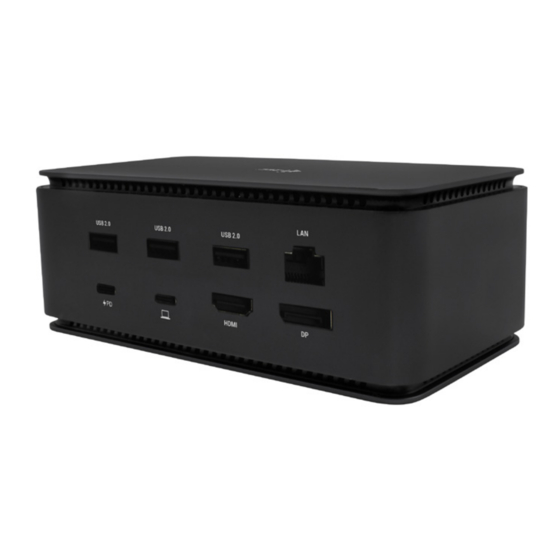
i-tec USB4DUAL4KDOCKPD Gebrauchsanweisung
Inhaltsverzeichnis
Verfügbare Sprachen
Verfügbare Sprachen
Quicklinks
USB4 Metal Docking Station
Dual 4K HDMI DP
1x HDMI / 1x DP / 1x Gigabit LAN / 1x USB-C Power Delivery /
1x USB-C 3.2 Gen. 2 / 3x USB-A 3.2 Gen. 2 / 3x USB 2.0 /
1x SD Card Reader / 1x microSD Card Reader / 1x Combo Audio Jack
User guide • Gebrauchsanweisung • Mode d'emploi
Manual de instrucciones • Manuale • Uživatelská příručka
Instrukcje obsługi • Užívateľská príručka • Vartotojo vadovas
Handleiding
P/N: USB4DUAL4KDOCKPD
Inhaltsverzeichnis

Verwandte Anleitungen für i-tec USB4DUAL4KDOCKPD


Inhaltszusammenfassung für i-tec USB4DUAL4KDOCKPD
- Seite 2 Prosíme o pečlivé přečtení celého manuálu. Podrobný manual is available on our website www.i-tec.pro/en/ in the manuál je k dispozici na našem webu www.i-tec.pro v záložce tab „Manuals, drivers“. In case of any issues, please contact „Manuály, ovladače“ u tohoto produktu. V případě problémů...
-
Seite 12: Spezifikationen
USB4 Metal Docking station Dual 4K HDMI DP + PD 80 W Quick Start Wichtiger Hinweis zur 8K-Auflösung: SPEZIFIKATIONEN Das Dock unterstützt eine Auflös- ung von bis zu 8K (7680x4320/30Hz), aber diese Auflösung kann nur einge- • 1x USB4-Anschluss für den Anschluss an einen Laptop stellt werden, wenn Ihr Laptop sie unterstützt - USB4/Thunderbolt™... -
Seite 13: Beschreibung
USB4 Metal Docking station Dual 4K HDMI DP + PD 80 W Quick Start BESCHREIBUNG Rückwand: Frontplatte: 5. 3x USB 2.0 6. Ethernet GLAN RJ-45-Anschluss (ASIX AX88179) - unterstützt 1. 3,5-mm-Audio-Kombianschluss 10/100/1000 Mbps 2. Gen 2 USB-C-Anschluss (nur Daten) 7. -
Seite 14: Systemanforderungen
USB4 Metal Docking station Dual 4K HDMI DP + PD 80 W Quick Start SYSTEMANFORDERUNGEN Unter Windows wird der LAN-Anschluss in Start → Systemsteuerung (Kleine Symbole anzeigen) → Geräte-Manager → Netzwerkadapter als „ASIX AX88179“ Hardwareanforderungen:Gerät mit einem freien USB4-, Thunderbolt- oder angezeigt. - Seite 15 USB4 Metal Docking station Dual 4K HDMI DP + PD 80 W Quick Start HDMI/DP-MONITORANSCHLUSS Verwenden Sie HDMI / DP, um den Monitor an die Dockingstation an- zuschließen (für HDMI empfehlen wir ein Kabel der Version 2.0 oder höher, für DP ein Kabel der Version 1.4 oder höher).
- Seite 16 USB4 Metal Docking station Dual 4K HDMI DP + PD 80 W Quick Start 2. Daraufhin werden die Einstellungen für die Anzeigeauflösung von Windows angezeigt. Platzierung eines zusätzlichen Monitors im Verhältnis zum ursprünglichen Laptop-/Tablet-Monitor Standby-/Ruhezustand und Videoanschluss - nach dem Aktivieren des Lap- tops/Tablets aus dem Standby-/Ruhezustand wird der primäre (ursprüngli-...
- Seite 17 USB4 Metal Docking station Dual 4K HDMI DP + PD 80 W Quick Start Verwendung der DOCKING STATION in mac OS Sie können die Monitore auch ganz einfach über die Tastenkombination Wenn Sie den Monitor anschließen, flackert der Bildschirm Ihres Macs, was „Windows“...
- Seite 18 USB4 Metal Docking station Dual 4K HDMI DP + PD 80 W Quick Start Spiegelungsmodus: kann nur verwendet werden, Erweitern Sie den Modus: Der Pfeil zeigt die Möglichkeit an, wenn er von Mac angeboten wird. den angeschlossenen Monitor relativ zum Mac-Monitor zu positionieren.
-
Seite 19: Zusätzliche Features Der Docking Station Unter Win- Dows Und Macos
USB4 Metal Docking station Dual 4K HDMI DP + PD 80 W Quick Start ZUSÄTZLICHE FEATURES DER DOCKING STATION UNTER WIN- DOWS UND MACOS LAN-Verbindung - GLAN RJ-45-Port zum Anschluss an Router/Switch/Hub und an das Internet, unterstützt Geschwindigkeiten von 10 / 100 / 1000 Mbps Anschließen von USB-Geräten - Nach dem Anschließen von USB-Geräten... - Seite 86 rifiuti differenziati istituita per questo scopo e non in altri centri indicati per European Union Only depositare rifiuti urbani normali non differenziati. In questo modo si contribu- Note: Marking is in compliance with EU WEEE Directive isce al miglioramento della qualità dell’ambiente (valido soltanto per l’Unione Europea).
- Seite 87 Product, Bezeichnung, Le prénom, Producto, Prodotto, Název, Názov, Nazwa, Gaminys, Naam: elektromagnetycznej, Skirtas EMC, Voor EMC): i-tec USB4 Metal Docking station Dual 4K HDMI DP + PD 80 W EN 55032:2015+A11:2020; EN 55035:2017+A11:2020 Model, Modell, Modèle, Modelo, Modello, Model, Model, Model, Modelis,...