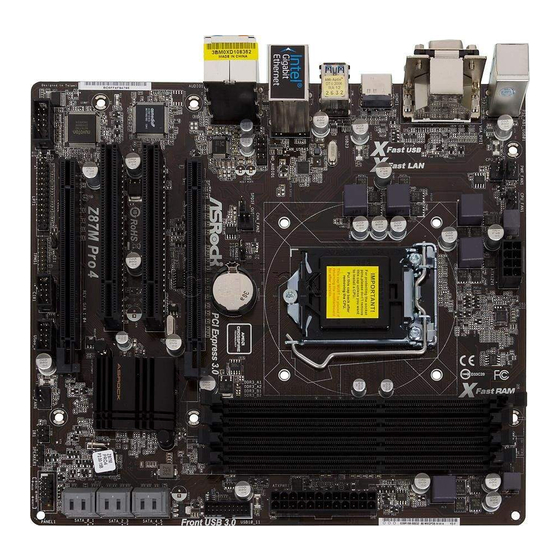
ASROCK Z87M Pro4 Handbuch
Inhaltsverzeichnis
Verfügbare Sprachen
Verfügbare Sprachen
Quicklinks
Version 1.0
Published March 2013
Copyright©2013 ASRock INC. All rights reserved.
Copyright Notice:
No part of this documentation may be reproduced, transcribed, transmitted, or
translated in any language, in any form or by any means, except duplication of
documentation by the purchaser for backup purpose, without written consent of
ASRock Inc.
Products and corporate names appearing in this documentation may or may not
be registered trademarks or copyrights of their respective companies, and are used
only for identiication or explanation and to the owners' beneit, without intent to
infringe.
Disclaimer:
Speciications and information contained in this documentation are furnished for
informational use only and subject to change without notice, and should not be
constructed as a commitment by ASRock. ASRock assumes no responsibility for
any errors or omissions that may appear in this documentation.
With respect to the contents of this documentation, ASRock does not provide
warranty of any kind, either expressed or implied, including but not limited to
the implied warranties or conditions of merchantability or itness for a particular
purpose.
In no event shall ASRock, its directors, oicers, employees, or agents be liable for
any indirect, special, incidental, or consequential damages (including damages for
loss of proits, loss of business, loss of data, interruption of business and the like),
even if ASRock has been advised of the possibility of such damages arising from any
defect or error in the documentation or product.
TM
he terms HDMI
and HDMI High-Deinition Multimedia Interface, and the HDMI
logo are trademarks or registered trademarks of HDMI Licensing LLC in the United
States and other countries.
his device complies with Part 15 of the FCC Rules. Operation is subject to the following
two conditions:
(1) this device may not cause harmful interference, and
(2) this device must accept any interference received, including interference that
may cause undesired operation.
CALIFORNIA, USA ONLY
he Lithium battery adopted on this motherboard contains Perchlorate, a toxic substance
controlled in Perchlorate Best Management Practices (BMP) regulations passed by the
California Legislature. When you discard the Lithium battery in California, USA, please
follow the related regulations in advance.
"Perchlorate Material-special handling may apply, see www.dtsc.ca.gov/hazardouswaste/
perchlorate"
ASRock Website: http://www.asrock.com
Downloaded from
www.Manualslib.com
manuals search engine
Inhaltsverzeichnis

Verwandte Anleitungen für ASROCK Z87M Pro4


Inhaltszusammenfassung für ASROCK Z87M Pro4
- Seite 2 Downloaded from www.Manualslib.com manuals search engine...
- Seite 18 English Downloaded from www.Manualslib.com manuals search engine...
- Seite 22 English Downloaded from www.Manualslib.com manuals search engine...
- Seite 30 1 Einleitung Vielen Dank, dass Sie sich für das Z87M Pro4 von ASRock entschieden haben – ein zuverlässiges Motherboard, das konsequent unter der strengen Qualitätskontrolle von ASRock hergestellt wurde. Es liefert ausgezeichnete Leistung mit robustem Design, das ASRocks Streben nach Qualität und Beständigkeit erfüllt.
-
Seite 31: Technische Daten
Z87M Pro4 1.2 Technische Daten • Micro-ATX-Formfaktor Plattform • Vollständig solides Kondensatordesign • Unterstützt Intel® Core Prozessor i7 / i5 / i3 / Xeon® / Pentium® / Celeron® der 4. Generation im LGA1150-Paket • Digipower-Design • 4-Leistungsphasendesign • Unterstützt Intel® Turbo Boost 2.0-Technologie •... - Seite 32 • Unterstützt drei Monitore • Unterstützt HDMI-Technologie mit maximaler Aulösung von 1920 x 1200 bei 60 Hz • Unterstützt DVI-D mit maximaler Aulösung von 1920 x 1200 bei 60 Hz • Unterstützt D-Sub mit maximaler Aulösung von 1920 x 1200 bei 60 Hz •...
- Seite 33 Z87M Pro4 • 6 x SATA-III-6,0-Gb/s-Anschlüsse, unterstützt RAID (RAID Speicher 0, RAID 1, RAID 5, RAID 10, Intel Rapid Storage Technology 12 und Intel Smart Response Technology), NCQ, AHCI und „Hot-Plugging“ • 1 x IR-Stitleiste Anschluss • 1 x Druckanschluss-Stitleiste •...
- Seite 34 Aufgrund von Beschränkungen kann die Größe des tatsächlich für die Systemnutzung reservierten Speichers unter Windows®-Betriebssystemen mit 32 Bit weniger als 4 GB betragen. Windows®-Betriebssysteme mit 64 Bit haben keine derartigen Beschränkungen. Mit ASRock XFast RAM können Sie den Speicher einsetzen, den Windows® nicht nutzen kann. Downloaded from www.Manualslib.com...
-
Seite 35: Jumper-Einrichtung
Z87M Pro4 1.3 Jumper-Einrichtung Die Abbildung zeigt, wie die Jumper eingestellt werden. Wenn die Jumper- Kappe auf den Kontakten angebracht ist, ist der Jumper „kurzgeschlossen“. Wenn keine Jumper-Kappe auf den Kontakten angebracht ist, ist der Jumper „ofen“. Die Abbildung zeigt einen 3-poligen Jumper, dessen Kontakt 1 und Kontakt 2 „kurzgeschlossen“... -
Seite 36: Integrierte Stiftleisten Und Anschlüsse
1.4 Integrierte Stiftleisten und Anschlüsse Integrierte Stitleisten und Anschlüsse sind KEINE Jumper. Bringen Sie KEINE Jumper-Kappen an diesen Stitleisten und Anschlüssen an. Durch Anbringen von Jumper-Kappen an diesen Stitleisten und Anschlüssen können Sie das Motherboard dauerhat beschädigen. Systemblende-Stitleiste Verbinden Sie (9-polig, PANEL1) Netzschalter, Reset-Taste (siehe S. - Seite 37 Z87M Pro4 Serial-ATA-III-Anschlüsse Diese sechs SATA-III- (SATA_0_1: Anschlüsse unterstützen siehe S. 1, Nr. 11) SATA-Datenkabel für (SATA_2_3: interne Speichergeräte mit siehe S. 1, Nr. 10) einer Datenübertragungsge- (SATA_4_5: schwindigkeit bis 6,0 Gb/s. siehe S. 1, Nr. 9) USB 2.0-Stitleisten Neben zwei USB 2.0-Ports...
- Seite 38 1. High Deinition Audio unterstützt Anschlusserkennung, der Draht am Gehäuse muss dazu jedoch HDA unterstützt. Bitte befolgen Sie zum Installieren Ihres Systems die Anweisungen in unserer Anleitung und der Anleitung zum Gehäuse. 2. Wenn Sie ein AC’97-Audiopanel nutzen, installieren Sie es bitte anhand der nachstehenden Schritte an der Audiostitleiste (Frontblende): A.
- Seite 39 Z87M Pro4 CPU-Lüteranschlüsse Dieses Motherboard bietet (4-polig, CPU_FAN1) einen 4-poligen CPU- (siehe S. 1, Nr. 3) Lüteranschluss (lautloser Lüter). Falls Sie einen (3-polig, CPU_FAN2) 3-poligen CPU-Lüter (siehe S. 1, Nr. 2) anschließen möchten, verbinden Sie ihn bitte mit Kontakt 1 bis 3.
- Seite 40 Gehäuseeingrif- Dieses Motherboard Stitleiste unterstützt die Gehäuse- (2-polig, CI1) ofen-Erkennung, die (siehe S. 1, Nr. 19) erkennt, wenn die Ge- häuseabdeckung entfernt wurde. Diese Funktion setzt ein Gehäuse mit Gehäuseeingriferken- nungsdesign voraus. TPM-Stitleiste Dieser Anschluss (17-polig, TPMS1) unterstützt das Trusted (siehe S.