i-tec CATRIPLE4KDOCKPD Gebrauchsanweisung
Vorschau anzeigen
Andere Handbücher für CATRIPLE4KDOCKPD:
- Gebrauchsanweisung (52 Seiten) ,
- Benutzerhandbuch (52 Seiten)
Inhaltsverzeichnis
Verfügbare Sprachen
Verfügbare Sprachen
Quicklinks
Inhaltsverzeichnis

Verwandte Anleitungen für i-tec CATRIPLE4KDOCKPD


Inhaltszusammenfassung für i-tec CATRIPLE4KDOCKPD
- Seite 1 USB-C / USB-A 3.0 3x 4K Docking Station User guide • Gebrauchsanweisung • Mode d’emploi Manual de instrucciones • Manuale • Uživatelská příručka Instrukcje obsługi • Užívateľská príručka • Vartotojo vadovas Handleiding P/N: CATRIPLE4KDOCKPD...
- Seite 2 Quick Start / USB-C / USB-A 3.0 3x 4K Docking Station Please read the entire instruction manual carefully. Detailed manual is avail- able on our website www.i-tec.cz/en/ in the tab „Manuals, drivers“. In case of any issues, please contact our technical support at: support@itecproduct.com Bitte lesen Sie das gesamte Handbuch sorgfältig durch.
-
Seite 10: Einleitung
Quick Start / USB-C / USB-A 3.0 3x 4K Docking Station EINLEITUNG Wir bedanken uns für den Kauf von universaler i-tec Docking Station. Erhöhen Sie Ihre Effektivität durch einfachen Anschluss der Docking Station an Ihr Note- book oder Tablet-PC mit Hilfe von einem einzigen Kabel. Sie gewinnen Zugang zur Versorgung (es gilt für den Anschluss über USB-C oder Thunderbolt 3;... -
Seite 11: Auflösung
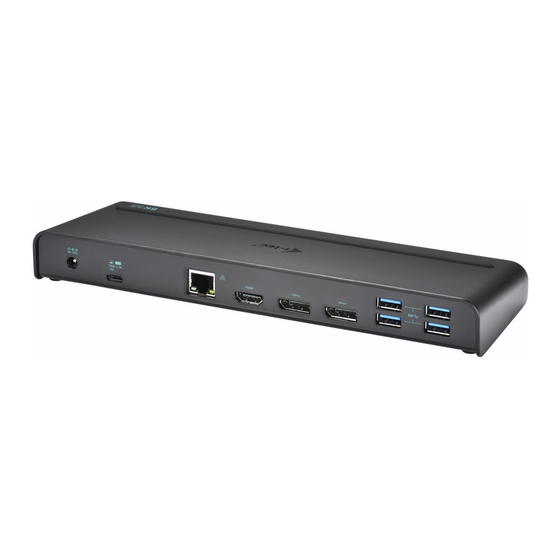
Quick Start / USB-C / USB-A 3.0 3x 4K Docking Station Hinterseite: Eingang für Versorgung – externer Versorgungsadapter (Ausgang: DC 20V/2A) USB-C Port für den Anschluss der Docking Station an Notebook mit USB-C oder USB-A Schnittstelle (USB-C/F Adapter auf USB-A/M zum Anschluss an USB-A Port gehört zum Lieferumfang). -
Seite 12: Systemanforderungen
Benutzung zu installieren. Vergewissern Sie sich vor der Installation, dass Sie im System die neuesten Treiber für Ihr Gerät installiert haben und BIOS aktualisiert ist. Für Windows 7/8/8.1 sind die Treiber unter unserer Internetseite www.i-tec.cz/de unter „Download“ bei diesem Produkt herunterzuladen. Starten Sie die Installa-... -
Seite 13: Treiberinstallation Unter Mac Os
HINWEIS! Schließen Sie die Docking Station an Ihren Mac nicht an, bis die betref- fenden Treiber nicht installiert sind. Die Treiber sind nur vor erster Verwendung zu installieren. Wir empfehlen das neueste Betriebssystem macOS zu installie- ren. Die Treiber sind unter unserer Internetseite www.i-tec.cz/de unter „Download“ bei diesem Produkt herunterzuladen. SICHERHEITSHINWEISE •... -
Seite 47: English
Quick Start / USB-C / USB-A 3.0 3x 4K Docking Station EUROPEAN UNION ONLY NOTE: MARKING IS IN COMPLIANCE WITH EU WEEE DIRECTIVE ENGLISH This equipment is marked with the above recycling symbol. It means that at the end of the life of the equipment you must dispose of it separately at an appro- priate collection point and not place it in the normal domestic unsorted waste stream. -
Seite 49: Declaration Of Conformity
že výrobok / deklaruje, że produkt / verklaart hierbij dat het product Product, Bezeichnung, Le prénom, Producto, Název, Názov, Nazwa, Naam: i-tec BlueTouch 244 - Bluetooth 3.0 Optical Mouse Adjustable DPI Model, Modell, Modèle, Modelo, Model, Model, Model: MWBT244 / MS-142BT Determination, Bestimmung, la détermination, Determinación, Určení, Určenie, Opcje,... - Seite 50 Quick Start / USB-C / USB-A 3.0 3x 4K Docking Station Pro Rádiové parametry, pre Rádiové parametre, dla parametrów Radiowych, for Radio parameters: EN 300 328-1 V1.8.1(2012-06); EN 301 489-1 V1.9.2(2011-09); EN 301 489-17 V2.2.1(2012-09) Pro Elektrickou bezpečnost, pre Elektrickú bezpečnost´, dla Bezpieczeństwa, for Safety: EN 62479(2010);...
- Seite 52 www.i-tec.cz/en...