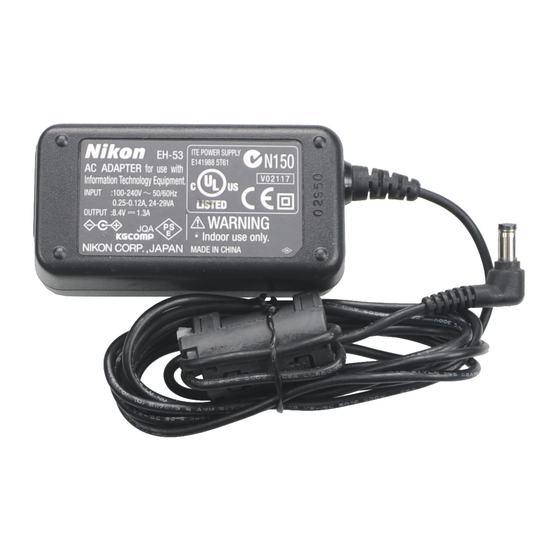
Nikon EH-53 Bedienungsanleitung
EH-53
Jp
AC アダプタ 使用説明書
En
AC Adapter Instruction Manual
De
Netzadapter Bedienungsanleitung
Fr
Alimentation secteur Fiche Technique
Es
Adaptador CC Manual de instrucciones
Nl
Lichtnetadapter Gebruikshandleiding
It
Alimentatore a rete Manuale di istruzioni
電源プラグ
/
Wall plug/Netzstecker/
電源コード /
Power cable*/Netzkabel*/
Fiche secteur murale/
Cordon d'alimentation*/Cable de corriente*/
Enchufe de Pared/
Netsnoer*/Cavo di alimentazione*
Stekker stopcontact-zijde/
AC プラグ
/
Presa a rete
AC adapter plug/Netzgerätestecker/
Fiche secteur pour EH-53/
Enchufe del adaptador a la corriente/
Stekker lichtnetadapter-zijde/
Connettore a due poli
DC 接続用コード
/DC cord/
Adapterkabel/Câble électrique/
Cable CC/Gelijkstroomstekker/
電源ランプ
/POWER Lamp/
Cavo DC
Netzkontrolllampe (POWER)/
Témoin lumineux de mise
sous tension/
Luz de ENCENDIDO/
POWER-lampje/
Spia di alimentazione
電源コード差込み口
/
AC inlet/
DC プラグ
/DC plug/
Anschluß für Netzkabel/
Stecker des Adapterkabels/
Prise électrique/Conector CC/
Connecteur électrique/
Entrada CA/
Gelijkstroomsnoer/Spinotto DC
EH-53
Netsnoer aansluiting/
Ingresso AC
* Shape of cable depends on country of use.
* Das mit Ihrem Adapter mitgelieferte Netzkabel kann von der hier gezeigten
Abbildung abweichen.
* La forme du câble électrique dépend du pays où il est utilisé.
* La forma del cable depende del país en el que se haya adquirido.
* De vorm van het snoer hangt af van het land van aankoop.
* La forma del cavo dipende dal paese d'uso.
図 1/Figure 1/Abbildung 1/Figure 1/Figura 1/Figuur 1/Figura 1
b
a
図 2/Figure 2/Abbildung 2/Figure 2/Figura 2/Figuur 2/Figura 2
日本語
このたびはACアダプタEH-53をお買い上げいただきありがとうございます。 EH-
53 は、Li-ion リチャージャブルバッテリー EN-EL1 を使用するニコンデジタルカ
メラ(COOLPIX880 は除く)および COOLPIX2000 専用の AC アダプタです。
ご使用の前に、 本書およびデジタルカメラの使用説明書をよくお読みください。
安全上のご注意
警告
ご使用の前に、 「安全上のご注意」 をよくお
分解したり、 修理 ・ 改造をしないこと
読みの上、正しくお使いください。
感電したり、 異常動作をしてケガの
この「安全上のご注意」は製品を安全に正
分解禁止
原因となります。
しく使用していただき、あなたや他の人々
への危害や財産への損害を未然に防止す
落下などによって破損し、 内部が露
出したときは、 露出部に手を触れな
るために、重要な内容を記載しています。
いこと
お読みになった後は、お使いになる方がい
接触禁止
感電したり、 破損部でケガの原因と
つでも見られるところに必ず保管してく
なります。
ださい。
電源プラグを抜いて、 販売店または
表示と意味は次のようになっています。
すぐに
当社サービス部門に修理を依頼し
修理依頼を
てください。
この表示を無視して、誤っ
熱くなる、煙が出る、焦げ臭いなど
た取り扱いをすると、人が
警告
の異常時は、 速やかに接続プラグを
死 亡 ま た は 重 傷 を 負 う 可
抜くこと
プラグを抜く
能 性 が 想 定 さ れ る 内 容 を
そのまま使用すると火災、やけどの
示しています。
原因となります。接続プラグを抜く
際、 やけどに十分注意してください。
この表示を無視して、誤っ
すぐに
販売店または当社サービス部門に
た取り扱いをすると、人が
修理依頼を
修理を依頼してください。
注意
傷 害 を 負 う 可 能 性 が 想 定
さ れ る 内 容 お よ び 物 的 損
水につけたり、水をかけたり、雨に
害 の 発 生 が 想 定 さ れ る 内
ぬらしたりしないこと
発火したり、 感電の原因となります。
容を示しています。
水かけ禁止
引火・爆発のおそれのある場所では
お守りいただく内容の種類を、次の絵表
使用しないこと
示で区分し、説明しています。
プロパンガス、 ガソリンなどの引火性
使用禁止
ガスや粉塵の発生する場所で使用す
絵表示の例
ると爆発や火災の原因となります。
電源プラグの金属部やその周辺に
記号は、注意(警告を含む)を促
ほこりが付着している場合は、 乾い
す内容を告げるものです。図の中や
た布で拭き取ること
近くに具体的な注意内容(左図の場
警告
そのまま使用すると火災の原因に
合は感電注意)が描かれています。
なります。
記号は、 禁止 (してはいけないこ
と) の行為を告げるものです。 図の中
注意
や近くに具体的な禁止内容(左図の
場合は分解禁止) が描かれています。
ぬれた手でさわらないこと
記号は、行為を強制すること(必
感電の原因となることがあります。
感電注意
ずすること) を告げるものです。 図の
中や近くに具体的な強制内容(左図
製品は幼児の手の届かない所に置
の場合はプラグを抜く)が描かれて
くこと
います。
放置禁止
ケガの原因になることがあります。
本製品の使用上のご注意
• 本製品には、 国内でのご使用に適合する電源コードが付属しています。 本製品を海外で
ご使用する場合は、 別売の電源コードが別途必要になります。 別売の電源コードについ
ては、カメラの使用説明書裏面に記載の当社サービス部門にお問い合わせください。
• 本書に記載されていない機器は、接続しないでください。
• 使用しないときは、電源プラグをコンセントから抜いてください。
• DC プラグをショートさせないでください。
• カメラに DC プラグを接続した状態で DC プラグおよび DC 接続コードに強い力をあた
えないでください。故障の原因となることがあります。
AC アダプタの使用方法
AC アダプタを取り付ける前に、カメラ本体の電源スイッチが「OFF」になって
いることを確認してください。 AC アダプタの取り付けは、次の手順で行います
(図 2 −イラストは COOLPIX5000 です) 。
1
電源コードの AC プラグを、電源コード差込み口に差し込みます (図 2-a) 。
2
カメラの DC 入力端子カバーを開け、DC 接続用コードの DC プラグを DC 入
力端子に差し込みます (図 2-b) 。
3
電源プラグをコンセントに差し込みます。
・ 電源ランプが点灯して、通電状態になります。
4
カメラの電源を ON にします。
これで、カメラをご使用になれます。
カメラをご使用になる際は、プラグがカメラから外れないようにご注意ください。
重要 ❢
カメラから取りはずす場合はカメラ本体の電源を 「OFF」 にして電源プラグとDC
接続コードのプラグを抜きます。プラグを抜くときはコードを引っ張らずに必ず
プラグ部分を持って抜いてください。
仕様
(仕様、外観の一部を、改善のため予告なく変更することがあります。 )
電源:
AC 100 ∼ 240 V(50/60Hz)
定格入力容量: 24 ∼ 29 VA
定格出力:
DC 8.4 V/1.3 A
使用温度:
0 ∼+ 40 ℃
寸法:
約 41 mm(幅) × 77 mm(奥行き) ×26 mm(高さ)
コード長:
約 1800 mm
質量(重さ) :
約 130 g(電源コードを除く)
English
Thank you for your purchase of
Precautions for Use
an EH-53 AC adapter. This adapter
• Do not connect the product
is for use with digital cameras that
to any device not specifically
take a rechargeable Nikon EN-EL1
referred to in this manual.
lithium-ion battery (except the
• Remove the power cable from
COOLPIX880). The adapter can
the power outlet when not in use.
also be used with COOLPIX2000.
• Do not short the DC plug.
• Do not apply excessive force to
Before using the product, thor-
the DC plug or cable while the
oughly read both this document
AC adapter and camera are
and the Guide to Digital Photogra-
connected. Failure to observe
phy provided with your camera.
this precaution may result in
malfunction.
For customers in the U.S.A.
Federal Communications
Connecting the AC Adapter
Commission (FCC) Radio
Frequency
Before connecting the AC adapter,
Interference Statement
be sure the camera is off.
This equipment has been tested and found to
comply with the limits for a Class B digital
Follow these steps to connect the
device, pursuant to Part 15 of the FCC rules.
adapter (Figure 2; illustration
These limits are designed to provide reason-
shows COOLPIX5000):
able protection against harmful interference in
a residential installation. This equipment gen-
1
Plug the AC adapter plug into
erates, uses, and can radiate radio frequency
energy and, if not installed and used in accor-
the AC adapter (Figure 2-a).
dance with the instructions, may cause harmful
interference to radio communications. How-
2
Open the door which covers
ever, there is no guarantee that interference
the DC IN connector and in-
will not occur in a particular installation. If this
equipment does cause harmful interference to
sert the DC plug into the DC
radio or television reception, which can be
IN connector (Figure 2-b).
determined by turning the equipment off and
on, the user is encouraged to try to correct the
interference by one or more of the following
3
Plug the wall plug into a
measures:
power outlet. The POWER
• Reorient or relocate the receiving an-
lamp will glow showing the
tenna.
• Increase the separation between the
EH-53 is plugged in.
equipment and receiver.
• Connect the equipment to an outlet on
4
Turn the camera on.
a circuit different from that to which the
receiver is connected.
• Consult the dealer or an experienced
You can now use the camera.
radio/TV technician for help.
When operating the camera
CAUTION
with the AC adapter, take care
Modifications
that the camera does not acci-
The FCC requires the user to be notified that
any changes or modifications made to this
dentally become unplugged.
device that are not expressly approved by
Nikon Corporation may void the user's au-
✔ IMPORTANT
thority to operate the equipment.
Before disconnecting the AC
The accessory power cord must
adapter, be sure the camera is
be used.
For USA only: Over AC 125V
off. Unplug the DC plug from
Use a power cord suited to the voltage in
the camera's DC-IN connector,
use with AC 250V AC 15A rated plugs
then unplug the power cable
(NEMA 6P-15) and a minimum of SVT
type cord for insulation and for anything
from the power source by pull-
over AWG 18 in size.
ing on the plug, not the cable.
Nikon Inc.,
1300 Walt Whitman Road, Melville, New
York
Specifications
11747-3064, U.S.A.
Tel.: 631-547-4200
Rated input:
Notice for customers in Canada
AC 100–240 V, 0.25–0.12 A,
CAUTION
50/60 Hz
This Class B digital apparatus meets all
Rated output:
requirements of the Canadian Interference-
DC 8.4 V/1.3 A
Causing Equipment Regulations.
Operating temperature:
ATTENTION
Cet appareil numérique de la classe B respecte
0–40°C (+32–104°F)
toutes les exigences du Règlement sur le
Dimensions (W)×(D)×(H):
matériel brouilleur du Canada.
Approximately 41 × 77 × 26 mm
(1.6 × 3.0 × 1.0˝)
Safety Precautions
Length of cord:
To ensure proper operation, read
Approximately 1800 mm (70.9˝)
this manual thoroughly before us-
Weight:
ing this product. After reading, be
Approximately 130 g (4.6 oz),
sure to keep it where it can be seen
excluding power cable
by all those who use the product.
Improvements to this product may result in
unannounced changes to specifications and
external appearance.
Deutsch
Vielen Dank für Ihr Vertrauen in Nikon-Technik. Der Netzadapter
EH-53 dient zur Verwendung an digitalen Kameras, die (mit Ausnah-
me der COOLPIX880) von einem wieder aufladbaren Lithium-Io-
nen-Akku EN-EL1 mit Spannung versorgt werden. Der Netzadapter
kann auch an der COOLPIX2000 genutzt werden.
Bevor Sie das Gerät einsetzen lesen Sie bitte sorgfältig diese Bedie-
nungsanleitung und das Referenzhandbuch, welches mit Ihrer Kamera
geliefert wurde.
Sicherheitshinweise
Bitte lesen Sie diese Anleitung vor Gebrauch des Netzadapters/Akku-
Ladegeräts aufmerksam durch um eine ordnungsgemäße Funktion
des Gerätes zu gewährleisten. Bitte sorgen Sie dafür dass diese Anlei-
tung für alle Personen griffbereit liegt, die den EH-53 nutzen.
Nutzungshinweise
• Schließen Sie den Netzadapter nur an Geräte an die in dieser
Anleitung ausdrücklich genannt sind.
• Ziehen Sie das Netzkabel aus der Steckdose wenn Sie den
Netzadapter/das Ladegerät nicht benutzen.
• Achten Sie darauf dass Sie die Kontakte des Adaptersteckers
nicht versehentlich kurzschließen.
• Während der Netzadapter an die Kamera angeschlossen ist sollten
Sie das Adapterkabel und den Stecker des Adapterkabels keiner
Belastung aussetzen. Andernfalls kann es zu Fehlfunktionen kommen.
Anschluss des Netzadapters an die Kamera
Ehe Sie den Netzadapter anschließen, stellen Sie sicher, dass die
Kamera ausgeschaltet ist.
Gehen Sie dann in der nachfolgend beschriebenen Reihenfolge vor
(die Abbildung zeigh die COOLPIX5000).
1
Schließen Sie das Netzkabel am Netzadapter/Akku-Ladegerät
an (Abbildung 2-a).
2
Öffnen Sie an der Kamera die Abdeckung für den Anschluss
des Netzadapters und stecken Sie den Stecker des Adapter-
kabels in den DC-IN-Anschluss (Abbildung 2-b).
3
Stecken Sie den Netzstecker des Netzkabels in eine Steckdose.
Die Netzkontrolllampe (POWER) leuchtet auf und zeigt an,
dass das EH-53 angeschlossen ist.
4
Schalten Sie die Kamera ein.
Sie können jetzt mit der Kamera arbeiten. Wenn Sie die Kamera
über den Netzadapter mit Strom versorgen, sollten Sie darauf ach-
ten dass die Verbindung zwischen beiden Geräten nicht versehent-
lich getrennt wird, während die Kamera eingeschaltet ist.
✔ WICHTIG
Bevor Sie die Kabelverbindung zwischen Kamera und Netzadapter tren-
nen, sollten Sie sicherstellen dass die Kamera ausgeschaltet ist. Ziehen Sie
zuerst den Stecker des Adapterkabels von der Kamera ab, und ziehen Sie
anschließend das Netzkabel aus der Steckdose. Fassen Sie das Netzkabel
beim Abziehen immer am Netzstecker an, niemals am Kabel selbst.
Technische Daten
Eingangsspannung:
100–240 V, 0,25–0,12 A, 50/60 Hz
Ausgangsspannung:
8,4 V/1,3 A
Betriebstemperatur: 0–40 °C
ca. 26 mm × 41 mm × 77 mm
Abmessungen:
(Höhe × Breite × Tiefe)
Kabellänge:
ca. 1,8 m
Gewicht:
ca. 130 g (ohne Netzkabel)
Änderungen der technischen Daten und des Produktdesigns im Sinne des
technischen Fortschritts vorbehalten.
Printed in Japan
S2L03000201 (76)
6MAK0676-01

Verwandte Anleitungen für Nikon EH-53


Inhaltszusammenfassung für Nikon EH-53
- Seite 1 Vielen Dank für Ihr Vertrauen in Nikon-Technik. Der Netzadapter 53 は、Li-ion リチャージャブルバッテリー EN-EL1 を使用するニコンデジタルカ an EH-53 AC adapter. This adapter EH-53 dient zur Verwendung an digitalen Kameras, die (mit Ausnah- AC アダプタ 使用説明書 • Do not connect the product メラ(COOLPIX880 は除く)および COOLPIX2000 専用の AC アダプタです。...
- Seite 2 Collegate l’altra estremità del cavo ad una presa di corrente. La Enchufe el cable de corriente en una toma de corriente. La luz gaat branden om aan te geven dat de EH-53 op het lichtnet is spia di alimentazione si accenderà indicando che EH-53 è rego- Ouvrez la porte de l’appareil photo couvrant le connecteur DC-...