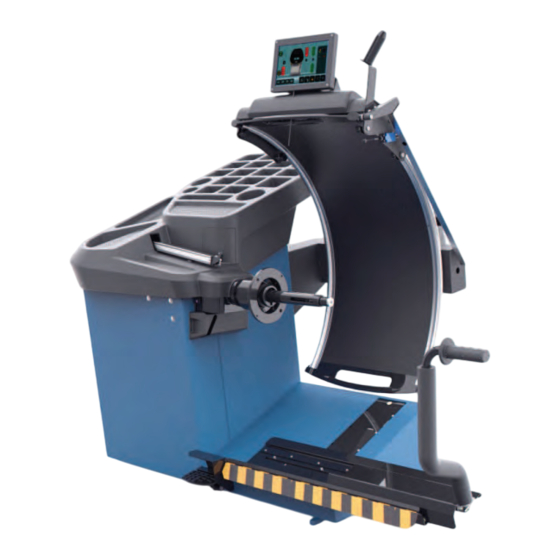
Hofmann geodyna 7700 Bedienungsanleitung

Verwandte Anleitungen für Hofmann geodyna 7700


Inhaltszusammenfassung für Hofmann geodyna 7700
- Seite 1 7700 geodyna 7750 Operator’s Manual Wheel balancer Manuel Opérateur Équilibreuse Roues Bedienungsanleitung Radauswuchtmaschine...
- Seite 2 Todas as informações contidas neste manual foram fornecidas pelo produtor do equipamento: Snap-on Equipment Srl a unico socio Via Provinciale per Carpi, 33 42015 CORREGGIO (RE) ITALY Tel.: +39-(0)522-733480 Fax: +39-(0)522-733479 E-mail: corrcs@snapon.com Internet: http://www.snapon-totalshopsolutions.com geodyna 7700 l - 7700 p - 7750 p...
- Seite 3 Содержится в каталоге запчастей EC DECLARATION DICHIARAZIONE CE EG-KONFORMITÄTSERKLÄRUNG DECLARACIÓN CE DECLARATION CE DECLARAÇÃO CE ДЕКЛАРАЦИЯ ЕС Wiring Diagram Schema Elettrico Schaltplan Esquema Eléctrico Schéma électrique Esquema Elétrico Схема электрических соединений geodyna 7700 l - 7700 p - 7750 p...
- Seite 4 WARRANTY TERMS AND LIMITATIONS OF UPDATES REPORT LIABILITIES While the authors have taken special care in the Release:______ ________ Sept 2019 preparation of this manual, nothing contained herein: PCN:____________________ 19G0166 modifies or alters in any way the standard Accessories section: terms and conditions of the purchase, lease or Standard Caliper EAA0247G21A for rim width;...
-
Seite 5: Inhaltsverzeichnis
APPLICATION DE LA GARANTIE ET GEWÄHRLEISTUNGS- UND LIMITATIONS DE RESPONSABILITÉ HAFTUNGSAUSSCHLUSS Bien que les auteurs aient accordé la plus grande Die Informationen in dieser Bedienungsanleitung attention à la rédaction du présent manuel, aucun wurden gewissenhaft und sorgfältig zusammengestellt. élément fi gurant dans ce dernier : D e r I n h a l t o d e r Te i l e d e s I n h a l t s d i e s e r ne modifi... - Seite 6 Safety Safety The safety precautions must be completely understood and observed by every operator. The Operator’s Manual will contain specifi c warnings and cautions when dangerous situations may be encountered during the procedures described. Important safety precautions relevant to the unit are described in the Safety Booklet, refer to Figure 1-1.
-
Seite 7: Sécurité
Sécurité Sicherheit Sécurité Sicherheit Die Sicherheitsmaßnahmen müssen von allen Tout opérateur doit avoir une parfaite connaissance des consignes de sécurité et il est tenu de les Bedienern vollständig verstanden und eingehalten respecter. Quand les opérations décrites peuvent créer werden. Das Bedienungshandbuch enthält spezifi sche des situations dangereuses, le manuel pour l’opérateur Warnungen und Hinweise, wenn bei den beschriebenen contient des avertissements et des indications... -
Seite 8: Spécifi Cations
Specifi cations Specifi cations " $ $ # & & " &'(!)( &(* " " &'(!)( &(* $( & ( & ( & $( & ( & + , -." " / -. , " 0 0 & 0 % & -. -
Seite 9: Spezifikationen
Spécifi cations Spezifi kationen Spécifi cations Spezifi kationen %$ && )*+%,+")+- ! " # " & ' " & 10& " *& " 23 " ' " # 23 " ' & 23 " ' 2 . 2 / (" , , . - Seite 10 Introduction 3.0 Introduction This wheel balancer combines advanced, high- performance technology, robustness and reliability with very simple, user-friendly operation. The low rotation speed of the wheel ensures that this balancer is very safe. The colour monitor shows the data set, operating modes, values measured, symbols and operator help information.
-
Seite 11: Introduction
Introduction Einführung 3.0 Introduction 3.0 Einführung Cette équilibreuse vous offre une technologie avancée Dieses Auswuchtgerät verbindet hochmoderne de haute performance, solidité et fiabilité et son Hochleistungstechnik, Robustheit und Zuverlässigkeit opération est très simple et conviviale. mit einfachem, benutzerfreundlichem Betrieb. La faible vitesse de rotation de la roue assure que Durch die niedrige Rotationsgeschwindigkeit des Rades cette équilibreuse peut être utilisée en toute sécurité. -
Seite 12: Accessories
Accessories Accessories See Figure 3-3. The standard accessories are: EAA0277G61A MZW handwheel Power Clamp EAM0086G86A Power Clamp Nut EAM0058D69A Plastic sleeve EAC0058D15A Drum Cushion EAC0058D07A Wheel pressing Drum EAC0058D08A Pressure ring EAM0005D25A Large cone EAM0005D24A Medium cone EAM0005D23A Small cone EAM0005D40A Calibration weight 8-04250A... - Seite 13 Accessoires Zubehör Accessoires Zubehör Se reporter à la Figure 3-3. Siehe Abbildung 3-3. Les accessoires standard sont : Das folgende Standardzubehör steht zur Verfügung: Volant MZW EAA0263G66A EAA0263G66A Handrad MZW Embout de blocage Power Clamp EAM0086G86A EAM0086G86A Power Clamp Spannmutter Manchon en plastique EAM0058D69A EAM0058D69A...
- Seite 14 Layout 4.0 Layout 7a 3b See Figure 4-1. Functional description of the unit: 1. Touch screen Refer to Chapter 4.1. 2. Input panel Refer to Chapter 4.1.2 3a Gauge arm 3b. External Detector - Sonar 4. Flange 5. Stub shaft 6.
-
Seite 15: Disposition
Disposition Layout Disposition Layout Se reporter à la Figure 4-1. Bezug auf die Abbildung 4-1 nehmen. Description fonctionnelle de la machine : Funktionsbeschreibung des Geräts: 1. Affi cheur tactile 1. Berührungseingabe Bildschirm Se reporter au Chapitre 4.1 Siehe Kapitel 4.1. 2. - Seite 16 Layout 4.1 The screen Fig. 4-3 Screen with display fi elds. Display fi eld. Information fi eld. Commands Field (Key pad). The screen shows the set data, helpful information, all measured data and possible Error codes. Description of display fi elds Each fi...
- Seite 17 Disposition Layout 4.1 Écran 4.1 Bildschirm Fig. 4-3 Écran avec zones d’affi chage. Abb. 4-3 Bildschirm mit Anzeigezonen. Zone d’affi chage. Anzeigefeld Zone d’informations. Informationsfeld. Zone de commandes (Clavier). Steuerungsfeld (Tastenfeld). Sur l’écran sont affi chés les paramètres, les textes Auf dem Bildschirm werden die jeweiligen Eingabedaten, d’aide, toutes les valeurs mesurées et les messages bedienerunterstützende Informationen, alle ermittelten...
- Seite 18 Layout 4.1.1 Screen pages / Menu Types of Menu Fields The Display fi eld shows the main Operating Screen Pages: Fig. 4-5 INTRO SCREEN Basic screen / Main menu. Available once the start-up is completed. Note: From this screen page, simply removing the arm causes an automatic switch to the “RIM DATA ENTRY”...
-
Seite 19: Die Display-Seiten / Menü
Disposition Layout 4.1.1 Die Display-Seiten / Menü 4.1.1 Les pages-écrans / Menu Arten Menüfelder Types de Zones Menu Im Anzeigefeld sind die wichtigsten Betriebsseiten La zone Affi chage donne accès aux principales Pages- écrans opérationnelles : dargestellt: Abb. 4-5 Fig. 4-5 INTRO SCREEN INTRO SCREEN Basisbildschirm / Hauptmenü. - Seite 20 Layout Fig. 4-9 SETTING Settings Screen. You may access it with the Key (1) Even though the machine presents the most common functions already selected, the operator can customise various display specifi cations and process modes. This screen lets the operator customise all the operating settings to his/her specifi...
- Seite 21 Disposition Layout Fig. 4-9 Abb. 4-9 SETTING SETTING Page-écran Réglages. Einstellungen Bildschirm. Il est possible d’accéder avec la touche (1) . Sie können mit dem Schlüssel zugreifen (1). Même si le véhicule présente déjà les éléments d’usage Obwohl an der Maschine bereits die üblichsten plus communs sélectionnés, l’opérateur est en mesure Verwendungselemente ausgewählt sind, kann d’adapter différentes caractéristiques d’affi...
- Seite 22 Layout Fig. 4-13 OPTIMIZATION Optimisation / weight Minimisation screen page. You may access it with the Key (1) after a measuring run. 4-13 Fig. 4-14 OP. 1 Optimisation screen page. You may access the optimisation/minimisation screen by pressing Key (1). 4-14 Fig.
- Seite 23 Disposition Layout Fig. 4-13 Abb. 4-13 OPTIMIZATION OPTIMIZATION Page-écran Optimisation/Minimisation. Bildschirm Optimierung/Minimierung. Il est possible d’accéder avec la touche (1) à la suite Sie können nach dem Messlauf mit der Taste (1) de la lancée de mesure. zugreifen. Fig. 4-14 Abb.
- Seite 24 Layout 4.1.2 Fundamental commands STOP Figure 4.-17 When the Stop Button is pressed, the machine stops all automatic movements. 4.1.2.1 Command Keys 4-17 The Menu Keys are in the Commands Field. Therefore, depending on the position in the program, the many Operating Screen Pages will in each case show the Command keys needed for the functions available.
-
Seite 25: Commandes De Base
Disposition Layout 4.1.2 Commandes de base 4.1.2 Grundbefehle ARRÊT STOPP Figure 4-17 Abbildung 4-17 À la pression du bouton d’arrêt, la machine effectue Wenn man die Taste für den Stopp-Taste drückt, hält l’arrêt de tous les mouvements automatiques. die Maschine alle automatischen Bewegungen an. 4.1.2.1 Touches de commande 4.1.2.1... - Seite 26 Layout START key – Starts the measuring run. Press to start wheel rotation, with the wheel guard down. STOP key – Immediately brakes the measuring run and any other automatic movement in progress, for example, wheel clamping and the Lifter (if present). 3b PROFILES key –...
- Seite 27 Disposition Layout Touche START START-Taste – Initialiser la lancée de mesure. – Messlauf beginnen. Presser pour lancer la rotation de la roue, après Zum Starten der Raddrehung drücken, wenn die avoir abaissé le carter de roue. Schutzabdeckung unten ist. Touche STOP STOP-Taste –...
- Seite 28 Layout EASY ALU TOGGLE key – With the “Easy Alu Toggle” key you can change the Alu mode proposed by the machine. HOME Key – Returns to the home page INTRO SCREEN OPT/MIN Key – Starts the Optimisation / Minimisation program. SPLIT Key –...
- Seite 29 Disposition Layout Touche EASY ALU TOGGLE EASY ALU TOGGLE-Taste – Avec le bouton “Easy Alu Toggle” vous pouvez – Mit der “EasyAlu Toggle” Taste nun kann man den changer le mode Alu suggéré par la machine. vom Gerät vorgeschlagenen Alu-Modus ändern. Touche HOME HOME-Taste –...
- Seite 30 Layout RESTART OPT/MIN key – If the optimisation/minimisation run is to be started after an interruption, press the key (1d, Fig. 4-18d). MINIMISATION key – Starts the Minimisation program. CONFIRMATION / CONTINUE key – Confi rms the action or acquires the selection and continues.
- Seite 31 Disposition Layout Touche RESTART OPT/MIN OPT/MIN RESTART-Taste – Si après l’interruption d’un cycle d’optimisation/ – Soll die Laufruhenoptimierung/Gewichteminimierung minimisation, celui-ci doit être redémarré, appuyer sur nach einem Abbruch neu begonnen werden, wird die la touche (1d, Fig. 4-18d). Taste (1d, Abb. 4-18d). Touche MINIMISATION MINIMIEREN-Taste –...
- Seite 32 Layout MULTIMEDIA Key – Allows accessing the Multimedia screen. CUSTOMER DATA ENTRY Key – Allows accessing the Customer Data Entry screen. ADD BEFORE BALANCING Key – Allows adding to the report the measurement run data, i.e. the one carried out before the application of balance weights.
- Seite 33 Disposition Layout Touche MULTIMÉDIA MULTIMEDIA-Taste – Permet d’accéder à l’écran Multimédia. – Ermöglicht, auf die Multimedia-Bildschirmseite zuzugreifen. Touche SAISIE DES DONNÉES DU CLIENT Taste KUNDENDATENEINGABE – Permet d’accéder à l’écran Customer Data Entry. – Ermöglicht, auf die Bildschirmseite Customer Data Entry zuzugreifen.
- Seite 34 Layout Pictographs and symbols Pictographs • Pictogrammes • Piktogramme Pictographs are viewed on the screen in all fi elds: in Information, Menu and Display fi elds. P1 Wheel type 1 - standard wheel - nominal size in inches or millimetres. P2 Wheel type 2 - motorcycle wheel P3 Alu 0 - normal - Standard weight positioning P4 Alu 1...
-
Seite 35: Symboles - Pictogrammes
Disposition Layout Symboles - Pictogrammes Symbolbilder und Piktogramme Sur l’écran, des symboles et des pictogrammes sont affi chés dans toutes les zones d’affi chage : dans les Auf dem Bildschirm werden Piktogramme in allen zones d’affi chage, dans les zones de menu et dans la Anzeigezonen dargestellt: In Informationsfeldern, zones d’information. - Seite 36 Layout Pictographs • Pictogrammes • Piktogramme P14 Compensation run carried out P15 Start measuring run by pressing the START key or by lowering the wheel guard. P16 Set the Calibration weight. P17 Use a chalk to make a mark on left tyre side. P18 Use a chalk to make a mark on right tyre side.
- Seite 37 Disposition Layout P14 Lancée de compensation effectuée. P14 Kompensationlauf durchgeführt. P15 Effectuer une lancée de mesure en appuyant sur P15 Messlauf starten durch Drücken der START-Taste la touche START ou en baissant le carter de roue. oder Schließen des Radschutzes. P16 Fixer la masse-étalon.
- Seite 38 Layout 4.2.1 Lifter online help STEP 1 Support pictograms on how to use the lifter are displayed on the monitor (if any). The symbols of the displayed help guide are described below. Loading sequence with free shaft 4.2.1.1 STEP 1 1a - Press the pedal to activate the lifter.
-
Seite 39: Anzeige Der Anleitung Für Radheber
Disposition Layout 4.2.1 Guide en ligne de l’élévateur 4.2.1 Anzeige der Anleitung für Radheber Le moniteur affi che les pictogrammes de support pour Am Monitor werden Piktogramme angezeigt, die als l’utilisation de l’élévateur (si présent). Unterstützung beim Einsatz des Radhebers (sofern Les symboles du guide à... - Seite 40 Layout Sequence with locked wheel on 4.2.1.3 STEP 1 shaft. STEP 1 1a - Press the pedal to activate the lifter. STEP 2 1a - Bring the carriage under the wheel. 1b - The lifter platform is under the wheel. 2a - Pull the handle upwards to lift the lifter up.
- Seite 41 Disposition Layout Séquence avec roue bloquée sur Sequenz mit auf Welle gespanntem 4.2.1.3 4.2.1.3 l’arbre. Rad. ÉTAPE 1 STEP 1 1a - Presser la pédale pour activer l’élévateur. 1a - Das Pedal nach unten drücken, um den Radheber zu aktivieren. ÉTAPE 2 STEP 2 1a - Placer le chariot sous la roue.
-
Seite 42: Laser Pointer
Layout Stop brake Figure 4-19 Pedal of wheel stop brake Press the pedal to brake the wheel holder chuck to make clamping nut locking or unlocking easier. The wheel is retained in the correction position for correct fi tting of the balance weights. Warning: This brake is designed only to facilitate orientation of the wheel and must not be used for braking the... - Seite 43 Disposition Layout Pédale de blocage Feststellbremse Fig. 4-19 Pédale de blocage roue Bild 4-19 Pedal der Feststellbremse L’arbre principal est bloqué quand la pédale est Bei getretenem Pedal wird die Hauptwelle festgestellt. actionnée. Cela permet de serrer ou de desserrer Hierdurch wird das Anziehen bzw.
- Seite 44 Layout Help information Help information explains the current action and, in the case of an error code, also provides hints for remedy. Display help information — Press the HELP key (Fig. 4-23, Pos. 3). 4-23 The fi rst screen with help information appears, e. g. to the screen RIM DATA ENTRY (Fig.
- Seite 45 Disposition Layout Textes d’aide Hilfetexte Les textes d’aide expliquent l’opération en cours et Hilfetexte erläutern den aktuellen Handlungsschritt und donnent des consignes en cas de messages d’erreur geben bei Fehlermeldungen Hinweise zur Bearbeitung. pour pouvoir trouver un remède. Hilfetext aufrufen Appeler texte d’aide —...
-
Seite 46: Stop Button
Operations Stop button Refer to (Figure 4-26). To perform an immediate stop: • Press the Electromechanical stop button; The electronic brake is activated to immediately stop wheel shaft rotation, as well as any other balancer automatic movement. In the event of a stop due to an unexpected action by the unit, reconstruct the steps taken: Did the operator make an error or omit to do something? - Seite 47 Utilisation Arbeitsmaßnahmen Bouton d’arrêt Stopp-Taste Se reporter à la (Figure 4-26). Bezug auf die (Abbildung 4-26) nehmen. Pour effectuer un arrêt immédiat : So führen Sie einen Sofortstopp durch: • Appuyer sur le bouton d’arrêt Électromécanique ; • Drücken Sie die Taste „Elektromechanischer Le frein électronique intervient pour l’arrêt immédiat Stopp“.
- Seite 48 Operations Operation This chapter describes how to operate the unit in order to balance a wheel. The standard balancing runs will be described fi rst. From chapter 5.10 on, special functions will be described. Be familiar with: possible hazards, ( unit, ( Clamping a wheel Figure 5-1 illustrates clamping a conventional car...
-
Seite 49: Utilisation
Utilisation Arbeitsmaßnahmen Utilisation Betrieb Ce chapitre décrit l’utilisation de la machine pour In diesem Kapitel wird beschrieben, wie das Auswuchten équilibrer une roue. eines Rads mit diesem Gerät ausgeführt wird. Les opérations d’équilibrage standard sont décrites Zunächst werden sind die Standard-Verfahren für das en premier. -
Seite 50: Clamping The Wheel
Operations 5.2 POWER CLAMP (if present) Fig. 5-3 The main shaft lock pedal has two functions PEDAL DOWN: Stopping rotation PEDAL UP: POWER CLAMP lock The pedal also controls the POWER CLAMP, for clamping the wheel on the balancer. Power Clamp with jaws fully open. Power Clamp with jaws fully closed. -
Seite 51: Serrage De Roue
Utilisation Arbeitsmaßnahmen 5.2 POWER CLAMP (si présent) 5.2 POWER CLAMP (falls vorhanden) Fig. 5-3 La pédale de blocage de l’arbre principal a une double Abb. 5-3 fonction : Das Pedal zum Feststellen der Hauptwelle hat eine doppelte Funktion: PÉDALE APPUYÉE : Blocage de la rotation PEDAL NACH UNTEN: Blockieren der Drehung PÉDALE SOULEVÉE : Blocage POWER CLAMP... -
Seite 52: Unclamping The Wheel
Operations • Press the clamping sleeve and clamping tool fi rmly against the wheel and lift the pedal (Fig. 5-7a). • Check for proper clamping prior to the measuring run. Warnings: If during clamping the pedal is operated a second time, clamping is interrupted and the clamping jaws return to the home position. -
Seite 53: Rad Abspannen
Utilisation Arbeitsmaßnahmen • Presser la douille et le moyen de serrage fortement • Die Spannhülse mit dem gewählten Spannmittel fest gegen das Rad drücken und das Pedal 5-7a). contre la roue et soulever la pédale (Fig. anheben (Abb. 5-7a). • Contrôler, avant la lancée de mesure, si la roue est •... - Seite 54 Operations Preparation • The operator should be familiar with the warnings and cautions. • The operator should be qualifi ed to work with the machine. • Alwaysensure that the wheel guard is lifted and the gauge arm is in its home position (fully retracted). 5.4.1 Power up •...
-
Seite 55: Vorbereitung
Utilisation Arbeitsmaßnahmen Préparation Vorbereitung • L’opérateur doit se familiariser avec les • Der Bediener muss mit den Warnhinweisen und avertissements et les mesures de sécurité. Vorsichtsmaßnahmen vertraut sein. • L’opérateur doit être formé pour travailler avec la • Der Bediener muss für die Arbeit mit dem Gerät machine. - Seite 56 Operations 5.4.2 Status at switching on The electronics is factory programmed so that upon machine start-up the following operating modes are pre-set: – vehicle type 1 (car wheel with nominal dimensions in inches, width 6.5” and diameter 15.0”) – entry of rim data in inches –...
-
Seite 57: Einschaltzustand
Utilisation Arbeitsmaßnahmen 5.4.2 État au démarrage 5.4.2 Einschaltzustand L’unité électronique est programmée par le fabricant de Die Elektronik ist werkseitig so programmiert, dass façon à ce que les modes de fonctionnement suivants nach dem Einschalten die folgenden Funktionsweisen soient préconfi gurés après la mise en service : gegeben sind: –... -
Seite 58: Shutting Down
Operations 5.4.5 Shutting down Always shut down properly when work is complete: • Remove the wheel from the balancer. • Remove the cones from the stub shaft. Check the surfaces (internal and external) of the cones for damage. The conditions of the cone are very important for a good balance quality. - Seite 59 Utilisation Arbeitsmaßnahmen 5.4.5 Arrêt 5.4.5 Abschalten À la fi n du travail compléter toujours les opérations de Schalten Sie das Gerät am Ende einer Arbeitsschicht façon convenable : immer ordnungsgemäß aus: • Retirer la roue de l’équilibreuse. • Nehmen Sie das Rad und die Spannmutter von dem Auswuchtgerät.
- Seite 60 Operations 5 . 5 W e i g h t a p p l i c a t i o n a n d Measurement methods 5.5.1 Weight application positions Normal Standard positioning of weights, spring weights on the rim edges (steel). Alu 1 Symmetrical application of stick-on weights on rim shoulders (aluminium).
-
Seite 61: Applikationsweisen Der Gewichte Und Erfassung Der Maße
Utilisation Arbeitsmaßnahmen 5.5 Modes d’application des masses 5.5 Applikationsweisen der Gewichte et relevé des mesures und Erfassung der Maße 5.5.1 Positions d’application des masses 5.5.1 Applikationspositionen für Gewichte Normal Positionnement normal des masses, masses Normal Normale Anordnung der Gewichte, Gewichte à... - Seite 62 Operations 5.5.2 Data required for weight application Normal Offset Distance (rim machine) Rim nominal diameter Rim nominal width Alu 1 Offset Distance (rim machine) Rim nominal diameter Rim nominal width Alu 2 Offset Distance (rim machine) Rim nominal diameter Alu 3 Offset Distance (rim machine) Rim nominal diameter Alu 4...
-
Seite 63: Für Die Anbringung Der Gewichte Erforderliche Daten
Utilisation Arbeitsmaßnahmen 5 . 5 . 2 D o n n é e s n é c e s s a i r e s p o u r 5.5.2 Für die Anbringung der Gewichte l’application des masses erforderliche Daten Normal Distance écart (machine jante) Normal Abstand Offset (Maschine Felge) Diamètre nominal jante... - Seite 64 Operations 5.6 Data detection mode 5.6.1 Selecting the Type of Vehicle Select the Type of Vehicle before the measuring run. — In the screen of the RIM DATA ENTRY Menu (Fig. 5-15) press the TYPE of VEHICLE key. — Select the TYPE OF VEHICLE item according to the rim.
-
Seite 65: Auswahl Des Fahrzeug-Typs
Utilisation Arbeitsmaßnahmen 5.6 Mode de saisie des données 5.6 Betriebsart „Datenerfassung“ 5.6.1 Sélection du type de véhicule 5.6.1 Auswahl des Fahrzeug-Typs Il est nécessaire de sélectionner le type de véhicule Der Fahrzeugtyp muss vor dem Messlauf ausgewählt avant la lancée de mesure. werden. -
Seite 66: Manual Mode
Operations 5.6.2 Manual Mode 5.6.2.1 Width Manual Entry — Measure by hand with the steel rim gauge (optional Ref. no. EAA0247G21A, Figure 5-16) or acquire data from the rim. • Acquire rim nominal width by reading the value on the rim or on the tyre. —... -
Seite 67: Mode Manuel
Utilisation Arbeitsmaßnahmen 5.6.2 Mode Manuel 5.6.2 Manuelle Betriebsart 5.6.2.1 Saisie manuelle de la largeur 5.6.2.1 Manuelle Eingabe der Länge — Mesurer manuellement avec un calibre pour jantes — Von Hand mit der Lehre für Stahlfelgen (optionalen Mat.-Nr. EAA0247G21A, Abbildung 5-16) messen en acier (en option No. -
Seite 68: Automatic Mode
Operations 5.6.3 Automatic Mode 5.6.3.1 Distance and Diameter Automatic Entry with measuring arm • Make sure that the measuring arm is in rest position. • Correctly position the measuring arm on rim, so that its reference point touches the rim reference point, as shown by the arrow (Fig. -
Seite 69: Mode Automatique
Utilisation Arbeitsmaßnahmen 5.6.3 Mode Automatique 5.6.3 Automatische Betriebsart 5.6.3.1 Saisie Automatique de Distance et 5.6.3.1 Automatische Eingabe von Abstand Diamètre avec jauge de mesure und Durchmesser mit dem Messarm • S’assurer que la jauge de mesure est dans la position •... - Seite 70 Operations 5.6.3.2 Width Automatic Entry The machines featuring a Sonar detector automatically acquire the width while wheel protection moves down. • Lower the protection with a regular and continuous movement. Important warning: For machines without SONAR, width must be always acquired through the keyboard. Note: If more than one wheel of the same type need to be balanced (with the same nominal...
-
Seite 71: Manuelle Eingabe Der Breite
Utilisation Arbeitsmaßnahmen 5.6.3.2 Saisie Automatique de la Largeur 5.6.3.2 Manuelle Eingabe der Breite Les machines équipées de détecteur Sonar saisissent Die mit Sonar-Messgerät ausgestatteten Maschinen automatiquement la largeur lors de l’abaissement du erfassen die Breite während der Senkung des carter de roue. Radschutzes automatisch. - Seite 72 Operations Preliminary verifi cations Preliminary operations: – If necessary perform a compensation run 7.1.1). – Check the wheel is clamped correctly ( 5.1). – Select the Type of Vehicle ( 5.6.1). – Read the rim dimension parameters ( 5.6). 5.8.1 Measuring Imbalance Having completed the preliminary operations, a Measuring run can be launched: —...
-
Seite 73: Vérifi Cations Préliminaires
Utilisation Arbeitsmaßnahmen Vérifi cations préliminaires Vorprüfungen Préparatifs : Vorarbeiten: – Effectuer une lancée de compensation, si nécessaire – Falls nötig, einen Kompensationslauf durchführen 7.1.1). 7.1.1). – Sicherstellen, dass das Rad korrekt aufgespannt ist – Vérifi er le serrage correct de la roue ( 5.1). - Seite 74 Operations Weight application The following weight types and application methods are available: - Clip-on weights. • Always apply by hand at 12 o’clock (Fig. 5-24). • The lip should be inserted on the rim edge. Use the weight pliers to correctly position it. - Stick-on weights.
-
Seite 75: Anbringen Von Gewichten
Utilisation Arbeitsmaßnahmen Pose des masses Anbringen von Gewichten Les types de masses et méthodes de pose suivantes Es stehen die folgenden Arten von Gewichten und sont disponibles : Anbringungsmethoden zur Verfügung: - Masses agrafées. - Klemmgewichte: • Appliquer toujours manuellement à 12 heures •... -
Seite 76: Using The Laser Pointer
Operations 5.9.1 Alu 2P and Alu 3P weight application modes: 5.9.1.1 Using the Laser Pointer With the Laser Pointer mode active in Alu 2P and Alu 3P modes, the correction planes for stick-on weights are accurately indicated by the laser pointer directly on the rim (Fig. -
Seite 77: Anbringungsweisen Der Gewichte Alu 2P Und Alu 3P
Utilisation Arbeitsmaßnahmen 5.9.1 Modes d’application de la masse Alu 5.9.1 Anbringungsweisen der Gewichte 2P et Alu 3P : Alu 2P und Alu 3P: 5.9.1.1 Utilisation du Laser Pointer 5.9.1.1 Anwendung des Laserpointers Avec le mode Laser Pointer actif, dans les modes Alu Bei aktiver Laserpointer-Funktion werden die 2P et Alu 3P, les plans de correction pour les masses Korrekturebenen für die Klebegewichte in den... - Seite 78 Operations 5.9.1.2 Application with gauge arm Weight will be positioned to the left compared to the contact point (A) of Gauge on rim (Figure 5-27). Refer to (Figure 5-28). The gauge arm must be used to apply the stick-on weights. •...
-
Seite 79: Anwendung Mit Messarm
Utilisation Arbeitsmaßnahmen 5.9.1.2 Application avec jauge 5.9.1.2 Anwendung mit Messarm La masse sera placée à gauche par rapport au Das Gewicht wird im Verhältnis zum point de contact (A) de la jauge sur la jante (Fig. Berührungspunkt (A) des Tastkopfs auf der Felge 5-27). - Seite 80 Operations 5.9.2 Measuring run It is good practice to perform a measuring run after applying the weights. Having fi nished the measuring run, if the wheel is balanced correctly, both the numerical indicators should indicate 0 and an OK should be displayed (Fig.
- Seite 81 Utilisation Arbeitsmaßnahmen 5.9.2 Lancée de vérifi cation 5.9.2 Kontrolllauf Il est conseillé d’effectuer un lancée de vérifi cation Es ist ratsam, nach Anbringen der Gewichte zur après avoir appliqué les masses. Bestätigung einen Kontrolllauf durchzuführen. Quand la lancée de vérifi cation est terminée, si la Nach beendetem Kontrolllauf zeigen beide numerischen Anzeigefelder bei korrekt ausgewuchtetem Rad 0 und roue est parfaitement équilibrée, les deux indicateurs...
-
Seite 82: Behind-The-Spokes Placement
Operations 5.10 Behind-the-spokes placement - SWM ( Split Weight Mode The behind-the-spokes placement mode (HWM) allows to split balance weights that, according to the machine, would have to be fi tted in a visible position that probably the client would not like. With the SWM Mode instead, two weights, equivalent to the fi... -
Seite 83: Hinterspeichenplatzierung
Utilisation Arbeitsmaßnahmen 5.10 Positionnement masses 5.10 Hinterspeichenplatzierung derrière les rayons - SWM ( Split Split Weight Mode Weight Mode Das Messprogramm Hinterspeichenplatzierung (HWM) ermöglicht es, bei Speichenrädern die Le programme d’équilibrage pour le positionnement Ausgleichsgewichte, die aufgrund der Messung in des masses derrière les rayons (HWM) permet de einen Speichenzwischenraum - also sichtbar und bei partager les poids de correction que la machine... - Seite 84 Operations Note: We suggest you keep the wheel in position with the brake pedal until the selection has been made. — Use the 17 key to select the Hidden Weight behind spokes item. The function is now selected and on the right of the screen two balancing gauges are shown instead of one (Fig.
- Seite 85 Utilisation Arbeitsmaßnahmen Remarque : Hinweis: Il est conseillé de bloquer la roue en position avec Wir empfehlen, das Rad mithilfe des Bremspedals le frein de blocage jusqu’à la fi n de la sélection. in der Position zu halten, bis die Wahl beendet ist. —...
- Seite 86 Operations 5.10.2 Hidden weights placement How to fi t stick-on weights on the left side of the rim channel — Clean the application point before applying the stick-on weight. — Fit stick-on weights on the left side of the rim channel ( 5.9).
-
Seite 87: Anbringen Der Versteckten
Utilisation Arbeitsmaßnahmen 5.10.2 Fixation d’une masse cachée 5.10.2 Anbringen der versteckten Klebegewichten Placer la masse adhésive sur le côté gauche du canal de jante Klebegewicht auf der linken Seite der Felgenschüssel anbringen — Avant de fi xer les masses autocollantes, nettoyer l’emplacement de fi... -
Seite 88: Optimisation / Weight Minimisation
Operations 5.11 Optimisation / Weight Minimisation 5.11.1 General The unbalance optimisation is used to minimise operation noise. During the optimisation the tyre is fi tted on the rim in a specifi c position based on the result of the different unbalance measuring runs. -
Seite 89: Optimisation / Minimisation Des Masses
Utilisation Arbeitsmaßnahmen 5.11 Optimisation / Minimisation 5.11 Laufruhenoptimierung / des masses Gewichteminimierung 5.11.1 Généralités 5.11.1 Allgemeine Angaben L’optimisation du balourd sert à maximiser le silence Durch die Laufruhenoptimierung wird die Laufruhe de marche. verbessert. Au cours du processus d’optimisation, la jante et le Beim Optimieren wird der Reifen auf der Felge in einer pneu sont adaptés l’un à... - Seite 90 Operations 5.11.3 Start optimisation or weight minimisation Procedure: — Clamp the wheel or bare rim. — Enter correct rim dimensions, or check existing inputs for correctness. — Close the wheel guard (if necessary press the START key). 5-39 — Starting from the BALANCING Menu press key 20 (Fig.
-
Seite 91: Start Der Laufruhenoptimierung Oder Gewichteminimierung
Utilisation Arbeitsmaßnahmen 5.11.3 Démarrer optimisation de stabilité 5.11.3 Start der Laufruhenoptimierung de marche ou minimisation des masses oder Gewichteminimierung Procédure : Verfahren: — Serrer la roue ou la jante nue. — Spannen Sie das Rad oder nur die Felge auf. —... - Seite 92 Operations Figure 5-42 OPTIMISATION “OP.2” START is signalled on the screen. — Perform the wheel measuring run. A compensation run is performed. Fig. The OPTIMISATION “OP.3” screen is displayed 5-43). 5-42 Figure 5-43 OPTIMISATION “OP.3” — Mount the tyre correctly on the rim (follow the centring line) and inflate to specified inflation pressure.
- Seite 93 Utilisation Arbeitsmaßnahmen Fig. 5-42 OPTIMISATION “OP.2” Abb. 5-42 OPTIMIEREN “OP.2” START est alors affi ché sur l’écran. START wird am Bildschirm angezeigt. — Effectuer une lancée de roue. — Führen Sie den Messlauf aus. La lancée de compensation est effectuée. Der Kompensationslauf wird durchgeführt.
- Seite 94 Operations Figure 5-47 OPTIMISATION “OP.6” (second measuring run with tyre) — Rotate the wheel into marking position following the arrows. — In this position mark the tyre, on the outer side of the wheel, precisely above the chuck. — Confi rm by pressing the key 26. The OPTIMISATION “OP.7”...
- Seite 95 Utilisation Arbeitsmaßnahmen Fig. 5-47 OPTIMISATION “OP.6” Abb. 5-47 OPTIMIEREN “OP.6” ère lancée de mesure avec pneu) (2. Messlauf mit Reifen) — Tourner la roue en position de marquage (fl èches — das Rad in die Markierungsposition eindrehen de direction). (Richtungspfeile) —...
- Seite 96 Operations Fig. The OPTIMISATION “OP.9” screen is displayed 5-51). Figure 5-51 OPTIMISATION “OP.9” START is displayed on the screen — Perform the wheel measuring run. A measuring run is performed. The OPTIMISATION “OP.10” screen is displayed, 5-51 outside (Fig. 5-52) or the OPTIMISATION “OP.10” screen appears, inside (Fig.
- Seite 97 Utilisation Arbeitsmaßnahmen La page-écran OPTIMISATION “OP.9” est alors Es erscheint die Bildschirmanzeige OPTIMIEREN affi chée(Fig. 5-51). Abb. 5-51). „OP.9” Fig. 5-51 OPTIMISATION “OP.9” Abb. 5-51 OPTIMIEREN “OP.9” START est alors affi ché sur le moniteur. Auf dem Bildschirm wird START angezeigt. —...
- Seite 98 Operations Figure 5-53b OPTIMISATION “OP.10”, outside — Rotate the wheel into marking position following the arrows. — In this position make a double mark on the tyre outer side exactly above the chuck. — Confi rm by pressing menu key 26. The OPTIMISATION “OP.11”...
- Seite 99 Utilisation Arbeitsmaßnahmen Fig. 5-53b OPTIMISATION “OP.10”, externe Abb 5-53b OPTIMIEREN “OP.10”, außen — Tourner la roue en position de marquage (fl èches — das Rad in die Markierungsposition eindrehen de direction). (Richtungspfeile) — Dans cette position, tracer un double repère sur —...
- Seite 100 Operations Message E9 Message E9 means that at least one error has occurred during the optimisation cycle (System messages 7.1). — Abort the optimisation program by pressing the STOP key and, if desired, start optimisation once again. Fig. 5-57 OPTIMISATION “OP.12” 5-57 (fourth measuring run with tyre) —...
- Seite 101 Utilisation Arbeitsmaßnahmen Code d’erreur E9 Bei Meldung E9 Le message E9 signifie que durant le cycle Bei der Meldung E9 ist bei der Durchführung der d’optimisation, il y a eu au moins une erreur (Messages Optimierung mindestens ein Fehler im Programmablauf de système 7.1).
- Seite 102 Operations 5.11.3.2 WEIGHT MINIMISATION To directly perform compensation weights Minimisation, proceed as follows: — Starting from the BALANCING menu press key 20 Optimisation – Minimisation (Fig. 5-61). The OPTIMISATION MENU “OP.1” screen is displayed 5-61 (Fig. 5-62). — Press the menu key 28 (Fig. 5-62). Fig.
-
Seite 103: Die Ventilposition Über Die Menütaste
Utilisation Arbeitsmaßnahmen 5.11.3.2 MINIMISATION DES 5.11.3.2 GEWICHTEMINIMIERUNG MASSES Um die Minimierung der Ausgleichsgewichte direkt durchzuführen, Pour effectuer directement la minimisation des masses gehen Sie folgendermaßen vor: de compensation, procéder comme suit : — Drücken Sie im Menü AUSWUCHTEN die Taste 20 „Optimieren-Minimieren“... - Seite 104 Operations Figure 5-65 MINIMISATION “Un.6” — Rotate the wheel into marking position following the arrows. — In this position mark the tyre, on the outer side of the wheel, precisely above the chuck. — Confi rm by pressing the key 26. The MINIMISATION “Un.7”...
- Seite 105 Utilisation Arbeitsmaßnahmen Fig. 5-65 MINIMISATION “Un.6” Abb. 5-65 MINIMIEREN “Un.6” — Tourner la roue en position de marquage (fl èches — Das Rad in die Markierungsposition eindrehen de direction). (Richtungspfeile) — Dans cette position marquer le pneu, sur sa — In dieser Position den Reifen an der Außenseite des Rads, exakt über der Hauptwelle, markieren.
- Seite 106 Operations Fig. 5-70 MINIMISATION “Un.10”, outside — Rotate the wheel into marking position following the arrows — In this position make a double mark on the tyre outer side exactly above the chuck. — Confi rm by pressing menu key 26. The MINIMISATION “Un.11”...
- Seite 107 Utilisation Arbeitsmaßnahmen Abb. 5-70 MINIMIEREN “Un.10”, außen Fig. 5-70 MINIMISATION “Un.10”, externe — Das Rad in die Markierungsposition begleiten — Tourner la roue en position de marquage (fl èches (Richtungspfeile) de direction) — In dieser Position exakt über der Hauptwelle außen —...
- Seite 108 Operations Message E9 Message E9 means that at least one error has occurred during the optimisation cycle (System messages 7.1). — Abort the optimisation program by pressing the STOP key and, if desired, start optimisation once again. Fig. 5-73 MINIMISATION “Un.12” 5-73 —...
- Seite 109 Utilisation Arbeitsmaßnahmen Code d’erreur E9 Bei Meldung E9 Le message E9 signifie que durant le cycle Bei der Meldung E9 ist bei der Durchführung der d’optimisation, il y a eu au moins une erreur (Messages Optimierung mindestens ein Fehler im Programmablauf de système 7.1).
- Seite 110 Operations 5.12 Profi les The profi les function is used to optimise the workshop activities, by reducing downtimes to a minimum by allowing various users to use the balancer at the same time on different memory levels. 5.12.1 Using Profi les If the fi...
-
Seite 111: Verwenden Von Profi Len
Utilisation Arbeitsmaßnahmen 5.12 Profi ls 5.12 Profi len La fonction profi ls permet d’optimiser l’activité de Ü b e r d i e F u n k t i o n a l i t ä t P r o f i l e k a n n d e r l’atelier, en réduisant au maximum les temps morts Werkstättenbetrieb optimiert werden, indem d’inutilisation des appareillages dans la mesure... - Seite 112 Maintenance Maintenance This unit is designed to operate for a long time. If the operator shuts down the unit correctly ( 5.2.4) at the end of each shift, no further maintenance is required. This unit must not be opened by the operator. Compensation Run All clamping and centring means are balanced within a maximum permitted tolerance.
-
Seite 113: Maintenance
Maintenance Wartung Maintenance Wartung Cette machine est conçue pour vous donner un service Dieses Gerät wurde entwickelt, um viele Stunden de longue durée. nacheinander arbeiten zu können. Wenn der Bediener das Gerät am Ende seiner Si l’opérateur éteint correctement la machine ( 5.2.4) après son utilisation, aucune maintenance supplémentaire Arbeitsschicht ordnungsgemäß... -
Seite 114: User Calibration
Maintenance User Calibration If several measuring runs are necessary to balance a wheel because balance weight size and position have to be adjusted repeatedly, this is often due to insuffi cient measurement accuracy. If this is the case the operator can electronically calibrate the rotating masses on the machine;... -
Seite 115: Kalibrierung Durch Den Benutzer
Maintenance Wartung Étalonnage par l’opérateur Kalibrierung durch den Benutzer S’il faut effectuer plusieurs lancées de mesure afi n Sind zum Auswuchten eines Rades mehrere d’équilibrer une roue, en particulier pour corriger la Messläufe nötig, weil die Größe und die Position der grandeur et la position de la masse d’équilibrage, ce Ausgleichsgewichte wiederholt korrigiert werden müssen, phénomène sera, dans la plupart des cas, dû... - Seite 116 Maintenance Monitor Calibration Follow the fi gures 6.7 (1, 2, 3). Keeping the STOP key pressed for more than 3 seconds in the Introduction screen the calibration process starts. The process is performed in 3 stages. The operator must touch in three different times the cross indicator displayed on the screen.
-
Seite 117: Monitorkalibrierung
Maintenance Wartung Calibrage du Moniteur Monitorkalibrierung Suivre les Figures 6.7 (1, 2, 3). Befolgen Sie die Figuren 6.7 (1, 2, 3). Lorsque la touche STOP de la page-écran d’introduction Wenn man die STOP-Taste auf der Einführungsseite est enfoncée pendant plus de 3 secondes le processus länger als 3 Sekunden gedrückt wird, wird der de calibrage est lancé. -
Seite 118: Changing The Fuse
Maintenance Storage When the unit will be stored for a few weeks or longer, prepare the unit correctly: • Shut down the unit properly, 5.2.4. • Remove the stub shaft from the balancer. • Apply a thin layer of non-corrosive oil on all threads and cones. -
Seite 119: Remplacement Du Fusible
Maintenance Wartung Stockage Lagerung Lorsque la machine est entreposée pendant plusieurs Wenn das Gerät für mehrere Wochen oder länger gelagert semaines ou plus, préparer correctement la machine werden soll, muss es entsprechend vorbereitet werden: comme suit : • Schalten Sie das Gerät ordnungsgemäß ab, 5.2.4. - Seite 120 Maintenance Wi-fi Connections Figure 6.-10 Managing the Wi-fi connections The machine can be connected to the network via Wi-fi . Connecting the machine to the company network allows the operator to print from remote and for an advanced management of the information supplied by the balancer software.
- Seite 121 Maintenance Wartung Connexions Wi-Fi WLAN-Verbindungen Figure 6-10 Abbildung 6-10 Gestion des connexions Wi-Fi Verwaltung der WLAN-Verbindungen Die Maschine kann über WLAN an ein Netzwerk La machine peut être mise en réseau via Wi-Fi. angeschlossen werden. La connexion au réseau de l’entreprise permet Durch den Anschluss an das Unternehmensnetzwerk l’impression à...
- Seite 122 Maintenance Print and report management The machine allows creating reports that can be sent to the remote software or copied on a USB memory device in .pdf format. Once print or report exchange has been enabled (refer to section 7.3) the icon will appear inside the balancing window (1e Fig.
-
Seite 123: Verwaltung Des Druckers Und Der Berichte
Maintenance Wartung Gestion Impression et rapport Verwaltung des Druckers und der Berichte La machine donne la possibilité de créer des rapports pouvant être envoyés au logiciel à distance ou être Mit der Maschine können Berichte erstellt werden, die copiés sur une mémoire USB en pdf. der Remote-Software zugesandt oder auf einen USB- Une fois l’impression ou l’échange des rapports activé... - Seite 124 Troubleshooting Troubleshooting If a problem arises with the wheel balancer, proceed in the following order to solve the problem: 1. Rethink the last steps taken. Did you work according to the manual? Did the unit work as described and expected? 2.
-
Seite 125: Dépannage
Dépannage Fehlerbeseitigung Dépannage Fehlerbeseitigung Sollte ein Problem mit dem Auswuchtgerät auftreten, En cas de problème avec l’équilibreuse, procéder gehen Sie bitte in der nachfolgend beschriebenen comme suit pour résoudre le problème : Reihenfolge vor, um das Problem zu lösen: 1. Remémorer les dernières actions effectuées. Le 1. - Seite 126 Troubleshooting Gauge arm inputs differ from wheel dimensions stated on rim or tyre. 1. Did you position the arm correctly? • Refer to Chapter 5.4. 2. Check the offset input of the arm by entering the value manually. • Refer to the scale on the gauge. •...
- Seite 127 Dépannage Fehlerbeseitigung Les paramètres de la jauge diffèrent des dimensions Die Eingabewerte des Messarms stimmen nicht de la roue indiquées sur la jante ou le pneu. mit den Angaben auf der Felge oder dem Reifen überein. 1. Avez-vous positionné correctement la jauge ? •...
-
Seite 128: System Messages
Troubleshooting System messages The wheel balancer can send messages to the operator. relevant to errors (E codes), warnings (H codes) or Hardware problems (X codes). The codes will be described in the following chapters. Whenever an H code appears (e.g.H 33 - Fig. 7-0): •... -
Seite 129: Systemmeldungen
Dépannage Fehlerbeseitigung Messages de système Systemmeldungen L’équilibreuse peut afficher des messages pour Das Auswuchtgerät kann dem Bediener Meldungen l’opérateur. Ces messages peuvent indiquer des machen. Diese können sich auf Fehler (E-Codes) beziehen, Warnungen (H-Codes) oder Hardware- erreurs (Codes E), des avertissements (Codes H) ou des problèmes de matériel (Codes X). - Seite 130 Troubleshooting The power clamp device is not clamped. The measuring run has been started with the device not clamped correctly. • Release the wheel and then clamp it correctly. Recalibration correction factor is out of range. During recalibration, values above or below the preset calibration values were found.
- Seite 131 Dépannage Fehlerbeseitigung Le dispositif power clamp n’est pas accroché. Die Vorrichtung Power Clamp ist nicht eingehakt. Un cycle de mesurage a été démarré en présence d’un Es wurde ein Messzyklus gestartet, obwohl die dispositif non correctement accroché. Vorrichtung nicht richtig angebracht war. •...
- Seite 132 Troubleshooting Wheel silent running cannot be improved with balancing optimisation. Further optimisation is not recommended but is possible. Weight minimisation is recommended, further optimisation does not bring improvements. Pedal unclamping is disabled. The machine is equipped with a clamping device fi...
- Seite 133 Dépannage Fehlerbeseitigung Impossible d’améliorer le silence de marche de la roue Die Laufruhe des Rades kann durch Optimierung nicht au moyen d’une Optimisation. verbessert werden. Déconseillé de continuer l’optimisation qui reste Weiteres Optimieren nicht empfohlen, aber möglich. pourtant possible. Gewichteminimierung wird empfohlen, weiteres Recommandé...
- Seite 134 Troubleshooting Wheel acceleration was too slow, or braking was too weak after a measuring run. If the main shaft does not reach the required rpm, check whether the brake was activated or whether the mass of the wheel is too great.
-
Seite 135: Service Après-Vente
Dépannage Fehlerbeseitigung L’accélération de la roue a été trop lente, ou bien la Das Rad wird zu langsam beschleunigt oder zu langsam roue a été freinée trop lentement après un lancement abgebremst nach einem Messlauf. Das Rad wird zu de mesure. Si l’arbre principal n’atteint pas une vitesse langsam beschleunigt oder nach einem Messlauf zu suffi... -
Seite 136: Changing The Operating Mode
User Code Changing the operating mode Normal operation usually does not require any modifi cation of the factory-adjusted operating modes or their factory-adjusted statuses. For specifi c needs, or to customise the settings, the operator can temporarily or permanently change the modes and conditions in the SETTINGS MENU. -
Seite 137: Ändern Von Modi
Codes Utilisateur Benutzercode M o d i f i c a t i o n d u m o d e Ändern von Modi opératoire Für den normalen Betrieb ist es in der Regel nicht notwendig, die werkseitig programmierten Pour un fonctionnement normal de l’équilibreuse, Funktionsweisen und deren Zustände zu ändern. - Seite 138 User Code Setting the factory-adjusted modes of operation 5.2.2). 7-4) Select; (Fig “SETTINGS”(4), “General Confi gurations” — (A), “Set the preset operating mode” (M), No (*) = No action Activate = Set default values (“Activate” status is only shown briefl y) After the confi...
- Seite 139 Codes Utilisateur Benutzercode Configuration des modes de fonctionnement Setzen der werkseitig eingestellten Funktionsweise programmés par le fabricant ( 5.2.2). 5.2.2). (Fig. 7-4) Sélectionner ; (Abb. 7-4) auswählen; “ R É G L A G E S ” ( 4 ) , “ C o n f i g u r a t i o n s —...
- Seite 140 User Code Stop of the wheel when the wheel guard is lifted during the measuring run 7-4) Select; (4), (A), (P), (Fig Disabled = Stop deactivated THE WHEEL ROTATES WHEN THE WHEEL GUARD IS OPEN. MAKE SURE THAT THE WHEEL IS NOT BLOCKED BY A TOOL OR SIMILAR ITEM.
- Seite 141 Codes Utilisateur Benutzercode Arrêt de la roue quand le carter de roue est soulevé Kompensierung der eventuell noch im Spannmittel pendant la lancée de mesure vorhandenen Restunwucht (Fig. 7-4) Sélectionner ; (4), (A), (P), (Abb. 7-4) auswählen; (4), (A), (P), Désactivé...
- Seite 142 User Code (Fig. 7-6) Storing the selected mode of operation in the permanent memory If an operating mode is to be transferred into the permanent memory, fi rst modify its status, e.g.: activate or deactivate it and then transfer it into the permanent memory.
-
Seite 143: Betriebsmodus Im Dauerspeicher
Codes Utilisateur Benutzercode (Fig. 7-6) Enregistrement du mode de fonctionnement (Abb. 7-6) Speichern einer Funktionsweise im dans la mémoire permanente Dauerspeicher Si le mode de fonctionnement doit être transféré dans Soll eine Funktionsweise dauerhaft geändert werden, la mémoire permanente, en modifi er d’abord l’état die betreffende Funktionsweise in den gewünschten désiré... - Seite 144 User Code Measuring runs counter Select the keys (4), (D) of Fig.7-7. — Example: 25 measuring runs so far performed (R). The following counters can be displayed: 1 = Total number of measuring runs 2 = Total number of measuring runs where balance result was considered OK 3 = Number of optimisations or minimisations 4 = Number of measuring runs in service mode...
- Seite 145 Codes Utilisateur Benutzercode Compteur des lancées de mesure Anzeigen der Anzahl von Messläufen Sélectionner les touches (4), (D) de Fig. 7-7. Folgende Tasten auswählen (4), (D) von Abb.7-7. — — Exemple : 25 lancées de mesure effectuées (R). Beispiel: 25 durchgeführte Messläufe (R, ). Les compteurs suivants peuvent être affi...
- Seite 146 User Code Recalibration of the machine by the operator 6-2. Recalibration by the user. Indication of: Software version, Model code and Kernel version (R, Fig. 7-8) Select the keys (4), (E) of Fig.7-8. — All the information on the electronics, software version, memories as well as network connections are displayed in the box on the right.
- Seite 147 Codes Utilisateur Benutzercode Étalonnage de la machine par l’opérateur Nachjustage der Maschine durch den Betreiber 6-2. Étalonnage par l’opérateur. 6-2. Nachjustage durch den Betreiber. Indication de : Version logiciel, sigle modèle et Anzeige der: Programmversion, des Modellkürzels version Kernel (R, Fig. 7-8) und der Kernel-Version (R, Abb.
- Seite 148 User Code Disable touch screen sound (Fig.7-10a): The function allows disabling the touch screen sound, keeping at the same time machine warning and error sound unchanged. Enable the audible signals (Y): —Enabled (Y1) = Audible signals enabled. —Disabled = Audible signals disabled. Enable the network mode / remote printing / the 7-10a remote report...
- Seite 149 Codes Utilisateur Benutzercode Désactiver son écran tactile (Fig.7-10a): Deaktiviert den Ton des Touchscreens (Abb. 7-10a): La fonction donne la possibilité de désactiver le son de Mit dieser Funktion kann der Ton des Touchscreens l’écran tactile, en laissant inchangé le son relatif aux deaktiviert werden, ohne den Ton von Meldungen und avertissements et aux erreurs machine.
-
Seite 150: Disposing Of The Unit
Disposal / Appendix 8. DISPOSING OF THE UNIT To dispose of the equipment at the end of its life, contact the reseller for a quote or for the regulations on disposal which apply to the unit. This symbol indicates that separate collection of waste electrical and electronic equipment is mandatory for scrapping. -
Seite 151: Élimination
Élimination / Annexes Entsorgung / Anhang VENTE .8 8. ENTSORGUNG Setzen Sie sich zur Verschrottung des Geräts am Pour la mise à la décharge de l’équipement arrivé en fi n de vie, contacter le revendeur pour une Ende seiner Lebensdauer bitte mit Ihrem Händler offre ou pour connaître les instructions utiles à... - Seite 152 Blank Page...
-
Seite 153: Annexes : Instructions D'installation
Appendix: Installation Instructions This appendix describes the installation requirements, installation procedures and checks. Annexes : Instructions d’installation Cette annexe contient les conditions requises, les procédures et les vérifi cations nécessaires pour l’installation. Anhang: Installationsanweisungen In diesem Anhang werden die Installationsanforderungen, der Installationsvorgang und die Überprüfungen beschrieben. -
Seite 154: Installation Requirements
Installation requirements Space requirements The drawing show the minimum space safety requirements: Fig. i.1 geodyna 7700 Fig. i.2 geodyna 7750 Each drawing has two sets of dimensions: from the wall to the centre of the holes: on the left and top of the drawing... -
Seite 155: Conditions D'installation
D i e Z e i c h n u n g z e i g t d e n P l a t z , d e r a u s à la sécurité : Sicherheitsgründen mindestens benötigt wird: Fig. i.1 geodyna 7700 Abbildung i.1 geodyna 7700 Fig. i.2 geodyna 7750 Abbildung i.2 geodyna 7750... - Seite 156 Installation ii Transport, unpacking and contents Carriage instructions The wheel balancer is supplied on a pallet. • Use a pallet truck (Figure ii-1) to bring the unit to its working area. Unpacking WARNING: PREVENT THE STRAPS FROM SPRINGING LOOSE AFTER BEING CUT. •...
- Seite 157 Installation Installation ii Transport, déballage et contenu i i T r a n s p o r t , V e r p a c k u n g u n d Lieferungsumfang Transport Transport L’unité est fournie sur une palette. •...
-
Seite 158: Installation Procedure
Installation iii Installation procedure Unit: Refer to the drawing in i section for correct wheel bal- ancer positioning. If the wheel balancer needs secur- ing, we recommend fi xing elements with a diameter of 8 mm, quality 8.8 or higher. Supports for Accessories: •... -
Seite 159: Procédure D'installation
Installation Installation iii Procédure d’installation iii Installationsvorgang Unité : Gerät: Voir le graphique de la section i pour positionner Beachten Sie zur korrekten Aufstellung des Aus- l’équilibreuse correctement. Si l’équilibreuse doit être wuchtgeräts die Zeichnung in Abschnitt i. Wenn das fi... -
Seite 160: Electrical Connection
Installation Electrical Connection Figure iii-3 Power Supply Warning Before connecting any cable turn off the mains switch. — Plug in the plug (1, Fig.iii-3) of the power supply cable. iii-3 iv Test procedures • Balance a wheel until obtaining an unbalance less than 5 grams (0.25 oz.) per plane. -
Seite 161: Instructions Pour L'opérateur
Installation Installation Raccordement électrique Elektrischer Anschluss Fig. iii-3 Alimentation électrique Abbildung iii-3 Netzgerät Attention Vorsicht Déconnecter l’interrupteur secteur avant de brancher Vor dem Stecken der elektronischen n’importe quel câble. Verbindungskabel den Netzschalter ausschalten. — Brancher la fi che (1, Fig.iii-3) du câble pour l’unité —... - Seite 162 Blank Page...
- Seite 163 Blank Page...
- Seite 164 N o t i c e : The information contained in this document is subject to change without notice. Hofmann makes no warranty with regard to present documentation. Hofmann shall not be liable for errors contained here- in or for incidental consequential damages in connection with furnishings, performance, or use of this material.