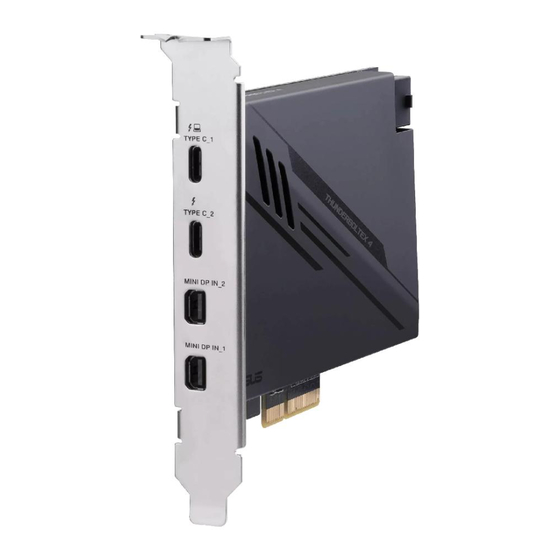
Asus ThunderboltEX 4 Bedienungsanleitung
Inhaltsverzeichnis

Verwandte Anleitungen für Asus ThunderboltEX 4


Inhaltszusammenfassung für Asus ThunderboltEX 4
- Seite 1 ThunderboltEX 4 User Guide...
- Seite 2 (including damages for loss of profits, loss of business, loss of use or data, interruption of business and the like), even if ASUS has been advised of the possibility of such damages arising from any defect or error in this manual or product.
-
Seite 3: Package Contents
Thunderbolt™ 4 technology, and two mini DisplayPort IN ports (support DisplayPort 1.4 specifications) that allow you to redirect VGA input signals through the ThunderboltEX 4 card for video output. The Thunderbolt™ 4 port also features a number or features such as 40 Gb/s bi-directional bandwidth and incorporates DisplayPort 1.4 support, enabling... -
Seite 4: Accessories
ThunderboltEX 4 specifications summary Intel ® Thunderbolt™ 4 JHL8540 Controller Chipset 2 x Thunderbolt™ 4 USB Type-C ® ports - up to 40 Gbps for Thunderbolt™ devices - Type-C_1 supports up to 20V/5A, 100W quick charge feature, Type-C_2 support up to 9V/3A, 27W quick charge feature. - Seite 5 ThunderboltEX 4 card layout Thunderbolt™ 4 USB Type-C ® port (supports up to 20V/5A, 100W quick charge feature) ® Thunderbolt™ 4 USB Type-C port (supports up to 9V/3A, 27W quick charge feature) Mini DisplayPort IN ports 6-pin PCIe power connector USB 2.0 header...
- Seite 6 Installing the ThunderboltEX 4 card • The recommended PCIe slot for the ThunderboltEX 4 card may differ between models. • The following illustrations are for reference only. The motherboard layout may vary with models, but the installation steps remain the same.
- Seite 7 Type-C ® port on the ThunderboltEX 4 card. • The Thunderbolt™ 4 cable is not bundled with the ThunderboltEX 4 package. Use the Thunderbolt™ cable that came with your Thunderbolt™-enabled device when connecting to the Thunderbolt™ 4 USB Type-C ®...
-
Seite 8: Connecting To External Devices
Connecting to external devices • Before connecting any Thunderbolt™-enabled devices in a daisy-chain configuration, ensure that it is equipped with one Thunderbolt™ IN port and one Thunderbolt™ OUT port. • The total bandwidth of Thunderbolt™ is 40 Gbps, this is shared between the devices connected in a daisy-chain configuration. - Seite 9 The maximum supported monitor resolution for this configuration is 4K, but may differ according to the amount of devices connected. Installing the ThunderboltEX 4 driver To install the driver, place the Support DVD into the optical drive then follow on-screen...
-
Seite 10: Fcc Compliance Information
Notices FCC Compliance Information Responsible Party: Asus Computer International Address: 48720 Kato Rd., Fremont, CA 94538, USA Phone / Fax No: (510)739-3777 / (510)608-4555 This device complies with part 15 of the FCC Rules. Operation is subject to the following two conditions: (1) This device may not cause harmful interference, and (2) this device must accept any interference received, including interference that may cause undesired operation. - Seite 11 ASUS follows the green design concept to design and manufacture our products, and makes sure that each stage of the product life cycle of ASUS product is in line with global environmental regulations. In addition, ASUS disclose the relevant information based on regulation requirements.
-
Seite 12: Turkey Rohs
AEEE Yönetmeliğine Uygundur ASUS Recycling/Takeback Services ASUS recycling and takeback programs come from our commitment to the highest standards for protecting our environment. We believe in providing solutions for you to be able to responsibly recycle our products, batteries, other components as well as the packaging materials. - Seite 13 доступний на: www.asus.com/support Cijeli tekst EU izjave o sukladnosti dostupan je na: www.asus.com/support Türkçe AsusTek Computer Inc., bu aygıtın temel gereksinimlerle ve ilişkili Čeština Společnost ASUSTeK Computer Inc. tímto prohlašuje, že Yönergelerin diğer ilgili koşullarıyla uyumlu olduğunu beyan eder.
- Seite 14 • ASUS dragovoljno nudi komercijalno proizvođačko jamstvo. • ASUS zadržava prava na tumačenje odredbi ASUS komercijalnog • ASUS reserves the right to interpret the provisions of the ASUS Commercial Guarantee. jamstva. • This ASUS Commercial Guarantee is provided independently and •...
- Seite 15 • Si tiene alguna queja o necesidad de un centro de reparación local o el periodo de garantía del producto ASUS, por favor visite el sitio Información de garantía de ASUS de Soporte de ASUS en https://www.asus.com/mx/support/ para •...
-
Seite 16: Asus Contact Information
+1-510-739-3777 +1-510-608-4555 https://www.asus.com/us/ Web site Technical Support Support fax +1-812-284-0883 Telephone +1-812-282-2787 https://qr.asus.com/techserv Online support ASUS COMPUTER GmbH (Germany and Austria) Address Harkortstrasse 21-23, 40880 Ratingen, Germany https://www.asus.com/de Web site https://www.asus.com/support/Product/ContactUs/ Online contact Services/questionform/?lang=de-de Technical Support Telephone (DE) +49-2102-5789557 Telephone (AT) +43-1360-2775461 https://www.asus.com/de/support...