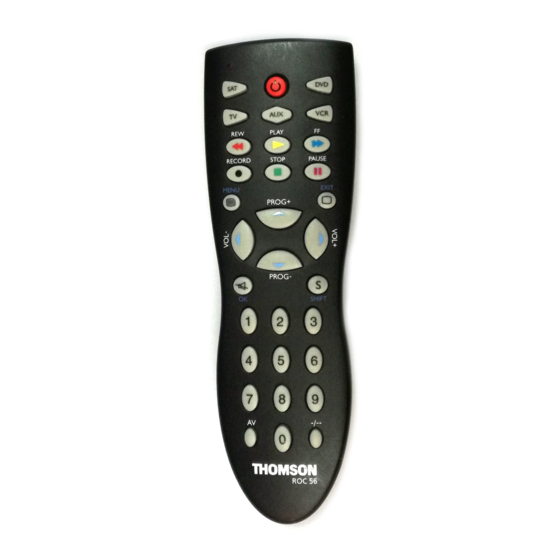
THOMSON ROC 56 Bedienungsanleitung
Inhaltsverzeichnis
Verfügbare Sprachen
Verfügbare Sprachen
01-ROC 56 GB
Downloaded from
www.Manualslib.com
24/02/04
14:37
This Universal Remote Control is compatible with most models of infrared-controlled TV sets,
video recorders, LVD players, satellite and cable TV receivers.
This remote control has already been programmed so that you can use it to control most of the
audio/video products made by the THOMSON group. Before attempting to programme the
remote control, install 2 batteries (AAA, not supplied) and try it out by using one of the
methods described in this user manual.
Please keep this guide along with the code list (provided separately), so that you can
programme your remote control for use with other products.
1 - Description of the key functions
1
Indicator lamp: the red indicator lamp lights up when any key is pressed.
2
Product keys (TV, VCR, SAT, DVD or AUX): Used to programme and control different products (TV,
satellite receiver, video recorder, DVD player and so on).
3
G (REW): Goes backward or advances forward (VCR
function in TV mode.
4
RECORD: To record, press the RECORD key twice.
5
STOP: Stops VCR tape advance; in DVD mode, stops disc play; press with green key for fast text
function in TV mode.
6
a/MENU: Teletext On/Off in TV mode; turns on the menu of the selected products (SHIFT + MENU).
7
VOL -, VOL +: Increases (+) or decreases (-) the volume of the TV set; use to scroll horizontally in
any menu (SHIFT + VOL+/-).
8
/OK: Switches the TV sound off or confirms a selection (SHIFT +
9
Number keys 0 to 9: these keys have the same functions as those of your original remote and are
also used to enter the codes for different products.
10
AV: For selecting an external source (SCART).
11
B
B : On/Standby.
12
F (FF) : fast forward for VCR
13
B (PLAY): plays a VCR tape or DVD disk; press with yellow key for fast text function in TV mode.
14
K (PAUSE): Suspends play and stops on an image; press with magenta key for fast text function in
TV mode.
15
I/EXIT: Teletext Off in TV mode; turns off the menu of the selected product (SHIFT + EXIT).
16
PROG+/-: Programmes zapping button (rapid select); use to scroll vertically through menus (SHIFT +
PROG+/-).
17
S/SHIFT: Programmes the remote control (S) or activates the secondary key features (SHIFT).
18
3: Press this key first before you type in the 2-digit channel number (except for Thomson group
products).
2 - Testing the remote control before you programme it
1. Turn on the product you want to control.
2. Press the product key (2) that corresponds to the type of product you want to
control:
TV: television set
DVD: DVD player
VCR: video recorder
AUX: other product
SAT: satellite receiver
3. Point the remote control towards the product and try to turn it off by pressing the
B key. If the product doesn't turn off, you'll need to programme the remote control
B
by one of the methods described in chapter 3.
manuals search engine
Page 1
and DVD
); press with red key for fast text
S
S
and DVD
; press with blue key for fast text function in TV mode.
S
S
1
).
Inhaltsverzeichnis

Verwandte Anleitungen für THOMSON ROC 56


Inhaltszusammenfassung für THOMSON ROC 56
-
Seite 11: Beschreibung Der Tastenfunktionen
Videorecordern, LVD-Spielern, Satelliten- und Kabelfernsehempfängern kompatibel. Die Fernbedienung wurde im Werk programmiert, damit Sie sie sofort zum Steuern des größten Teils der Geräte der Marken des THOMSON-Konzerns benutzen können. Deshalb empfehlen wir Ihnen, die Fernbedienung anhand einer der in dieser Bedienungsanleitung beschriebenen Methoden auszuprobieren, bevor Sie versuchen, sie zu programmieren. -
Seite 12: Programmieren Der Fernbedienung
TV: Fernseher, VCR: Videorecorder, SAT: Satellitenempfänger, DVD: DVD Player, AUX: anderes Gerät 4. Wenn die Anzeige leuchtet, den Untercode eintippen (z. B. 1 für THOMSON). 5. Die Fernbedienung auf das Gerät richten und versuchen, es auszuschalten, indem Sie auf die Taste B B (11) drücken. - Seite 13 Beispiel: Sie wollen in Stellung AUX einen Satellitenempfänger fernsteuern. Geben Sie irgendeinen Satellitenempfängercode ein, den Sie im Codeverzeichnis finden; z.B. den Code 603 für Thomson Sat-Empfänger. Dann schalten Sie die Automatiksuche ein. Die Fernsteuerung probiert nun alle Bedienungscodes für Sat-Empfänger der ausgewählten Fabrikmarke.
-
Seite 14: Wie Man Einen Programmierten Code Wiederfindet
03-ROC 56 DE 24/02/04 14:39 Page 14 Methode E – Programmieren zum Steuern eines COMBO (TV-VCR-Kombigerät) Das Einrichten der Fernbedienung zum Steuern eines COMBO’s besteht darin, daß Sie zuerst den Fernsehgeräte- und anschließend den Videorecorderteil des aus diesen beiden Geräten bestehenden COMBO’s programmieren. -
Seite 15: Lautstärkeeinstellung In Der Betriebsart Satelliten- Und Kabelfernsehen
Fernsehers. 7 - Das NAVILIGHT-Navigationssystem Das Navigationssystem NAVILIGHT NAVILIGHT ermöglicht Ihnen einen leichten Zugang zu den Einstellungen Ihres mit dem System THOMSON NAVILIGHT ausgestatteten Fernsehgeräts (TV) oder Videorecorders (VCR). 1. Schalten Sie das Gerät ein, das Sie steuern möchten. 2. Betätigen Sie die Taste, die dem betreffenden Gerät zugeordnet ist (TV, VCR, SAT oder AUX). - Seite 73 ìåòîä ‚). „àëåå, çàïóñòèòå ïîèñê â àâòîìàòè÷åñêîì ðåæèìå (ìåòîä C). •ðèìåð: åñëè âû õîòèòå óïðàâëßòü ñïóòíèêîâûì ïðèåìíèêîì ïðè ïîìîùè êíîïêè AUX, ñëåäóåò ââåñòè êîä ñïóòíèêà (ëþáîé êîä ñïóòíèêà, ñîäåðæàùèéñß â ñïèñêå êîäîâ, íàïðèìåð, 603 Ð ñïóòíèê Thomson), çà òåì íåîáõîäèìî çàïóñòèòü ïîèñê â àâòîìàòè÷åñêîì ðåæèìå. Ghjdthrf ghjuhfvvbhjdfybz% Dfi fggfhfn>...
- Seite 75 ïðèåìíèêà, à åñëè ðàíåå êîíòðîëèðîâàëàñü ãðîìêîñòü ñïóòíèêîâîãî ïðèåìíèêà, òî òåïåðü ýòî áóäåò ãðîìêîñòü òåëåâèçîðà. 7 - Yfdbufwbz NAVILIGHT Cbcntvf yfdbufwbb THOMSON NAVILIGHT j,tcgtxbdftn dfv kturbq ljcneg r yfcnhjqrt dfituj ntktdbpjhf !TV@ bkb dfituj vfuybnjcrjgf !VCR@> j,jheljdfyyjuj cbcntvjq THOMSON NAVILIGHT. 1. Drk/xbnt ghtlyfpyfxtyysq eghfdktyb/ fggfhfn.