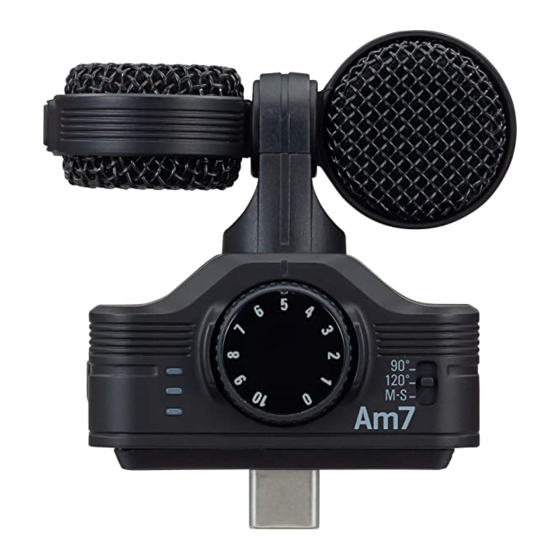
Zoom Am7 Bedienungsanleitung
Mid-side stereo microphone for android
Inhaltsverzeichnis
Verfügbare Sprachen
Verfügbare Sprachen
You must read the Usage and Safety Precautions before use.
The Operation Manual can be downloaded from the ZOOM website (www.zoom.jp/docs/am7). This page has
files in PDF and ePub formats. The PDF file format is suitable for printing on paper and reading on a
computer. The ePub format can be read with electronic document readers and is designed for reading on
smartphones and tablets.
Thank you very much for purchasing the ZOOM Am7 .
The Am7 has the following features.
• High quality mic that connects with Android device
This stereo microphone can be connected to an Android device and used with an application that supports mic input to record
high-quality audio.
Note: In this manual, we refer to all of these devices as "the connected device" or "the Android device. "
• Stereo width control using mid-side mics
The mid-side (M-S) stereo mic design has a directional mid mic that covers the front and a bidirectional side mic that covers
the sides. By adjusting the level of the side mic signal you can change the stereo width of the sound as you like.
• Two modes: audio and video
Use the audio position when pointing the connected device like a mic toward the sound you are recording. Use the video
position when recording with the connected device's camera.
• High-performance app for use with the mic
Download the free application from the Google Play and use it with the Am7 to, for example, set the recording format, edit
audio files and apply various effects.
• Audio monitoring without latency (only when using the ZOOM Handy Recorder app)
Using latency-free direct monitoring, the audio input through the Am7 can be output directly from the stereo mini jack without
passing through the connected Android device.
• Hardware controls for adjusting recording
Use the Am7 dial and switches to adjust the recording gain and stereo width.
• Usable even with devices in cases
By removing the included case adjuster, you can connect this mic to a device even when it is in a case.
© 2020 ZOOM CORPORATION
Copying or reproduction of this document in whole or in part without permission is prohibited.
Product names, registered trademarks and company names in this document are the property of their respective companies.
Note: All trademarks and registered trademarks in this document are for identification purposes only and are not intended to infringe on the
copyrights of their respective owners.
You might need this manual in the future. Always keep it in a place where you can access it easily.
The contents of this manual and the specifications of the product could be changed without notice. Android™ and Google Play are trademarks or
registered trademarks of Google LLC.
Recording from copyrighted sources, including CDs, records, tapes, live performances, video works and broadcasts, without permission of the
copyright holder for any purpose other than personal use is prohibited by law. Zoom Corporation will not assume any responsibility related to
infringements of copyrights.
Am7
Mid-Side Stereo Microphone for Android
OPERATION MANUAL
EN
Inhaltsverzeichnis

Verwandte Anleitungen für Zoom Am7


Inhaltszusammenfassung für Zoom Am7
- Seite 9 Position „Video“ , wenn Sie über die Kamera des angeschlossenen Gerätes aufzeichnen. • Leistungsstarke App zur Tonaufnahme mit dem Mikrofon Kostenlose Download-Software für das Am7 aus dem Google Play. Hier können Sie etwa das Aufnahmeformat definieren, Aufnahmen editieren und Effekte hinzufügen.
-
Seite 10: Bezeichnung Der Bedienelemente
Adapter an das Gerät an. Wenn das Am7 über das angeschlossene Gerät mit Strom versorgt wird, leuchtet die rote LED schwach. Das Am7 kann sofort benutzt werden, wenn Sie Handy Recorder oder eine andere kompatible App starten. • Entfernen Sie den Case Adjuster, wenn das Case des Geräts einen... -
Seite 11: Nutzung Des Mikrofons
Über die Handy Recorder App stellen Sie die Lautstärke für den Kopfhörer oder ein anderes Gerät an der Stereo-Miniklinkenbuchse des Am7 ein. Die über die Handy Recorder App eingestellte Lautstärke wird im Am7 gespeichert und auch für den Betrieb mit anderen Programmen benutzt. -
Seite 12: Einstellen Des Aufnahmepegels
ANMERKUNG • Solange das Am7 angeschlossen ist, gibt das angeschlossene Gerät selbst keinen Ton aus. Möchten Sie den Ton über die Lautsprecher hören, entfernen Sie das Am7 nach der Aufnahme von ihrem Gerät. • Verbinden Sie Am7 und Android-Gerät vollständig. Eine unvollständige Verbindung kann zu Fehlfunktionen oder Gerätedefekten führen.