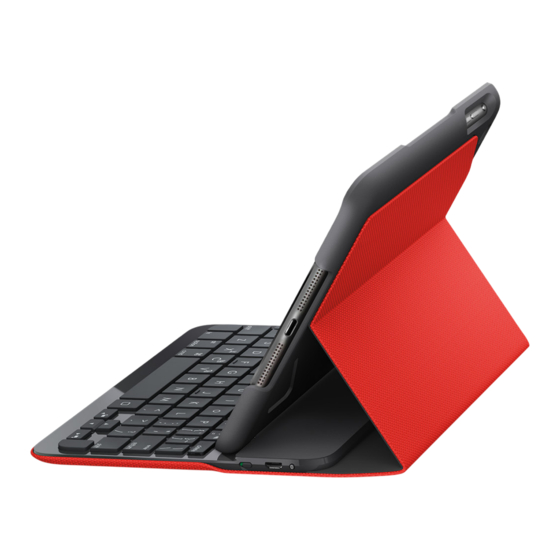
Logitech CANVAS Installationsanleitung
Vorschau ausblenden
Andere Handbücher für CANVAS:
- Installationsanleitung (201 Seiten) ,
- Einrichtungsanleitung (292 Seiten)
Inhaltsverzeichnis
Verfügbare Sprachen
Verfügbare Sprachen
Quicklinks
Inhaltsverzeichnis

Verwandte Anleitungen für Logitech CANVAS


Inhaltszusammenfassung für Logitech CANVAS
-
Seite 3: Know Your Product
Logitech CANVAS – Keyboard Case – For iPad mini, 2, 3 Know your product 1. Tablet holder 2. Function keys 3. Keyboard 4. Bluetooth® and battery status light 5. Bluetooth connect button 6. Micro-USB charging port 7. On/off switch 8. Micro-USB charging cable 9. -
Seite 12: Produkt Auf Einen Blick
Logitech CANVAS – Tastatur-Case für iPad mini, 2, 3 Produkt auf einen Blick 1. Tablet-Halterung 2. Funktionstasten 3. Tastatur 4. Bluetooth®- und Akkustandsanzeige 5. Bluetooth-Verbindungstaste 6. Mikro-USB-Ladeanschluss 7. Ein-/Ausschalter 8. Mikro-USB-Ladekabel 9. Dokumentation Español Desechar las baterías al final de la útil del producto... -
Seite 13: Einrichten Des Tastatur-Case
Logitech CANVAS – Tastatur-Case für iPad mini, 2, 3 Einrichten des Tastatur-Case Herstellen der Verbindung mit dem iPad mini Erste Schritte Das Tastatur-Case stellt die Verbindung 1. Öffnen Sie das Tastatur-Case, stellen Sie mit dem iPad mini über Bluetooth her. -
Seite 14: Verbinden Mit Einem Anderen Ipad Mini
Logitech CANVAS – Tastatur-Case für iPad mini, 2, 3 2. Führen Sie auf dem iPad mini 3. Drücken Sie die Bluetooth- die folgenden Schritte aus: Verbindungstaste. • Vergewissern Sie sich, dass Bluetooth aktiviert ist. Wählen Sie „Einstellungen > Bluetooth > Ein“. - Seite 15 Logitech CANVAS – Tastatur-Case für iPad mini, 2, 3 Verwenden des Keyboard Folio Wenn Sie die Tastatur in der Schreib- position eine Zeit lang nicht verwenden, Zwei Blickwinkel wechselt sie automatisch in den Das Tastatur-Case ermöglicht zwei Energiesparmodus. Drücken Sie eine Blickwinkel –...
-
Seite 16: Verstauen Des Ipad Mini Für Den Transport
Logitech CANVAS – Tastatur-Case für iPad mini, 2, 3 Verstauen des iPad mini für den Transport 1. Setzen Sie das iPad mini in die Tablet- Halterung. 2. Schließen Sie das Tastatur-Case: Statusanzeigen Die Statusanzeige Ihres Tastatur-Case bietet Informationen zum Akkustand der Tastatur... -
Seite 17: Funktionstasten
Logitech CANVAS – Tastatur-Case für iPad mini, 2, 3 Funktionstasten Fn + Minus = Leiser Fn + 1 = Bildschirm sperren Sperrt oder entsperrt Fn + Plus = Lauter den Bildschirm des iPad mini Home = Startbildschirm Fn + 2 = Siri des iPad mini Sie können mit Ihrer Stimme... -
Seite 18: Informationen Zum Akku
Logitech CANVAS – Tastatur-Case für iPad mini, 2, 3 Laden des Tastaturakkus Informationen zum Akku Wenn die Statusanzeige für den Akku rot leuchtet, muss der Akku des Keyboard-Case • Eine Vollladung des Akkus gewährleistet geladen werden. etwa sechs Monate Laufzeit, 1. -
Seite 19: Akkuentsorgung
Logitech CANVAS – Tastatur-Case für iPad mini, 2, 3 Akkuentsorgung Durchsuchen Sie Online-Artikel zur Unterstützung beim Einrichten, für Tipps zur Nutzung und für Informationen zu weiteren Funktionen. Wenn für die Bluetooth-Tastatur optionale Software verfügbar ist, können Sie hier herausfinden, wie Sie die Tastatur an Ihre Bedürfnisse anpassen und alle ihre Funktionen optimal nutzen können. -
Seite 20: Ihre Meinung Ist Gefragt
Logitech CANVAS – Tastatur-Case für iPad mini, 2, 3 Fehlerbehebung Ihre Meinung ist gefragt Vielen Dank, dass Sie sich für unser Produkt Die Tastatur funktioniert nicht entschieden haben. • Drücken Sie eine beliebige Taste, Bitte nehmen Sie sich einen Moment Zeit, um den Energiesparmodus der Tastatur um ein paar Fragen zu beantworten. -
Seite 21: Présentation Du Produit
Logitech® CANVAS - Étui clavier - pour iPad mini, iPad mini 2, iPad mini 3 Présentation du produit 1. Support pour tablette 2. Touches de fonction 3. Clavier 4. Témoin Bluetooth® et de charge de la batterie 5. Bouton de connexion Bluetooth 6. -
Seite 30: Panoramica Del Prodotto
Logitech CANVAS – Custodia con tastiera – Per iPad mini, 2, 3 Panoramica del prodotto 1. Porta tablet 2. Tasti funzione 3. Tastiera 4. Spia Bluetooth® e di stato della batteria 5. Pulsante di connessione Bluetooth 6. Porta di ricarica micro USB 7. -
Seite 39: Componentes Del Producto
Logitech CANVAS – Funda protectora – Para iPad mini, 2, 3 Componentes del producto 1. Soporte para tablet 2. Teclas de función 3. Teclado 4. Diodo de Bluetooth® y estado de batería 5. Botón de conexión Bluetooth 6. Puerto de carga micro USB 7. - Seite 48 Logitech CANVAS – Estojo para teclado – Para iPad mini, 2, 3 Conheça o seu produto 1. Suporte do tablet 2. Teclas de função 3. Teclado 4. Luz de estado da bateria e do Bluetooth® 5. Botão de ligação Bluetooth 6.
-
Seite 57: Ken Uw Product
Logitech CANVAS – Keyboard Case – voor iPad mini, 2, 3 Ken uw product 1. Tablethouder 2. Functietoetsen 3. Toetsenbord 4. Bluetooth®- en batterijstatuslampje 5. Bluetooth- verbindingsknopje 6. Micro-USB-oplaadpoort 7. Aan/uit-schakelaar 8. Micro-USB-oplaadkabel 9. Handleiding Español Desechar las baterías al final de la útil del producto... - Seite 66 Logitech CANVAS – Tangentbordsfodral – för iPad mini, 2 och 3 Produktöversikt 1. Surfplattehållare 2. Funktionstangenter 3. Tangentbord 4. Bluetooth® och batteriindikator 5. Anslutningsknapp för Bluetooth 6. Mikro-USB-laddningsport 7. På/av-reglage 8. Mikro-USB-laddningssladd 9. Bruksanvisning Español Desechar las baterías al final de la útil del producto...
-
Seite 75: Oversigt Over Produktet
Logitech CANVAS – Tastaturetui til iPad mini, 2 og 3 Oversigt over produktet 1. Holder til tablet-pc 2. Funktionstaster 3. Tastatur 4. Indikator for Bluetooth® og batteriniveau 5. Knap til etablering af Bluetooth-binding 6. Mikro-USB-port til opladning 7. Tænd/sluk-knap 8. Mikro-USB-opladerkabel 9. -
Seite 84: Bli Kjent Med Produktet
Logitech CANVAS – Tastaturetui – For iPad mini, 2, 3 Bli kjent med produktet 1. Nettbrettholder 2. Funksjonstaster 3. Tastatur 4. Statuslampe for Bluetooth® og batteri 5. Tilkoplingsknapp for Bluetooth 6. Ladeport med mikro-USB- tilkopling 7. Av/på-bryter 8. Ladeledning med mikro-USB-tilkopling 9. - Seite 93 Logitech CANVAS – näppäimistökotelo – iPad mini-, iPad mini 2- ja iPad mini 3 -laitteille Tunne tuotteesi 1. Taulutietokoneen kulmapidike 2. Toimintonäppäimet 3. Näppäimistö 4. Bluetoothin® ja akun tilan merkkivalo 5. Bluetooth-yhteyspainike 6. mikro-USB-latausportti 7. Virtakytkin 8. Mikro-USB-latausjohto 9. Tuotteen dokumentaatio Español...
- Seite 102 Logitech CANVAS – Θήκη-πληκτρολόγιο – Για iPad mini, 2, 3 Γνωριμία με το προϊόν 1. Βάση στήριξης για tablet 2. Πλήκτρα λειτουργιών 3. Πληκτρολόγιο 4. Bluetooth® και φωτεινή ένδειξη κατάστασης μπαταρίας 5. Κουμπί σύνδεσης Bluetooth 6. Θύρα φόρτισης micro-USB 7. Διακόπτης ενεργοποίησης/ απενεργοποίησης...
- Seite 111 Logitech CANVAS — клавиатура-чехол — для iPad mini, 2, 3 Знакомство с продуктом 1. Держатель планшета 2. Функциональные клавиши 3. Клавиатура 4. Индикатор состояния Bluetooth® и батареи 5. Кнопка Bluetooth- соединения 6. Порт микро-USB для зарядки 7. Переключатель Вкл./Выкл. 8. Кабель питания микро-USB 9.
-
Seite 120: A Termék Ismertetése
Logitech CANVAS – billentyűzettok – iPad mini, 2, 3 készülékhez A termék ismertetése 1. Táblagéptartó 2. Funkcióbillentyűk 3. Billentyűzet 4. Bluetooth®- és akkumulátor- fényjelzések magyarázata 5. Bluetooth- csatlakoztató gomb 6. Mikro-USB port töltéshez 7. Be- és kikapcsológomb 8. Mikro-USB töltőkábel 9. -
Seite 129: Popis Produktu
Logitech CANVAS – Pouzdro s klávesnicí – Pro iPad mini, 2, 3 Popis produktu 1. Držák tabletu 2. Funkční klávesy 3. Klávesnice 4. Indikátor Bluetooth® a stavu baterie 5. Tlačítko pro připojení Bluetooth 6. Nabíjecí port micro-USB 7. Vypínač zap/vyp 8. - Seite 138 Logitech CANVAS — Etui z klawiaturą — Do iPada mini, 2, 3 Poznaj urządzenie 1. Uchwyt tabletu 2. Klawisze funkcyjne 3. Klawiatura 4. Wskaźnik stanu połączenia Bluetooth® i akumulatora 5. Przycisk nawiązywania połączenia Bluetooth 6. Port ładowania Micro-USB 7. Wyłącznik zasilania 8.
- Seite 147 Logitech CANVAS – Puzdro s klávesnicou – Pre iPad mini, 2, 3 Popis produktu 1. Držiak tabletu 2. Funkčné klávesy 3. Klávesnica 4. Indikátor Bluetooth® a stavu batérie 5. Tlačidlo pripojenia Bluetooth 6. Nabíjací port micro-USB 7. Vypínač 8. Nabíjací kábel micro-USB 9.
-
Seite 156: Ürününüzü Tanıyın
Logitech – CANVAS – Klavyeli Kılıf – iPad mini, 2 ve 3 için Ürününüzü tanıyın 1. Tablet bilgisayar tutucu 2. İşlev tuşları 3. Klavye 4. Bluetooth® ve pil durumu ışığı 5. Bluetooth bağlantı düğmesi 6. Mikro USB şarj bağlantı noktası... -
Seite 165: العربية
2، 3 – حقيبة لوحة مفاتيح – ألجهزةLogitech CANVAS تعرف على المنتج حامل الجهاز اللوحي مفاتيح التشغيل لوحة المفاتيح Bluetooth مصباح حالة البطارية و ® Bluetooth زر توصيل Micro-USB منفذ شحن مفتاح التشغيل/إيقاف التشغيل Micro-USB كابل شحن... - Seite 174 2, 3- - כיסוי מקלדת - לLogitech CANVAS הכר את המוצר מחזיק הטאבלט מקשי פונקציות מקלדת וסוללהBluetooth נורית מצב ® Bluetooth לחצן חיבור Micro-USB חיבור טעינה מתג הדלקה/כיבוי Micro-USB כבל טעינה תיעוד מוצר Español Desechar las baterías al final de la útil del producto...