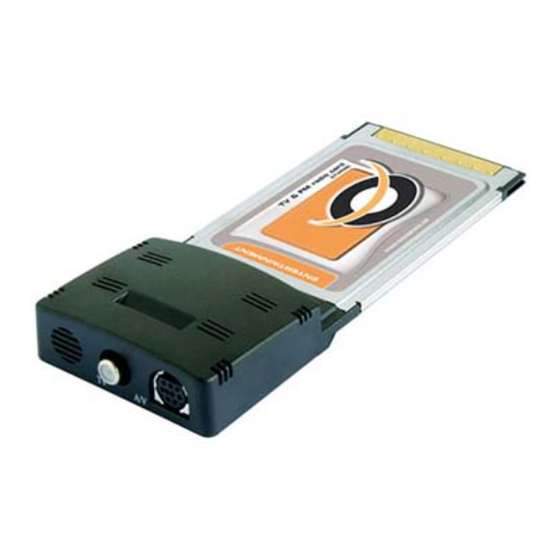
Conceptronic CTVFMC Schnellstartanleitung
Inhaltsverzeichnis
Verfügbare Sprachen
Verfügbare Sprachen
NEDERLANDS
Conceptronic CTVFMC
Snelstart handleiding
Hartelijk gefeliciteerd met de aanschaf van uw
Conceptronic TV-kaart.
In de bijgaande Snelstart handleiding wordt stap voor stap uitgelegd hoe u de
Conceptronic CTVFMC installeert.
Ingeval van problemen adviseren wij u onze support-site te bezoeken (ga naar:
www.conceptronic.net
en klik op 'Support'). Hier vindt u een database met
veelgestelde vragen waar u hoogstwaarschijnlijk de oplossing voor uw probleem
kunt vinden.
Heeft u andere vragen over uw product die u niet op de website kunt vinden,
neem dan contact met ons op via e-mail:
support@conceptronic.net
Voor meer informatie over Conceptronic producten kunt u terecht op de
Conceptronic website: www.conceptronic.net.
Bij software/drivers installatie: het is mogelijk dat onderstaande installatie iets
afwijkt van de installatie op uw computer. Dit is afhankelijk van de Windows
versie die u gebruikt.
1
Inhaltsverzeichnis

Verwandte Anleitungen für Conceptronic CTVFMC


Inhaltszusammenfassung für Conceptronic CTVFMC
- Seite 10 Falls sie andere Fragen zu ihrem Produkt haben und sie diese nicht auf unserer Website finden können, kontaktieren sie uns bitte per E-Mail: support@conceptronic.net Weitere Informationen zu den Conceptronic Produkte finden Sie auf der Website von Conceptronic: www.conceptronic.net Die nachstehend beschriebene Software-Installation kann sich bei Ihrem Rechner...
- Seite 11 DEUTSCH 1. Einleitung 1.1 Packungsinhalt Öffnen Sie die Packung der TV Capture Card und versichern Sie sich, dass sämtliche Elemente enthalten sind. In Ihrem TV Capture Card-Paket müssen sich folgende Elemente befinden: • TV & Video Capture Card • Audiokabel •...
-
Seite 12: Installation Der Hardware
DEUTSCH 2. Installation der Hardware Für die Installation der TV Capture Card sind folgende Schritte zu befolgen: Schalten Sie Ihren Computer aus. Führen Sie die TV Capture-Karte in einen freien Kartensteckplatz an Ihrem PC ein. Schließen Sie das SVHS-Gerät an einem verfügbaren, 4-poligen Mini-Din- Anschluss (SVHS-IN) an. -
Seite 25: Driver Installation
DRIVER INSTALLATION Driver installation NEDERLANDS: Klik op ‘Cancel’ (Annuleren) en niet op ‘Next’ (Volgende). Volg de stappen 1 tot en met 4 om de installatie van de driver te voltooien. ENGLISH: Click ‘Cancel’. Do not click ‘Next’. Continue step 1 through 4 to complete the driver installation. - Seite 26 DRIVER INSTALLATION...
- Seite 27 TV APPLICATION INSTALLATION NEDERLANDS: Volg de stappen 1 tot en met 6 om de installatie van de TV applicatie te voltooien. ENGLISH: Follow step 1 through 6 to complete the TV Application installation. ESPAÑOL: Siga los pasos 1 a 6 para finalizar la instalación de la aplicación de DEUTSCH: Führen Sie Schritt 1 bis 6 aus, um...
- Seite 28 TV APPLICATION INSTALLATION...
- Seite 29 TV APPLICATION INSTALLATION...
- Seite 30 APPLICATION FIRST TIME USAGE NEDERLANDS: Dubbelklik de PVR Plus pictogram om de TV applicatie te starten (1) Volg de stappen 2 tot en met 8 om de ”eerste gebruik setup’ te voltooien. ENGLISH: Double click the PVR Plus icon, to start using the TV application (1) Follow step 2 through 8 to finish the ‘First time usage setup’.
- Seite 32 APPLICATION FIRST TIME USAGE...
- Seite 33 FINE TUNING THE TV CHANNELS NEDERLANDS (3) Dubbelklik (4) Gebruik de schuifbalk om fijn af te stellen ENGLISH (3) Double click (4) Use the slide bar for fine tuning ESPAÑOL (3) Haga doble clic (4) Deslize la barra para sintonizar DEUTSCH (3) Doppelklicken FRANÇAIS...
- Seite 34 TELETEXT INSTALLATION NEDERLANDS: Volg de stappen 1 tot en met 3 om de teletext applicatie installatie te voltooien. ENGLISH: Follow step 1 through 3 to complete the teletext application installation. ESPAÑOL: Siga los pasos 1 a 3 para finalizar la instalación de la aplicación de teletexto.
- Seite 35 TELETEXT INSTALLATION...