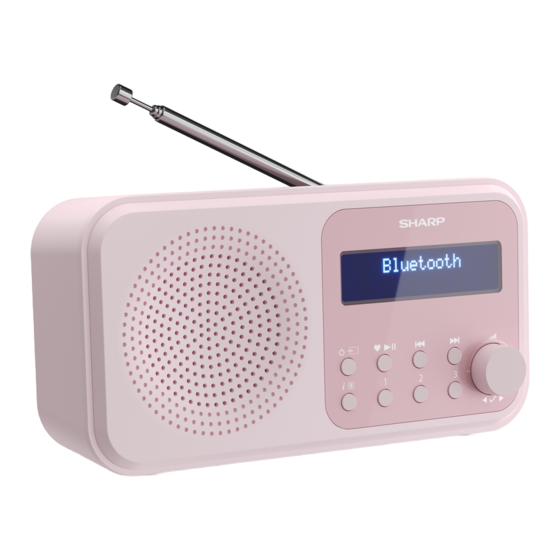
Sharp DRP420GN Bedienungsanleitung

Verwandte Anleitungen für Sharp DRP420GN


Inhaltszusammenfassung für Sharp DRP420GN
- Seite 1 User manual DR-P420 / DR-P421 | Tokyo Portable Digital Radio Product images are for illustration purposes only. Actual product may vary.
-
Seite 4: Important Safety Instructions
Location Important safety • The product should be installed in a stable instructions location and ensure the product and its parts are not overhanging. Ventilation Please follow all safety instructions • Slots and openings in the cabinet are provided and heed all warnings. Keep this for ventilation to ensure reliable operation of manual for future reference. - Seite 5 Water, moisture, and liquid entry clean cloth to clean the outside of the unit. • To prevent the risk of fi re or electric shock, Never clean it with chemicals or detergent. do not expose this product to rain, water, or Service and repair moisture.
- Seite 6 product is not to be used for a long time (more “Disposal of this equipment and batteries”). Do than a month), remove the batteries from the not throw them into fi re, do not disassemble product to prevent them from leaking. If the them and do not try to recharge non-rechargea- batteries leak, wipe away the leakage inside the ble batteries.
- Seite 7 CE and UKCA statement: This symbol on a product means that the product is covered by European • Hereby, Sharp Consumer Electronics Poland Directive 2012/19/EU and must not sp. z o.o. declares that this audio device is in be disposed of or dumped with your compliance with the essential requirements other household waste.
- Seite 8 Controls • In DAB mode: - Short press to move up the DAB Station list 1. Telescopic aerial • In FM mode: 2. Battery compartment - Short press: Move down the frequency 3. Micro USB port band by 0.05MHz. 4. Headphone jack - Long press: Scan down the frequency 5.
- Seite 9 (standard) end of the cable into a USB device or adapter to power the radio. The radio will power 1 x DR-P420 / DR-P421 Tokyo Portable Digital on and display <SHARP sharpconsumer.eu>. It Radio will then go into standby mode.
-
Seite 10: Initial Setup
memory; the next time the radio is switched on, Inserting batteries (optional) the station search does not take place. Before installing the batteries (not included), Short press to scroll through the please ensure the radio is switched off using available stations. To select the station displayed, and has been unplugged from the USB short press . -
Seite 11: Dab Radio Mode
confi rmed and you will return to the <Set Time/ automatically be selected when you switch the Date> menu. radio back on. to change the clock/date format Change DAB stations and auto update settings. Short press to exit to scroll through the available the menu. -
Seite 12: Prune Dab Stations
<Scanning…>. A progress bar will show the Store <1:(Empty)>> is displayed. Use progress of the scan and the number of stations move to the preset location that you would like to found. store the radio station to (1-20). Press to select. The display will confi rm <Preset X stored>, where Prune DAB stations ‘X’... -
Seite 13: Dab Display Information
• Channel and frequency – e.g. 12B 225.648 MHz DAB display information (Channel=12B, Frequency=225.648 MHz) When listening to a DAB station, you can change • Signal error - This is displayed as a number the information that will appear on the display. between 0-99. -
Seite 14: Fm Radio Mode
There are 3 levels of compression: stop at the next available station. • DRC off - no compression. This is the default Short press to fi ne-tune each frequency setting. in 0.05MHz steps. • DRC low - medium compression Note: If the reception is poor, adjust the aerial or •... -
Seite 15: Storing An Fm Station Preset
asterisk (*) in the display. Store (AMS) feature to store your FM radio station presets. In FM mode, long press . Use Storing an FM station preset to scroll to and select <AMS>. Your radio Your radio can store up to 20 FM stations in will now scan the FM frequency band and the its preset memories for instant access to your stations found will be automatically stored to the... -
Seite 16: Fm Display Information
• Program Type (PTY) – e.g., ‘Rock’ , ‘Pop‘ , ‘Talk’ , When found, your radio will be displayed as or ‘News’ SHARP DR-P420 / SHARP DR-P421 on your device. • Station name or frequency – e.g., BBC R4, Select this to begin pairing. Once done, <BT 93.30MHz... -
Seite 17: Set An Alarm
Wirelessly stream music via Alarm functionality Bluetooth Note: The alarm function will only function when In Bluetooth mode, you can wirelessly stream the radio is powered through via USB; it won’t audio through the product’s speaker. Use the function when powered through batteries (to controls on your paired Bluetooth device as well preserve the battery life). - Seite 18 Full Scan Manual Tune System DAB+ Sleep Alarm Prune Alarm Alarm 1 Setup System Time Alarm 2 Setup Backlight Scan setting Language Factory reset System Software Version System Alarm 1 or 2 settings Hour Time Duration 1, 5, 15, 30, or 60 minutes Source Buzzer, DAB, or FM Frequency...
-
Seite 19: Sleep Timer
Note: If the time is not set or has failed to update To switch off the alarm, follow the steps for ‘Set an from the radio signal, <Time is not set> will be alarm’ and select <Off >. displayed when you try to set the alarm. The radio Sleep timer will then prompt you to set the time. -
Seite 20: Display Language
<Yes>. <Restarting…> will be will be displayed next to the current language displayed. Your radio will restart and the display setting. will show <SHARP sharpconsumer.eu>. Other information Troubleshooting Software version If there is no sound or power: •... - Seite 21 if they need to be replaced. Please use good If the function buttons do not respond: quality AA batteries. • Check that the USB cable is connected to the back of your radio. Short press . If If the radio reception is poor: you are using batteries, they may need to be •...
-
Seite 22: Technical Specifications
FM frequency range 87.5 MHz to 108 MHz Bluetooth Version Bluetooth frequency range 2.4 GHz ~ 2.480 GHz Pairing name SHARP DR-P420 SHARP DR-P421 Dimensions (W) x (H) x (D) mm 174 x 90 x 53 Weight approx. 0,39 kg... -
Seite 23: Wichtige Sicherheitsanweisungen
Wichtige Vorsichtsmaßnahmen Sicherheitsanweisungen Kindersicherheit • Halten Sie sich während der Nutzung dieses Produkts immer an die allgemeinen Sicherheit- Bitte befolgen Sie alle shinweise, insbesondere, wenn Kinder in der Sicherheitshinweise und Nähe sind. Kinder sollten beaufsichtigt werden, beachten Sie alle Warnungen. um sicherzustellen, dass sie nicht mit dem Produkt spielen. - Seite 24 Belüftung sicherzustellen. Lassen Sie niemals Gewitter und Blitze zu, dass jemand – und dies gilt ganz besonders • Gewitter sind für alle elektrischen Produkte für Kinder – etwas in die Löcher, Spalten oder gefährlich. Wenn das Strom- oder Antennenka- anderen Öff nungen des Produktgehäuses stop- bel vom Blitz getroff en wird, kann das Produkt, ft, da dies zu einem Stromschlag führen kann.
- Seite 25 wenden Sie beim Reinigen niemals Chemikalien Nutzung und Wartung oder Reinigungsmittel. • Setzen Sie Batterien keinen hohen Temper- Service und Reparatur aturen aus, z. B. in der Nähe von Feuer oder • Dieses Produkt enthält keine Teile, die vom direkte Sonneneinstrahlung. Wenn das Produkt Benutzer gewartet werden können.
-
Seite 26: Entsorgung Dieses Geräts Und Von Batterien
Umweltbedingungen Entsorgung dieses Geräts • Batterien dürfen keinem niedrigen Luftdruck und von Batterien und keinen hohen Temperaturen ausgesetzt werden. Dies kann zu einer Explosion oder dem Austreten einer brennbaren Flüssigkeit oder Informationen für Benutzer hinsichtlich der eines entfl ammbaren Gases führen. Sammlung und Entsorgung von Altgeräten und Entsorgung gebrauchten Batterien. - Seite 27 Produkte und Batterien nicht mit dem Altgeräten fi nden Sie auf der lokalen Website allgemeinen Hausmüll vermischt werden des Herstellers des Produktes (www.sharp- dürfen. Haushaltskunden sollten sich bezüglich consumer.eu), oder wenden Sie sich an den Informationen, wie sie diese Gegenstände Händler, von dem das Produkt bezogen wurde.
-
Seite 28: Ce- Und Ukca-Erklärung
1. Teleskopantenne 2. Batteriefach CE- und UKCA-Erklärung: 3. Micro-USB-Anschluss 4. Kopfhöreranschluss • Sharp Consumer Electronics Poland Sp. z o.o. 5. Display mit Hintergrundbeleuchtung erklärt hiermit, dass dieses Audiogerät den Strom/Modus wesentlichen Anforderungen und weiteren ent- • Wenn ausgeschaltet, kurz drücken:... - Seite 29 - Kurz drücken: Wiedergabe/Pause - Lange drücken: Im Frequenzband nach - Lange drücken: Aktuelles Gerät trennen oben suchen. und nach neuen Geräten suchen • Im Bluetooth-Modus: Nächster Track • Im Menü: Durch die Menüoptionen bewegen • Im DAB-Modus: - Kurz drücken: In der DAB-Senderliste nach Info/Menü...
-
Seite 30: Packungsinhalt
1 x Tragbares Digitalradio Tokyo DR-P420 / um die Stromversorgung des Radios zu DR-P421 gewährleisten. Das Radio schaltet sich ein und 1 x Stromkabel USB auf Micro-USB zeigt <SHARP sharpconsumer.eu> an. Danach Benutzerdokumentation schaltet es in den Stand-by-Modus. Verwendung Ihres Batterien einlegen (optional) -
Seite 31: Ersteinrichtung
dass die Markierungen „+“ und „-“ übereinstimmen kurz auf . Nach einer kurzen Verzögerung sind. Legen Sie dann die Batterien richtig ein. schaltet Ihr Radio auf Ihren ausgewählten Sender. Bringen Sie die Batterieabdeckung wieder an. Einstellen der Lautstärke Achten Sie darauf, dass sie mit einem „Klicken“ Drehen Sie gegen den Uhrzeigersinn, richtig schließt. -
Seite 32: Dab-Radio-Modus
Fortschritt des Suchlaufs und es wird auch die ein. Es wird <Uhrzeit gespeichert> Anzahl der gefundenen Sender angezeigt, die angezeigt, sobald Sie das Jahr bestätigt haben, während des Suchlaufs gefunden wurden. Wenn und Sie kehren zurück zum Menü <Zeit/Datum Sie beim Ausschalten des Radios einen DAB- einstellen>. -
Seite 33: Dab-Sender Löschen
sollten Sie auch eine manuelle Sendersuche Einen DAB-Sender-Favoriten durchführen. abspeichern Im DAB-Modus: Ihr Radio kann bis zu 20 DAB-Radiosender als Drücken Sie lange auf . Scrollen Sie mit Favorit speichern – Sie können also sofort auf Ihre und wählen Sie <Vollständiger Lieblingssender zugreifen. -
Seite 34: Zu Einem Dab-Sender-Favoriten Wechseln
Informationsoptionen zu blättern: Zu einem DAB-Sender-Favoriten • Dynamic Label Segment (DLS) – dies sind vom wechseln Sender bereitgestellte Lauftextinformationen. Im DAB-Modus: Dazu gehören beispielsweise Künstlername, Um die als Favoriten abgespeicherten Liedtitel, Kontaktdaten des Radiosenders usw. Radiosender 1, 2 oder 3 schnell aufzurufen, •... -
Seite 35: Dynamic Range Control (Drc)
Antenne neu aus oder stellen Sie Ihr Radio an • DRC tief – mittlere Komprimierung. einen anderen Standort, um den Empfang zu • DRC hoch - maximale Komprimierung. verbessern. Drücken Sie im DAB-Modus lange auf • Signaldaten – die Datenrate, mit der das Signal Scrollen Sie mit und wählen Sie <DRC>... -
Seite 36: Die Suchlauf-Einstellungen Ändern
Drücken Sie kurz auf oder , um jede wählen Sie aus den zur Verfügung stehenden Frequenz in Schritten von 0,05 MHz fein Optionen. abzustimmen. Hinweis: Die aktuelle Suchlauf-Einstellung wird Hinweis: Richten Sie die Antenne bei einem mit einem Sternchen (*) auf dem Display markiert. schlechten Empfang neu aus oder stellen Sie das Einen FM-Sender-Favoriten Radio an einen anderen Standort. -
Seite 37: Zu Einem Fm-Sender-Favoriten Wechseln
Favoriten ist (1-20). Zu einem FM-Sender-Favoriten wechseln Hinweis: Wenn unter einem Favoriten schon ein FM-Sender abgespeichert wurde, wird dieser beim Im FM-Modus: Speichern des neuen Senders überschrieben. Um die als Favoriten abgespeicherten Auto Memory Store (AMS) Radiosender 1, 2 oder 3 schnell aufzurufen, drücken Sie entsprechend kurz auf 1, 2 oder 3. -
Seite 38: Bluetooth-Modus
• Sendername oder Frequenz – z. B. BBC R4, Wenn Ihr Radio gefunden wurde, wird es auf 93,30 MHz Ihrem Gerät als SHARP DR-P420 / SHARP DR-P421 • Betriebsanzeige – zeigt <USB-Strom> bei einer angezeigt. Wählen Sie es aus, um mit dem Pairen Stromversorgung über USB; zeigt <Batterie zu beginnen. -
Seite 39: Alarmfunktion
Drahtlos Musik per Bluetooth Alarmfunktion streamen Hinweis: Die Alarmfunktion funktioniert nur, Im Bluetooth-Modus können Sie Audiodaten wenn das Radio über USB mit Strom versorgt wird. drahtlos über den Lautsprecher des Geräts Sie funktioniert nicht bei der Stromversorgung per übertragen. Benutzen Sie die Steuerelemente Batterie (um die Akkulaufzeit zu erhalten). - Seite 40 Vollständiger Suchlauf Manuelle Abstimmung System DAB+ Schlaf Wecker Löschen Wecker Einstellung Alarm 1 System Uhrzeit Einstellung Alarm 2 Beleuchtung FM Einstellung Sprache Werkseinstellung System Software-Version System Einstellung Alarm 1 oder 2 Stunde Uhrzeit Minute Dauer 1, 5, 15, 30 oder 60 Minuten Quelle Buzzer, DAB oder FM Frequenz Täglich, einmalig, wochentags oder am Wochenende Lautstärkepegel...
- Seite 41 Hinweis: Wurde die Uhrzeit nicht eingestellt zu schalten, drücken Sie . <Schlummern> oder nicht durch das Funksignal aktualisiert, wird wird angezeigt, gefolgt von einem 10-minütigen <Keine Zeiteinst.> angezeigt, wenn Sie den Countdown. Sobald der Countdown endet, ertönt Alarm einstellen wollen. Das Radio fordert Sie der Alarm erneut.
-
Seite 42: Auto-Dimmen Der Hintergrundbeleuchtung Des Displays
Auto-Dimmen der wählen Sie <System> / <Sprache>. Scrollen Sie und wählen Sie Ihre bevorzugte Hintergrundbeleuchtung des Sprache. Es stehen 7 Optionen zur Verfügung: Displays Englisch, Französisch, Deutsch, Italienisch, Um das Auto-Dimmen der Spanisch, Polnisch und Niederländisch. Neben der Hintergrundbeleuchtung des Displays aktuellen Spracheinstellung wird ein Sternchen anzupassen, drücken Sie lange . - Seite 43 Sie <Ja>. Es wird „Nach DAB-Sendern scannen“ und/oder „Einen <Neustart…>. Ihr Radio wird neu gestartet und FM-Sender einstellen“. das Display zeigt <SHARP sharpconsumer.eu> • Stellen Sie Ihr Radio versuchsweise an einem anderen Standort auf, um herauszufi nden, ob sich der Empfang verbessert.
- Seite 44 • Bewegen Sie das Radio und das Bluetooth-Gerät von anderen Bluetooth-Geräten/elektrischen Geräten weg. • Schalten Sie nach Möglichkeit andere Blue- tooth-Geräte in der Nähe aus oder deaktivieren Sie deren Bluetooth-Funktionalität. Wenn die Funktionstasten nicht reagieren: • Überprüfen Sie, ob das USB-Kabel an der Rückseite Ihres Radios angeschlossen ist.
-
Seite 45: Technische Daten
DAB-Frequenzbereich Band III, 174 MHz bis 240 MHz FM-Frequenzbereich 87,5 MHz bis 108 MHz Bluetooth Version Bluetooth frequency range 2,4 GHz ~ 2,480 GHz Pairing-Name SHARP DR-P420 SHARP DR-P421 Abmessungen (B) x (H) x (T) mm 174 x 90 x 53 Gewicht ca. 0,39 kg... -
Seite 46: Instrucciones De Seguridad Importantes
Instrucciones de seguridad Precauciones importantes Seguridad infantil • Respete siempre las precauciones básicas de seguridad cuando utilice este producto, Siga todas las instrucciones de especialmente si hay niños presentes. Los niños seguridad y preste atención a deben ser supervisados para asegurarse de que todas las advertencias. - Seite 47 ninguna apertura de la carcasa del producto, ya está encendido. Debe desconectar todos los que podrían dar lugar a descargas eléctricas. cables y conectores del producto antes de una Calor y temperatura de funcionamiento tormenta. • No instale el aparato cerca de ninguna fuente Cable USB de calor, como radiadores, salidas de aire •...
- Seite 48 gase en contacto con el fabricante o el servicio Seguridad infantil técnico autorizado. La garantía del fabricante • Asegúrese siempre de que el compartimento de no cubre las averías resultantes de reparaciones las pilas está bien cerrado. llevadas a cabo por terceros. •...
- Seite 49 Eliminación de este equipo Este símbolo indica que el producto y de las pilas se ha diseñado y fabricado para poder reciclarse y reutilizarse. • Estos símbolos incluidos en los productos, los Información dirigida a los usuarios relativa a la embalajes o los documentos acompañantes recogida y eliminación de equipos antiguos y indican que los productos eléctricos y electróni-...
- Seite 50 Controles del Reino Unido: 1. Antena telescópica 2. Compartimento de las pilas • Por la presente, Sharp Consumer Electronics Po- 3. Puerto Micro USB land sp. z o.o. declara que este equipo cumple 4. Conexión para los auriculares los requisitos esenciales y otras disposiciones 5.
- Seite 51 • Mantenga pulsado para almacenar emisora - Pulse para recorrer hacia arriba la banda de en memoria frecuencias en intervalos de 0,05 MHz. • En modo Bluetooth: - Mantenga pulsado para buscar hacia arriba - Pulse para reproducir o poner en pausa la banda de frecuencias.
-
Seite 52: Contenido De La Caja
USB o adaptador para ali- mentar la radio. La radio se encenderá y mostrará Una radio portátil digital DR-P420 / DR-P421 <SHARP sharpconsumer.eu>. A continuación, Un cable de alimentación USB a Micro USB pasará a modo en espera. -
Seite 53: Configuración Inicial
das como LR-6), teniendo en cuenta los signos + nar la emisora, pulse brevemente . Transcurrirá y - para colocarlas correctamente. Vuelva a colocar un breve instante hasta que la radio sintonice la la tapa de las pilas, asegurándose de que oye un emisora seleccionada. -
Seite 54: Modo De Radio Dab
<Ajustar hora/fecha>. cuando vuelva a encender el aparato. para cambiar el formato de fecha/ Cambiar emisoras DAB hora y los ajustes de actualización automática. Utilice para desplazarse a través de las Pulse brevemente para salir del menú. emisoras disponibles. Pulse para seleccionar Cambio del modo cuando se muestre la emisora que desea escuchar. - Seite 55 de progreso mostrará el avance del proceso de Sintonice la emisora DAB que desea guardar en búsqueda y el número de emisoras encontradas. memoria. Mantenga pulsado hasta que aparezca <Programa guardado <1:(Vacío)>>. Eliminar emisoras DAB Utilice para desplazarse a la ubicación de Puede eliminar las emisoras DAB de la lista de memoria en la que le gustaría almacenar la emisoras sin recepción en su área.
- Seite 56 en esa ubicación o <(Vacío)> si no se almacenó • Tipo de programa (PTY): p. ej., Rock, Pop, Chat ninguna emisora previamente. Utilice o News para desplazarse y seleccionar la emisora guarda- • Nombre multiplex: muestra el área de emisión y da en memoria que le gustaría escuchar (1-20).
- Seite 57 Control de gama dinámica (DRC) Modo de radio FM No todas las emisoras transmiten datos DRC. DRC Para cambiar al modo FM, pulse hasta que se utiliza para controlar la diferencia entre los la radio muestre <FM>. Si estaba escuchando una sonidos más altos y los más bajos, por ejemplo, emisora FM cuando apagó...
- Seite 58 búsqueda> Pulse Nota: El almacenamiento de emisoras de radio Dispone de dos opciones diferentes entre las FM no sobrescribe las emisoras DAB guardadas que elegir: en memoria. • <Emisoras con buena recepción>: la búsque- Sintonice la emisora FM que desea guardar en da solo se detendrá...
- Seite 59 pulsado . Utilice para desplazarse y Información en la pantalla FM seleccione <AMS>. La radio pasará a buscar las Cuando escucha una emisora DAB puede cambiar bandas de frecuencia FM y las emisoras encon- la información que se mostrará en la segunda tradas se almacenarán automáticamente en las línea de la pantalla.
-
Seite 60: Modo Bluetooth
• Reproducir/poner en pausa: pulse Bluetooth • Pista anterior: pulse Cuando lo encuentre, la radio se mostrará SHARP • Pista siguiente: pulse DR-P420 / SHARP DR-P421 en el dispositivo. También se puede ajustar el volumen, ya sea Seleccione para iniciar el emparejamiento. - Seite 61 Funcionalidad de alarma Nota: La funcionalidad de alarma solo se puede utilizar cuando la radio se alimenta a través de USB; no funcionará si se alimenta a través de pilas (para conservarlas). Ajustar una alarma Nota: Compruebe que la radio muestra la hora y la fecha correctas antes de ajustar una alarma.
- Seite 62 Búsqueda completa Sintonización manual Sistema DAB+ Repetir Alarma Recortar Alarma Confi guración de alarma 1 Sistema Hora Confi guración de alarma 2 Retroiluminación Confi gurar búsqueda Idioma Restaurar valores por defecto Sistema Versión de software Sistema Ajustes de alarma 1 o alarma 2 Hora Hora Duración...
-
Seite 63: Apagado Automático
Nota: Si no se establece la hora o no se actualiza Para apagar la alarma, siga los pasos para Ajustar a partir de la señal de la radio, aparecerá <Hora una alarma y seleccione <Apagar>. no ajustada> cuando intente ajustar la alarma. La Apagado automático radio le pedirá... -
Seite 64: Idioma De La Pantalla
Se mostrará un asterisco (*) junto al ajuste valores por defecto>. <Restaurar valores por del idioma actual. defecto? Se mostrará <No> Sí>. Utilice para desplazarse y seleccione <Sí>. Se mostrará <Reiniciando…>. Su radio se reiniciará y la pan- talla mostrará <SHARP sharpconsumer.eu>. -
Seite 65: Resolución De Problemas
Si no puede emparejar la radio con un disposi- Resolución de problemas tivos Bluetooth: • Compruebe que se encuentra en modo Si no se oye nada o no se enciende: Bluetooth. • Ajuste del volumen. • Asegúrese de que se encuentra a menos de •... - Seite 66 Nota: Si se restablece la radio a los ajustes de fábrica, todos los ajustes, incluida la lista de emisoras de radio, dispositivos Bluetooth conectados y cualquier emisora almacenada en memoria se eliminarán.
-
Seite 67: Especificaciones Técnicas
Banda III, de 174 MHz a 240 MHz Rango de frecuencias FM De 87,5 MHz a 108 MHz Bluetooth Version Bluetooth frequency range 2,4 GHz~2,480 GHz Nombre de emparejamiento SHARP DR-P420 SHARP DR-P421 Dimensiones (An x Al x Pr en mm): 174 x 90 x 53 Peso aproximado. 0,39 kg... -
Seite 68: Consignes De Sécurité Importantes
Surveillez les enfants afi n de vous assurer qu'ils Consignes de sécurité ne jouent pas avec le produit. importantes Emplacement • Le produit doit être installé dans un endroit sta- ble, et vous devez vous assurer que le produit et Veuillez suivre toutes les consignes ses pièces ne sont pas en surplomb. - Seite 69 (y compris des amplifi cateurs) produisant de la Dégâts chaleur. Évitez l'exposition directe au soleil. • Veuillez inspecter l'appareil après le déballage. Flammes nues S'il est endommagé de quelque manière que ce • Pour éviter tout risque d'incendie, éloignez les soit, n'utilisez pas l'appareil et consultez votre bougies ou les fl ammes nues de ce produit.
- Seite 70 brûlures internes et entraîner la mort. Gardez Piles les piles hors de portée des enfants. Consultez immédiatement un médecin si vous pensez Installation qu'une pile a été avalée. • N'utilisez pas de piles autres que celles spéci- Conditions environnementales fi ées. Observez la polarité correcte en insérant •...
- Seite 71 Déclaration CE et UKCA : signifi ent que la pile contient du cadmium (Cd), du mercure (Hg) ou du plomb (Pb). • Par la présente, Sharp Consumer Electronics Poland sp. z o.o. déclare que cet équipement Ce symbole sur un produit signifi e...
- Seite 72 • Le texte complet des déclarations de conformité Commandes CE et UKCA est disponible sur sharpconsumer. eu et en entrant ensuite dans la section 1. Antenne télescopique de téléchargement de votre modèle et en 2. Compartiment des piles choisissant « CE Statements ». 3.
- Seite 73 - Appuyez brièvement pour lire/mettre en - Pression courte : Montez dans la bande de pause fréquence de 0,05 MHz. - Appuyez longuement pour déconnecter - Longue pression : Analysez la bande de l'appareil actuel et rechercher de nouveaux fréquence appareils • En mode Bluetooth : Piste suivante •...
-
Seite 74: Contenu De L'emballage
USB pour alimenter DR-P421 la radio. La radio s'allumera et affi chera 1 câble d'alimentation USB vers le micro USB <SHARP sharpconsumer.eu>. Elle passera alors Documentation utilisateur en mode veille. Insertion des piles (facultatif) Utilisation de votre radio... -
Seite 75: Configuration Initiale
appelées LR-6), en vous assurant de noter les syntonise la station sélectionnée. repères « + » et « - » et de positionner les piles Réglage du volume correctement. Replacez le couvercle des piles en Tournez dans le sens horaire pour vous assurant qu'il s'enclenche correctement. augmenter le volume et dans le sens antihoraire Confi guration initiale pour le diminuer. -
Seite 76: Mode Radio Dab
Utilisez pour modifi er le format de vous avez éteint la radio, cette station sera l'horloge/de la date et les paramètres de mise automatiquement sélectionnée lorsque vous à jour automatique. Appuyez brièvement pour rallumerez la radio. quitter le menu. Changer de station DAB Changer de mode Utilisez pour faire défi ler les stations... - Seite 77 En mode DAB : radio DAB en tant que préréglages pour un accès Appuyez longuement sur . Utilisez instantané à vos stations préférées. pour faire défi ler, et sélectionnez <Recherche Remarque : La mémorisation des préréglages de totale>. L'écran passera à <Recherche...>. Une station radio DAB ne remplace pas les préréglages barre de progression affi che la progression de la de station FM.
- Seite 78 • Segment d'étiquette dynamique (DLS) - Il s'agit Régler sur une station radio DAB d'informations textuelles défi lantes telles que prédéfi nie fournies par le diff useur. Cela peut inclure des En mode DAB : noms d'artistes, des titres de chansons, les Pour accéder rapidement aux stations radio coordonnées de la station de radio, etc.
-
Seite 79: Mode Radio Fm
ou déplacez votre radio pour améliorer la paramètre par défaut. réception. • DRC bas - Compression moyenne • Informations sur le signal - Le débit de données • DRC haut - Compression maximale auquel le signal est transmis. En mode DAB, appuyez longuement sur •... - Seite 80 prochaine station disponible. aura un astérisque (*) sur l'écran. Appuyez brièvement sur pour affi ner Mémorisation d'un préréglage de chaque fréquence par pas de 0,05 MHz. station FM Remarque : Si la réception est mauvaise, ajustez Votre radio peut stocker jusqu'à 20 stations FM en l'antenne ou déplacez la radio à...
- Seite 81 préréglage 1, 2 ou 3, appuyez sur la touche Stockage en mémoire automatique correspondante (1, 2 ou 3). Vous pouvez aussi (AMS) appuyer brièvement sur . <Rappel Alternativement, vous pouvez utiliser la fonction mémorisé <1:>> s'affi che avec le nom ou la de stockage en mémoire automatique (AMS) fréquence de la station qui y est mémorisée, ou pour stocker vos stations radio FM préréglées.
-
Seite 82: Mode Bluetooth
'Pop‘ , 'Chroniques' ou 'Informations' Une fois trouvée, votre radio s'affi chera sous • Nom ou fréquence de la station – Par exemple, le nom SHARP DR-P420 / SHARP DR-P421 sur BBC R4, 93,30 MHz votre appareil. Sélectionnez-la pour commencer •... -
Seite 83: Fonction D'alarme
• Lecture/Pause : Pression courte sur Fonction d'alarme • Piste précédente : Pression courte sur • Piste suivante : Pression courte sur Remarque : La fonction d'alarme ne fonctionnera Le volume peut également être réglé à l'aide de que lorsque la radio est alimentée via USB ; elle votre radio et/ou de votre appareil connecté. - Seite 84 Recherche totale Réglage manuel Système DAB+ Mode sommeil Alarme Ecrêter Alarme Confi guration alarme 1 Système Heure Confi guration alarme 2 Rétroéclairé Régl. recherche Langue Régl. en usine Système Version du logiciel Système Paramètres d'alarme 1 ou 2 Heure Heure Durée 1, 5, 15, 30 ou 60 minutes Source...
-
Seite 85: Minuteur De Mise En Veille
Remarque : Si l'heure n'est pas réglée ou n'a pas mettre fi n à la répétition en appuyant sur pu être mise à jour à partir du signal radio, <Heure <Réveil désactivé> s'affi chera. non réglée> s'affi che lorsque vous essayez de Pour désactiver l'alarme, suivez les étapes de régler l'alarme. -
Seite 86: Langue D'affi Chage
l'écran, appuyez longuement sur . Utilisez Autres informations pour faire défi ler, et sélectionnez <Système> / <Rétroéclairé> / <Temporisation>. Version du logiciel Faites défi ler les options de temporisation du Pour vérifi er la version du logiciel de votre radio, rétroéclairage disponibles. - Seite 87 • Vérifi ez que vous n'avez pas posé un autre équi- pement électrique à proximité de votre radio. <SHARP sharpconsumer.eu>. Cela peut provoquer des interférences. Dépannage Si vous ne parvenez pas à apparier un appareil Bluetooth :...
- Seite 88 Remarque : Tous vos paramètres, y compris la liste des stations de radio, les appareils Bluetooth connectés et tous les préréglages seront supprimés lors d'une réinitialisation aux paramètres d'usine.
-
Seite 89: Spécifications Techniques
Bande III, 174 à 240 MHz Plage de fréquences FM 87,5 à 108 MHz Bluetooth Version Bluetooth frequency range 2,4 - 2,480 GHz Nom d'appariement SHARP DR-P420 SHARP DR-P421 Dimensions (L) x (H) x (P) mm 174 x 90 x 53 Poids approx. 0,39 kg... -
Seite 90: Importanti Istruzioni Di Sicurezza
dovrebbero essere supervisionati per assicurarsi Importanti istruzioni di che non giochino con il prodotto. sicurezza Posizione • Il prodotto deve essere installato in un luogo stabile e bisogna assicurarsi che esso e le sue Seguire tutte le istruzioni di parti non siano pendenti. sicurezza e fare attenzione a Areazione tutte le avvertenze. - Seite 91 calore. Evitare l'esposizione alla luce diretta Danni del sole. • Controlla che l'unità non abbia riportato danni Fiamme scoperte dopo aver aperto la confezione. Se è danneg- • Per prevenire il rischio di incendio, tenere giato in qualsiasi modo, non utilizzare l'unità e candele o fi amme scoperte lontane da questo consultare il rivenditore.
- Seite 92 ustioni interne e portare alla morte. Tenere Batterie lontano le batterie dai bambini. Cercare imme- diatamente una consulenza medica se si pensa Installazione che una batteria sia stata ingerita. • Non utilizzare batterie diverse da quelle spec- Condizioni ambientali ifi cate. Rispettare la corretta polarità quando •...
- Seite 93 Dichiarazione CE e UKCA: Questo simbolo indica che il prodotto è coperto dalla Direttiva europea • Con il presente, Sharp Consumer Electronics 2012/19/EU che decreta che non Poland sp. z o.o. dichiara che il televisore LED può essere smaltito o gettato con i soddisfa i requisiti essenziali e le altre dispo- normali rifi uti domestici.
- Seite 94 Regno Unito del 2017. Controlli • Il testo completo CE e la dichiarazione di conformità UKCA sono disponibili su 1. Antenna telescopica sharpconsumer.eu e successivamente 2. Scompartimento delle batterie accedendo alla sezione di download del 3. Porta micro USB modello, quindi selezionando “Dichiarazioni CE”. 4.
- Seite 95 in pausa banda di frequenza. - Pressione lunga per disconnettere l'attuale • In modalità Bluetooth: Traccia successiva dispositivo e scansionare nuovi dispositivi • In Menu: Scorrere per le opzioni del menu Info/Menu • In modalità DAB: • Pressione breve: Informazioni sulla stazione - Pressione breve per scorrere in alto •...
-
Seite 96: Contenuto Della Confezione
USB o un adattatore per alimentare DR-P421 la radio. La radio si accenderà e mostrerà 1 x Cavo di alimentazione USB a Micro USB <SHARP sharpconsumer.eu>. Quindi entrerà in Documentazione utente modalità stand-by. Inserire le batterie (facoltativo) Usare la radio DAB+/FM... -
Seite 97: Confi Gurazione Iniziale
scompartimento delle batterie, assicurandosi stazione selezionata. di sentire uno scatto perché sia chiuso Regolare il volume correttamente. Ruotare in senso orario per aumentare Confi gurazione iniziale il volume e in senso antiorario per diminuire il Premere brevemente per accendere la volume. -
Seite 98: Modalità Radio Dab
ora/data>. automaticamente al momento della riaccensione Usare per cambiare il formato orologio/ della radio. data e le impostazioni di aggiornamento Cambiare stazioni DAB automatico. Pressione breve per uscire dal menu. Usare per scorrere per le stazioni Cambiare la modalità disponibili. Premere per selezionare la stazione Premere brevemente per cambiare la... - Seite 99 scorrere e selezionare <Ricerca completa>. Il Nota: Memorizzando le stazioni radio DAB display cambierà e mostrerà <Ricerca…>. Una come preselezioni non vengono soprascritte le barra del progresso mostrerà l'avanzamento della preselezioni delle stazioni FM. scansione e il numero di stazioni trovate. Sintonizzare la radio alla stazione radio DAB che si desidera memorizzare come preselezione.
- Seite 100 1, 2 o 3, premere brevemente 1, 2 o 3, come • Signal strength: un simbolo vuoto apparirà appropriato, sul lato anteriore della radio. sul display per indicare la potenza minima del In alternativa, premere brevemente segnale per un ascolto accettabile. La fi la di .
-
Seite 101: Modalità Radio Fm
tramite USB; mostra <Batteria XX> in cui XX è Modalità radio FM la carica residua della batteria. • Ora Per passare alla modalità FM, premere brevemente • Data fi nché la radio non mostra <FM>. Se si era in ascolto di una stazione FM quando la radio DRC (Dynamic Range Control) è... - Seite 102 Modifi care le impostazioni di Memorizzare una stazione FM scansione come preselezione In modalità FM: È possibile memorizzare fi no a 20 stazioni FM Tenere premuto , quindi apparirà <Impostaz. come preselezione per un accesso istantaneo alle di ricerca>. Premere proprie stazioni preferite.
- Seite 103 . <Visual.preselez. <1:>> viene mostrato AMS (Auto Memory Store) insieme al nome o alla frequenza della stazione lì In alternativa, è possibile usare la funzione AMS memorizzata, oppure <(Vuoto)> se non è stata (Auto Memory Store) per memorizzare come memorizzata alcuna stazione precedente. Usare preselezioni le stazioni radio FM.
-
Seite 104: Modalità Bluetooth
• Traccia precedente: Pressione breve Una volta trovato, la radio apparirà sul • Traccia successiva: Pressione breve dispositivo come SHARP DR-P420 / SHARP Il volume può essere regolato usando la radio DR-P421. Selezionare questa voce per iniziare oppure il dispositivo connesso. -
Seite 105: Funzione Allarme
non viene ricevuto alcun segnale audio, la radio entrerà automaticamente in stand-by (oppure si spegnerà se la radio è alimentata a batteria). Funzione allarme Nota: La funzione allarme funziona solo quando la radio è alimentata tramite USB: non funzionerà quando si utilizza l'alimentazione tramite batterie (per preservare la durata della batteria). - Seite 106 Ricerca completa Sintonizz. manuale Sistema DAB+ Sospensione Allarme Elimina Allarme Confi gurazione allarme 1 Sistema Confi gurazione allarme 2 Retroilluminazione Impostaz. di ricerca Lingua Ripristino valori di default Sistema Versione software Sistema Impostazioni allarme 1 o 2 Durata 1, 5, 15, 30 o 60 minuti Sorgente Cicalino, DAB o FM Frequenza...
-
Seite 107: Timer Sleep
Nota: Se l'ora non è impostata o se rovescia, l'allarme suonerà nuovamente. Si può l'aggiornamento dal segnale radio non è riuscito, terminare il posticipo dell'allarme premendo quando si tenta di impostare l'allarme appare Apparirà <Allarme disatt.>. <Ora non impost.>. La radio chiederà quindi di Per disattivare l'allarme, seguire i passaggi della impostare l'ora. -
Seite 108: Altre Informazioni
<Sistema> / <Ripristino alla lingua impostata attualmente apparirà un valori di default>. <Ripristino valori di default? asterisco (*). Apparirà <No> Sì>. Usare per scorrere e selezionare <Sì>. La tua radio si riavvierà e il display mostrerà <SHARP sharpconsumer.eu>. -
Seite 109: Risoluzione Dei Problemi
sharpconsumer.eu> e quindi entrerà in modalità • Controllare che non ci siano altri apparecchi stand-by. elettronici vicini alla radio. Potrebbero provo- care interferenze. Risoluzione dei problemi Se non si riesce ad accoppiare un dispositivo Bluetooth: Se non c'è audio o alimentazione: •... -
Seite 110: Specifiche Tecniche
Intervallo frequenze FM da 87,5MHz a 108MHz Bluetooth Version Bluetooth frequency range 2,4 GHz ~ 2,480 GHz Nome accoppiamento SHARP DR-P420 SHARP DR-P421 Dimensioni (L) x (A) x (S) in mm 174 x 90 x 53 Peso approssimativo 0,39 kg... -
Seite 111: Belangrijke Veiligheidsinstructies
toezicht te staan om er zeker van te zijn dat ze Belangrijke niet met het product spelen. veiligheidsinstructies Locatie • Installeer het product op een stabiele plaats en zorg ervoor dat het product en de onderdelen Volg alle veiligheidsinstructies ervan niet overhangen. op en neem alle waarschuwingen Ventilatie in acht. - Seite 112 (inclusief versterkers) die warmte produceren. Schade Vermijd blootstelling aan direct zonlicht. • Controleer het product na het uitpakken direct Open vlammen op beschadigingen. Als het product op enigerlei • Om brandgevaar te voorkomen, dient u kaarsen wijze beschadigd is, dan mag u dit niet gebruik- of open vlammen uit de buurt van dit product en.
- Seite 113 brandwonden veroorzaken en zelfs de dood tot Batterijen gevolg hebben. Houd batterijen uit de buurt van kinderen. Raadpleeg onmiddellijk een Installatie arts als u denkt dat een kind een batterij heeft • Gebruik geen andere batterijen dan de gespeci- ingeslikt. fi ceerde batterijen.
- Seite 114 huishoudelijk afval. Verwijdering van deze apparatuur en batterijen Dit symbool betekent dat het product zodanig ontworpen en vervaardigd is dat dit gerecycled en hergebruikt Informatie voor gebruikers over de inzameling en kan worden. verwijdering van oude apparatuur en gebruikte • Deze symbolen op de producten, verpakkingen batterijen.
- Seite 115 CE- en UKCA-verklaring: Bediening • Hierbij verklaart Sharp Consumer Electronics 1. Uitschuifbare antenne Poland sp. Z o.o. dat dit audioapparaat voldoet 2. Batterijvak aan de essentiële vereisten en andere relevante 3. Micro-USB-poort bepalingen van de RED richtlijn 2014/53/EU en 4. Hoofdtelefoonaansluiting de Britse voorschriften voor radioapparatuur 5.
- Seite 116 - Lang indrukken om het huidig toestel te • In Bluetooth-modus: Volgende track onkoppelen en naar nieuwe toestellen te • In het Menu: Door de menu-opties scrollen scannen Info/Menu • Kort indrukken: Informatie over het • In DAB-modus: radiostation - Kort indrukken om omhoog te scrollen in •...
-
Seite 117: Inhoud Van De Doos
USB-apparaat of -adapter om de radio van 1× DR-P420 / DR-P421 Tokyo draagbare digitale stroom te voorzien. De radio gaat aan en op het radio display verschijnt <SHARP sharpconsumer.eu>. 1× voedingskabel USB naar micro-USB De radio schakelt dan over in de stand-bymodus. Gebruikersdocumentatie... -
Seite 118: Eerste Instellingen
Eerste instellingen Tijd en datum Druk kort op om de radio aan te zetten. De Tijd en datum worden automatisch radio begint automatisch te scannen naar DAB- gesynchroniseerd met de door de DAB-dienst zenders. Een voortgangsbalk toont de voortgang uitgezonden tijd in 24-uurs formaat. van de scan en het aantal gevonden stations. - Seite 119 De modus veranderen DAB-stations wijzigen Druk kort op om te schakelen tussen de Gebruik om door de beschikbare modi DAB, FM en Bluetooth. Op het display wordt stations te bladeren. Druk op om te selecteren de modus bevestigd. wanneer het station waarnaar u wilt luisteren wordt weergegeven.
-
Seite 120: Een Dab-Station Als Voorinstelling Opslaan
voortgangsbalk toont de voortgang van de scan voorinstelling opslaat, dan worden de en het aantal gevonden stations. voorinstellingen voor FM-radiostations niet overschreven. Lijst met DAB-stations inkorten Stem de radio af op het DAB-station dat u U kunt de DAB-stations die u in uw omgeving als voorinstelling wilt opslaan. -
Seite 121: Afstemmen Op Een Als Voorinstelling Opgeslagen Dabstation
• Dynamic Label Segment (DLS) - Dit is scrollende Afstemmen op een als tekstinformatie zoals aangeleverd door de voorinstelling opgeslagen DAB- omroep. Het kan hierbij gaan om namen van station artiesten, titels van liedjes, contactgegevens van het radiostation, enz. In DAB-modus: •... - Seite 122 • Signaalinformatie - De datasnelheid waarmee om te scrollen en selecteer <DRC>. het signaal wordt verzonden. Selecteer vervolgens uw voorkeur. • Stroomindicator – Toont <USB-voeding> als de Opmerking: De huidige DRC-instelling krijgt een stroom afkomstig is van USB; toont <Batterij asterisk (*) in het display.
-
Seite 123: Een Fm-Station Als Voorinstelling Opslaan
Opmerking: Als de ontvangst slecht is, stel dan Een FM-station als voorinstelling de antenne bij of verplaats de radio naar een opslaan andere plaats. Uw radio kan tot 20 FM-radiostations opslaan De scaninstelling wijzigen als voorinstelling voor directe toegang tot uw favoriete radiostations. -
Seite 124: Afstemmen Op Een Als Voorinstelling Opgeslagen Fmstation
drukken. <Station opvragen <1:>> Auto Memory Store (AMS) wordt weergegeven met de naam of frequentie U kunt ook de AMS-functie (Auto Memory van het opgeslagen station. <(Leeg)> verschijnt Store) gebruiken om uw FM-radiostations als er nog niet eerder een station is opgeslagen. als voorinstelling op te slaan. - Seite 125 SHARP • Vorige track: kort indrukken DR-P420 / SHARP DR-P421. Selecteer dit om het • Volgende track: kort indrukken koppelproces te beginnen. Zodra de verbinding U kunt het volume ook aanpassen - via uw radio...
-
Seite 126: Een Wekker Instellen
en/of uw verbonden apparaat. Opmerking: Als de radio gedurende 20 minuten inactief is of als de radio geen audiosignaal ontvangt, dan schakelt deze automatisch over naar de stand-bymodus (of de radio schakelt uit als deze op batterijen werkt). Wekkerfunctie Opmerking: De wekkerfunctie werkt alleen als de radio stroom krijg via de USB-voeding. - Seite 127 Volledige scan Handmatig afstemmen Systeem DAB+ Slaapstand Wekker Inkorten Wekker Wekker 1 instellen Systeem Tijd Wekker 2 instellen Achtergrondverlichting Scaninstelling Taal Terugzetten naar fabrieksinstelling Systeem Softwareversie Systeem Instellingen alarm 1 of 2 Tijd Duur 1, 5, 15, 30 of 60 minuten Bron Zoemer, DAB of FM Frequentie...
- Seite 128 Opmerking: Als de tijd niet is ingesteld of niet gevolgd door een aftelprocedure van 10 minuten. is bijgewerkt via het radiosignaal, dan verschijnt Zodra het aftellen is afgelopen, gaat het alarm <Geen tijd ingesteld> op het scherm wanneer u opnieuw af. U kunt de snoozefunctie beëindigen de wekker probeert in te stellen.
-
Seite 129: Andere Informatie
7 opties beschikbaar: Engels, Frans, Duits, Italiaans, Time-out Spaans, Pools en Nederlands. Er verschijnt een displayachtergrondverlichting asterisk (*) naast de huidige taalinstelling. Om de time-out van de achtergrondverlichting aan te passen, drukt u lang op . Gebruik Andere informatie om te scrollen. Selecteer <Systeem> / <Achtergrondverlichting>... -
Seite 130: Probleemoplossing
<Herstarten…> wordt weergegeven. Uw radio om te zien of dat de ontvangst verbetert. wordt opnieuw opgestart en het display toont • Controleer of er geen andere elektrische <SHARP sharpconsumer.eu>. apparaten in de buurt van uw radio zijn. Deze kunnen interferentie veroorzaken. Probleemoplossing... - Seite 131 Als de functieknoppen niet reageren: • Controleer of de USB-kabel is aangesloten op de achterkant van uw radio. Druk kort in. Als u batterijen gebruikt, dan moeten deze wellicht vervangen worden. • Reset het apparaat om dit terug te zetten naar de fabrieksinstelling.
-
Seite 132: Technische Specificaties
Band III, 174 MHz tot 240 MHz FM-frequentiebereik 87.5 MHz tot 108 MHz Bluetooth Version Bluetooth frequency range 2,4 GHz ~ 2,480 GHz Koppelnaam SHARP DR-P420 SHARP DR-P421 Apparaatafmetingen (B) × (H × (D) mm 174 × 90 × 53 Gewicht ca. 0,39 kg... -
Seite 133: Ważne Środki Ostrożności
by nie bawiły się urządzeniem. Ważne środki Lokalizacja ostrożności • Urządzenie należy zainstalować na stabilnej powierzchni i upewnić się, że urządzenie ani jego elementy nie zwisają. Należy przestrzegać wszystkich Wentylacja podanych środków ostrożności • Szczeliny i otwory w obudowie służą do i ostrzeżeń. - Seite 134 promieni słonecznych. em, nie umieszczać na nim ciężkich przedmi- Źródła otwartego ognia otów, rozciągać go ani zginać. • Aby zapobiec powstaniu pożaru, należy trzymać Uszkodzenia świece i inne źródła otwartego ognia z dla od • Po usunięciu opakowania należy sprawdzić, czy urządzenia.
- Seite 135 należy przechowywać w miejscu niedostępnym Baterie dla dzieci. Jeśli przypuszczasz, że bateria została połknięta, natychmiast zasięgnij porady lekarza. Instalacja Warunki otoczenia • Nie używaj innych baterii niż wskazane w • Baterie należy chronić przed niskim ciśnieniem instrukcji. Zachowaj prawidłową polaryzac- lub wysokimi temperaturami.
- Seite 136 Usuwanie urządzenia Ten symbol oznacza, że i baterii produkt został zaprojektowany i wyprodukowany w sposób umożliwiający poddanie go Informacje dla użytkowników dotyczące zbiórki recyklingowi i ponowne wykorzystanie. usuwania zużytych urządzeń i baterii. • Te symbole umieszczone na produktach, opakowaniach i/lub załączonych dokumentach Ten symbol oznacza, że produkt oznaczają, że zużytych urządzeń...
-
Seite 137: Elementy Sterujące
Deklaracja zgodności CE i Elementy sterujące UKCA: 1. Antena teleskopowa 2. Pojemnik na baterie • Sharp Consumer Electronics Poland sp. z o.o. 3. Port Micro USB niniejszym oświadcza, że opisywane urządzenia 4. Gniazdo słuchawkowe audio jest zgodne z zasadniczymi wymaganiami 5. - Seite 138 zaprogramowanej stacji • Długie naciśnięcie spowoduje: zapisanie • W trybie DAB: stacji - Krótkie naciśnięcie powoduje przesunięcie • W trybie Bluetooth: w dół na liście stacji DAB - Krótkie naciśnięcie spowoduje • W trybie FM: uruchomienie lub wstrzymanie odtwarzania - Krótkie naciśnięcie spowoduje: przejście - Długie naciśnięcie spowoduje odłączenie w górę...
-
Seite 139: Zawartość Opakowania
USB lub do zasilacza, aby podłączyć 1 x przenośne radio cyfrowe DR-P420 / DR-P421 radio do zasilania. Radio wyłączy się i wyświetli Tokyo napis <SHARP sharpconsumer.eu>. Następnie 1 x przewód zasilający USB–Micro USB przełączy się do trybu gotowości. -
Seite 140: Ustawienia Początkowe
przechowywana w pamięci; przy kolejnym Wkładanie baterii (opcjonalnie) włączeniu radia wyszukiwanie stacji nie odbywa Przed włożeniem baterii (spoza zestawu) się. należy upewnić się, że radio jest wyłączone za Krótko naciśnij przycisk , aby przewinąć pomocą przycisku , a przewód USB został dostępne stacje. -
Seite 141: Zmiana Trybu
<Ustaw zegar> i zaczną pulsować cyfry godziny; Przy pierwszym użyciu radia, lub jeśli lista stacji użyj do ustawienia godziny i minut. jest pusta, radio automatycznie rozpocznie Wyświetli się komunikat <Ustaw datę> i zacznie skanowanie stacji radiowych DAB. Na pasku pulsować wskazanie dnia; użyj postępu pojawi się... - Seite 142 dobrym pomysłem jest również przeprowadzenie Zapisywanie zaprogramowanej ręcznego skanowania. stacji DAB W trybie DAB: Opisywane radio może przechowywać do 20 Długo naciśnij przycisk . Użyj zaprogramowanych stacji DAB w celu uzyskania do przewijania i wybierz opcję <Kompletne natychmiastowego dostępu do ulubionych stacji. skanowanie>.
- Seite 143 • Dynamic label segment (DLS) – to przewijane Dostrojenie do zaprogramowanej informacje tekstowe dostarczane przez nadaw- stacji DAB cę. Mogą obejmować nazwiska wykonawców, W trybie DAB: tytuły utworów, dane kontaktowe stacji Aby szybko uzyskać dostęp do stacji radiowej radiowej itp. zaprogramowanej na pozycji 1, 2 lub 3, krótko •...
- Seite 144 danych, z jaką przesyłany jest sygnał. W trybie DAB długo naciśnij przycisk . Użyj • Wskaźnik zasilania – wyświetla się <Zasilanie do przewijania i wybierz opcję <DRC>, a USB> przy zasilaniu USB; wyświetla się <Ba- następnie wybierz swoje preferencje. teria XX> gdzie XX oznacza dostępny poziom Uwaga: Aktualne ustawienie DRC będzie naładowania baterii.
- Seite 145 Uwaga: Jeśli odbierany sygnał jest słaby, zmień Zapisywanie zaprogramowanej położenie anteny lub umieść radio w innym stacji FM miejscu. Opisywane radio może przechowywać do 20 Zmiana ustawień skanowania stacji FM, zaprogramowanych w celu uzyskania natychmiastowego dostępu do ulubionych stacji. W trybie FM: Długo naciśnij przycisk , wyświetli się...
- Seite 146 zaprogramowanej stacji 1, 2 lub 3. Ewentualnie Automatyczne zapisywanie w krótko naciśnij przycisk . Wyświetli pamięci (AMS) się komunikat <Wybierz <1:>> razem z Możesz również użyć funkcji automatycznego nazwą lub częstotliwością zapisanej stacji, zapisywania w pamięci (AMS) do zapisywania albo <(pusty)>, jeśli żadna stacja nie została zaprogramowanych stacji radiowych FM.
-
Seite 147: Tryb Bluetooth
• Nazwa lub częstotliwość stacji – np. BBC R4, urządzeniu jako SHARP DR-P420 / SHARP DR- 93.30MHz P421. Wybierz tę opcję, aby rozpocząć parowanie. • Wskaźnik zasilania – wyświetla się <Zasilanie Po zakończeniu radio wyświetli komunikat <BT USB> przy zasilaniu USB; wyświetla się <Ba- połączono>. -
Seite 148: Funkcja Alarmu
cisku Funkcja alarmu • Poprzedni utwór: krótkie naciśnięcie przycisku Uwaga: Funkcja alarmu działą tylko przy • Następny utwór: krótkie naciśnięcie przycisku zasialaniu USB; nie działą w przypadku zasilania z baterii (aby wydłużyć trwałość baterii). Poziom głośności można również regulować – za pomocą... - Seite 149 Kompletne skanowanie Strojenie ręczne System DAB+ Czuwanie Alarm Wyświetli się komunikat Usunąć Alarm Konfi guracja Alarmu 1 System Czas Konfi guracja Alarmu 2 Podświetlenie Ustawienia skanowania Język Ustawienia fabryczne System Wersja oprogramowania System Ustawienia Alarmu 1 lub 2 Godzina Czas Minuty Czas trwania 1, 5, 15, 30 lub 60 minut...
-
Seite 150: Wyłącznik Czasowy
Uwaga: Jeśli godzina nie zostanie ustawiona się 10-minutowe odliczanie. Po zakończeniu lub aktualizacja z sygnału radiowego zakończy odliczania alarm włączy się ponownie. Możesz się niepowodzeniem, podczas próby ustawienia przerwać drzemkę naciskając . Wyświetli się alarmu wyświetli się komunikat <Ustaw czas>. komunikat <Alarm wyłączony>. - Seite 151 Aktualne ustawienie języka będzie oznaczone Czas wygaszenia podświetlenia gwiazdką (*) na wyświetlaczu. wyświetlacza Aby ustawić czas wygaszenia podświetlenia Inne informacje wyświetlacza, długo naciśnij przycisk . Użyj do przewijania i wybierz <System> / <Podświetlenie> / <Czas wygaszenia>. Przewiń Wersja oprogramowania dostępne opcje czasu wygaszenia podświetlenia Aby sprawdzić...
-
Seite 152: Rozwiązywanie Problemów
<Wznawianie…>. Twoje radio „Dostrojenie do stacji FM”. zostanie zrestartowane i na wyświetlaczu pojawi • Spróbuj przenieść radio w inne miejsce, aby się <SHARP sharpconsumer.eu>. sprawdzić czy odbiór się poprawił. • Sprawdź, czy w pobliżu radia nie znajdują się Rozwiązywanie inne urządzenia elektryczne. - Seite 153 tyłu radia. Krótko naciśnij przycisk . Jeśli używasz baterii, mogą wymagać wymiany. • Przywróć urządzeniu ustawienia fabryczne. Uwaga: Wszystkie ustawienia, w tym lista stacji radiowych, podłączone urządzenia Bluetooth i wszystkie zaprogramowane stacje, zostaną usunięte po przywróceniu ustawień fabrycznych.
-
Seite 154: Dane Techniczne
Od 87,5 MHz do 108 MHz Bluetooth Version Bluetooth frequency range Od 2,4 GHz do 2,480 GHz Nazwa urządzenia stosowana w trybie parowania SHARP DR-P420 SHARP DR-P421 Wymiary (szer. x wys. x gł.) w mm 174 x 90 x 53 Waga ok. - Seite 155 Важные инструкции по Предостережения технике безопасности Безопасность детей • В процессе использования изделия всегда соблюдайте основные правила техники Соблюдайте все инструкции безопасности, особенно в присутствии детей. по технике безопасности и Дети должны находиться под надзором, примите во внимание все чтобы они не могли играть с изделием. Расположение...
- Seite 156 порты, слоты и прочие отверстия в корпусе Грозы и молнии устройства, поскольку это может привести к • Грозы представляют опасность для всех поражению электрическим током. электроприборов. Удар молнии в сетевой Источники тепла и рабочая температура или антенный кабель может привести к •...
- Seite 157 салфетку. Никогда не очищайте еще с полярность. Использовать одновременно помощью химических или моющих средств. батарейки разных типов или старые и новые Обслуживание и ремонт батарейки категорически запрещено. • Данное изделие не содержит компонентов, Эксплуатация и техническое обслуживание техническое обслуживание которых •...
- Seite 158 немедленно обратитесь за медицинской Утилизация помощью. оборудования и батареек Условия окружающей среды • Не допускайте попадания батареек в места Информация для пользователей, относящаяся с низким давлением воздуха или высокой к утилизации старого оборудования и температурой: это может привести к взрыву использованных батареек. или...
- Seite 159 Заявление о соответствии требованиям Данный символ обозначает, что при для получения маркировки CE и UKCA: проектировании и изготовлении изделия предусмотрена • Настоящим компания Sharp Consumer возможность его повторного использования и Electronics Poland sp. z o.o. заявляет, что переработки. данное аудиоустройство соответствует...
-
Seite 160: Элементы Управления
• В режиме Bluetooth: Элементы управления - Короткое нажатие: воспроизведение/ пауза 1. Телескопическая антенна - Длинное нажатие: отключение текущего 2. Батарейный отсек устройства и поиск новых устройств 3. Порт микро-USB 4. Разъем для наушников • В режиме DAB: 5. Дисплей с подсветкой - Короткое... -
Seite 161: Содержимое Коробки
- Короткое нажатие: повышение частоты Регулятор громкости: на 0,05 МГц. • Вращение: настройка громкости - Длинное нажатие: сканирование • Вращение во время пользования частотного диапазона в сторону меню или при выборе предварительно повышения частоты. настроенных станций: Выбор пункта меню • В режиме Bluetooth: следующая запись или... - Seite 162 <SHARP sharpconsumer.eu>. Затем он Пользование портативным перейдет в режим ожидания. радиоприемником DAB+/FM Установка батареек (необязательно) Телескопическая антенна Прежде чем вставлять батарейки (не входят в Прежде чем настраивать радиоприемник на комплект), убедитесь в том, что радиоприемник радиостанцию DAB / FM, полностью вытяните...
- Seite 163 отображается индикатором степени Время и дата выполнения. Завершив поиск, радиоприемник Время и дата автоматически согласуются с выберет первую доступную станцию. По данными, передаваемыми службой DAB в умолчанию, названия станций в списке 24-часовом формате. упорядочены в порядке возрастания: сначала Чтобы установить время и дату вручную, числа, затем...
- Seite 164 при последующем включении радиоприемник нажимая кнопку . Выйдите из меню, возобновит прием той же станции. кратковременно нажав кнопку. Изменение режима Изменение станций DAB Нажимая кнопку , можно перейти в Пользуясь кнопками и , прокручивайте режим DAB, FM или Bluetooth. Изменение список...
- Seite 165 В режиме DAB: Сохранение в памяти новой Нажмите и придержите кнопку станции DAB Нажимая кнопку , найдите и В памяти радиоприемника может храниться до выберите пункт <Full Scan>. На дисплее 20 радиостанций DAB, что позволяет быстро появится новое сообщение: <Scanning…>. переключать...
- Seite 166 сохранении новой станции старые данные изменить появляющуюся на дисплее стираются. информацию. Вещатель передает в эфир несколько видов информации. Выбор предварительно Последовательно нажимая кнопку настроенной станции DAB выберите один из вариантов информации: • Dynamic label segment (DLS) - текст бегущей В режиме DAB: строки, предоставляемый...
- Seite 167 • Channel and frequency – например, "12B вещатели. DRC используется для ограничения 225.648 MHz" различия в громкости между самыми громкими • Signal error – отображается в виде и самыми тихими звуками. Например, если числа в пределах от 0 до 99. Для установить...
- Seite 168 Примечание. Если прием слабый, измените Режим FM-радио положение антенны или перенесите радиоприемник в другое место. Чтобы перевести радиоприемник в режим FM- радио, нажимайте кнопку до появления Изменение настройки поиска на дисплее надписи <FM>. Если перед В режиме FM: выключением радиоприемника происходило При...
- Seite 169 Примечание. Текущая настройка поиска Примечание. Если под выбранным номером помечается на дисплее "звездочкой" (*). уже сохранена какая-либо FM-станция, при сохранении новой станции старые данные Сохранение в памяти новой FM- стираются. станции Функция автосохранения (AMS) В памяти радиоприемника может храниться до 20 FM-станций, что позволяет быстро Сохранить...
- Seite 170 • Radiotext (RT) - бегущая строка с Выбор предварительно информацией, которую предоставляет настроенной FM-станции вещатель. Он может содержать имена В режиме FM: исполнителей, названия произведений, Для быстрого вызова радиостанций, контактные данные радиостанции и т. д.. сохраненных в памяти под номерами 1, 2 или •...
- Seite 171 После обнаружения радиоприемник В режиме Bluetooth можно осуществлять отображается на экране устройства под потоковую передачу звука через динамики названием SHARP DR-P420 / SHARP DR-P421. изделия. При этом используются средства Чтобы начался процесс установки соединения, управления как устройства Bluetooth, так выберите этот пункт. После установки...
-
Seite 172: Настройка Будильника
Примечание. Если радиоприемник не используется в течение 20 минут или на него не поступает аудиосигнал, происходит автоматический переход в режим ожидания (или выключение, если питание радиоприемника осуществляется от батареек). Функция будильника Примечание. Функция будильника работает, только если питание радиоприемника осуществляется по кабелю USB; при питании от... - Seite 173 Full Scan Manual Tune System DAB+ Sleep Alarm Prune Alarm Alarm 1 Setup System Time Alarm 2 Setup Backlight Scan setting Language Factory reset System Software Version System Alarm 1 or 2 settings Hour Time Duration 1, 5, 15, 30 или 60 minutes Источник...
- Seite 174 Примечание. Если время не настроено или <Once>, то он сработает в то же время на его не удалось обновить по радиосигналу, то следующий день. при попытке настройки будильника на дисплее Чтобы отложить сигнал будильника, нажмите появится сообщение: <Time is not set>. В таком кнопку...
-
Seite 175: Прочая Информация
level> и <On level>. Предусмотрено 3 варианта: . Нажимая кнопку , найдите и выберите <High>, <Medium> и <Low>. пункт <System> / <Sleep>. Нажимая кнопку , найдите и выберите нужный вариант. Язык дисплея На дисплее появится надпись: <Sleep>. В Чтобы изменить язык дисплея, нажмите и правом... - Seite 176 появится запрос: <Factory Reset? <No> Yes>. • Повторите поиск радиостанций согласно Нажав кнопку , выберите ответ <Yes>. указаниям в разделе "Поиск станций DAB" и Ваше радио перезагрузится, и на дисплее (или) "Настройка приемника на FM-станцию", отобразится <SHARP sharpconsumer.eu>. в зависимости от режима.
- Seite 177 • Посмотрите, не улучшится ли прием, если Если радиоприемник не реагирует на перенести радиоприемник в другое место. функциональные кнопки: • Проверьте, не расположены ли рядом • Убедитесь в том, что кабель USB вставлен в с радиоприемником какое-либо еще гнездо на задней панели радиоприемника. электроприборы.
-
Seite 178: Технические Характеристики
Частотный диапазон FM от 87,5 МГц до 108 МГц Bluetooth Version Bluetooth frequency range от 2,402 ГГц до 2,480 ГГц Название при установке соединения SHARP DR-P420 SHARP DR-P421 Размер устройства (Ш) x (В x (Г), мм 174 x 90 x 53 Масса, приблизительно 0,39 кг... -
Seite 179: Trademarks
Trademarks: The Bluetooth® word mark and logos are registered trademarks owned by Bluetooth SIG, Inc. and any use of such marks by Sharp Consumer Electronics Poland sp. z o.o is under license. Other trademarks and trade names are those of their respective owners. - Seite 180 SAU/MAN/0203 V2 Sharp Consumer Electronics Poland sp. z o.o. Ostaszewo 57B, 87-148 Łysomice, Poland Made in China www.sharpconsumer.eu...