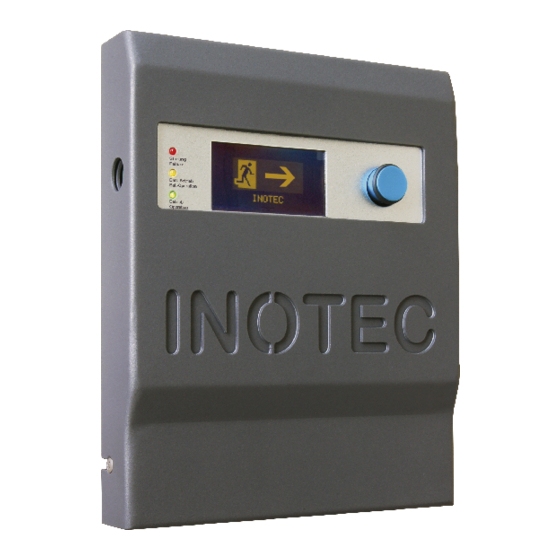
InoTec CLS - MTB Montage- Und Betriebsanleitung

Inhaltszusammenfassung für InoTec CLS - MTB
- Seite 1 Mounting- and Operating Instructions Montage- und Betriebsanleitung Mimic panel Meldetableau CPS - MTB CPS - MTB CLS - MTB CLS - MTB BNS - MTB BNS - MTB Sicherheitstechnik GmbH...
-
Seite 3: Inhaltsverzeichnis
MTB Mounting and Operating Instructions MTB Montage- und Betriebsanleitung Inhalt Contents 1.1. Allgemeine Hinweise 1.1. General information 1.1.1. Symbolerklärung 1.1.1. Explanation of symbols 1.1.2. Haftung und Gewährleistung 1.1.2. Liability and warranty 1.1.3. Ersatzteile 1.1.3. Spare parts 1.1.4. Entsorgung 1.1.4. Disposal 1.1.5. - Seite 4 MTB Mounting and Operating Instructions MTB Montage- und Betriebsanleitung 3.8.2. Menüstruktur 3.8.2. Menu structure 3.8.3. Funktionstest starten 3.8.3. Starting the function test 3.8.4. Betriebsdauertest 3.8.4. Battery duration test 3.8.5. Betriebsdauertest abbrechen 3.8.5. Cancelling the battery duration test 3.8.6. Blockieren/Aufheben 3.8.6. Blocking/Releasing 3.8.7.
-
Seite 5: Allgemeine Hinweise
1.1.4. Entsorgung Batteries and electronic components supplied by INOTEC Von INOTEC gelieferte Batterien und Elektronikbauteile may be returned to INOTEC or should be disposed of in können an INOTEC zurückgegeben werden oder sind accordance with the national guidelines and regulations gemäß... -
Seite 6: Bedienungsanleitung
Any repairs which need to be carried out and/or which Eventuelle Reparaturen oder Eingriffe dürfen ausschließ- involve opening the device must ONLY be carried out lich durch INOTEC autorisierte Personen vorgenommen by personnel authorised to do so by INOTEC. werden. 1.3. Transport and storage 1.3. Transport und Lagerung 1.3.1. -
Seite 7: Cps-Mtb
Mounting- and Operating Instructions Montage- und Betriebsanleitung Mimic panel Meldetableau CPS - MTB CPS - MTB... -
Seite 8: Produktbeschreibung
2.4. Produktbeschreibung 2.4. Product description Das INOTC CPS-Meldetableau ist eine zentrale Überwa- The INOTEC CPS mimic panel (MTB) realises the central chungseinrichtung zur Überwachung von bis zu 16 CPS- monitoring for up to 16 CPS systems types CPS 220/64 or Anlagen des Typs CPS 220/64 oder CPS 220/48.1. -
Seite 9: Aufbau Des Meldetableaus
MTB Mounting and Operating Instructions MTB Montage- und Betriebsanleitung 2.4.1. Aufbau des Meldetableaus 2.4.1. Mimic panel layout OLED graphical display OLED-Grafik-Display Störung Failure Batt.-Betrieb Bat.-Operation Betrieb Operation Terminals Klemmen Data line cards Strangkarten Power supply unit Spannungsversorgung 2.5. Technical data 2.5. -
Seite 10: Montage
MTB Mounting and Operating Instructions MTB Montage- und Betriebsanleitung 2.6. Montage 2.6. Installation Bei der Montage des Gerätes ist auf ausreichende When installing the device, you must make sure Tragfähigkeit der entsprechenden Montagewand that the assembly wall has sufficient load-bearing sowie auf geeignetes Montagematerial (Dübel) capacity and that suitable assembly materials zu achten. -
Seite 11: Anschluss Cps (Rtg)
= DL / M = DL / M = DL / M = DL / M = DL / M = DL / M = DL / M = DL / M INOTEC INOTEC INOTEC Störung Betrieb Betrieb Betrieb Failure Batt.-Betrieb... -
Seite 12: Remote Switch
MTB Mounting and Operating Instructions MTB Montage- und Betriebsanleitung 2.6.2.3. Fernschalter 2.6.2.3. Remote switch Die angeschlossenen CPS-Geräte können per Fernschalter The connected CPS devices can be blocked using the blockiert werden. Hierzu wird ein Schalter oder Schlüssel- remote switch. Therefor a switch or a key switch is con- schalter an die Klemmen FS+ und FS- angeschlossen. -
Seite 13: Inbetriebnahme Des Meldetableaus
MTB Mounting and Operating Instructions MTB Montage- und Betriebsanleitung *Betrieb: Alle Anlagen melden keine Störung, *Operation: None of the systems are reporting any keine Anlage ist blockiert, keine Anlage ist im failures, none of the systems are blocked and none Batteriebetrieb. -
Seite 14: Bedienung
MTB Mounting and Operating Instructions MTB Montage- und Betriebsanleitung 2.8. Bedienung 2.8. Operation 22.08.2008 15:30 Störung Failure Status: Batt.-Betrieb Bat.-Operation Start FT Betrieb Operation In der untersten Zeile des Displays werden die einzelnen The individual menu items are displayed in the bottom Menüpunkte angezeigt. -
Seite 15: Menüstruktur
MTB Montage- und Betriebsanleitung 2.8.2. Menüstruktur 22.08.2008 15:30 Rechts drehen Status: Links drehen Strang 1 1 2 3 4 5 6 7 Drücken Start FT Hauptmenü Start FT Funktionstest starten Start BT Betriebsdauerstest starten Abbruch BT Betriebsdauerstest abbrechen Blockieren / Aufheben Blockieren Freigeben Quittieren... -
Seite 16: Menu Structure
MTB Mounting and Operating Instructions 2.8.2. Menu structure 22.08.2008 15:30 Turn right Status: Turn left Line 1 1 2 3 4 5 6 7 Push Start FT Main menu Start FT Start functiontest Start DT Start durationtest Cancel DT Cancel durationtest Block / Release Block Release... -
Seite 17: Funktionstest Starten
MTB Mounting and Operating Instructions MTB Montage- und Betriebsanleitung 2.8.3. Funktionstest starten 2.8.3. Starting the function test Im Funktionstestmodus schalten alle angeschlossen In the function test mode, all connected CPS devices CPS-Geräte in den Batteriebetrieb und überprüfen die switch to battery operation and check the connected angeschlossenen und angemeldeten Leuchten auf and registered luminaires to see if they are in working Funktionstüchtigkeit. -
Seite 18: Blockieren/Aufheben
MTB Mounting and Operating Instructions MTB Montage- und Betriebsanleitung 22.08.2008 15:30 22.08.2008 15:30 Abbruch BT Cancel DT Zurück Back BT abbrechen Cancel DT Hauptmenü Abbruch BT OK Main menu Cancel DT ... -
Seite 19: Quittieren
MTB Mounting and Operating Instructions MTB Montage- und Betriebsanleitung Die softwareseitige Blockierfunktion und die des The software‘s blocking function and that of the Fernschalters sind „ODER“ verknüpft. Das heißt – remote switch are „OR“ operated. This means that steht ein Zustand auf „Blockiert“ werden alle if one status is „Blocked“, all connected CPS angeschlossenen CPS-Geräte blockiert. -
Seite 20: Störungsinformationen
MTB Mounting and Operating Instructions MTB Montage- und Betriebsanleitung 2.8.8. Störungsinformationen 2.8.8. Failure information Bei Störung eines angeschlossenen CPS-Gerätes wird eine If a connected CPS device fails, a malfunction message is Störmeldung im Statusfenster des Meldetableaus ange- displayed in the status window of the mimic panel. Details zeigt. - Seite 21 MTB Mounting and Operating Instructions MTB Montage- und Betriebsanleitung 2.8.9.1. Stranginformation/Adressbelegung 2.8.9.1. Data line information/address configuration You can configure the address of a data line here. Hier wird die Adressbelegung eines Stranges angezeigt. 22.08.2008 15:30 22.08.2008 15:30 Information Information Data line 1 Strang 1 Main menu ...
- Seite 22 MTB Mounting and Operating Instructions MTB Montage- und Betriebsanleitung Adresse 1 Address 1 Zielort Destination U=248V U=248V I=+0,0A I=+0,0A Betrieb Operation Netz OK Mains OK BT-Zeit: DT-Zeit: 00:00:00 00:00:00 Programmversion Release C1.A87 C1.A87 Status Adresse 1 Address status 1 ...
-
Seite 23: Software Version
MTB Mounting and Operating Instructions MTB Montage- und Betriebsanleitung 2.8.9.3. Meldetableau 2.8.9.3. Mimic panel Die Softwareversion des Meldetableaus wird im Menü- The mimic panel software version is displayed punkt „Meldetableau“ angezeigt. in the „Mimic panel“ menu item. 22.08.2008 15:30 22.08.2008 15:30 Information Information... -
Seite 24: Anmeldung Der Cps-Anlagen
MTB Mounting and Operating Instructions MTB Montage- und Betriebsanleitung Uhrzeit 15:15 Time 15:15 ¨ þ ¨ ¨ þ ¨ ¨ ¨ þ ¨ ¨ þ ¨ ¨ Mo Di Mi Do Fr Sa So MO TU WE TH FR SA SU Abbruch Cancel Automatischer FT... - Seite 25 MTB Mounting and Operating Instructions MTB Montage- und Betriebsanleitung Die RTG-Adressen der angeschlossenen CPS- The RTG addresses of the connected CPS devices Geräte müssen unbedingt mit denen der ange- must correspond with the registered addresses. meldeten Adressen übereinstimmen. Main menu ...
-
Seite 26: Defaultparameter
MTB Mounting and Operating Instructions MTB Montage- und Betriebsanleitung Durch Drehen des Bedienknopfs können die verschiede- The various states in which the contact is to be closed can nen Zustände, bei denen der Kontakt geschlossen werden be selected by turning the control knob. The statuses are soll, angewählt werden. -
Seite 27: Passwort Ändern
MTB Mounting and Operating Instructions MTB Montage- und Betriebsanleitung 2.8.10.8. Passwort ändern 2.8.10.8. Changing the password Mit der Passwortabfrage können die Einstellungen The settings can be protected against unauthorised vor unbefugten Zugriff geschützt werden. Werksseitig access using a password prompt. The password is set ist „0000“... -
Seite 28: Fehlerbehebung
MTB Mounting and Operating Instructions MTB Montage- und Betriebsanleitung 2.9. Fehlerbehebung 2.9. Troubleshooting 2.9.1. Kommunikationsfehler 2.9.1. Communication failures Steht am Meldetableau ein Kommunikationsfehler If there is a communication failure on the mimic panel, an, überprüfen Sie bitte, ob das CPS-MTB wie in siehe please check whether the CPS mimic panel is connected 2.6.2.2. -
Seite 29: Index
MTB Mounting and Operating Instructions MTB Montage- und Betriebsanleitung Index Index Anschlussspannung Battery duration test 8,16,17,24 • Battery duration test automat 8,13,16,17,24 • Battery duration test cancle 16,17 Batteriebetrieb 12,13,14,17 • Battery duration test start 16,17 Betrieb Battery operation 12,13,14,173 Betriebsdauertest 15,17 Block... - Seite 30 MTB Mounting and Operating Instructions MTB Montage- und Betriebsanleitung Störung 12,20 Supply voltage Störungsinformation 15,20,85 Strang Te Time 15,23 Summer 19,26 Wire length Technische Daten Übertragungsstörung 13,20,28,85 Uhrzeit 14,23 Unterstation...
-
Seite 31: Cls-Mtb
Mounting- and Operating Instructions Montage- und Betriebsanleitung Mimic panel Meldetableau CLS - MTB CLS - MTB... -
Seite 32: Produktbeschreibung
MTB Montage- und Betriebsanleitung 3.4. Produktbeschreibung 3.4. Product description Das INOTC CLS-Meldetableau ist eine zentrale Über- The INOTEC CLS mimic panel (MTB) realises the central wachungseinrichtung zur Überwachung von bis zu monitoring for up to 16 CLS systems. 16 CLS-Anlagen. -
Seite 33: Aufbau Des Meldetableaus
MTB Mounting and Operating Instructions MTB Montage- und Betriebsanleitung 3.4.1. Aufbau des Meldetableaus 3.4.1. Mimic panel layout OLED graphical display OLED-Grafik-Display Störung Failure Batt.-Betrieb Bat.-Operation Betrieb Operation Terminals Klemmen Data line cards Strangkarten Power supply unit Spannungsversorgung 3.5. Technische Daten 3.5. -
Seite 34: Montage
MTB Mounting and Operating Instructions MTB Montage- und Betriebsanleitung 3.6. Montage 3.6. Installation Bei der Montage des Gerätes ist auf ausreichende When installing the device, you must make sure Tragfähigkeit der entsprechenden Montagewand that the assembly wall has sufficient load-bearing sowie auf geeignetes Montagematerial (Dübel) capacity and that suitable assembly materials zu achten. -
Seite 35: Anschluss Cls (Rtg)
MTB Mounting and Operating Instructions MTB Montage- und Betriebsanleitung 3.6.2.2. Anschluss CLS (RTG) 3.6.2.2. CLS (RTG) connection Die zu überwachenden CLS-Geräte werden über den The CLS devices being monitored are connected 3-adrigen RTG-Bus an das Meldetableau angeschlossen. to the mimic panel via a triple-wired RTG bus. Störung Failure Batt.-Betrieb... - Seite 36 MTB Mounting and Operating Instructions MTB Montage- und Betriebsanleitung 3.6.2.3. Fernschalter 3.6.2.3. Remote switch The connected CLS devices can be blocked using the Die angeschlossenen CLS-Geräte können per Fernschalter remote switch. Therefor a switch or a key switch is con- blockiert werden.
- Seite 37 Allgemeinbeleuchtung General lighting General lighting General lighting DPÜ DPÜ DPÜ gem. gem. gem. 0108 0108 0108 INOTEC INOTEC INOTEC UVA 1 UVA 2 UVA 3 sub db 1 sub db 2 sub db 3 SL- SL+ Stör. Betr.. Bat.-B Opt.
-
Seite 38: Inbetriebnahme Des Meldetableaus
General lighting Letzte DPÜ DPÜ DPÜ DPÜ Zenerabschluss gem. gem. gem. 0108 0108 0108 Last DPÜ INOTEC INOTEC INOTEC Zener diode termination UVA 1 UVA 2 UVA 3 sub db 1 sub db 2 sub db 3 SL- SL+ Stör. Betr.. -
Seite 39: Bedienung
MTB Mounting and Operating Instructions MTB Montage- und Betriebsanleitung 3.8. Bedienung 3.8. Operation 22.08.2008 15:30 Störung Failure Status: Batt.-Betrieb Bat.-Operation Start FT Betrieb Operation The individual menu items are displayed in the bottom In der untersten Zeile des Displays werden die einzelnen line of the display. -
Seite 40: Menüstruktur
MTB Montage- und Betriebsanleitung 3.8.2. Menüstruktur 22.08.2008 15:30 Rechts drehen Status: Links drehen Strang 1 1 2 3 4 5 6 7 Drücken Start FT Hauptmenü Start FT Funktionstest starten Start BT Betriebsdauerstest starten Abbruch BT Betriebsdauerstest abbrechen Blockieren / Aufheben Blockieren Freigeben Quittieren... -
Seite 41: Menu Structure
MTB Mounting and Operating Instructions 3.8.2. Menu structure 22.08.2008 15:30 Turn right Status: Turn left Line 1 1 2 3 4 5 6 7 Push Start FT Main menu Start FT Start functiontest Start DT Start durationtest Cancel DT Cancel durationtest Block / Release Block Release... -
Seite 42: Funktionstest Starten
MTB Mounting and Operating Instructions MTB Montage- und Betriebsanleitung 3.8.3. Funktionstest starten 3.8.3. Starting the function test Im Funktionstestmodus schalten alle angeschlossen In the function test mode, all connected CLS devices CLS-Geräte in den Batteriebetrieb und überprüfen die switch to battery operation and check the connected angeschlossenen und angemeldeten Leuchten auf and registered luminaires to see if they are in working Funktionstüchtigkeit. -
Seite 43: Blockieren/Aufheben
MTB Mounting and Operating Instructions MTB Montage- und Betriebsanleitung 22.08.2008 15:30 22.08.2008 15:30 Abbruch Cancel BT abbrechen Cancel DT Hauptmenü Abbruch BT OK Main menu Cancel DT OK 3.8.6. Blockieren/Aufheben 3.8.6. -
Seite 44: Quittieren
MTB Mounting and Operating Instructions MTB Montage- und Betriebsanleitung Die softwareseitige Blockierfunktion und die des The software‘s blocking function and that of the Fernschalters sind „ODER“ verknüpft. Das heißt – remote switch are „OR“ operated. This means that steht ein Zustand auf „Blockiert“ werden alle if one status is „Blocked“, all connected CLS angeschlossenen CLS-Geräte blockiert. -
Seite 45: Störungsinformationen
MTB Mounting and Operating Instructions MTB Montage- und Betriebsanleitung 22.08.2008 15:30 22.08.2008 15:30 Quittieren Reset Handrückschaltung Manual release Handrückschaltung OK Manual release OK 3.8.8. Störungsinformationen 3.8.8. Failure information Bei Störung eines angeschlossenen CLS-Gerätes wird eine If a connected CLS device fails, a malfunction message is Störmeldung im Statusfenster des Meldetableaus ange- displayed in the status window of the mimic panel. -
Seite 46: Information
MTB Mounting and Operating Instructions MTB Montage- und Betriebsanleitung 3.8.9. Information 3.8.9. Information Zu jeder angeschlossenen CLS-Anlage sind bis auf Leuch- Information on each of the connected CLS systems (down tenebene Informationen am Meldetableau abrufbar. to luminaire level) can be requested on the mimic panel. Die Informationen werden immer aus dem Gerät Die Informationen werden immer aus dem Gerät aktuell abgefragt. -
Seite 47: Programmierung
MTB Mounting and Operating Instructions MTB Montage- und Betriebsanleitung 22.08.2008 15:30 22.08.2008 15:30 Zielort Anlage Address 1 U=27,5V I=+0,0A U=27,5V I=+0,0A Betrieb Operation OK Netz OK Mains OK Status Adresse 1 Address status Stromkreis x Circuit x 22.08.2008 15:30 Address: 1... - Seite 48 MTB Mounting and Operating Instructions MTB Montage- und Betriebsanleitung Durch Drehen des Bedienknopfs ist der Wochentag, das Turn the control knob to select the weekday, date and Datum sowie die Uhrzeit anzuwählen. Änderungen wer- time. Make a change by pressing the control knob. den mit Drücken des Bedienknopfs vorgenommen.
-
Seite 49: Anmeldung Der Cls-Anlagen
MTB Mounting and Operating Instructions MTB Montage- und Betriebsanleitung anschließendes Drehen des Bedienknopfs vorgenommen. again takes you back to the selection screen. A tick in the Durch erneutes Drücken gelangen Sie wieder zur Auswahl. box on the right-hand side of the display indicates that Ein Haken im Kästchen auf der rechten Seite des Displays the battery duration test is activated. -
Seite 50: Zentrales Einschalten Bei Netzausfall Uv
MTB Mounting and Operating Instructions MTB Montage- und Betriebsanleitung 3.8.10.5. Optionaler Relaiskontakt 3.8.10.5. Optional relay contact The CLS mimic panel features a programmable, volt-free Das CLS-Meldetableau bietet einen programmierbaren relay contact. This contact functions as a normally-open potentialfreien Relaiskontakt. Dieser Kontakt fungiert bei contact in the event of the following statuses: folgenden Zuständen als Schließer: -Sub-db failure... -
Seite 51: Passwort Ändern
MTB Mounting and Operating Instructions MTB Montage- und Betriebsanleitung Wenn mehrere CLS 24-Geräte über das CLS-MTB per RTG If multiple CLS 24 devices are connected over the CLS- verbunden sind, können diese über einen Befehl einge- MTB via RTG, these can be activated with a single com- schaltet werden. -
Seite 52: Fehlerbehebung
MTB Mounting and Operating Instructions MTB Montage- und Betriebsanleitung 3.8.10.9. Spracheinstellungen 3.8.10.9. Language settings 22.08.2008 15:30 22.08.2008 15:30 Programmierung Programming Sprache Language Programmierung Sprache Programming Language 22.08.2008 15:30 22.08.2008 15:30 deutsch german englisch... -
Seite 53: Index
MTB Mounting and Operating Instructions MTB Montage- und Betriebsanleitung Index Index Symbole Symbole Anschlussspannung Battery duration test 40,41,47 • Battery duration test automat 32,37,41,47 • Battery duration test cancle 16,17,40,41,68 Batteriebetrieb 36,37,38,41 • Battery duration test start 40,41 Betrieb Battery operation 36,37,38,41 Betriebsdauertest 39,41,47... - Seite 54 MTB Mounting and Operating Instructions MTB Montage- und Betriebsanleitung Störungsinformation 39,44,85 Strang 34,45,48,51 Technical data Stromschleife 37,51 Time 40,46 Summer 43,49 Wire length Technische Daten Zener Diode Übertragungsstörung 37,44,51,85 Uhrzeit 38,46 Zener Diode...
-
Seite 55: Bns-Mtb
Mounting- and Operating Instructions Montage- und Betriebsanleitung Mimic panel Meldetableau BNS - MTB BNS - MTB... -
Seite 56: Produktbeschreibung
Die Überwachungsstation BNS-MTB dient zur zentralen The BNS-MTB monitoring station is used for central mon- Überwachung und Steuerung von INOTEC Einzelbat- itoring and control of INOTEC self-contained luminaires. terieleuchten. Je nach Ausführung können 64 bzw. 128 Depending on the design, 64 or 128 self-contained lumi- Einzelbatterieleuchten unabhängig von ihrer Betriebsart... -
Seite 57: Aufbau Des Bns-Mtbs
MTB Mounting and Operating Instructions MTB Montage- und Betriebsanleitung 4.4.1. Aufbau des BNS-MTBs 4.4.1. BNS - Mimic panel layout OLED graphical display OLED-Grafik-Display Störung Failure Batt.-Betrieb Bat.-Operation Betrieb Operation Terminals Klemmen Data line cards Strangkarten Power supply unit Spannungsversorgung 4.5. Technical data 4.5. -
Seite 58: Montage
MTB Mounting and Operating Instructions MTB Montage- und Betriebsanleitung 4.6. Montage 4.6. Installation Bei der Montage des Gerätes ist auf ausreichende When installing the device, you must make sure Tragfähigkeit der entsprechenden Montagewand that the assembly wall has sufficient load-bearing sowie auf geeignetes Montagematerial (Dübel) capacity and that suitable assembly materials zu achten. -
Seite 59: Bns-Mtb Mit Einer Strangkarte
4.6.2.3. BNS-MTB with two line card Mit einem BNS-MTB mit zwei Strangkarten können bis zu A BNS-MTB with two line cards can monitor up to 128 INOTEC self-contained luminaires (a maximum of 64 128 INOTEC Einzelbatterieleuchten (maximal 64 Leuch- ten pro Strang) überwacht werden. -
Seite 60: Bns-Mtb Mit Inoweb Visualisierung
MTB can be connected to the INOWeb control software BNS-MTB auf die INOWeb-Control Software aufgeschal- via the INOWeb module. tet werden. A maximum of 64 INOTEC self-contained luminaires can be monitored with one BNS-MTB with INOWeb visualisa- Maximal 64 INOTEC Einzelbatterieleuchten können mit tion. -
Seite 61: Fernschalter Mit Schleifenüberwachung
Fernschalterkreis To ensure that the BNS-MTB does not become blocked as eine INOTEC Zenerdiode geschaltet werden. a result of short circuits or open circuits, an INOTEC Zener diode can be connected in the remote switch circuit. Stör. -
Seite 62: Anschluss Tastatur
MTB Mounting and Operating Instructions MTB Montage- und Betriebsanleitung 4.6.2.9. Anschluss Tastatur 4.6.2.9. Connecting a keyboard Zur vereinfachten Zielorteingabe kann eine handelsübli- To make it easier to input destination text, a standard che Tastatur mit PS/2 Stecker an das BNS-MTB ange- commercial keyboard can be connected to the BNS-MTB schlossen werden. -
Seite 63: Inbetriebnahme Des Meldetableaus
MTB Mounting and Operating Instructions MTB Montage- und Betriebsanleitung *Betrieb: Alle Einzelbatterieleuchten melden keine Stö- *Operation: None of the systems are reporting any fail- rung, keine Leuchte ist blockiert, keine Anlage ist im ures, none of the systems are blocked and none of the Batteriebetrieb. -
Seite 64: Bedienung
MTB Mounting and Operating Instructions MTB Montage- und Betriebsanleitung 4.8. Bedienung 4.8. Operation 22.08.2008 15:30 Störung Failure Status: Batt.-Betrieb Bat.-Operation Start FT Betrieb Operation In der untersten Zeile des Displays werden die einzelnen The individual menu items are displayed in the bottom Menüpunkte angezeigt. -
Seite 65: Menüstruktur
MTB Montage- und Betriebsanleitung 4.8.2. Menüstruktur 22.08.2008 15:30 Rechts drehen Status: Links drehen Drücken Hauptmenü Testmenü Funktionstest Betriebsdauerstest Information Leuchtenstatus Prüfbuch Prüfbuch BT Leuchtenbelegung Software Version Programmierung Automatischer FT Automatischer BT BNS-SV Leuchten Blockieren / Freigeben INOSTICK Speichern (Text) Konfiguration speichern Konfiguration laden... -
Seite 66: Menu Structure
MTB Mounting and Operating Instructions 4.8.2. Menu structure 22.08.2008 15:30 Turn right Status: Turn left Push Main menu Testmenu Function test Durationtest Information Luminaire status Logbook Logbook DT Luminaire allocation Software Version Programming auto. FT autom. DT BNS-SV Luminaire Block / Release INOSTICK Save (Text) Save configuration... -
Seite 67: Funktionstest Starten
MTB Mounting and Operating Instructions MTB Montage- und Betriebsanleitung 4.8.3. Funktionstest starten 4.8.3. Starting the function test Im Funktionstestmodus schalten alle angeschlossen Ein- In function test mode, all connected self-contained zelbatterieleuchten in den Batteriebetrieb und werden luminaires switch to battery operation and check the auf ihre Funktionstüchtigkeit überprüft. -
Seite 68: Betriebsdauertest Abbrechen
MTB Mounting and Operating Instructions MTB Montage- und Betriebsanleitung If a communication error, while the duration test, Bei einer Kommunikationsstörung, während des the connection to the lamp is disturbed.The light Betriebdauertest, ist die Verbindung zur Leuchte continues the duration test independently. In this gestört. - Seite 69 MTB Mounting and Operating Instructions MTB Montage- und Betriebsanleitung 4.8.6.2. Prüfbuch 4.8.6.2. Logbook Im Prüfbuch werden alle wichtigen Ereignisse sowie All important events as well as function tests and their Funktionstests und deren Ergebnisse protokolliert. Die results are recorded in the logbook. The annual or jährlichen oder manuellen Betriebsdauertests werden manual battery duration tests are saved in a separate in einem separaten Prüfbuch gespeichert...
- Seite 70 MTB Mounting and Operating Instructions MTB Montage- und Betriebsanleitung 22.08.2008 15:30 22.08.2008 15:30 Information Information Prüfbuch Logbook Löschen Delete Hauptmenü Informationen Prüf- Main menu Information Log- buch Löschen book ...
- Seite 71 MTB Mounting and Operating Instructions MTB Montage- und Betriebsanleitung 22.08.2008 15:30 22.08.2008 15:30 Information Information Prüfbuch BT Logbook DT Info Info Hauptmenü Informationen Prüf- Main menu Information DT Log- buch BT ...
-
Seite 72: Bns-Mtb
MTB Mounting and Operating Instructions MTB Montage- und Betriebsanleitung 22.08.2008 15:30 22.08.2008 15:30 Bitte Please Passwort eingeben enter password 0 * * * 0 * * * Löschen Delete 1. Ziffer 2. Ziffer ... 1. figure ... -
Seite 73: Störungsinfo
MTB Mounting and Operating Instructions MTB Montage- und Betriebsanleitung 4.8.7. Störungsinfo 4.8.7. Failure info Der Menüpunkt Störungsinfo ist nur im Fehlerfall aus- The failure information menu item can only be selected wählbar. Hier werden bei einer Störung die fehlerhaften if a failure occurs. If a failure occurs, the faulty luminaires Leuchten sowie die Art der Störung angezeigt. -
Seite 74: Betriebsdauertest
MTB Mounting and Operating Instructions MTB Montage- und Betriebsanleitung zeit ein automatischer Funktionstest durchgeführt. Mit „OK“ bestätigen Sie die Änderungen und mit „Abbre- chen“ verlassen Sie das Menü ohne die Änderungen zu übernehmen. 4.9.2. Battery duration test 4.9.2. Betriebsdauertest The battery duration test see 4.8.4. -
Seite 75: Bns
MTB Mounting and Operating Instructions MTB Montage- und Betriebsanleitung 4.9.3. BNS 4.9.3. BNS Das BNS-MTB kann auf dem Optionsplatz 2 mit unter- The BNS-MTB can be equipped with different cards at schiedlichen Karten bestückt werden. option place 2. - zweite Strangkarte zum Anschluss von weiteren 64 - second line card to connect a further 64 luminaires Einzelbatterieleuchten - RTG-card to connect to INOView via three-core... - Seite 76 MTB Mounting and Operating Instructions MTB Montage- und Betriebsanleitung Hauptmenü Programmierung Main menu Programming BNS BNS SV BNS-MTB Einstellungen SV BNS-MTB Settings 22.08.2008 15:30 22.08.2008 15:30 RTG-Adresse...
- Seite 77 MTB Mounting and Operating Instructions MTB Montage- und Betriebsanleitung Freitag Friday 22.08.08 22.08.08 8:30 8:30 Abbruch Cancel Anpassung Datum+Uhrzeit Date+Time Durch Drehen des Bedienknopfs ist der Wochentag, Turn the control knob to select the day of the week, das Datum sowie die Uhrzeit anzuwählen. Änderungen date and time.
-
Seite 78: Leuchten
MTB Mounting and Operating Instructions MTB Montage- und Betriebsanleitung 22.08.2008 15:30 22.08.2008 15:30 Werksparameter DEfault parameter Abbruch Cancel Inbetriebnahme Comissioning OK OK 4.9.5. Leuchten 4.9.5. Luminaire 4.9.5.1. Automatische Zuweisung 4.9.5.1. Autom. assignment Die angeschlossenen Einzelbatterieleuchten können The connected self-contained luminaires can be automatisch vom BNS-MTB erkannt und gespeichert detected and stored automatically by the BNS-MTB. - Seite 79 MTB Mounting and Operating Instructions MTB Montage- und Betriebsanleitung Programmierung Programming Leuchten Luminaire Belegung Assignment Strang 1 Line 1 Adr. 1 ... 32 Addr.. 1 ... 32 Hauptmenü Programmierung Main menu Programming ...
-
Seite 80: Inostick
Notlichtlichtbetrieb blo- with fluorescent lamps, only the emergency light- ckiert. Bei INOTEC Einzelbatterieleuchten mit LED- ing mode is blocked. In the case of INOTEC self- Leuchtmittel wird der Netz- und Notlichtbetrieb contained luminaires with LED illuminants, mains blockiert. - Seite 81 MTB Mounting and Operating Instructions MTB Montage- und Betriebsanleitung Datei File 22.08.2008 15:30 22.08.2008 15:30 T A A A A A A A T A A A A A A A ▲ ▲ Dateiname File name Der Name der Datei besteht aus 8 Buchstaben oder The file name consists of 8 letters or digits.
- Seite 82 MTB Mounting and Operating Instructions MTB Montage- und Betriebsanleitung Während die Konfiguration übertragen wird leuchten tion is being transferred, the LEDs on the INOSTICK are die LEDs des INOSTICKs. Nachdem die LEDs erloschen lit. When the LEDs are no longer lit, the INOSTICK can be sind kann der INOSTICK nach einer Wartezeit von etwa 5 removed after approximately 5 seconds.
-
Seite 83: Inoweb
MTB Mounting and Operating Instructions MTB Montage- und Betriebsanleitung 5. INOWeb 5. INOWeb 5.1. Einrichtung 5.1. Setup 5.1.1. 5.1.1. The INOWeb module is connected to option slot 2 Das INOWeb-Modul ist auf dem Optionsplatz and is connected to the network by plugging the 2 angeschlossen und wird durch aufstecken network cable into the RJ45 socket. -
Seite 84: Web Interface
MTB Mounting and Operating Instructions MTB Montage- und Betriebsanleitung Den entsprechenden Eintrag in der Liste auswählen und Select the corresponding entry in the list and press the den Button „Configure IP Settings“ betätigen. Es öffnet button „Configure IP Settings“. The following window sich folgendes Fenster. - Seite 85 MTB Mounting and Operating Instructions MTB Montage- und Betriebsanleitung The following functions can be executed via the menu Über die Menüleiste am linken Fensterrand können fol- bar on the left edge of the window: gende Funktionen ausgeführt werden: - Start function test - Funktionstest starten - Start operating duration test - Betriebsdauertest starten...
-
Seite 86: Automatische Email
MTB Mounting and Operating Instructions MTB Montage- und Betriebsanleitung 5.2.1.1. Automatische Email 5.2.1.1. Automatic e-mail Die nachfolgenden Einstellungen sind zum automati- The following settings configure the automatic sending schen Versenden von Emails an die angegebene Email- of e-mails to the specified e-mail address. Mail servers Adresse. -
Seite 87: Inolan
MTB Mounting and Operating Instructions MTB Montage- und Betriebsanleitung 5.2.1.2. Softwareupdate 5.2.1.2. Softwareupdate Über die Internetseite http://<IP-Adresse>/Digi.htm kön- The network settings can be configured and a soft- nen die Netzwerkeinstellungen und ein Softwareupdate ware update installed via the Internet page http://<IP- vorgenommen werden. - Seite 88 MTB Mounting and Operating Instructions MTB Montage- und Betriebsanleitung 6.1.2. Netzwerkadresse 6.1.2. Network address Die Vergabe der Netzwerkadresse erfolgt über das The network address is assigned via the „Finder“ pro- Programm „Finder“, welches auf der beiligenden CD zu gram, which can be found on the enclosed CD. finden ist.
-
Seite 89: Index
MTB Mounting and Operating Instructions MTB Montage- und Betriebsanleitung Index Index Battery duration test 56,67,68,70,74 Anschlussspannung • Battery duration test automat 56,63,66,67,74 • Battery duration test cancle Batteriebetrieb 62,64,67 • Battery duration test start Betrieb Battery operation 62,64,67 Betriebsdauertest 56,67,68,70,74 Block 66,76,80 •... - Seite 90 MTB Mounting and Operating Instructions MTB Montage- und Betriebsanleitung Technische Daten Technical data Time 65,74,76 Übertragungsstörung 62,85 Uhrzeit 64,74,76 Wire length 59,60 Zielort 61,79...
-
Seite 91: Anhang
MTB Mounting and Operating Instructions MTB Montage- und Betriebsanleitung Anhang Appendix A. Kundendienst A. Customer service Überprüfen Sie bitte vor Beauftragung des Kundendienst Please check the following points before contacting folgende Punkte: customer service: • Störungssuche • Failure search CPS-MTB siehe 2.8.8. -
Seite 92: Glossar
MTB Mounting and Operating Instructions MTB Montage- und Betriebsanleitung B. Glossar B. Glossar Bereitschaftslicht Battery duration test Notleuchte/Stromkreis ist im Netzbetrieb Test which can be scheduled to be per- ausgeschaltet und wird bei Notbetrieb formed automatically, but must be acti- eingeschaltet. - Seite 93 Gerät erfolgt. Dies gewähr- during DC operation. leistet, dass erst bei vorhandener und Internal device bus for connecting INOTEC ausreichender Allgemeinbeleuchtung modules (circuits, LSA, DPÜ/B, etc.) in betrieblich verdunkelten Räumen (z.B. Individual lamp monitoring Theater, Kino) zurückgeschaltet wird.
- Seite 94 MTB Mounting and Operating Instructions MTB Montage- und Betriebsanleitung INOWeb Ethernetmodul mit integriertem Webser- INOSTICK Adapter for PS/2 interfaces on INOTEC con- ver. Ermöglicht den Zugriff auf den Anla- trollers for importing and exporting system genstatus per Webbrowser. configurations, printing out data relevant...
- Seite 95 blocking consumer unit cir- Spannungsversorgung. cuits. Is connected to the FS+/FS- terminals. Relaisinterface RTG-BUS BUS system from INOTEC for monitoring Potentialfreie Kontakte zur Weiterleitung the emergency lighting device using other des Gerätestatus. Die Meldungen Betrieb, INOTEC systems or software.
- Seite 96 MTB Mounting and Operating Instructions MTB Montage- und Betriebsanleitung Loop monitoring Schleifenüberwachung SLÜ Einrichtung zur Überwachung einer Sub-db failure Failure of a phase monitored by DPÜ in SL+/SL- oder FS+/FS- gegen Draht- a general lighting sub-distribution board. bruch und Kurzschluss mittels einer ...
- Seite 98 INOTEC Sicherheitstechnik GmbH Am Buschgarten 17 59 469 Ense Germany +49 29 38/97 30-0 Fax +49 29 38/97 30-29 info@inotec-licht.de www.inotec-licht.de 708 129 H 08/2016 Sicherheitstechnik GmbH...