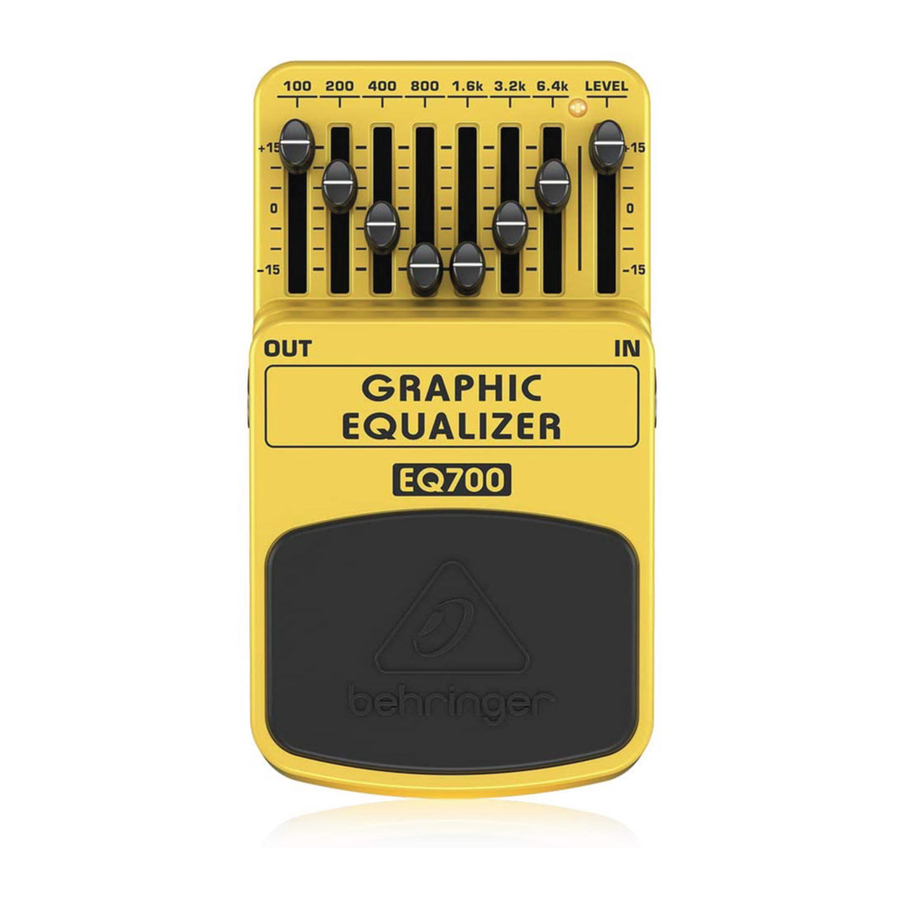
Behringer GRAPHIC EQUALIZER EQ700 Handbuch
Ultimate 7-band graphic equalizer
Inhaltsverzeichnis
Verfügbare Sprachen
Verfügbare Sprachen
Quicklinks
GRAPHIC EQUALIZER EQ700
Ultimate 7-Band Graphic Equalizer
(1)
(2)
(6)
Thank you for showing your confidence in us by purchasing the Behringer
GRAPHIC EQUALIZER EQ700. This high-quality stompbox is specifically
designed to provide complete tone control and eliminate unwanted
feedback. It allows 7-band sound shaping and feedback elimination from
100 Hz to 6.4 kHz with a powerful 15 dB boost/cut per band.
1. Controls
The 7-band EQ faders allow to boosting/cutting single
(1)
frequency ranges from
100 Hz to 6.4 kHz at ±15 dB.
The LEVEL fader adjusts the output level. It can be used to
(2)
achieve effective volume "boost" or "cut."
This LED illuminates when the EQ is activated. It also serves as a
(3)
battery level indicator.
Use the footswitch to activate/deactivate the EQ.
(4)
Use this 1/4" TS IN connector to plug in the instrument cable.
(5)
The 1/4" TS OUT connector sends the signal to your amp.
(6)
Use the DC IN connection at the front of the unit to plug in a 9 V power
supply (not included).
The BATTERY COMPARTMENT is located underneath the pedal cover.
To install or replace the 9 V battery, press the hinges with a ballpen and
remove the pedal cover. Be careful not to scratch the unit.
◊ ◊
The EQ700 has no on/off switch. As soon as you insert the
jack into the in connector, the EQ700 begins running.
When not using the EQ700, remove the jack from the
in connector. This extends the life of the battery.
The SERIAL NUMBER is located at the bottom.
V 1.0
A50-00002-77578
(3)
(5)
(4)
Inhaltsverzeichnis

Verwandte Anleitungen für Behringer GRAPHIC EQUALIZER EQ700


Inhaltszusammenfassung für Behringer GRAPHIC EQUALIZER EQ700
-
Seite 7: Bedienungselemente
7 GRAPHIC EQUALIZER EQ700 Vielen Dank für das Vertrauen, das Du uns mit dem Kauf des Behringer GRAPHIC EQUALIZER EQ700 entgegengebracht hast. Dieses hochqualitative Effektpedal ist speziell entwickelt, um eine umfangreiche Klangregelung zu ermöglichen und Feedbacks zu beseitigen. Das Gerät erlaubt Klanganpassung und Feedback- Unterdrückung im Bereich von 100 Hz bis 6,4 kHz mit effektiver... -
Seite 8: Technische Daten
54 x 70 x 123 mm Weight approx. 0.73 lbs / 0.33 kg Behringer ist ständig bemüht, die höchsten professionellen Standards aufrechtzuerhalten. Infolge dieser Bemühungen können von Zeit zu Zeit ohne vorherige Ankündigung Änderungen an vorhandenen Produkten vorgenommen werden. Die technischen Daten und das... - Seite 19 19 GRAPHIC EQUALIZER EQ700 Music Tribe accepts no liability for any loss Music Tribe übernimmt keine Haftung which may be suffered by any person who für Verluste, die Personen entstanden relies either wholly or in part upon any sind, die sich ganz oder teilweise auf hier...
- Seite 23 23GRAPHIC EQUALIZER EQ700...