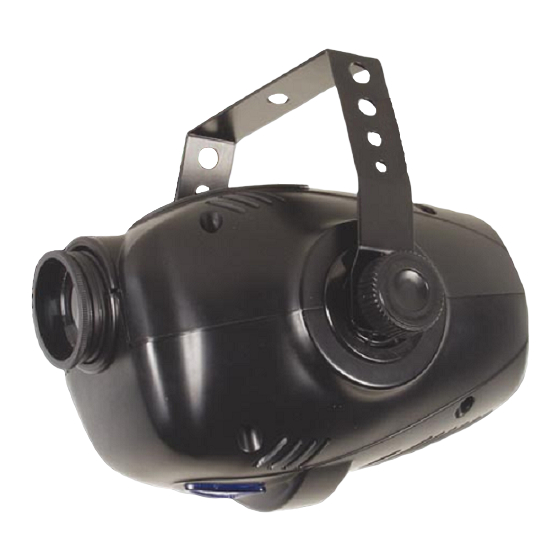
HQ Power VDP150CG Kurzanleitung
Spectral wizz 150
Inhaltsverzeichnis
Verfügbare Sprachen
Verfügbare Sprachen
Quicklinks
1. Introduction & Features
Thank you for buying the VDP150CG. This device is controlled via 1 DMX channel and creates a fast colour-changing
effect. Please read the manual thoroughly before bringing this device into service. Make sure that the device was not
damaged in transit. If the device is damaged you should contact your dealer and postpone installation of this device.
• 13 gobos/colours + shutter on wheel : 7 x 1-colour, 2 x two-colour, 3 x three-colour gobo, 1 x four-colour gobo + 1
clear gobo.
• different modes : DMX512 control mode / stand-alone mode / master-slave synchro mode / sound-controlled
mode.
• manual focusing
• rainbow effect in both directions with adjustable speed
• LED display for various parameters
• built-in thermostat provides overheating protection
• flash rate : 5Hz
• 1 DMX512 control channel
2. Safety Instructions
Be very careful during the installation: touching live wires can cause life-threatening electroshocks.
Do not touch the device during operation as the housing heats up.
Keep this device away from rain and moisture.
Unplug the mains lead before opening the housing.
• Damage caused by disregard of certain guidelines in this manual is not covered by the warranty and the dealer
will not accept responsibility for any ensuing defects or problems.
• A qualified technician should install and service this device.
• Do not switch the device on immediately after it has been exposed to changes in temperature. Protect the device
against damage by leaving it switched off until it has reached room temperature.
• This device falls under protection class I. It is therefore essential that the device be earthed. Have a qualified
person carry out the electric connection.
• Make sure that the available voltage does not exceed the voltage stated in the specifications of this manual.
• Do not crimp the power cord and protect it against damage. Have an authorised dealer replace it if necessary.
• Disconnect the device from the mains to clean it or when it is not in use. Handle the power cord by the plug only.
• There may be some smoke or a particular smell when the device is activated for the first time. This is normal and
any smoke or smell will gradually disappear.
• Do not look directly at the light source as sensitive people may go into epileptic seizure if they do.
• Note that damage caused by user modifications is not covered by the warranty.
• Keep the device away from children and unauthorised users.
VDP150CG
VDP150CG – SPECTRAL WIZZ 150
1
VELLEMAN
Inhaltsverzeichnis

Verwandte Anleitungen für HQ Power VDP150CG


Inhaltszusammenfassung für HQ Power VDP150CG
-
Seite 14: Especificaciones
VDP150CG – SPECTRAL WIZZ 150 1. Einführung & Eigenschaften Wir bedanken uns für den Kauf des VDP150CG! Das Gerät wird über 1 DMX-Kanal gesteuert und kreiert einen Effekt von schnellem Farbwechsel. Lesen Sie diese Bedienungsanleitung vor Inbetriebnahme sorgfältig durch. Überprüfen Sie zuerst, ob Transportschäden vorliegen. In diesem Fall, nehmen Sie das Gerät nicht in Betrieb und setzen Sie sich mit Ihrem Fachhändler in Verbindung. -
Seite 15: Allgemeine Richtlinien
3. Allgemeine Richtlinien • Dieses Gerät wurde für den professionellen Einsatz auf Bühnen, in Discotheken, Theater, usw. entworfen. Der VDP150CG ist nur für den Anschluss an einen AC-Strom von max. 230Vac/50Hz zugelassen und wurde ausschließlich zur Verwendung in Innenräumen konzipiert. - Seite 16 • Der elektrische Anschluss darf nur von einer Fachkraft durchgeführt werden. • Schließen Sie das Gerät über den Stecker an das Netz an. Lichteffekte sollten im Allgemeinen nicht über Dimmerpacks geschaltet werden. • Die Installation muss vor Inbetriebnahme von einem Experten genehmigt werden. VDP150CG VELLEMAN...
-
Seite 17: Reinigung Und Wartung
Gerät eingestellt haben, zu “hören”. Mit anderen Worten : nur das bewusste Gerät wird beeinflusst wenn Sie die Einstellungen eines Kanals ändern. Im Fall des VDP150CG, 1-Kanal-Gerät, müssen Sie die Startadresse des ersten Gerätes auf 1 einstellen, die zweite auf 2 (1 + 1), die dritte auf 3 (2 + 1), usw.