Herunterladen Inhalt Inhalt Diese Seite drucken
Stanley S300 Betriebsanleitung
Vorschau ausblenden Andere Handbücher für S300:
Inhaltsverzeichnis
  • English

    • Français

      • Italiano

        • Español

          • Português

            • Dutch

              • Norsk

              • Svenska

                • Dansk

                • Suomi

                  • Русский

                    • Polski

                      • Ελληνικά

                      • Magyar

                        • Čeština

                          • Slovenčina

                            • Latviešu

                              • Eesti

                                • Lietuvių

                                  • Română

                                    • Български

                                    • Türkçe

                                      • Hrvatski

                                        • Slovenščina

                                          Verfügbare Sprachen
                                          • DE

                                          Verfügbare Sprachen

                                          • DEUTSCH, seite 13
                                          S300
                                          STHT77407
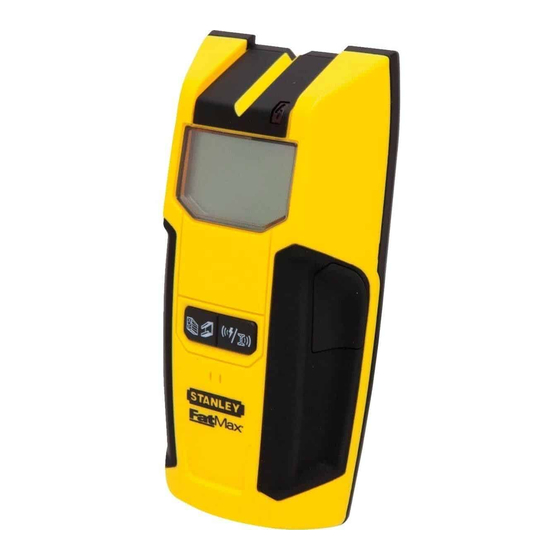
                                          Stanley Stud Sensor 300
                                          The Stud Sensor 300 uses electronic signals to locate the center of studs, joists
                                          or live AC wires through drywall or other common building materials. Once
                                          the center of a stud has been detected in one pass across the surface, the
                                          Stud Sensor 300 gives a visual display and sounds an audible tone. A marking
                                          channel allows you to easily note the stud center and edges on the wall.
                                          The Stud Sensor 300 will not detect objects in concrete, mortar, block or brick
                                          work, carpeting, foil faced materials, metallic surfaces or ceramic tiles. The
                                          Stud Sensor 300 is not designed to locate non-ferrous or plastic objects such
                                          as pipes.
                                          Note: Read all instructions prior to operating the Stud Sensor 300 and DO NOT
                                          remove any labels from the tool.
                                          WARNING:
                                          Protect Your Eyes, Wear Safety Goggles.
                                          1
                                          77407
                                          • Marking Channel
                                          • Live Wire Warning LED
                                          • LCD Display
                                          • Activation Button
                                          • STUD or METAL / AC Mode Selection
                                          • METAL SCAN Mode
                                          • AC TRACKING Mode
                                          • Self-Calibration Complete
                                          REV A 12
                                          OPERATING INSTRUCTIONS
                                          Battery
                                          1
                                          Open door on back of unit and connect a 9 volt battery
                                          (not included) to clip. Put battery back into case and close
                                          back battery door.
                                          Note: Recommend to replace a new 9 volt battery
                                          when low battery - "Low Battery" will appear on the
                                          LCD.
                                          Usage
                                          Detecting Wood / Metal Studs
                                          2
                                          Hold the Stud Sensor 300 fl at
                                          against the surface, making fi rm
                                          contact.
                                          3
                                          Press in and hold the activation
                                          button. A series of tones will sound.
                                          Note: The unit cannot be moved before
                                          calibration is complete.
                                          "Ready" icon will appear on the LCD.
                                          during all of the following procedures.
                                          Note: Once the Activation button is
                                          released, the unit shuts off.
                                          10
                                          the activation button is pressed, move the Stud Sensor
                                          300 to a different location and try again. Releasing the
                                          activation button will turn off the sensor.
                                          • Live Wire Detected
                                          Note: While calibrating, the Stud Sensor 300 must not
                                          • Depth Detection Mode
                                          be placed directly over a stud, dense material such as
                                          • STUD Mode
                                          metal, or over a wet or newly painted area, or it will not
                                          properly calibrate.
                                          • Stud Location Graphic
                                          • Low Battery Indicator
                                          As it detects a stud, the unit will display the relative position of the stud
                                          on the screen.
                                          center, the "Center" icon will appear on
                                          the LCD and an audible tone will sound.
                                          Use the marking channel located at the
                                          top of the unit to mark the stud center.
                                          4
                                          When the unit is calibrated the
                                          5
                                          Keep holding the activation button
                                          If all segments of the LCD fl ash on and off when
                                          8
                                          Slide the Stud Sensor 300 slowly across the surface in a straight line.
                                          6
                                          7
                                          /
                                          When it detects the stud
                                          8
                                          Inhaltsverzeichnis
                                          loading

                                          Inhaltszusammenfassung für Stanley S300

                                          • Seite 13 • Selbsteichung beendet STHT77407 REV A 12 Stanley Stud Sensor 300 BETRIEBSANLEITUNG Schieben Sie den Stud Sensor 300 geradlinig über die Fläche. Wenn es Der Stud Sensor 300 verwendet elektronische Signale, um die Mitte von Batterie einen Pfosten entdeckt, zeigt das Gerät die relative Position des Pfostens...
                                          • Seite 14: Technische Daten

                                            Pfosten. TRACKING" auf. GARANTIE Oberfl ächenabweichungen Stanley Tools übernimmt für 1 Jahr ab Kaufdatum die Garantie gegen Schäden Der Stud Sensor 300 sucht durch gewöhnliche Baustoffe wie: im Material und in der Verarbeitung. Stanleys Haftung unter dieser Garantie • Gipstrockenwand ist auf den Ersatz dieses Geräts beschränkt.

                                          Inhaltsverzeichnis