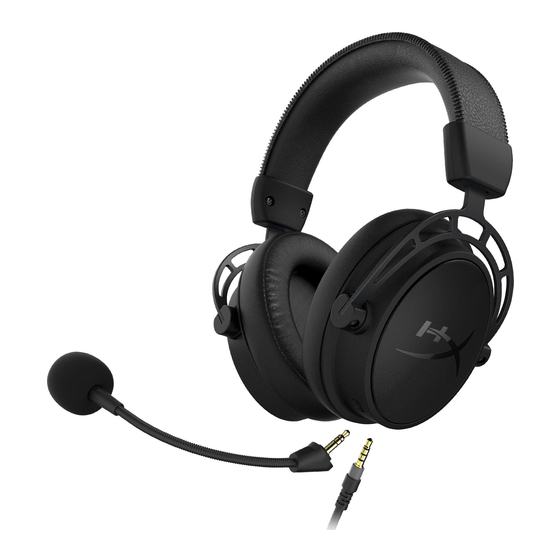
HyperX Cloud Alpha S Kurzanleitung
Vorschau ausblenden
Andere Handbücher für Cloud Alpha S:
- Schnellstartanleitung ,
- Anleitungen (226 Seiten) ,
- Schnellstartanleitung (19 Seiten)
Quicklinks
HyperX
Cloud AlphaTM S
Gaming Headset
Overview
O
Bass adjustment sliders
O
Detachablemicrophone
3.5mrn cable (4 pole)
4402149
LISB audio
control
mixer
o
Mic mute / mic monitoring button
O
7.1 surround sound button
Quick Start Guide
7.1
O
Headphone volume buttons
Game
Balance
button
O
Chat Balance button
HYPE.
Cloth
ear cushions
o
Trave bag

Verwandte Anleitungen für HyperX Cloud Alpha S


Inhaltszusammenfassung für HyperX Cloud Alpha S
- Seite 1 HyperX Cloud AlphaTM S Quick Start Guide Gaming Headset Overview Bass adjustment sliders LISB audio control mixer Headphone volume buttons Cloth ear cushions Detachablemicrophone Mic mute / mic monitoring button Game Balance button Trave bag 7.1 surround sound button 3.5mrn cable (4 pole) Chat Balance button HYPE.
- Seite 2 Usage BassAdjustment More Bass Less Bass USB Audio Control Mixer Mic mute / mic monitoring button Game/Chat balance buttons Pressto adjust mix between game audio • LED On Mic muted and chat audio. • LEDOff Micactjve • Hold for 3 secondsto togg e mic monitoring on/off 100% Game Game...
- Seite 3 Open Volume Mixer Open Sound settings Spatial sound (Off) Sounds Troubleshoot sound prob ems Playback Device Set Default Communications Device to "HyperX Cloud Alpha S Chat" Set Default Device to "HyperX Cloud Alpha SGame" Sound Playback Recording Smnds Communications Playback...
- Seite 4 Sound Playback Recording Sounds Communications VOICE APP SETTINGS Voice Video Microphone Overlay HyperX Cloud Alpha S Chat Default Device Notificaticms Game C TES-r Configure ActNi Questions or Setup Issues? Contact the HyperX support team or see user manual at: hyperxgaming.com/support/headsets...
- Seite 5 FRANCA'S HyperX C oud Alpha S Chat » Pour e périphérique par défaut, choisissez « HyperX Cloud Alpha S Présentation Game » A - Glissiéres de réglage des graves Périphérique d'enregistrement Microphone amovible Pour e périphériquepardéfaut, choisissez FWperX Cloud AlphaSChat»...
- Seite 6 LED Aus deaktiviert Software di chat vocale Discord mpostare il dispositivo di ingresso su "Microphone (HyperX Cloud Headset-Lautstärketasten Alpha SChat)' Game/Chat-Balance-Tasten mpostare il dispositivo di uscita su •HeadsetEarphone (HyperXCloud Drucke die Taste, um den Mix zwischen Game-Audio und Chat-Audio zu Alpha SChat)"...
- Seite 7 Prezentacja A - Suwaki do regulacji bas6w Oprogramowanie do rozmåw glosowych Discord B - Odlqczanymikrofon Jako wejsciowe urzqdzenie wybierz Mikrofon (HyperX Cloud Alpha S C Przewéd zezlaczem 35 mm (4-po owym) Chat)" D - Mikserdiwieku USB Jako wyßciowe urzadzenie wybierz „Sfuchawki zestawu sluchawkowego Przycisk vwciszania/monitorowania mikrofonu (HyperXC oud Alpha SChat)"...
- Seite 8 Software para chat de voz Discord Botöes de volume do headset Configurar como Dispositivo Predeterminado e "Micråfono (HyperX Cloud Alpha SChat)" Botöes de mix jogo/chat Configurar como Dispositivo Predeterminado Ios"Aud[fonos (HyperX Pressioneparaajustar o mix åudio do jogo e éudio do chat.
- Seite 9 Defina o Dispositivo Padräocomo "HyperX Cloud Alpha SChat" Tlaätko prostorového zvuku 7.1 Software de Chat de Voz Discord KontrolkaLEDsviti—zapnuto Defina o Dispositivo de entrada como "Microfone (HyperX Cloud KontrolkaLEDnesviti - vypnuto Alpha SChat)" Tlatitka pro üpravu hlasitosti Defina o Dispositivo de Saidacomo "Fone de ouvido do Headset (HyperXCloud A1 pha SChat)"...
- Seite 10 KPATHCbKA BiATB0peHHR YCTaHogiTb « HyperX Cloud Alpha S Chan AK 3B'R3Ky a a OrnRA 3aMoagyaaHHRM YCTaH08iTb «HyperX Cloud Alpha S Game» RK npvlctpiöl aa r1083YHKL AngperynoaaHHR 6aci3 MiKpo$0H 3aMOBqyeaHHRM Ka6er1b MM(4 KOHTaKTV1) npmcrpiü 3aru,1cy AYAi0MiKwep USB YCTaH08iTb «HyperX Cloud Alpha S Chat» AK npøcrpiül sa...
- Seite 11 Sounds (3gyw). YCTpoüCTB0 3anahe ycTPOL7CTa CBH3V1 no YMongaHM0 Kay, « HyperXC oud Alpha S Cham 3apaL7T ycTpoüCTgono YMonqaHV10 Kak «HyperX Cloud Alpha S Game». YCTpoüCTB0 3anncv1 / Sidetone 3anahTe ycTpoicTgo no YMonqaH',10KaK«HyperX Cloud Alpha S Chat»_ nporpaMMHoe 06ecneqeHmeronocoeoro qaTa Sidetone...
- Seite 12 HyperX Coud AlphaSChat' FHyperX CloudAlphas Gamed rHyperXCIoud AlphaSChat J Discord (HyperXCloud Alpha SChat)' (HyperXCloud Alpha S Chat)J Hyperx hyperxgaming.com/support/headsets "Hyperx Cloud "HyperX Cloud Alpha S "HyperX Cloud Alpha S Discord (Hyperx aoud Alpha s " (Hyperx aoud C- 3.5 HyperX...
- Seite 13 [HyperXCloudAlpha SChat) Discord [Microphone (HyperXCloud AlphaSChat)] [HeadsetEarphone(HyperXCloudAlpha S D- USB Chat)) F;fi5:-' HyperX +i;fi— hyperxgaming.com/support/headsets C- 3.5mrn D - LISB _f2C'_f2 F+j'3> F -7.1 Lf D __üØJ —mzt 01 a LED * B ± [HyperXCloud AlphaSChat] ÄE[HyperX aoud AlphaS OBOE...
- Seite 14 - . 11e > "HyperXCloud Alpha SChat" Ail S "HyperXCloud Alpha SGame" "HyperX C oud Alpha S Chat" Discord (HyperXCloud Alpha SChat)" AilS 0 IOHÉ(HyperXC oud Alpha SChat)" HyperX hyperxgaming.com/support/headsets...
- Seite 15 HyperX is adivision of Kingston. THIS DOCUMENT SUBJECT TO CHANGE WITHOUT NOTICE 02019 KingstonTechnologyCorporation, 11600 Newhope Street.FountainValley,CA 92/08 USA. All rightsreserved. A ll registeredtrademarksand trademarksarethe property of their respectiveowners.