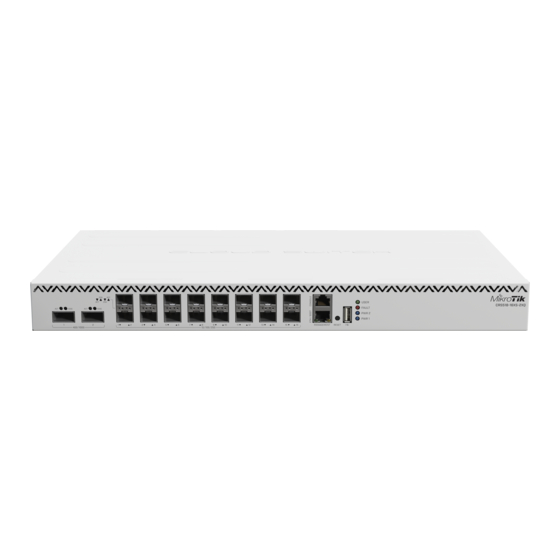
MikroTik CRS518-16XS-2XQ-RM Kurzanleitung
Vorschau ausblenden
Andere Handbücher für CRS518-16XS-2XQ-RM:
- Kurzanleitung (18 Seiten) ,
- Kurzanleitung (46 Seiten)
Quicklinks
EN - English - Quick Guide:
This device needs to be upgraded to RouterOS v7.10 or the latest version to ensure compliance with local authority regulations!
It is the end users' responsibility to follow local country regulations. All MikroTik devices must be professionally installed.
This Quick Guide covers the model: CRS518-16XS-2XQ-RM.
This is a network device. You can find the product model name on the case label (ID).
Please visit the user manual page on
The most important technical specifications for this product can be found on the last page of this Quick Guide.
Technical specifications, Full EU Declaration of Conformity, brochures, and more info about products at
Configuration manual for software in your language with additional information can be found
MikroTik devices are for professional use. If you do not have qualifications please seek a
First steps:
Connect with your computer to the device;
Connect the device to a power source;
Download the configuration tool
Start configuration within the chosen tool, using the default IP address 192.168.88.1. If the IP address is unavailable, use Winbox and choose the "Neighbors"
tab to find the device;
Proceed to connect using the MAC address. The username is "admin," and there is no password (or, for some models, check user and wireless passwords on
the sticker);
For a manual update, visit the products page at
"Support&Downloads" menu;
Upload downloaded packages to the Winbox "Files" menu and reboot the device;
By upgrading your RouterOS software to the latest version, you can ensure optimal performance, stability, and security updates;
Set up your router password.
Safety Information:
Before you work on any MikroTik equipment, be aware of the hazards involved with electrical circuitry, and be familiar with standard practices for preventing
accidents. The installer should be familiar with network structures, terms, and concepts.
Use only the power supply and accessories approved by the manufacturer, which can be found in the original packaging of this product.
This equipment is to be installed by trained and qualified personnel, as per these installation instructions. The installer is responsible for making sure, that the
Installation of the equipment is compliant with local and national electrical codes. Do not attempt to disassemble, repair, or modify the device.
This product is intended to be installed indoors. Keep this product away from water, fire, humidity, or hot environments.
We cannot guarantee that no accidents or damage will occur due to the improper use of the device. Please use this product with care and operate at your own
risk!
In the case of device failure, please disconnect it from power. The fastest way to do so is by unplugging the power plug from the power outlet.
Electric shock hazard. This equipment is to be serviced by trained personnel only
Manufacturer: Mikrotikls SIA, Unijas iela 2, Riga, Latvia, LV1039.
BG - Български. Бързо ръководство
https://mt.lv/um
for the full up-to-date user manual. Or scan the QR code with your mobile phone.
https://mt.lv/winbox
;
https://mikrotik.com/products
https://mikrotik.com/products
at https://mt.lv/help
consultant https://mikrotik.com/consultants
to find your product. The required packages are accessible under the

Verwandte Anleitungen für MikroTik CRS518-16XS-2XQ-RM


Inhaltszusammenfassung für MikroTik CRS518-16XS-2XQ-RM
- Seite 1 Set up your router password. Safety Information: Before you work on any MikroTik equipment, be aware of the hazards involved with electrical circuitry, and be familiar with standard practices for preventing accidents. The installer should be familiar with network structures, terms, and concepts.
- Seite 2 Задайте парола за вашия рутер. Информация за безопасност: Преди да работите с всяко оборудване на MikroTik, имайте предвид опасностите, свързани с електрическата верига, и се запознайте със стандартните практики за предотвратяване на злополуки. Инсталаторът трябва да е запознат с мрежовите структури, термини и понятия.
- Seite 3 Bezpečná informace: Než začnete pracovat na jakémkoli zařízení MikroTik, uvědomte si rizika spojená s elektrickými obvody a seznamte se se standardními postupy pro prevenci nehod. Instalátor by měl být obeznámen se síťovými strukturami, termíny a koncepty. Používejte pouze napájecí zdroj a příslušenství schválené výrobcem, které najdete v originálním balení tohoto produktu.
- Seite 4 Legen Sie Ihr Router-Passwort fest. Sicherheitsinformation: Bevor Sie an MikroTik-Geräten arbeiten, sollten Sie sich der Gefahren bewusst sein, die mit elektrischen Schaltkreisen verbunden sind, und sich mit den Standardverfahren zur Verhinderung von Unfällen vertraut machen. Das Installationsprogramm sollte mit Netzwerkstrukturen, Begriffen und Konzepten vertraut sein.
- Seite 5 Información de seguridad: Antes de trabajar en cualquier equipo MikroTik, tenga en cuenta los riesgos relacionados con los circuitos eléctricos y familiarícese con las prácticas estándar para prevenir accidentes. El instalador debe estar familiarizado con las estructuras de red, los términos y los conceptos.
- Seite 6 Cet appareil doit être mis à niveau vers RouterOS v7.10 ou la dernière version pour garantir la conformité aux réglementations des autorités locales ! Il est de la responsabilité des utilisateurs finaux de respecter les réglementations locales du pays. Tous les appareils MikroTik doivent être installés par un professionnel.
- Seite 7 Postavite lozinku za vaš usmjerivač. Sigurnosne informacije: Prije nego što radite na bilo kojoj MikroTik opremi, budite svjesni opasnosti koje uključuju električni krug i upoznajte se sa standardnim postupcima za sprečavanje nezgoda. Instalacijski program trebao bi biti upoznat s mrežnim strukturama, pojmovima i konceptima.
- Seite 8 Állítsa be a router jelszavát. Biztonsági információk: Mielőtt bármilyen MikroTik berendezésen dolgozik, tisztában kell lennie az elektromos áramkörökkel kapcsolatos veszélyekkel, és ismernie kell a balesetek megelőzésére szolgáló szokásos gyakorlatokat. A telepítőnek ismeri a hálózati struktúrákat, a fogalmakat és a fogalmakat. Csak a gyártó által jóváhagyott tápegységet és tartozékokat használjon, amelyek a termék eredeti csomagolásában találhatók.
- Seite 9 Stilla lykilorðið á routerinn þína. Öryggisupplýsingar: Áður en þú vinnur að einhverjum MikroTik búnaði, vertu meðvitaður um hættuna sem fylgir rafrásum og kynntu þér hefðbundnar venjur til að koma í veg fyrir slys. Uppsetningarforritið ætti að vera kunnugt um netkerfi, hugtök og hugtök.
- Seite 10 Konfigurer router-passordet ditt. Sikkerhetsinformasjon: Før du jobber med MikroTik-utstyr, må du være oppmerksom på farene som er forbundet med elektriske kretsløp, og kjenne til standard praksis for å forhindre ulykker. Installasjonsprogrammet skal være kjent med nettverksstrukturer, vilkår og konsepter. Bruk bare strømforsyningen og tilbehøret som er godkjent av produsenten, og som finnes i originalemballasjen til dette produktet.
- Seite 11 Iestatiet sava maršrutētāja paroli. Drošības informācija: Pirms sākat strādāt ar jebkuru MikroTik aprīkojumu, iepazīstieties ar briesmām, kas saistītas ar elektriskajām shēmām, un iepazīstieties ar standarta praksi negadījumu novēršanā. Instalētājam jāzina tīkla struktūras, termini un koncepcijas. Izmantojiet tikai ražotāja apstiprinātu barošanas kabeli un piederumus, kas atrodami šī produkta oriģinālajā iepakojumā.
- Seite 12 Stel uw routerwachtwoord in. Veiligheidsinformatie: Voordat u aan MikroTik-apparatuur werkt, moet u zich bewust zijn van de gevaren van elektrische circuits en bekend zijn met standaardprocedures om ongevallen te voorkomen. Het installatieprogramma moet bekend zijn met netwerkstructuren, termen en concepten. Gebruik alleen de voeding en accessoires die door de fabrikant zijn goedgekeurd en die zich in de originele verpakking van dit product bevinden.
- Seite 13 Informação de Segurança: Antes de trabalhar em qualquer equipamento MikroTik, esteja ciente dos riscos envolvidos nos circuitos elétricos e esteja familiarizado com as práticas padrão para prevenção de acidentes. O instalador deve estar familiarizado com estruturas, termos e conceitos de rede.
- Seite 14 Configurai parola routerului. Informaii de sigurană: Înainte de a lucra la orice echipament MikroTik, fii contieni de pericolele implicate de circuitele electrice i cunoatei practicile standard pentru prevenirea accidentelor. Programul de instalare ar trebui să fie familiarizat cu structurile, termenii i conceptele reelei.
- Seite 15 Konfigurera lösenordet för din router. Säkerhetsinformation: Innan du arbetar med någon MikroTik-utrustning ska du vara medveten om farorna med elektriska kretsar och känna till vanliga metoder för att förebygga olyckor. Installatören bör känna till nätverksstrukturer, termer och koncept. Använd endast den strömförsörjning och tillbehör som godkänts av tillverkaren och som finns i originalförpackningen för denna produkt.
- Seite 16 Это устройство должно быть обновлено до RouterOS v7.10 или до последней версии, чтобы обеспечить соответствие требованиям местных органов власти. Конечные пользователи несут ответственность за соблюдение местных правил страны. Все устройства MikroTik должны быть установлены профессионально. Это краткое руководство охватывает модель: CRS518-16XS-2XQ-RM.
- Seite 17 Перед началом работы на любом оборудовании MikroTik ознакомьтесь с опасностями, связанными с электрическими цепями, и ознакомьтесь со стандартными методами предотвращения несчастных случаев. Установщик должен быть знаком с сетевыми структурами, терминами и концепциями. Используйте только те источники питания и аксессуары, которые утверждены производителем и находятся в оригинальной упаковке этого продукта.
-
Seite 18: Federal Communication Commission Interference Statement
Цей пристрій потрібно оновити до RouterOS v7.10 або останньої версії, щоб забезпечити відповідність місцевим нормам влади ! Кінцеві користувачі несуть відповідальність за дотримання місцевих правил країни. Всі пристрої MikroTik повинні бути встановлені відповідно до інструкцій Цей короткий посібник стосується моделі: CRS518-16XS-2XQ-RM. - Seite 19 UKCA marking (EN) Technical Specifications / (DE) Technische Spezifikationen / (FR) Spécifications techniques /(IT) Specifiche tecniche / (ES) Especificaciones técnicas / (RU) Технические характеристики: (EN) Product Power Input Options (EN) Operating Temperature (EN) IP class of the enclosure (DE) IP-Klasse des Gehäuses...